Your Legacy - Completionist Companion
- By
All your Legacy progress in one window: points and rewards, every challenge, your characters, and a planner for the Legacy tree.
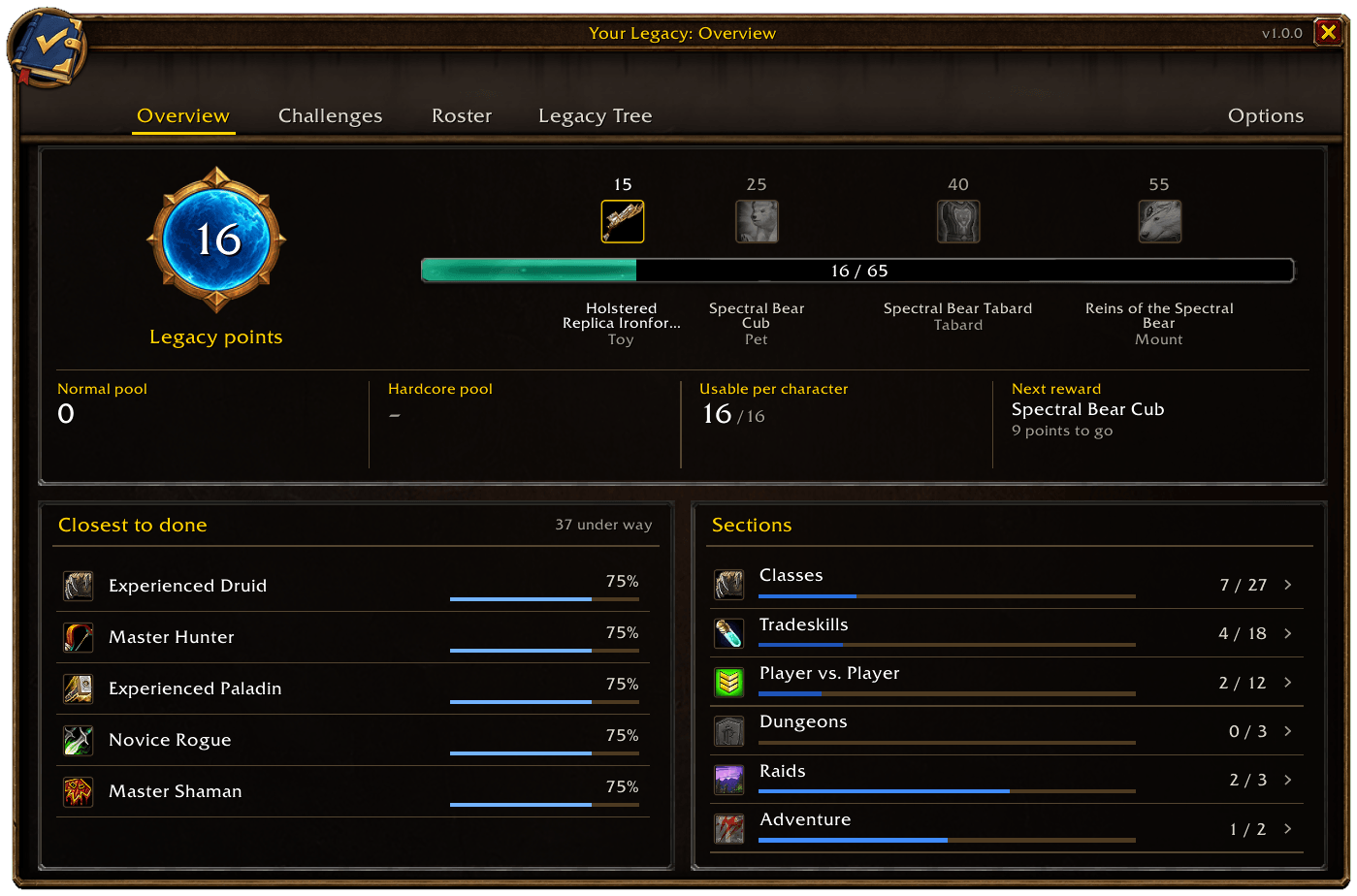
Your points, the reward track, both pools and the challenges closest to done.
Description
Your Legacy puts WoW Forever's Legacy system into one window that looks like part of the game. It shows your points and what they unlock, every challenge sorted the way the game sorts them, all your characters side by side, and a plan for each character's Legacy tree.
Open it with /yl, the minimap button, the addon compartment or a keybinding.
Overview
Your points, the reward track, both pools and the challenges closest to done.
- Your Legacy points on the Legacy emblem, and the reward track with the toy, pet, tabard and mount. Click a reward to preview it.
- When you've unlocked a reward but not picked it up yet, it tells you it's waiting at Innkeeper Wiley in Ratchet.
- Your Normal and Hardcore pools, how many points one character can spend (16), and your next reward.
- The challenges closest to done, and every section with its progress. Click a section to jump to it.
Challenges
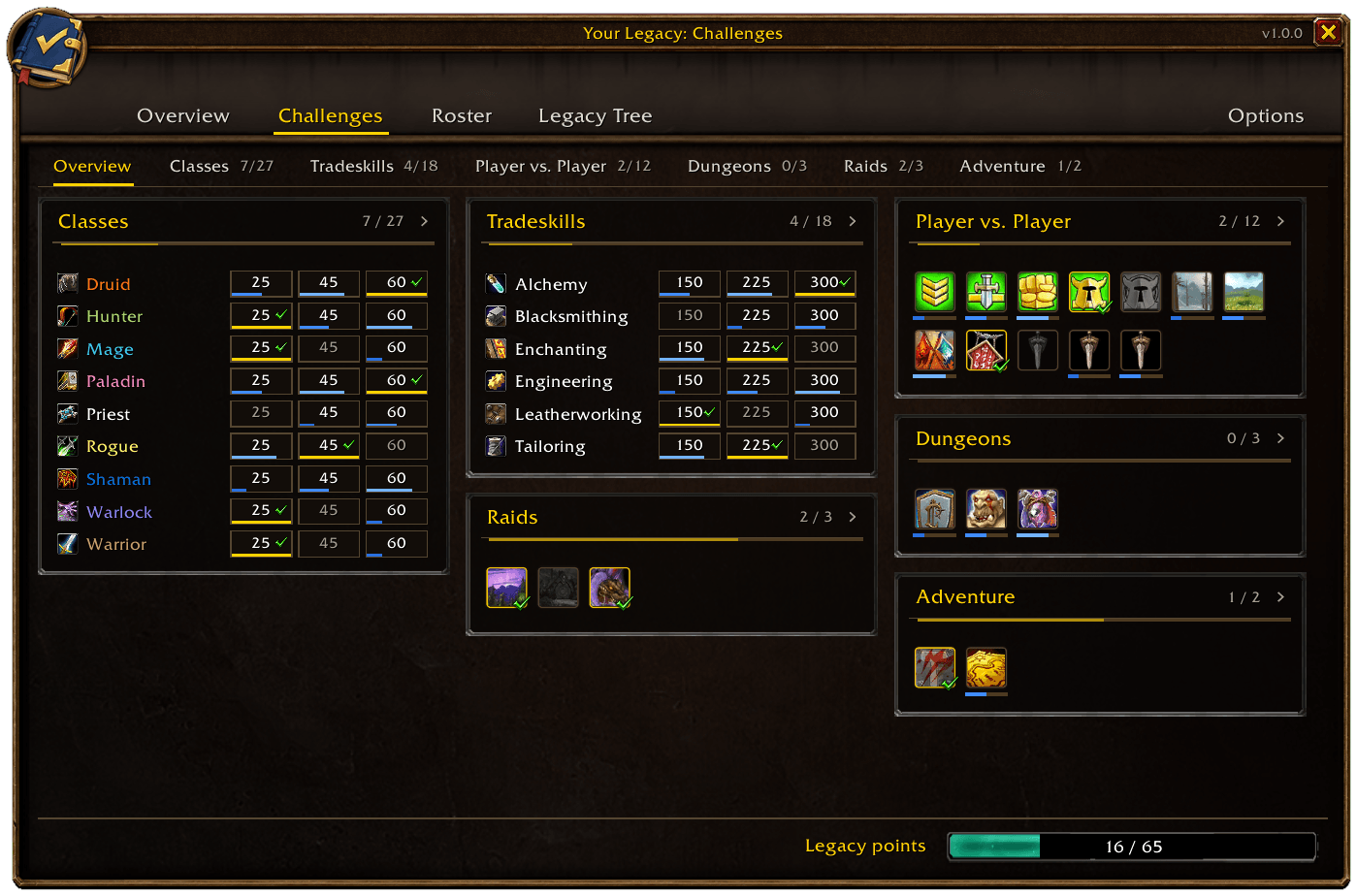
Every section at a glance, with Classes and Tradeskills as grids.
- One tab per section, plus an overview tab with every challenge at a glance.
- Classes and Tradeskills are grids: a row per class or craft, a cell per milestone.
- Dungeon tiers, raids and Explorer unfold into a checklist of their parts.
- Filter by open, in progress, done or all.
- The tooltip explains how a challenge counts, that it's earned once for the account, and which character did which part. For Explorer it names the character that's closest and the zones still missing.
- Click a challenge to open it in Blizzard's Legacy panel, or Shift-click to track it in the objective tracker. With the chat box open, Shift-click links it in chat instead.
- Sort a section by closest to done, most points or name.
- A cell lights up once when a challenge completes while the window is open.
Roster
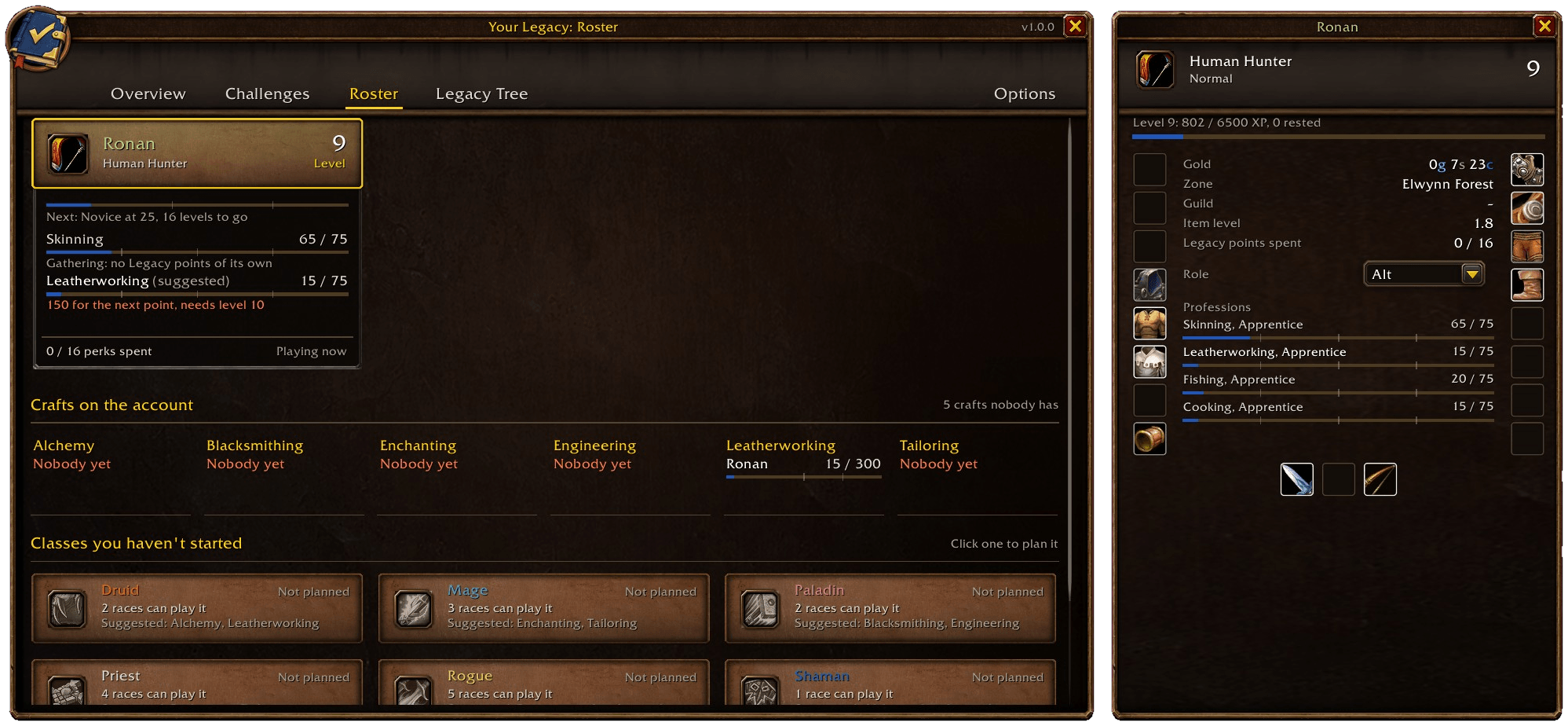
A card per character, the crafts on the account, and the planner for a class you haven't started.
- A card for every character you've logged in with: level, the next class milestone, both professions with the skill their next Legacy point needs, and the level a profession rank is waiting on.
- The crafts that suit the class, and perk ranks that no longer help at the character's level.
- Crafts on the account: who has each crafting profession, and which ones nobody has yet, so their challenges are still open.
- Click a card for that character's gear, gold, zone, guild, item level, XP and professions. Characters you aren't playing show their last logout.
- Give a character a role (Main, Alt, Crafter, Bank or Ignore). Ignore hides its card.
- For classes you haven't started, plan the ruleset, race and two crafts and see how many Legacy points that plan is worth.
Legacy Tree
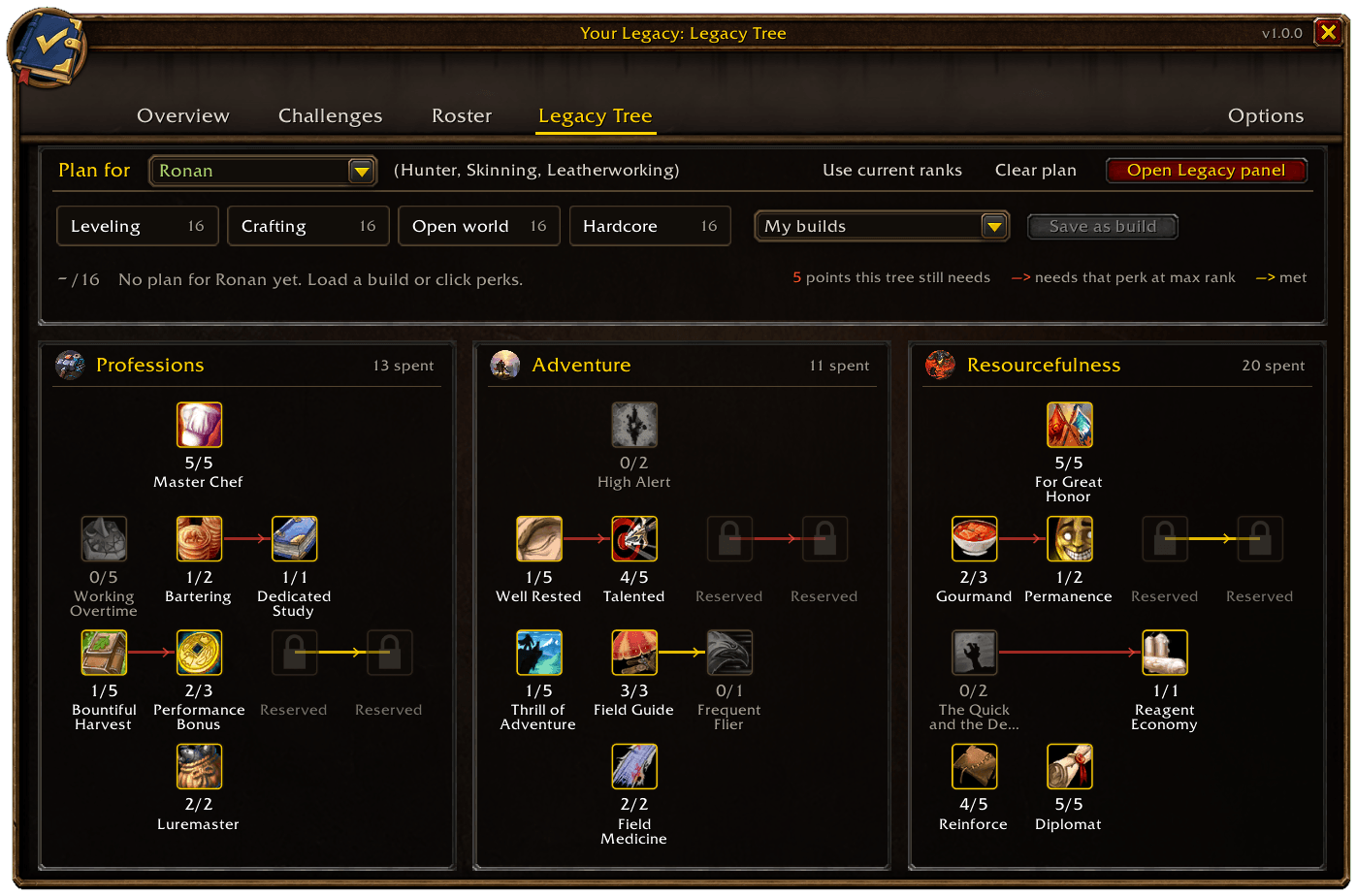
A plan on the game's own tree, with presets, saved builds and what each perk still needs.
- Plan perks for each character on the game's own tree layout.
- Each perk shows what it still needs: points in its tree, or another perk at max rank.
- Start from a preset (Leveling, Crafting, Open world, Hardcore), copy the ranks you have now, or save your own builds.
- Share a plan as text and import someone else's from the My builds list.
- The tab shows how many points you can still spend.
- The 16-point cap is always in view.
- A button opens Blizzard's Legacy panel, which is where perks are learned.
Dungeons, raids and the world map
- Step into a dungeon or raid that counts toward a challenge and a chat line tells you which one, and what's still missing there. After a boss dies it says whether the kill counted.
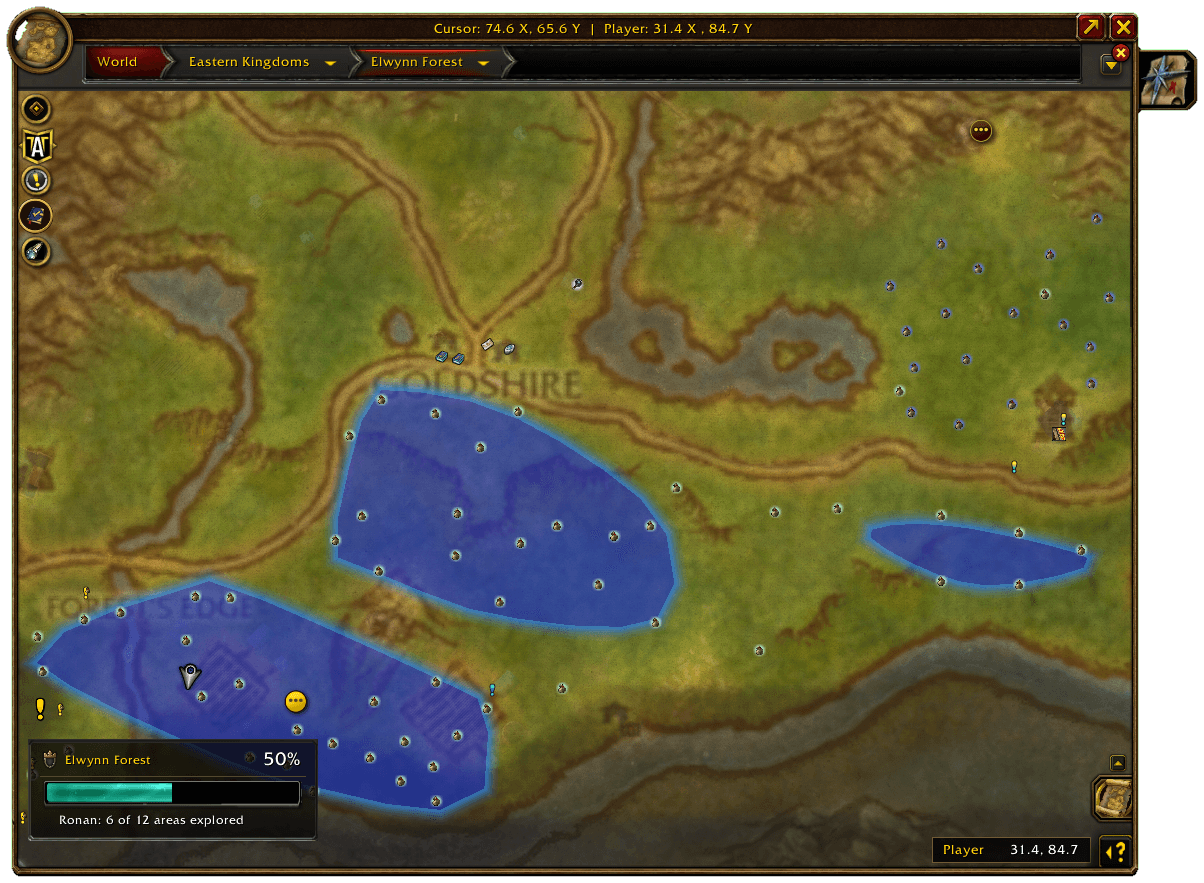
/yl hererepeats it at any time. - On the world map, a banner shows how far along the zone you're looking at is: this character's exploration, and every dungeon and raid with its entrance there. Drag it wherever you like.
- A Your Legacy button sits with the other map buttons. Click it to switch the banner off, put it back in its corner, or open the addon.
Options
Grouped into Window (size from 80 to 150%, lock, close in combat, animations), Chat and sound (a chat line, a guild announcement and a sound when you earn a challenge, reminders at login for unspent points and rewards to collect, the dungeon and raid help), Maps (the zone banner, the map button, the minimap button), How Legacy works (the rules Your Legacy relies on and how sure we are of each) and Data (an export of the addon's data as text you can copy).
Good to know
- It only reads what the game reports. It doesn't change how challenges count, and it never spends points for you.
- No libraries needed. If another addon has loaded LibDBIcon, the minimap button joins your button collector.
- Titan Panel, ElvUI and other data broker bars can show your points and the next reward.
- It doesn't refresh during combat, and by default the window closes when combat starts.
- English and German, following your game client.
- A character appears on the Roster after you've logged in with it once.
Commands
| Command | What it does |
|---|---|
/yl |
Open or close the window |
/yl options |
Open the options |
/yl status |
Print your points in chat |
/yl here |
Say what the dungeon or raid you're in counts toward |
/yl export |
Show the saved data as text you can copy |
/yl reset |
Clear everything the addon saved |
Feedback
Found a bug or a number that looks wrong? Leave a comment saying what you expected and what you saw, and which page it was on.
Your Legacy - Completionist Companion Team