XPCounter
Clean XP tracker for WoW: Forever: current XP, XP to level, XP per hour, time to level and a session timer, with pause, settings menu and an option to hide the default XP bar.
XP Counter
A clean, compact XP tracker made for WoW: Forever. One small card shows everything you need while levelling, with no clutter.
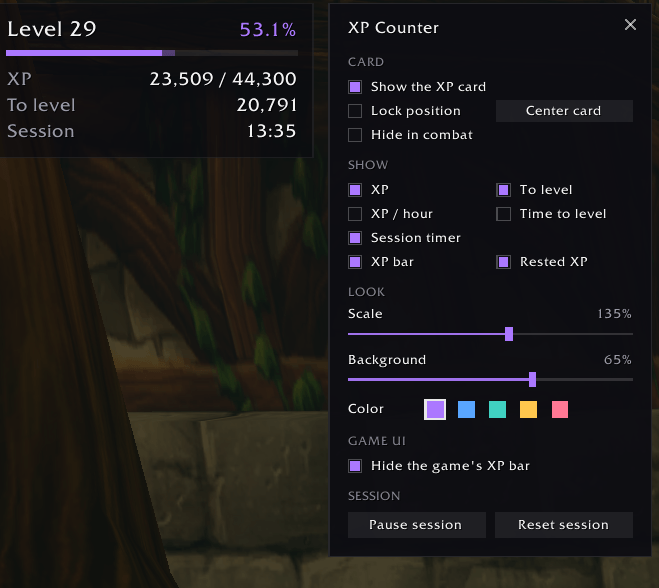
What it shows
- Level and progress: your level, percentage and a thin XP bar with rested XP shown ahead of it
- XP: current XP out of what you need for the level
- To level: how much XP is left
- XP / hour: based on your actual play time this session
- Time to level: an estimate at your current pace
- Session timer: how long you've been playing this session
XP per hour and time to level only count time you're actually playing. Time spent AFK or paused is left out, so the numbers stay honest.
Features
- Pause the session: hover the card and click the pause button, or use the settings. Time and XP earned while paused don't count.
- Settings menu: right-click the card, type
/xpc, or open Esc → Options → AddOns → XP Counter - Customise the card: turn each row on or off, change the size and background opacity, and pick from five accent colours
- Hide the game's XP bar: optional. Watched reputation bars stay visible, and the bar comes back in Edit Mode so you can still move it.
- Hide in combat: optional
- Survives reloads: your session continues through
/reloadand starts fresh on a new login - Hides itself at max level
How to use
- Drag the card to move it
- Right-click to open the settings
- Shift + right-click to reset the session
- Hover to see session details and the pause button
Slash commands
| Command | What it does |
|---|---|
/xpc |
Open or close the settings |
/xpc pause / /xpc resume |
Pause or resume the session |
/xpc reset |
Start a new session |
/xpc lock / /xpc unlock |
Lock or unlock the position |
/xpc scale 0.5-2 |
Change the size |
/xpc hide / /xpc show |
Hide or show the card |
/xpc center |
Move the card back to the middle of the screen |
Compatibility
Made for WoW: Forever (interface 16001). It only uses information the game allows addons to read, and changes nothing about combat.
Feedback
Found a bug or have an idea? Leave a comment. If you hit a Lua error, please include the full error text.
XPCounter Team