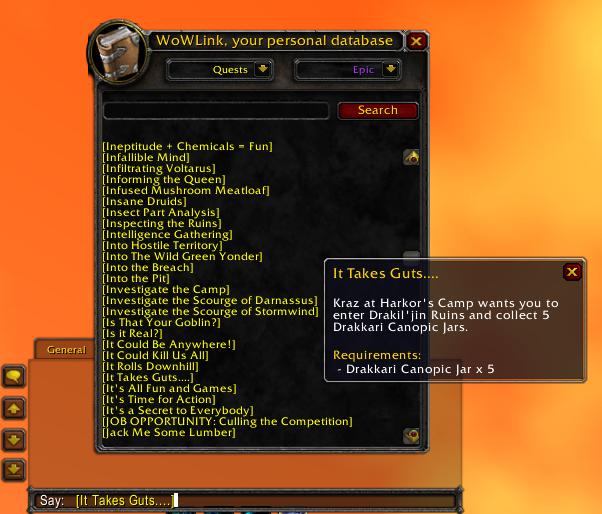
Linking a quest into the chat window in 0.9.6
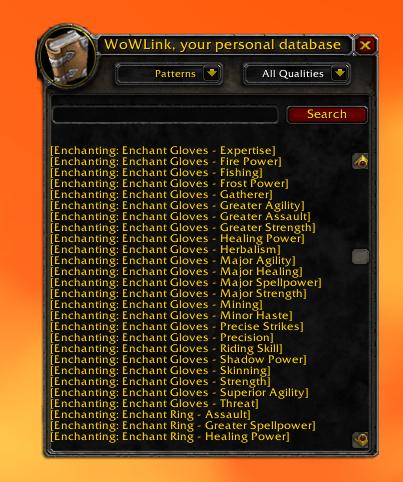
Viewing the Profession recipes in 0.9.6
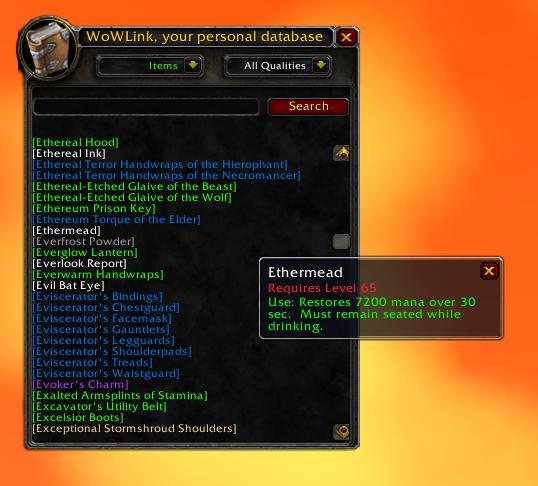
The tooltips of items on mouseover in 0.9.6
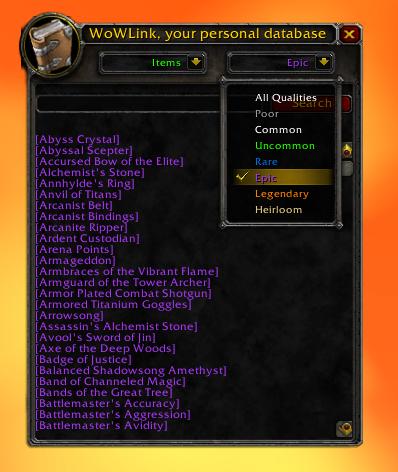
Filtering items by quality in 0.9.6
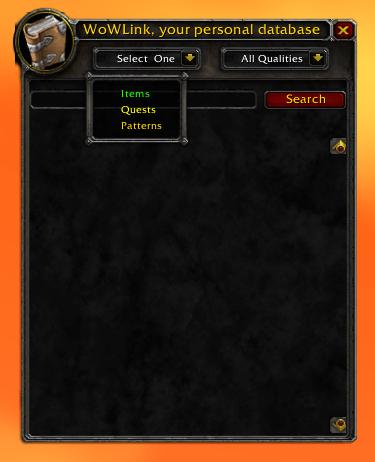
The main window in 0.9.6
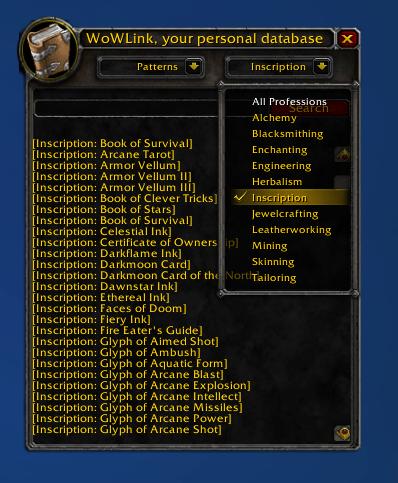
Filtering patterns by profession in 0.9.7
Description
<center>
I mostly made this addon to learn lua, but that doesn't mean it's not useful, in fact I've found it very useful myself.
Once you have picked up some information, open the main window, either by typing "/wowlink", making a macro with "/wowlink" in it, or assigning a key binding in the bindings interface. This is the main window, and will be your source for viewing the information you have gathered.
Viewing all of the information is easily done by selecting an information type from the drop-down menu, right above the search box. WoWlink will then build you a list of everything you have gathered. You can use the scroll bar to navigate this list.
When you're done, hit the "X" at the upper right to close the window and continue about your buisness.
If you're looking at items, you can select a Rarity in the Qualities drop down menu, from Poor to Heirloom, to show only the items of that quality. If you're browsing through patterns, you can select a profession in the Professions drop down menu, to only display the patterns from that profession.
Linking items couldn't be easier. Once you've found the item, mouse over it to display it, click it to keep it's tooltip open, and shift click on it to add it to your chat.
As for compatability, WoWLink can work well with some other addons. AuctionMaster is one to point out in perticular. AuctionMaster records prices from the Auction House and stores them in the item tooltips. Not only does WoWLink provide searching for items to look up price data without having the item link, but scanning the Auction House with AuctionMaster also builds up your database of items in WoWLink.
WoW UI Designer does deserve a lot of credit, it is a great IDE, and made making the windows much easier. Though I still had to learn lua AddOn Coding, it provided a useful environment for me to create my first AddOn. NOTE that WoW UI Designer will be useless to you unless you learn to code basic AddOns.
I would also like to thank ShadowDrakken for suggestions. I couldn't have made a good AddOn without adding what the people want. Also I thank Drundia on WoWInterface.com for the trick to remove unnecessary rendering and generate the list almost instantly, and Xinhuan from our own CurseForge forums for a tun of help with my questions.
I would also like to thank Telo, for the original inspiration from Lootlink to make this addon, to store more then just items. And all praise World of Warcraft, MMO god!
WoW Link
</center>Intro
WoWLink is an addon that records Items, Quests, and Patterns (enchanting/profession links) into a database for later searching and linking. It allows viewing of the whole list, as well as searching by keyword or filtering by quality or profession.I mostly made this addon to learn lua, but that doesn't mean it's not useful, in fact I've found it very useful myself.
Basic Usage
Database building tip.
You can easily build up your database of equippable items by standing in a capital city and ctrl-tabbing through the players.
To start using this addon, you must first gather the information. Items can be picked up from the chat window, your inventory and bank, the Auction House, a vendor, the trade window, any trade skill window (either one of yours or from a link in the chat) and even by just selecting another player. Same goes for Quests and Patterns. Quests are picked up through the chat or your quest log, and Patterns are picked up through the chat or your tradeskill window.You can easily build up your database of equippable items by standing in a capital city and ctrl-tabbing through the players.
Once you have picked up some information, open the main window, either by typing "/wowlink", making a macro with "/wowlink" in it, or assigning a key binding in the bindings interface. This is the main window, and will be your source for viewing the information you have gathered.
Viewing all of the information is easily done by selecting an information type from the drop-down menu, right above the search box. WoWlink will then build you a list of everything you have gathered. You can use the scroll bar to navigate this list.
When you're done, hit the "X" at the upper right to close the window and continue about your buisness.
Finding and Linking items
Item Links
Items are stored directly by the links, so if an item isn't cached, that's no problem, it will appear fine when moused over.
Finding a specific item can be easy. If you want, you can just find it with the scroll bar after selecting a data type, but that may take too long. To search for an item by name, simply type in the name into the Search Box, and click the Search button. If you have a data type selected, it will resort the list and only show items that contain your criteria in their name.Items are stored directly by the links, so if an item isn't cached, that's no problem, it will appear fine when moused over.
If you're looking at items, you can select a Rarity in the Qualities drop down menu, from Poor to Heirloom, to show only the items of that quality. If you're browsing through patterns, you can select a profession in the Professions drop down menu, to only display the patterns from that profession.
Linking items couldn't be easier. Once you've found the item, mouse over it to display it, click it to keep it's tooltip open, and shift click on it to add it to your chat.
Compatability and Localization
AuctionMaster
If you use AuctionMaster, you can check any item's price with WoWLink, and scanning the auction house adds to your item database.
Currently this addon is only localized in English, and no plans are made for addition localizations. However, if you happen to make or find one, please feel free to send it to me! It would be much appriciated by me and the users!If you use AuctionMaster, you can check any item's price with WoWLink, and scanning the auction house adds to your item database.
As for compatability, WoWLink can work well with some other addons. AuctionMaster is one to point out in perticular. AuctionMaster records prices from the Auction House and stores them in the item tooltips. Not only does WoWLink provide searching for items to look up price data without having the item link, but scanning the Auction House with AuctionMaster also builds up your database of items in WoWLink.
Credits
WoW UI Designer
WoW UI Designer is a great IDE, but I still had to learn lua coding. It doesn't do everything for you, just makes it easier.
I, Derrekk, made this AddOn from scratch using WoW UI Designer. It is my first addon, so it may not be well coded yet, but I try. I used no libraries, though I did start out learning from Ace3, but then later scrapped it and started over without it, so I guess Ace3 deserves some credit.WoW UI Designer is a great IDE, but I still had to learn lua coding. It doesn't do everything for you, just makes it easier.
WoW UI Designer does deserve a lot of credit, it is a great IDE, and made making the windows much easier. Though I still had to learn lua AddOn Coding, it provided a useful environment for me to create my first AddOn. NOTE that WoW UI Designer will be useless to you unless you learn to code basic AddOns.
I would also like to thank ShadowDrakken for suggestions. I couldn't have made a good AddOn without adding what the people want. Also I thank Drundia on WoWInterface.com for the trick to remove unnecessary rendering and generate the list almost instantly, and Xinhuan from our own CurseForge forums for a tun of help with my questions.
I would also like to thank Telo, for the original inspiration from Lootlink to make this addon, to store more then just items. And all praise World of Warcraft, MMO god!
WoWLink Team