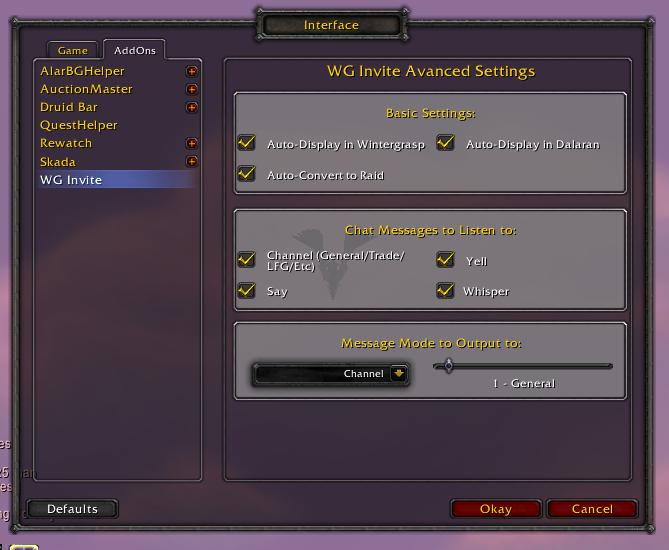
WG Invite settings tab of the Interface Options in 0.9.5
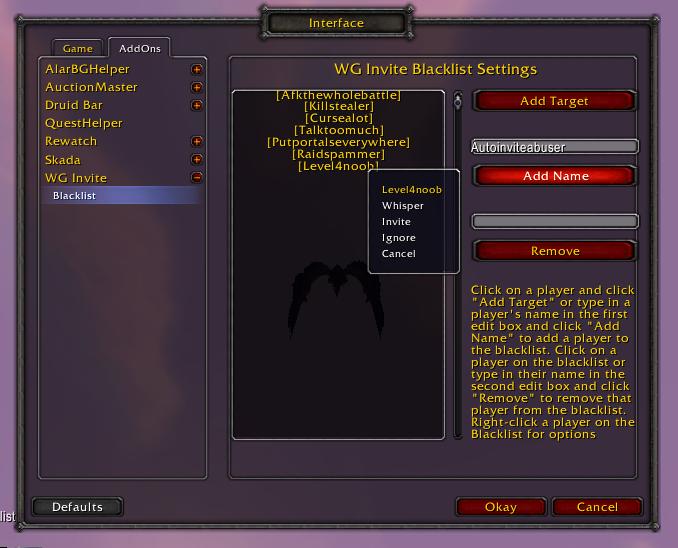
The Blacklist settings page in the Interface Options.
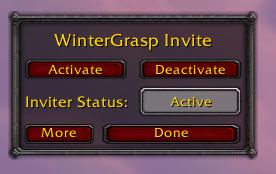
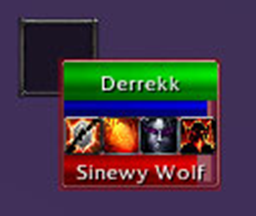
Collapsed version of the main window in 0.9.5
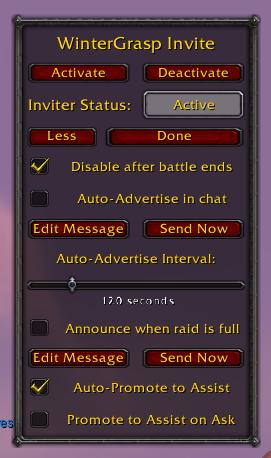
Expanded version of the main window in 0.9.5
Description
<center>
This addon is named after BG Invite, which became useless way back when Cross-Realm Battlegrounds were added.
If the inviter is activated, anyone who says "invite" or "inv" in the chat (general, trade, say, yell) or a whisper will get automatically invited into your group. After two people have joined, it will convert into a raid. Case doesn't matter, and they can be part of the message. "invite", "invite me", "can i get an invite?", "inv", "inv pls" and so on all work.
When you hit "More", you're given a host of options. Use the "Disable after battle ends" option if you don't want to accidentally invite people looking for vault groups. The "Auto-Advertise in chat" option is very useful, as it advertises that there is a raid group and how to join it. Turn on the "Announce when Raid is Full" option to tell everyone when you're full and can no longer accept invite requests. "Auto-Promote to Assist" is an option that, if enabled, will automatically promote everyone in the raid to Assistant status. Finally, "Promote to Assist on Ask" will promote anyone who says "assist" or "asst" into the raid chat.
Once you're done setting these options, which is best done before the battle begins, you may hit the "More" button, which should now say "Less", and go out there and show everyone that your faction is not to be messed with!
Under Basic Settings, you may choose to disable some features. Auto-Display in Wintergrasp will the main window when entering Wintergrasp. Likewise, the Auto-Display in Dalaran will show the main window when entering the faction-specific zones of Dalaran. Also, Auto-Convert to Raid will prevent this addon from converting your party into a raid.
The Chat Messages to Listen to section lets you choose which channels the addon will listen to. You can choose any combination of Channel, Yell, Say, and Whisper. You can choose which mode and channel to announce advertisements and full raid messages to under Message Mode to Output to.
A sub-category of the settings page is WG Invite Blacklist Settings. Here you can create a list of players to not issue auto-invites or assist requests to. Target a player and click "Add Target" or type in a player's name and click "Add Name" to add a player to the list. Click on a player, or type in their name, and click Remove to remove that player from the list. You may also right-click players on the list for options, or shift-click to do a /who request.
I would also like to thank the maker of the old BG Invite for the inspiration, I never realized how much I missed feeling this useful until it was gone. And all praise World of Warcraft, MMO god!
WG Invite
</center>Intro
WG Invite is an addon to be used in the World PvP zone of Wintergrasp. It scans the chat for people looking for invites, and automatically invites them into the raid.This addon is named after BG Invite, which became useless way back when Cross-Realm Battlegrounds were added.
Current Features:
- Auto-Invite
- Auto-Promote to Assist
- Promote to Assist on ask
- Auto-Disable when batte ends
- Auto-Advertise in General channel
- Set Advertise message and interval
- Announce when Raid is Full
- Blacklist to block certain players.
- Works in Wintergrasp and Dalaran's faction-specific zones.
Basic Usage
Stop worrying.
Don't worry about giving assists, or advertising, or watching the chat. Focus on the game, and let WG Invite worry for you.
To start using this addon, you need to be either in Wintergrasp, or in the faction-specific zones in Dalaran. Once you enter one of theze zones, the configuration dialog will appear. It's very simple, you choose to activate or deactivate the inviter, and then hit "Done" to hide it. You can bring it back up by typing "/wginvite" or "/wgi"Don't worry about giving assists, or advertising, or watching the chat. Focus on the game, and let WG Invite worry for you.
If the inviter is activated, anyone who says "invite" or "inv" in the chat (general, trade, say, yell) or a whisper will get automatically invited into your group. After two people have joined, it will convert into a raid. Case doesn't matter, and they can be part of the message. "invite", "invite me", "can i get an invite?", "inv", "inv pls" and so on all work.
More configuration
The More Button
When you first open up WG Invite, you'll see a small window. If you hit "More", you'll get many more option to play with.
While auto-inviting is the main operation of this addon, there are many other features you can benifit from. You can click the "More" button, next to the done button, to expand the window with more options and configuration. Once set up, it does all your work for you, so you can focus on the battle at hand.When you first open up WG Invite, you'll see a small window. If you hit "More", you'll get many more option to play with.
When you hit "More", you're given a host of options. Use the "Disable after battle ends" option if you don't want to accidentally invite people looking for vault groups. The "Auto-Advertise in chat" option is very useful, as it advertises that there is a raid group and how to join it. Turn on the "Announce when Raid is Full" option to tell everyone when you're full and can no longer accept invite requests. "Auto-Promote to Assist" is an option that, if enabled, will automatically promote everyone in the raid to Assistant status. Finally, "Promote to Assist on Ask" will promote anyone who says "assist" or "asst" into the raid chat.
Once you're done setting these options, which is best done before the battle begins, you may hit the "More" button, which should now say "Less", and go out there and show everyone that your faction is not to be messed with!
Advanced Options
Addon Options
You can usually find settings for a lot of addons in the AddOns tab of the Interface Options, accessed from WoW's main menu.
If you want even more options, open up your Interface Options's Addons tab. There you'll find a section for WG Invite.You can usually find settings for a lot of addons in the AddOns tab of the Interface Options, accessed from WoW's main menu.
Under Basic Settings, you may choose to disable some features. Auto-Display in Wintergrasp will the main window when entering Wintergrasp. Likewise, the Auto-Display in Dalaran will show the main window when entering the faction-specific zones of Dalaran. Also, Auto-Convert to Raid will prevent this addon from converting your party into a raid.
The Chat Messages to Listen to section lets you choose which channels the addon will listen to. You can choose any combination of Channel, Yell, Say, and Whisper. You can choose which mode and channel to announce advertisements and full raid messages to under Message Mode to Output to.
A sub-category of the settings page is WG Invite Blacklist Settings. Here you can create a list of players to not issue auto-invites or assist requests to. Target a player and click "Add Target" or type in a player's name and click "Add Name" to add a player to the list. Click on a player, or type in their name, and click Remove to remove that player from the list. You may also right-click players on the list for options, or shift-click to do a /who request.
Credits
WoW UI Designer
WoW UI Designer is a great IDE, but I still had to learn lua coding. It doesn't do everything for you, just makes it easier.
I, Derrekk, made this AddOn from scratch using WoW UI Designer, so it does deserve a lot of credit, it is a great IDE, and made making the windows much easier. Though I still had to learn lua AddOn Coding, it provided a useful environment for me to create my AddOn. NOTE that WoW UI Designer will be useless to you unless you learn to code basic AddOns.WoW UI Designer is a great IDE, but I still had to learn lua coding. It doesn't do everything for you, just makes it easier.
I would also like to thank the maker of the old BG Invite for the inspiration, I never realized how much I missed feeling this useful until it was gone. And all praise World of Warcraft, MMO god!
WG Invite Team