WoWfessions
- By
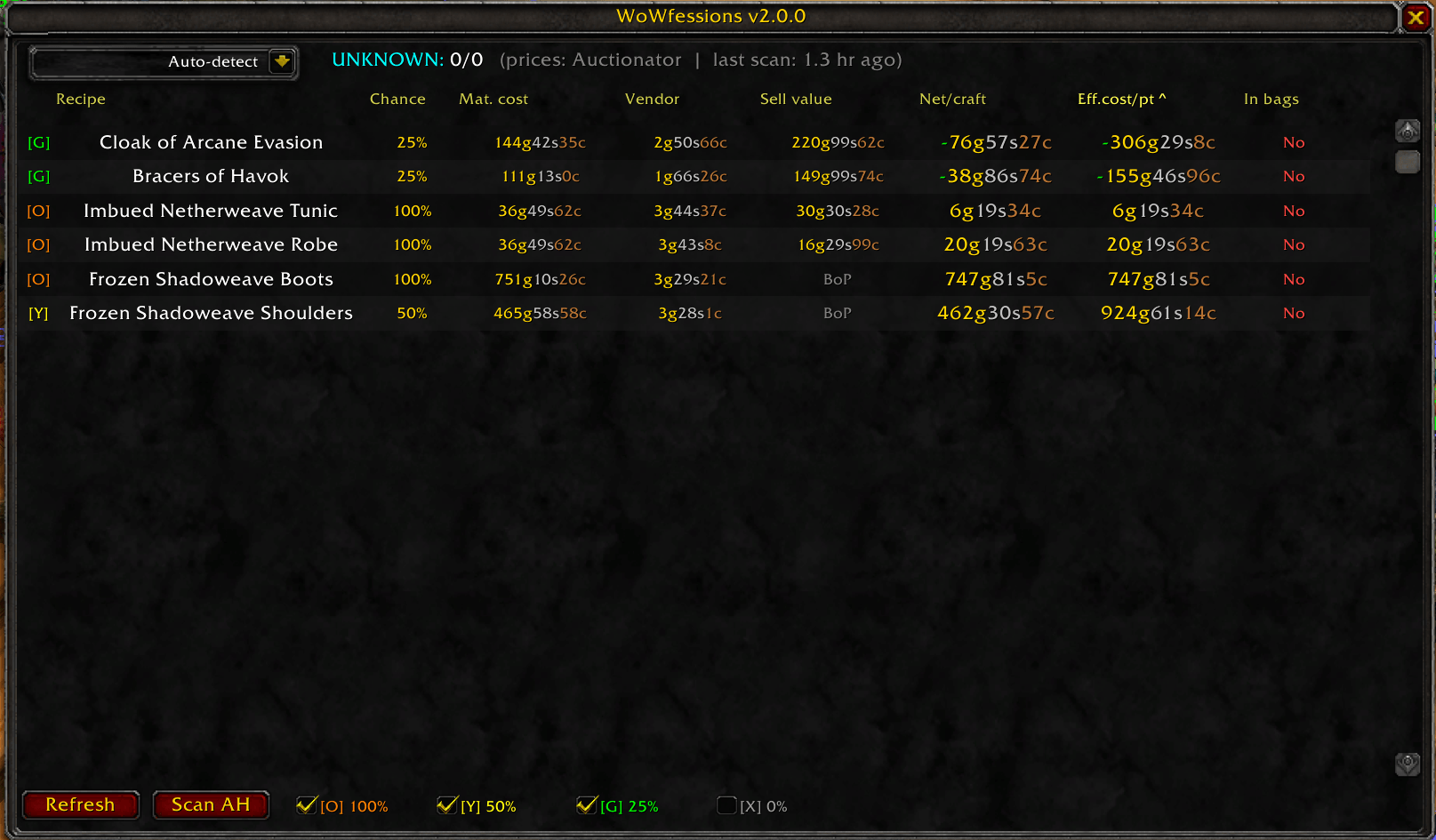
WoWfessions calculates the cheapest way to earn a skill point for any crafting profession, using live Auction House prices
Screenshot 2026-03-25 221141.png
Description
WoWfessions — Profession Levelling Advisor
Stop wasting gold on inefficient levelling. WoWfessions calculates the cheapest way to earn a skill point for any crafting profession, using live Auction House prices. Open your profession window, open WoWfessions, and instantly see what to craft sorted by real cost.
What it does
Every recipe that can give you a skill point is listed and ranked by effective cost per skill point — that's the net cost of materials divided by the chance of getting a skill point. An orange recipe at 100g costs less per skill point than a yellow recipe at 40g, because yellow only gives ~50% chance. WoWfessions does that math for you automatically.
A negative value means you actually make gold while levelling. Crafting and selling on the AH can pay for your skill points.
Features
- Works with all crafting professions — Alchemy, Blacksmithing, Enchanting, Engineering, Jewelcrafting, Leatherworking, Tailoring, Cooking, First Aid and more
- Always accurate — reads skill colors and materials live from your open profession window, no outdated static database
- Vendor prices included — shows the vendor sell value alongside the AH price, automatically uses whichever is higher in the cost calculation
- Auctionator and TSM support — prices are read automatically if you have either addon installed
- Built-in AH scanner — use
/wf scanat the Auction House if you don't have a price addon - Sortable columns — click any column header to sort by chance, mat cost, sell value, net profit, or effective cost. Click again to reverse
- Color filters — toggle Orange (100%), Yellow (50%), Green (25%), and Grey (0%) recipes on/off independently
- Grey recipes — optionally show recipes that no longer give skill points, useful to find profitable crafts to sell
- Profession dropdown — switch between professions without needing to open their windows
- Minimap button — drag to reposition, left-click to open, right-click to scan AH. Compatible with MinimapButtonBag, ButtonBin, Bazooka and any LibDataBroker display addon
- Auto-refresh — automatically updates when you open a profession window
- Window position memory — remembers where you placed it between sessions
- Auctionator shopping list — right-click any recipe to send its materials directly to an Auctionator shopping list, or print the list to chat for your party
How to use
- Install WoWfessions
- Open any profession window (press K and click your profession)
- Click the minimap button or type
/wf - The list shows every recipe that can give you a skill point, sorted cheapest first
- Craft the top recipe, gain a skill point, click Refresh, repeat
That's it.
Columns explained
| Column | What it means |
|---|---|
[O] / [Y] / [G] / [X] |
Skill color: Orange (100%), Yellow (~50%), Green (~25%), Grey (0%) |
| Chance | Skill point chance at your current skill level |
| Mat. cost | Total AH cost of required materials |
| Vendor | Vendor sell price of the crafted item |
| Sell value | AH sell price of the crafted item |
| Net/craft | What you spend (or earn) per single craft |
| Eff.cost/pt | Expected total spend per skill point — the main sorting column |
| In bags | Whether you have enough materials right now |
A ~ prefix means partial price — some materials have no AH data yet. Run /wf scan to fill in the gaps.
Price sources
WoWfessions auto-detects your price addon in this order:
- TradeSkillMaster (TSM)
- Auctionator
- Own scan — type
/wf scanat the Auction House
Commands
| Command | Description |
|---|---|
/wf |
Open / close the window |
/wf scan |
Scan the AH for prices |
/wf minimap |
Show / hide the minimap button |
/wf reset |
Clear all saved price data |
/wf debug |
Show diagnostic info |
/wf debug <item> |
Price lookup for a specific item, e.g. /wf debug primal earth |
/wf help |
List all commands |
Compatibility
- Game version: The Burning Crusade Classic — Anniversary Edition
- Price addons: Auctionator, TradeSkillMaster (TSM)
- Minimap addons: MinimapButtonBag, ButtonBin, Bazooka, any LibDataBroker display addon
Feedback & bugs
Found a bug or have a suggestion? Leave a comment on the CurseForge page or reach out to Wumatic1.
If a profession shows wrong prices or materials, try /wf debug <item name> and /wf scanvars — these commands show exactly what price data is available and where it comes from.
Made with love for the TBC Anniversary community.
WoWfessions Team