# WowPostIt
A simple and intuitive note-taking addon for World of Warcraft Classic with colorful post-it style interface.
## Features
- **Post-it Style Notes**: Each note has a random pastel color background, just like real post-it notes
- **Minimap Button**: Quick access to your notes with a yellow "PI" button on the minimap
- **Account-Wide Sharing**: All notes are shared across all characters on the same account
- **Chat Integration**: Send notes to various chat channels (Say, Guild, Party, Raid)
- **Auto-Save**: Notes are automatically saved as you type
- **Multi-line Support**: Create and manage multi-line notes with proper formatting
- **UTF-8 Support**: Full support for Korean, English, and other languages
## Installation
1. Download the WowPostIt folder
2. Place it in your WoW Classic addons directory:
- Windows: `World of Warcraft\_classic_\Interface\AddOns\`
- Mac: `World of Warcraft/_classic_/Interface/AddOns/`
3. Restart WoW or type `/reload` in chat
## Usage
### Opening Notes
- Click the yellow "PI" button near your minimap
- Or type `/postit`, `/pi`, or `/wowpostit` in chat
### Commands
- `/postit` - Open the notes window
- `/pi` - Quick command to open notes
- `/postit show` - Show minimap button if hidden
- `/postit hide` - Hide minimap button
### Managing Notes
- **New**: Create a new note with a random post-it color
- **Delete**: Delete the currently selected note
- **Delete All**: Remove all notes (with confirmation)
- **Send**: Send the current note to a selected chat channel
### Note List
- Shows the first 10 characters of each note
- Each note displays in its unique post-it color
- Click a note to view and edit it
- Selected note appears darker for easy identification
### Sending Notes to Chat
1. Select a note from the list
2. Choose a chat channel from the dropdown (Say, Guild, Party, Raid)
3. Click "Send" to share the note
4. Each line is sent as a separate message with 0.1 second delay to maintain order
## Features Details
### Post-it Colors
Eight pastel colors are randomly assigned to new notes:
- Soft Yellow
- Soft Pink
- Soft Green
- Soft Blue
- Soft Purple
- Soft Orange
- Soft Lime
- Soft Rose
### UTF-8 Text Handling
- Properly handles Korean characters (3 bytes per character)
- Note titles display correctly without text corruption
- Supports mixed language content
### Account-Wide Storage
- Notes are stored in `SavedVariables` (not per character)
- All characters on the same account share the same notes
- Perfect for guild officers, raid leaders, or anyone managing multiple characters
## Interface
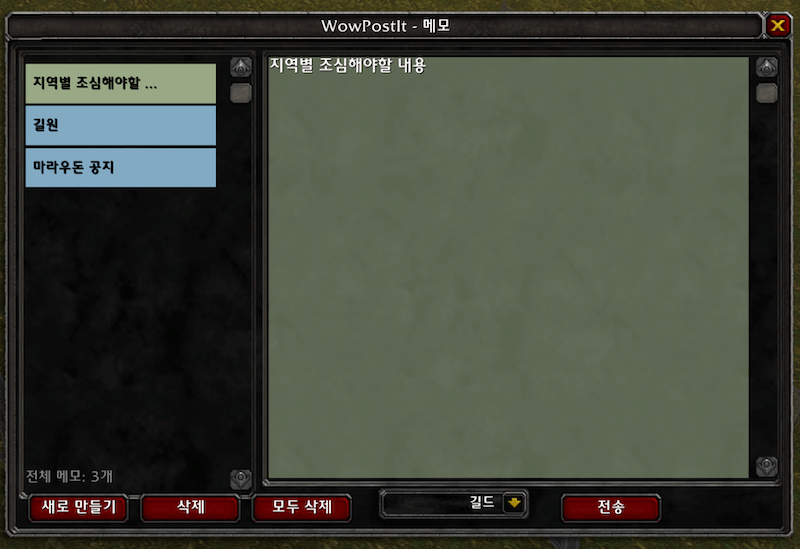
### Main Window (600x400)
- **Left Panel**: Note list with colorful backgrounds
- **Right Panel**: Note editor with matching background color
- **Bottom Buttons**: New, Delete, Delete All, Chat dropdown, Send
### Minimap Button
- **Left Click**: Open/close notes window
- **Right Click**: Context menu
- **Drag**: Move button around minimap
---
# WowPostIt (한국어)
월드 오브 워크래프트 클래식을 위한 간단하고 직관적인 포스트잇 스타일의 메모 애드온입니다.
## 기능
- **포스트잇 스타일 메모**: 각 메모는 실제 포스트잇처럼 랜덤한 파스텔 색상 배경을 가집니다
- **미니맵 버튼**: 미니맵의 노란색 "PI" 버튼으로 빠른 접근 가능
- **계정 전체 공유**: 모든 메모는 같은 계정의 모든 캐릭터가 공유합니다
- **채팅 연동**: 메모를 다양한 채팅 채널로 전송 (일반, 길드, 파티, 공격대)
- **자동 저장**: 타이핑하는 즉시 자동으로 저장됩니다
- **여러 줄 지원**: 여러 줄 메모를 올바른 형식으로 작성 및 관리
- **UTF-8 지원**: 한국어, 영어 및 기타 언어 완벽 지원
## 설치 방법
1. WowPostIt 폴더를 다운로드합니다
2. WoW 클래식 애드온 디렉토리에 넣습니다:
- Windows: `World of Warcraft\_classic_\Interface\AddOns\`
- Mac: `World of Warcraft/_classic_/Interface/AddOns/`
3. WoW를 재시작하거나 채팅창에 `/reload` 입력
## 사용법
### 메모 열기
- 미니맵 근처의 노란색 "PI" 버튼 클릭
- 또는 채팅창에 `/postit`, `/pi`, `/wowpostit` 입력
### 명령어
- `/postit` - 메모창 열기
- `/pi` - 메모 열기 단축 명령어
- `/postit show` - 숨겨진 미니맵 버튼 표시
- `/postit hide` - 미니맵 버튼 숨기기
### 메모 관리
- **새로 만들기**: 랜덤 포스트잇 색상으로 새 메모 생성
- **삭제**: 현재 선택된 메모 삭제
- **모두 삭제**: 모든 메모 제거 (확인 필요)
- **전송**: 현재 메모를 선택한 채팅 채널로 전송
### 메모 목록
- 각 메모의 처음 10자를 표시
- 각 메모는 고유한 포스트잇 색상으로 표시
- 메모를 클릭하여 보기 및 편집
- 선택된 메모는 더 진한 색으로 표시되어 쉽게 구분
### 채팅으로 메모 전송
1. 목록에서 메모 선택
2. 드롭다운에서 채팅 채널 선택 (일반, 길드, 파티, 공격대)
3. "전송" 클릭하여 공유
4. 각 줄은 순서 유지를 위해 0.1초 간격으로 개별 메시지로 전송
## 상세 기능
### 포스트잇 색상
새 메모에 랜덤으로 지정되는 8가지 파스텔 색상:
- 부드러운 노란색
- 부드러운 분홍색
- 부드러운 연두색
- 부드러운 하늘색
- 부드러운 연보라색
- 부드러운 연주황색
- 부드러운 라임색
- 부드러운 장미색
### UTF-8 텍스트 처리
- 한글 문자를 올바르게 처리 (문자당 3바이트)
- 메모 제목이 깨지지 않고 정확히 표시
- 혼합 언어 콘텐츠 지원
### 계정 전체 저장
- 메모는 `SavedVariables`에 저장 (캐릭터별이 아님)
- 같은 계정의 모든 캐릭터가 동일한 메모 공유
- 길드 오피서, 레이드 리더, 또는 여러 캐릭터를 관리하는 사용자에게 완벽
## 인터페이스
### 메인 창 (600x400)
- **왼쪽 패널**: 다채로운 배경의 메모 목록
- **오른쪽 패널**: 일치하는 배경색의 메모 편집기
- **하단 버튼**: 새로 만들기, 삭제, 모두 삭제, 채팅 드롭다운, 전송
### 미니맵 버튼
- **왼쪽 클릭**: 메모창 열기/닫기
- **오른쪽 클릭**: 컨텍스트 메뉴
- **드래그**: 미니맵 주위로 버튼 이동
## 문제 해결
### 메모가 보이지 않는 경우
- `/reload` 명령어로 UI 새로고침
- 미니맵 버튼이 숨겨졌다면 `/postit show` 입력
### 채팅 전송이 안 되는 경우
- 길드/파티/공격대에 속해 있는지 확인
- 메모가 비어있지 않은지 확인
## 버전 정보
- 현재 버전: 1.0
- WoW Classic 호환
- 계정 전체 메모 공유
- UTF-8 완벽 지원
## 라이선스
이 애드온은 자유롭게 사용 및 수정할 수 있습니다.
The WoW PostIt Team