# FoxChat
A World of Warcraft Classic addon for chat message filtering and highlighting with keyword detection.
## Developer
**우르사 (Ursa)** - 20th Anniversary Hardcore Classic Server, Fox and Wolf Guild
## Features
- **Keyword Highlighting**: Automatically highlights messages containing your specified keywords
- **Smart Filtering**:
- Your own messages are never filtered
- Prefix/suffix text is excluded from filtering
- Configurable ignore keywords
- **Chat Filtering**: Filter messages to show only those containing your keywords
- **Sound Alerts**: Play sound notifications when keywords are detected
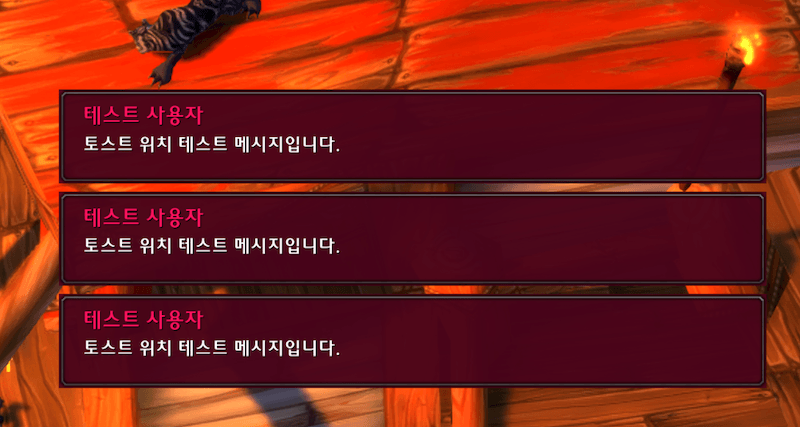
- **Toast Notifications**: Visual popup alerts for keyword matches with customizable position
- **Prefix/Suffix**: Automatically add custom text before and after your messages
- **Minimap Button**: Quick access to toggle filtering and open settings
- **Multi-Channel Support**: Monitor multiple chat channels simultaneously
- **Party Recruitment System**:
- Semi-automated advertising with manual click requirement (EULA compliant)
- First Come message feature for quick party announcements
- Party size management with auto-stop option
- Configurable cooldowns and channel selection
- **Tab-based UI**: Modern, organized settings interface with four tabs
- **Auto Features**:
- Trade completion messages with automatic whisper
- Party auto-greeting with random message selection
- Smart auto-reply system with cooldown management
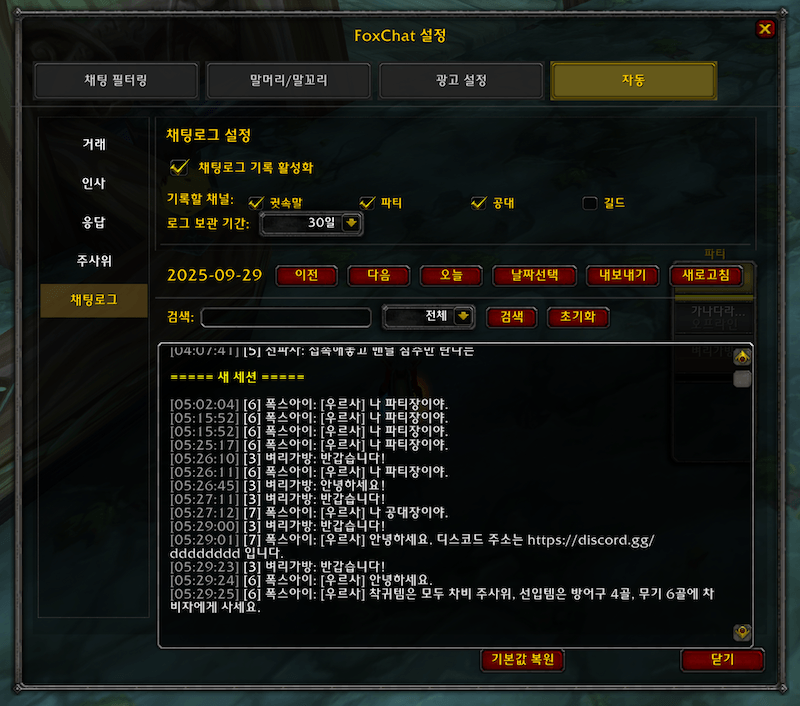
- Dice roll tracking and automatic result announcement
- Auto repair alerts
- **Localization**: Full support for English and Korean
## Installation
1. Download the FoxChat folder
2. Place it in your WoW Classic addons directory:
- Windows: `World of Warcraft\_classic_\Interface\AddOns\`
- Mac: `World of Warcraft/_classic_/Interface/AddOns/`
3. Restart WoW or type `/reload` in chat
## Usage
### Commands
- `/fc` or `/foxchat` - Open settings window
- `/fc toggle` - Enable/disable the addon
- `/fc add <keyword>` - Add a keyword
- `/fc remove <keyword>` - Remove a keyword
- `/fc list` - Show current keywords
- `/fcdbg autoreply` - Toggle auto-reply debug mode
### Minimap Button
- **Left Click**: Toggle chat filtering on/off
- **Right Click**: Open settings window
- **Drag**: Move button around minimap
### Settings Window (Tab UI)
The new tab-based interface includes four sections:
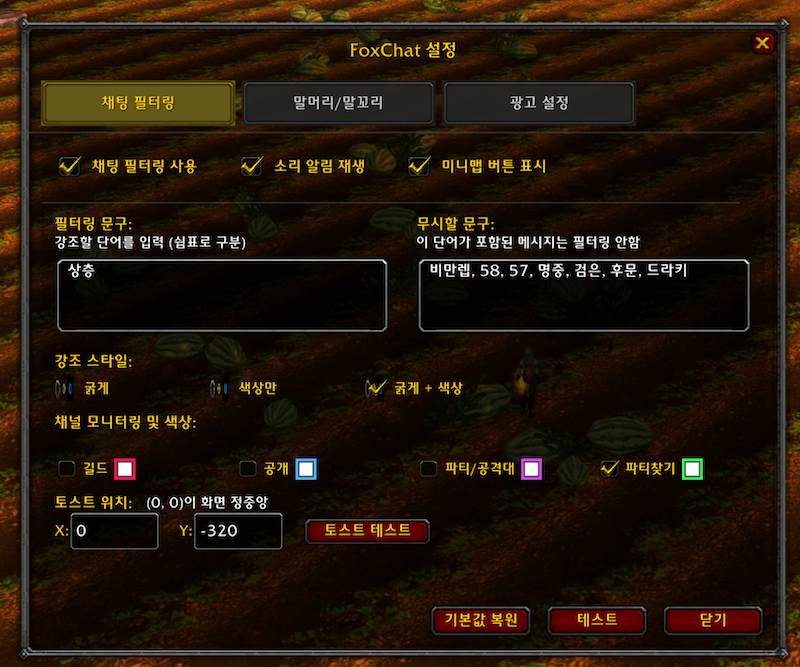
#### Tab 1: Chat Filtering
- Configure keywords (comma-separated)
- Set ignore keywords to exclude certain messages
- Select which channels to monitor
- Choose highlight style (bold, color, or both)
- Configure channel-specific colors
- Adjust toast notification position
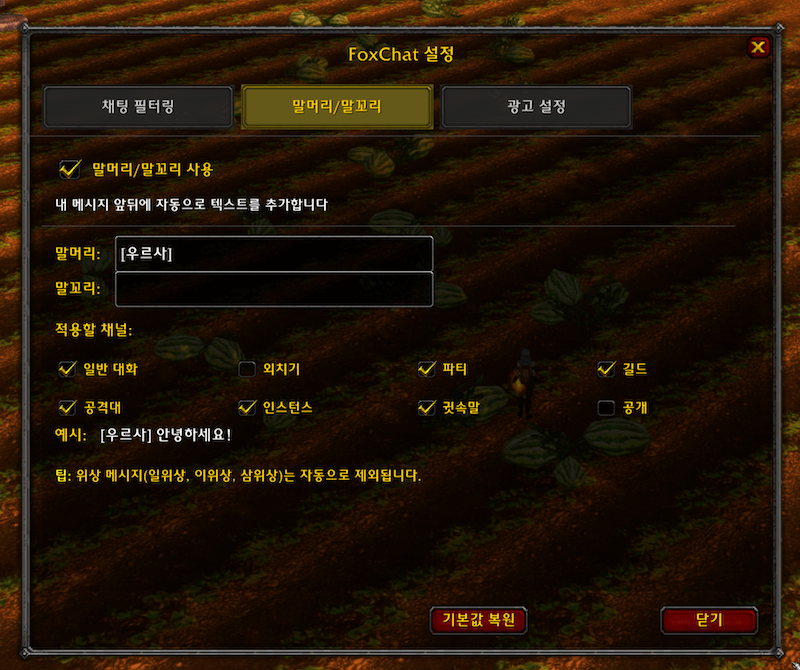
#### Tab 2: Prefix/Suffix
- Enable/disable prefix and suffix
- Set custom text for message prefix
- Set custom text for message suffix
- Select which channels to apply
#### Tab 3: Advertisement
- Set advertisement message (multi-line support)
- Configure button position (X, Y coordinates)
- Select cooldown duration (15/30/45/60 seconds)
- Choose target channel (automatic channel list)
- Start/stop advertising
#### Tab 4: Auto Features (Left Menu Navigation)
Enhanced UI with left-side menu and right-side content area:
**Trade (거래)**
- Automatically sends trade details via whisper after successful trades
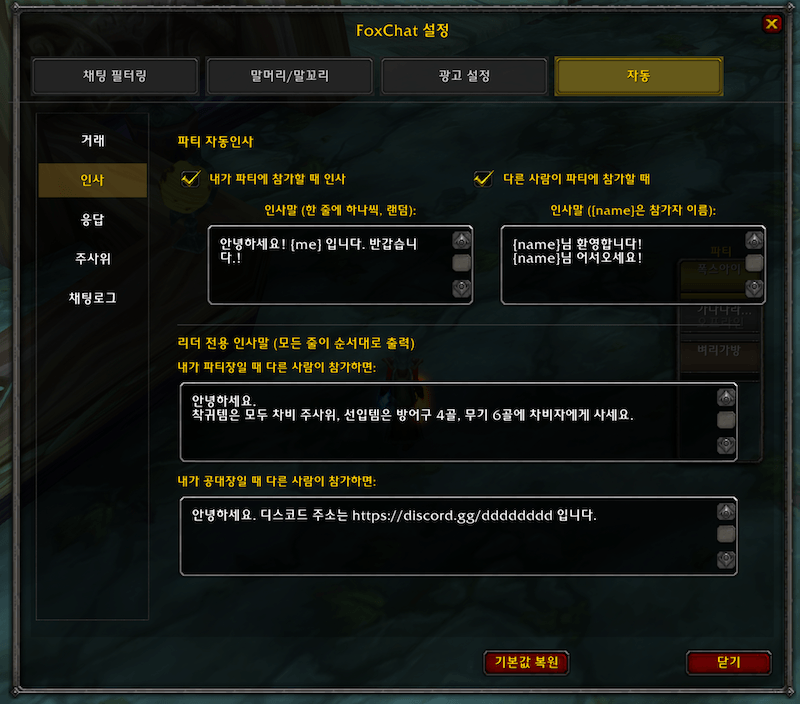
**Greetings (인사)**
- **When I Join**: Sends random greeting when you join a party
- Supports {me} variable for your character name
- Multiple messages (one per line, randomly selected)
- **When Others Join**: Sends greeting when others join your party/raid
- Supports {name} variable for the joiner's name
- Multiple messages with random selection
- **Leader Exclusive Greetings** (NEW)
- **Party Leader**: All lines sent in order when you're party leader
- **Raid Leader**: All lines sent in order when you're raid leader
- Overrides normal greetings when you have leader role
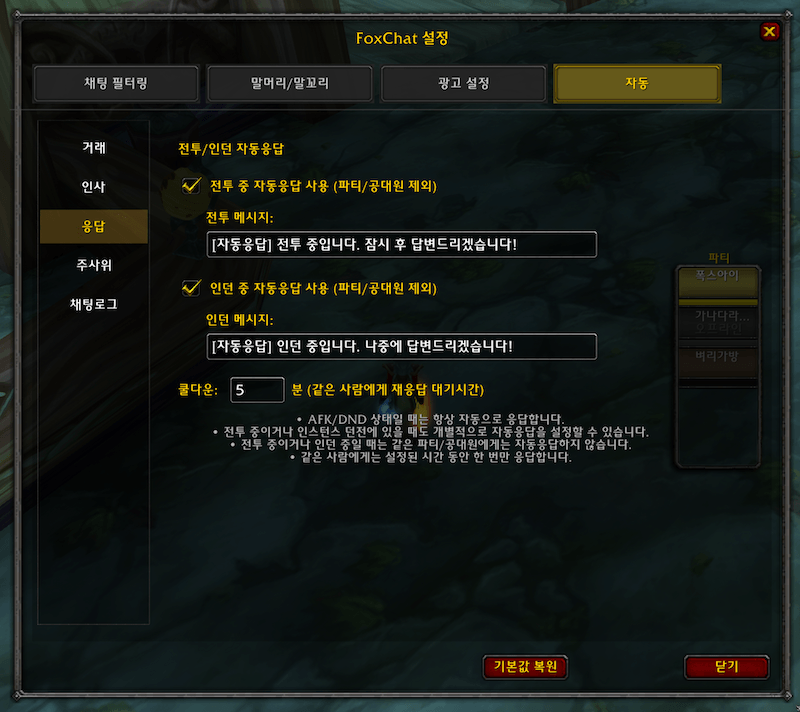
**Reply (응답)**
- **Combat Auto-Reply**: Responds to whispers during combat (excludes party/raid members)
- **Instance Auto-Reply**: Responds to whispers while in dungeons (excludes party/raid members)
- **AFK/DND**: Always active automatic responses
- **Cooldown System**: Configurable cooldown per sender (default: 5 minutes)
- Custom messages for each situation
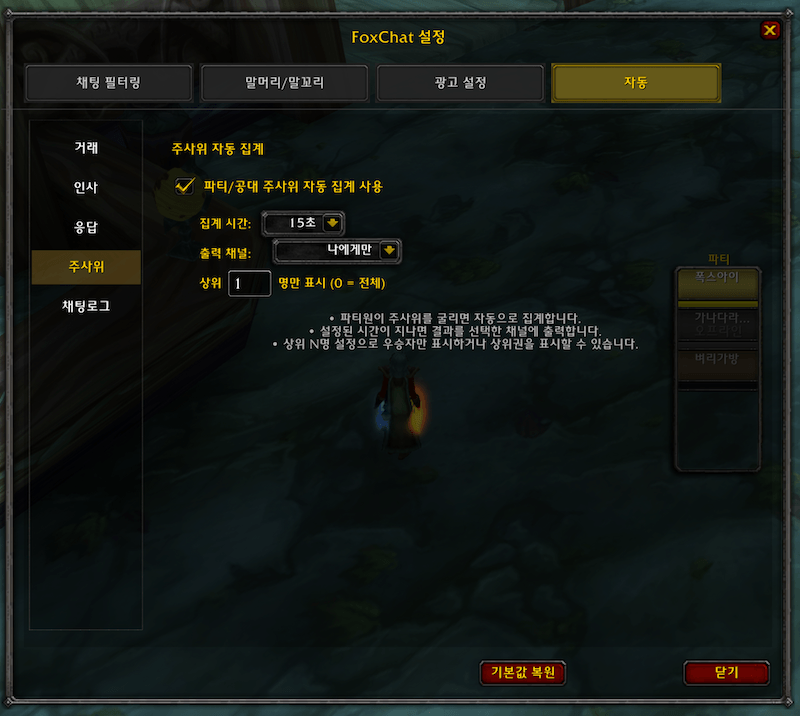
**Dice (주사위)**
- Automatic dice roll tracking for party/raid
- Configurable collection time: 10/15/20/30/45/60 seconds (default: 10)
- Output options: Party/Raid or Self only (default: Self)
- Winner display: Top N players (default: 1 winner only)
## Configuration Options
### Chat Channels
- Say, Yell, Party, Guild, Raid
- Instance, Whisper
- General, Trade, LookingForGroup
### Highlight Styles
- **Bold**: Makes keywords appear in bold white
- **Color Only**: Highlights keywords in your chosen color
- **Bold + Color**: Combines both effects
### Toast Notifications
- Position: X, Y coordinates (0, 0 = screen center)
- Default: (0, -320) - bottom center
- Maximum 3 toasts displayed simultaneously
### Advertisement System (EULA Compliant)
- **Manual Click Required**: Button must be clicked each time (no automation)
- **Configurable Cooldown**: Choose between 15, 30, 45, or 60 seconds
- **Channel Selection**: Automatically lists available channels
- **Default Position**: X: 350, Y: -150 (right side of screen)
- **Shift+Drag**: Move the advertisement button
- **Smart Cooldown**: Resets when stopping ads
### Auto-Reply System
- **Smart Group Detection**: Never auto-replies to party/raid members
- **Multiple Trigger Conditions**: Combat, Instance, AFK/DND
- **Per-Sender Cooldown**: Prevents spam to the same person
- **Customizable Messages**: Different messages for each situation
- **Debug Mode**: `/fcdbg autoreply` to see detection process
---
# FoxChat (한국어)
월드 오브 워크래프트 클래식용 채팅 메시지 필터링 및 키워드 강조 애드온입니다.
## 기능
- **키워드 강조**: 지정한 키워드가 포함된 메시지를 자동으로 강조 표시
- **채팅 필터링**: 키워드가 포함된 메시지만 표시하도록 필터링
- **소리 알림**: 키워드 감지 시 소리 알림 재생
- **토스트 알림**: 키워드 매칭 시 위치 조정 가능한 시각적 팝업 알림
- **말머리/말꼬리**: 메시지 앞뒤에 자동으로 텍스트 추가
- **미니맵 버튼**: 필터 전환 및 설정창 열기 빠른 접근
- **다중 채널 지원**: 여러 채팅 채널 동시 모니터링
- **광고 시스템**: 수동 클릭 필요한 반자동 모집 (EULA 준수)
- **탭 기반 UI**: 4개 탭으로 구성된 현대적이고 정리된 설정 인터페이스
- **자동 기능**:
- 거래 완료 시 자동 귓속말 메시지
- 파티 자동 인사 (랜덤 메시지)
- 스마트 자동응답 시스템 (쿨다운 관리)
- 주사위 자동 집계 및 결과 발표
- 자동 수리 알림
- **현지화**: 영어 및 한국어 완벽 지원
## 설치 방법
1. FoxChat 폴더를 다운로드합니다
2. WoW 클래식 애드온 디렉토리에 넣습니다:
- Windows: `World of Warcraft\_classic_\Interface\AddOns\`
- Mac: `World of Warcraft/_classic_/Interface/AddOns/`
3. WoW를 재시작하거나 채팅창에 `/reload` 입력
## 사용법
### 명령어
- `/fc` 또는 `/foxchat` - 설정창 열기
- `/fc toggle` - 애드온 켜기/끄기
- `/fc add <키워드>` - 키워드 추가
- `/fc remove <키워드>` - 키워드 제거
- `/fc list` - 현재 키워드 목록 표시
- `/fcdbg autoreply` - 자동응답 디버그 모드 토글
### 미니맵 버튼
- **왼쪽 클릭**: 채팅 필터링 켜기/끄기
- **오른쪽 클릭**: 설정창 열기
- **드래그**: 미니맵 주위로 버튼 이동
### 설정창 (탭 UI)
새로운 탭 기반 인터페이스는 네 가지 섹션으로 구성됩니다:
#### 탭 1: 채팅 필터링
- 키워드 설정 (쉼표로 구분)
- 무시할 키워드 설정
- 모니터링할 채널 선택
- 강조 스타일 선택 (굵게, 색상, 또는 둘 다)
- 채널별 색상 설정
- 토스트 알림 위치 조정
#### 탭 2: 말머리/말꼬리
- 말머리/말꼬리 활성화/비활성화
- 말머리 텍스트 설정
- 말꼬리 텍스트 설정
- 적용할 채널 선택
#### 탭 3: 광고 설정
- 광고 메시지 설정 (여러 줄 지원)
- 버튼 위치 설정 (X, Y 좌표)
- 쿨타임 선택 (15/30/45/60초)
- 대상 채널 선택 (자동 채널 목록)
- 광고 시작/중지
#### 탭 4: 자동 기능 (좌측 메뉴 네비게이션)
좌측 메뉴와 우측 컨텐츠 영역으로 개선된 UI:
**거래 (Trade)**
- 거래 완료 시 자동으로 거래 내역을 귓속말로 전송
**인사 (Greetings)**
- **내가 참가할 때**: 파티 참가 시 랜덤 인사 메시지 전송
- {me} 변수 지원 (내 캐릭터 이름)
- 여러 메시지 설정 가능 (한 줄에 하나씩, 랜덤 선택)
- **다른 사람이 참가할 때**: 다른 사람이 파티/공대 참가 시 인사
- {name} 변수 지원 (참가자 이름)
- 여러 메시지 랜덤 선택
- **리더 전용 인사말** (신규)
- **파티장일 때**: 파티장인 경우 모든 줄을 순서대로 전송
- **공대장일 때**: 공대장인 경우 모든 줄을 순서대로 전송
- 리더 권한이 있을 때 일반 인사말보다 우선 적용
**응답 (Reply)**
- **전투 중 자동응답**: 전투 중 귓속말 자동응답 (파티/공대원 제외)
- **인던 중 자동응답**: 던전 진행 중 자동응답 (파티/공대원 제외)
- **AFK/DND**: 항상 활성화되는 자동응답
- **쿨다운 시스템**: 발신자별 재응답 대기시간 설정 (기본: 5분)
- 각 상황별 사용자 정의 메시지 설정
**주사위 (Dice)**
- 파티/공대 주사위 자동 집계
- 집계 시간 설정: 10/15/20/30/45/60초 (기본: 10초)
- 출력 옵션: 파티/공대 또는 나에게만 (기본: 나에게만)
- 우승자 표시: 상위 N명 (기본: 1명만)
## 설정 옵션
### 채팅 채널
- 일반 대화, 외치기, 파티, 길드, 공격대
- 인스턴스, 귓속말
- 공개, 거래, 파티찾기
### 강조 스타일
- **굵게**: 키워드를 굵은 흰색으로 표시
- **색상만**: 선택한 색상으로 키워드 강조
- **굵게 + 색상**: 두 효과를 결합
### 토스트 알림
- 위치: X, Y 좌표 (0, 0 = 화면 정중앙)
- 기본값: (0, -320) - 화면 하단 중앙
- 최대 3개의 토스트 동시 표시
### 광고 시스템 (EULA 준수)
- **수동 클릭 필수**: 매번 버튼을 클릭해야 함 (자동화 없음)
- **설정 가능한 쿨타임**: 15, 30, 45, 60초 중 선택
- **채널 선택**: 사용 가능한 채널 자동 표시
- **기본 위치**: X: 350, Y: -150 (화면 오른쪽)
- **Shift+드래그**: 광고 버튼 이동
- **스마트 쿨타임**: 광고 중지 시 초기화
### 자동응답 시스템
- **스마트 그룹 감지**: 파티/공대원에게는 자동응답하지 않음
- **다중 트리거 조건**: 전투, 인스턴스, AFK/DND
- **발신자별 쿨다운**: 같은 사람에게 스팸 방지
- **사용자 정의 메시지**: 각 상황별 다른 메시지
- **디버그 모드**: `/fcdbg autoreply`로 감지 과정 확인
## 특징
- 플레이어 이름은 필터링하지 않고 메시지 내용만 필터링
- 위상 메시지(일위상, 이위상, 삼위상)는 말머리/말꼬리 제외
- 광고 메시지는 말머리/말꼬리 미적용
- 설정은 캐릭터별로 저장됨
- 탭별 설정 초기화 기능
## 문제 해결
- 애드온이 작동하지 않는 경우: `/reload` 명령어 실행
- 미니맵 버튼이 보이지 않는 경우: 설정창에서 "미니맵 버튼 표시" 확인
- 키워드가 작동하지 않는 경우: 키워드가 쉼표로 올바르게 구분되었는지 확인
- 광고 버튼이 보이지 않는 경우: 광고 메시지를 먼저 입력하고 시작 버튼 클릭
- 자동응답 테스트: `/fcdbg autoreply`로 디버그 모드 활성화
## 버전
- 현재 버전: 3.1
- WoW 클래식 호환
- 최신 업데이트 (3.1):
- 리더 전용 인사말 시스템 추가
- 공격대 지원 완벽 구현 (GetRaidRosterInfo 활용)
- 인사 메뉴 UI 2열 레이아웃 개선
- 광고 버튼 우클릭 시 설정창 열기 기능 추가
- 공대장 인사말 채널 수정 (RAID_WARNING → RAID)
- 이전 업데이트 (3.0):
- 자동 탭 UI를 좌측 메뉴 방식으로 완전 개편
- 스마트 자동응답 시스템 추가 (파티/공대원 제외)
- 주사위 자동 집계 기능 구현
- 파티 자동인사 메시지에 변수 지원 추가
- 각 기능별 상세 설정 UI 개선
## 개발자
개발자 : 우르사 (20주년 하드코어 클래식 서버 , Fox and Wolf 길드)
## 라이선스
이 애드온은 자유롭게 사용 및 수정할 수 있습니다.
Fox Chat Team