My Gamepad Is Rich Forever
- By
Your Gamepad is incredible ! Customize it as you want for World of Warcraft Forever ! Your skills where and how you ever wanted ! Everything is possible !
Capture d'écran 2026-11-08 180900.png
Capture d'écran 2026-11-08 181028.png
Capture d'écran 2026-11-08 181003.png
Capture d'écran 2026-11-08 180935.png
Description
My Gamepad Is Rich
Finally use the extra buttons of your controller in World of Warcraft Forever.
Back paddles, extra triggers, M-buttons: most "pro" controllers have more buttons than the standard Xbox layout, but the game never sees them. My Gamepad Is Rich turns each of them into a real button, and also lets you rework LT, RT, LB and RB. Even a plain Xbox or PlayStation controller gets dozens of new combos.
Everything is set up in game, with drag and drop, and everything works in combat.
What you can do
Turn every extra button into something useful
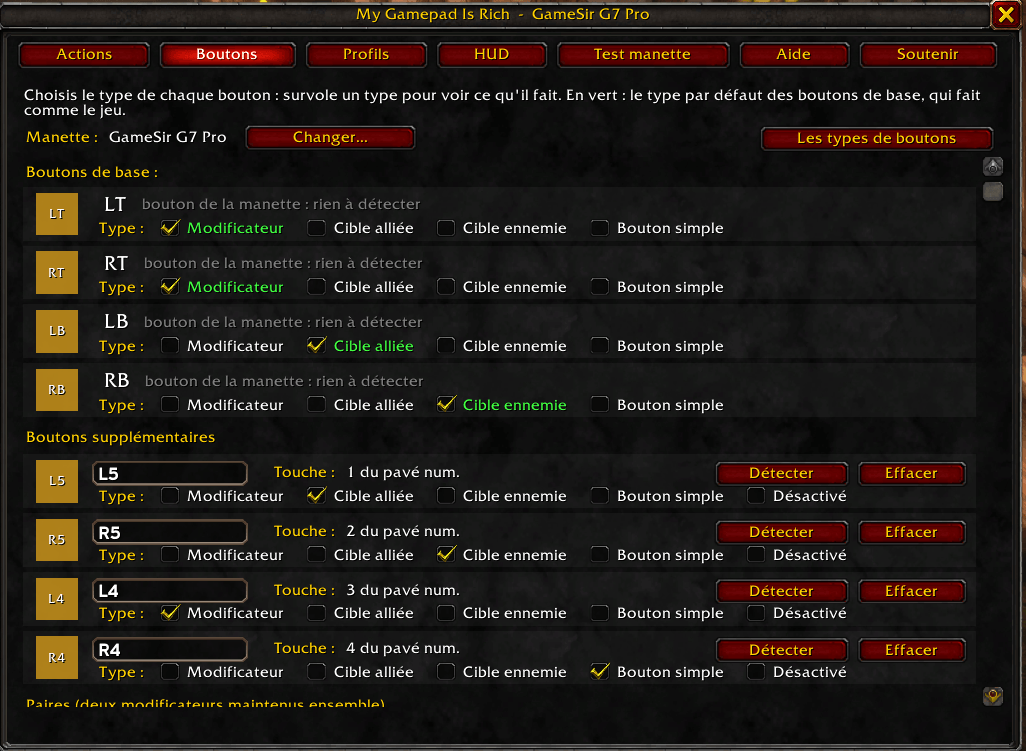
Up to 6 extra buttons, named after your controller (L4 / R4 / L5 / R5, P1–P4, M1–M6...). Each one can be:
- Modifier: hold it and press A, B, X, Y or the D-pad. That's 8 new combos per button, just like LT / RT.
- Simple button: one action, plus another one while LT is held and another one while RT is held. An empty layer falls back to the "Alone" action.
- Ally target / Enemy target: works like LB / RB in Forever. A short press targets the nearest ally or enemy; hold it and aim with the right stick to pick one. While held, it is also a modifier with its own 8 combos.
- Disabled.
Rework LT, RT, LB and RB
The four base buttons can also be a Modifier, an Ally / Enemy target or a Simple button, set per profile. By default they behave like the game (LT / RT modifiers, LB ally target, RB enemy target), with an extra layer of shortcuts on top.
Pairs: hold two modifiers together
Any two modifiers held together give 8 more combos: L5 + R5, LT + RT, L5 + LT, LB + RB... You choose which pairs to use. Left + right pairs are enabled by default.
Put anything on a button
Drag and drop onto any slot:
- spells, items, macros, mounts, toys, equipment sets;
- custom macros typed right in the addon;
- WoW commands (jump, interact with target...);
- basic actions of Forever (Jump, Cancel spell / target, Search, Auto attack, Interact) that you can place anywhere. They stay put even when Forever changes a button's role depending on context.
A, B, X and Y keep their normal game actions until you put something on them. Clear the slot and the game's action is back.
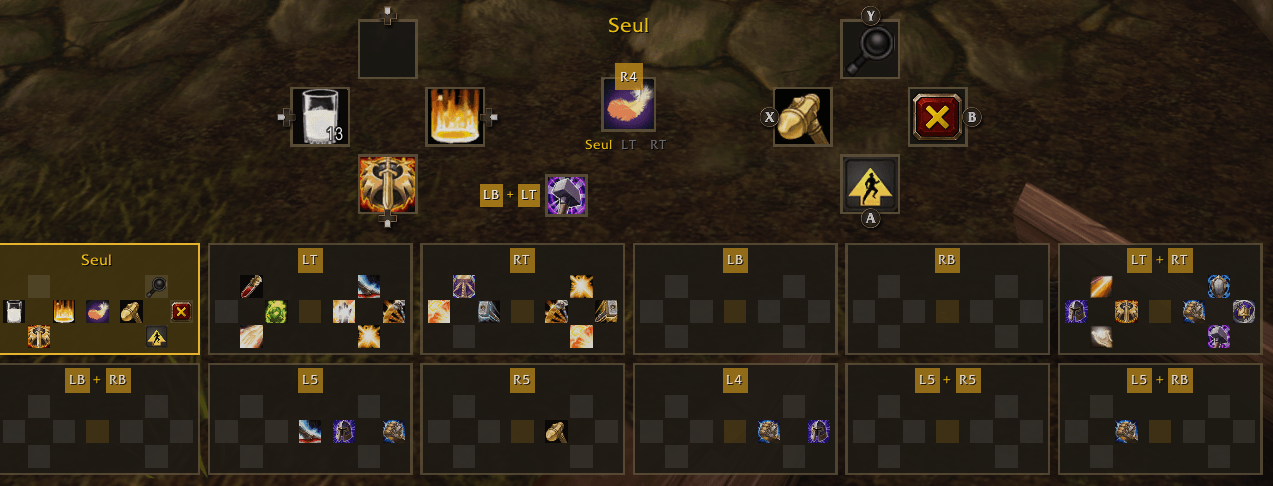
A HUD that shows your controller
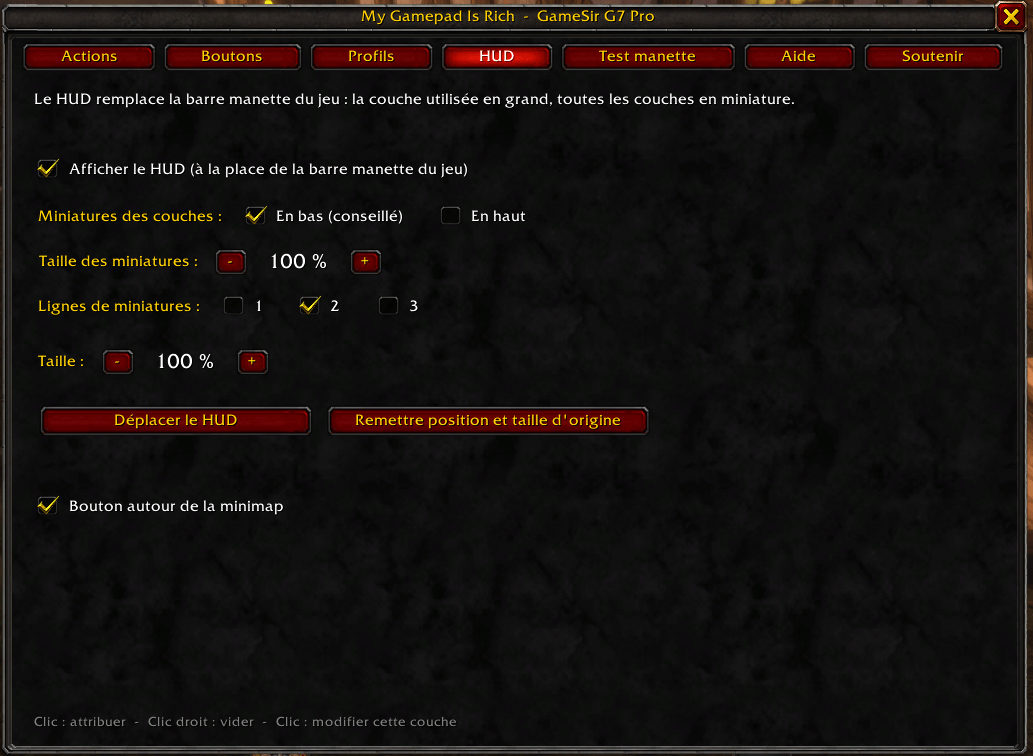
The HUD replaces the game's controller bar:
- the layer in use is shown large, laid out like your controller (D-pad on the left, A/B/X/Y on the right);
- every other layer is shown as a miniature (Alone, LT, RT, modifiers, pairs...);
- click a miniature to edit that layer directly on the HUD;
- move it, resize it, place the miniatures above or below, choose their size and number of rows.
Profiles: one per controller
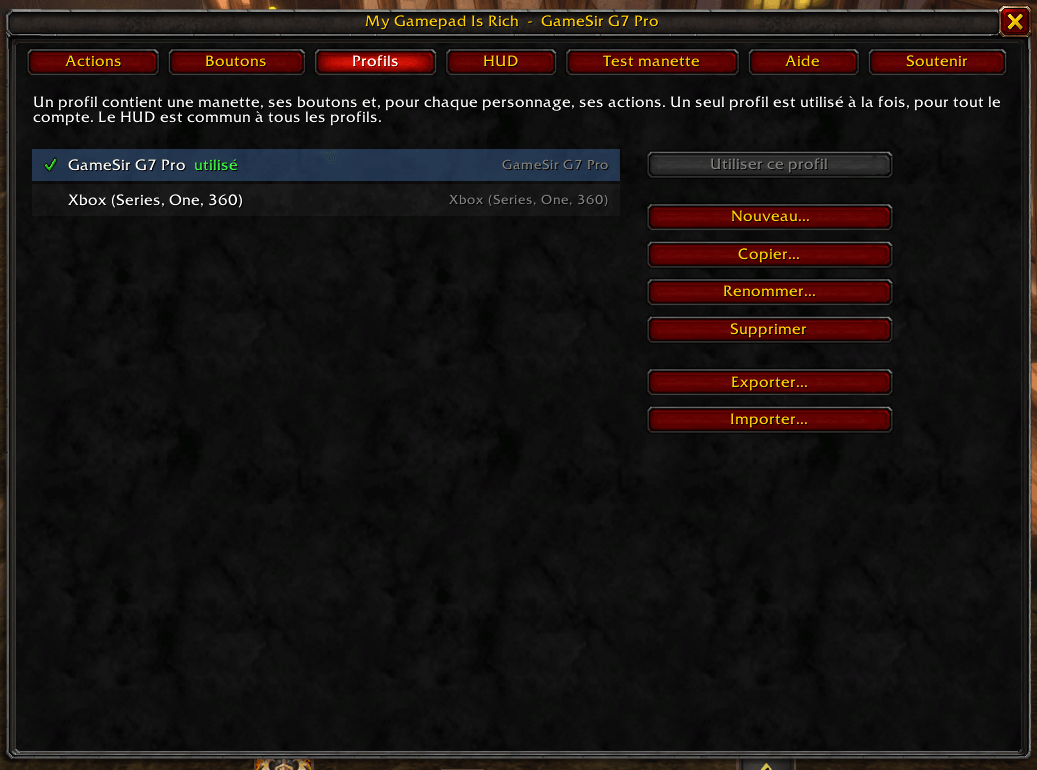
- Create, copy, rename and delete profiles. Each one holds a controller, its buttons and the actions of each character.
- Switch with one click or with
/mgir profile <name>. - Export / Import: share a profile as a single line of text (on Discord, or to another PC), with or without your actions and HUD settings. Before you import, a summary shows what the text contains and lists every custom macro and WoW command so you can check them. Imported text is never executed.
Guided setup
- A step-by-step tutorial on first launch: pick your controller, learn the button types, map the extra buttons, choose your pairs and place your actions.
- A Detect button: press the extra button and the addon learns its key.
- A Controller test tab that shows exactly what the game receives from each button.
Supported controllers
Presets with button names and the right software to use:
| Controller | Extra buttons |
|---|---|
| Xbox (Series, One, 360) | none: rework LT, RT, LB, RB |
| PlayStation (DualSense, DualShock 4) | none: rework L2, R2, L1, R1 (PlayStation icons and names) |
| GameSir G7 Pro | L5, R5, L4, R4 |
| GameSir G7 SE, Cyclone 2, Kaleid... | L4, R4 |
| Xbox Elite Series 2 / Core | P1–P4 |
| PlayStation DualSense Edge | LP, RP |
| Steam Controller / Steam Deck | L4, R4, L5, R5 |
| SCUF Envision Pro | P1–P4, G1, G2 |
| Razer Wolverine V3 Pro / V2 Pro | M1–M6 |
| 8BitDo Ultimate 2 | L4, R4, PL, PR |
| Flydigi Vader 4 Pro / Apex 4 | M1–M4, C, Z |
| Victrix Pro BFG | P1–P4 |
| Nacon Revolution 5 Pro | P1–P4 |
| Turtle Beach Stealth Ultra | P1–P4 |
| Any other controller | generic E1–E6 |
The GameSir G7 Pro is fully tested. For the other controllers, feedback is very welcome!
How it works (and the one-time setup)
Windows sees most controllers as a standard Xbox controller, and that protocol simply has no room for extra buttons. No addon can read them directly.
The fix takes two minutes:
- In your controller's software (GameSir Nexus, Xbox Accessories, iCUE, Razer, 8BitDo...), give each extra button an unused keyboard key, for example F9, F10, F11, F12. Avoid Shift / Ctrl / Alt.
- In game, click Detect for each button and press it. Done.
No suitable software (DualSense Edge, for example)? Use Steam Input (add WoW as a non-Steam game) or reWASD. The tutorial explains both.
Commands
| Command | Effect |
|---|---|
/mgir |
Open / close the configuration window |
/mgir profile <name> |
Switch to a profile |
/mgir profiles |
Open the Profiles tab |
/mgir test |
Open the Controller test tab |
/mgir tuto |
Replay the tutorial |
/mgir hud |
Unlock / lock the HUD to move it |
/mgir hud scale 1.2 |
HUD size (0.5 to 2) |
/mgir hud on / off |
Show the HUD / go back to the game's bar |
/mgir hud strip |
Miniatures above or below the HUD |
/mgir hud reset |
Reset HUD position and size |
/mgir minimap |
Hide / show the minimap button |
/mgir reset |
Clear this character's actions |
/mgir restore |
Give LT, RT, LB, RB back to the game |
There is also a minimap button, a key binding to open the window (Options › Key Bindings › AddOns) and a page in Options › AddOns.
Before disabling the addon, type
/mgir restoreto give the base buttons back to the game.
Good to know
- Controller, keys and modes are saved for your whole account. Actions are saved per character.
- Changes made in combat are applied as soon as combat ends (a WoW rule).
- In Forever's own windows (bags, map...), the base buttons keep their normal role.
- Available in English, French, German, Spanish, Italian, Portuguese (BR), Russian, Korean and Chinese (Simplified and Traditional).
My Gamepad Is Rich is free and will stay free. If you like it, the Support tab has a link to donate. It is completely optional and unlocks nothing.
My Gamepad Is Rich Forever Team