Worth Saying
- By
Write speeches, tours, RP scenes and one-liners ahead of time, then deliver them line by line or on a timer. Every channel, emotes, random quips, auto-popups when you enter a dungeon, and a rehearse mode for practice.
speeches.png
triggers.png
editor.png
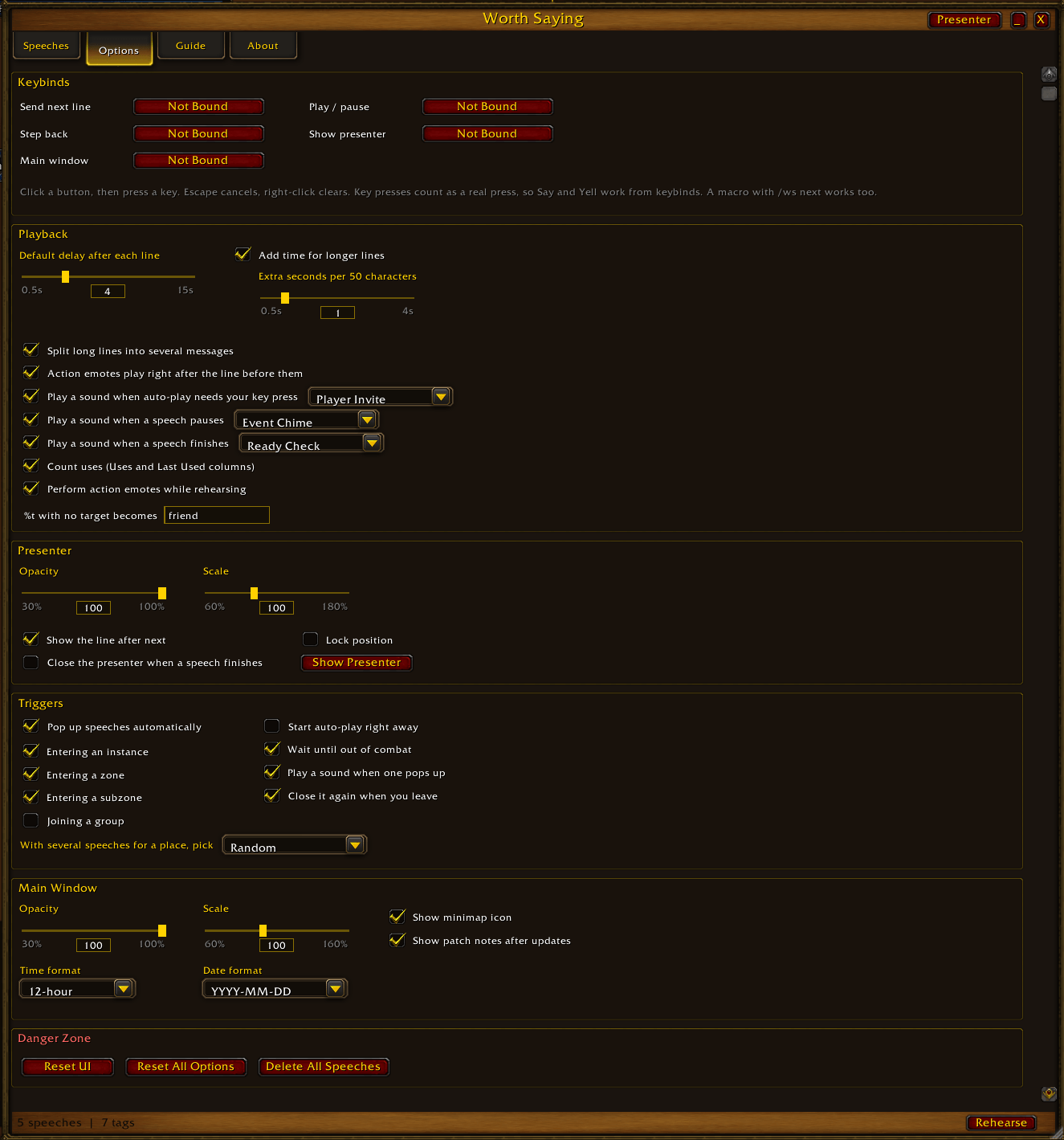
options.png

presenter-mini.png
Description
Worth Saying
Write it once. Say it on cue.
Worth Saying lets you write speeches, tours, roleplay scenes, and one-liners ahead of time, then deliver them in game right when you want them: one line per keypress, or on a timer while you get on with actually playing.
I started making it because I like giving my group a hype speech at the dungeon entrance, and typing one live while four people stand around waiting on you is… less than ideal to me. Neither is copy-pasting lines out of a notepad one at a time. Now I write the speech once, it pops up when I zone in, and I just press a button. Things grew a bit from there.
"BROTHERS! LISTEN UP! You will not touch the lava. You will not pull the whole tunnel. And if I catch one of you dying to a trogg…"
It works for anything worth saying more than once: guided tours around a capital, guild recruitment pitches, RP monologues, raid instructions, or a rotating stash of pull lines.
What it does
Quips: one-liners on a button

- A quip is a speech where every press sends one random line instead of the next one. Write a handful of greetings, pull lines, victory cheers, or groan-worthy puns, and you'll always have something worth saying.
- Put
/ws quip <name>in a macro, drag it to your action bar, and fire one off without opening a single window. - Quip lines get the full script toolbox: any channel, emotes, and tokens like
%tfor your target's name. - Emotes in curly braces happen along with the line, so
{cheer} Everyone ready? Doesn't matter, I'm going!says the line and cheers in one go. - A sample quip script (tank pull lines) is included to get you started.
The presenter

- The small window you actually deliver from. It shows the line that's up next (colored by channel), the one after it, and how far along you are.
- Send the next line with the Send button, a keybind, or a
/ws nextmacro. - Back, Skip, and Restart, plus a dropdown to jump between sections of a longer speech.
- Hit Play to let it run on its own (more on that below).
- Minimize it down to a tiny strip of playback buttons when you want it out of the way. Hovering Send there shows you what's coming.

Writing scripts
- One chat message per line, and that's most of it. The rest is optional:
- Channels:
/s,/y,/e,/p,/ra,/rw,/i,/g,/o,/w name,/1through/9, and/gr, which picks party, raid, or instance chat depending on what you're in. Put a prefix on a line by itself and every line after it uses that channel. - Emotes: any emote on its own line (
/bow,/wave %t), or in curly braces to go with a line. - Timing:
/wait 2for a longer (or shorter) beat, and/pauseto stop and wait for you, with an optional reminder like/pause wait for the stragglers. - Structure:
## Headingssplit a speech into sections you can jump between, and// notesare just for you. - Tokens:
%t(target),%tt(target's full name),%p(you),%z(zone),%sz(subzone),%c,%r,%lvl,%g,%l(group leader),%tank,%healerand%dps(by group role),%rhealerand friends (a random one),%time, and a few more, all filled in at the moment the line is sent.
The editor
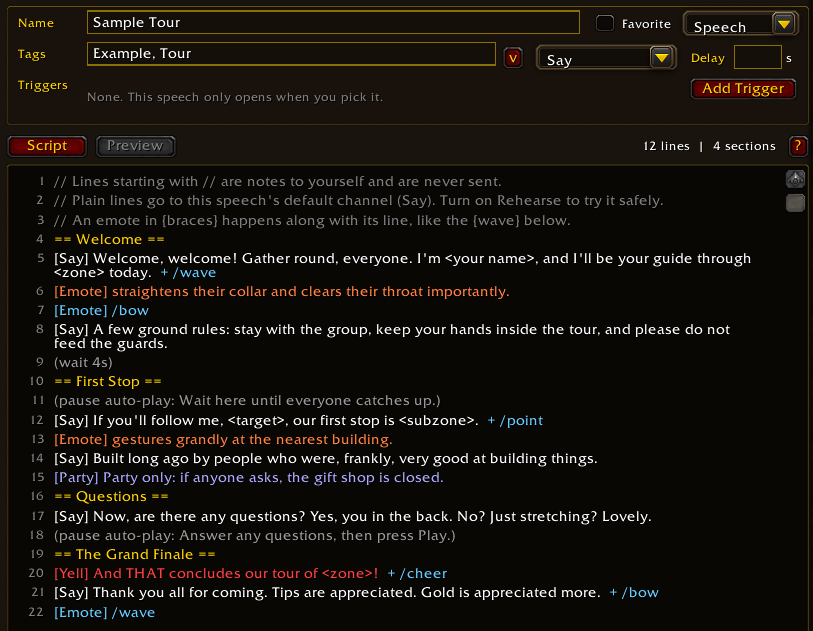
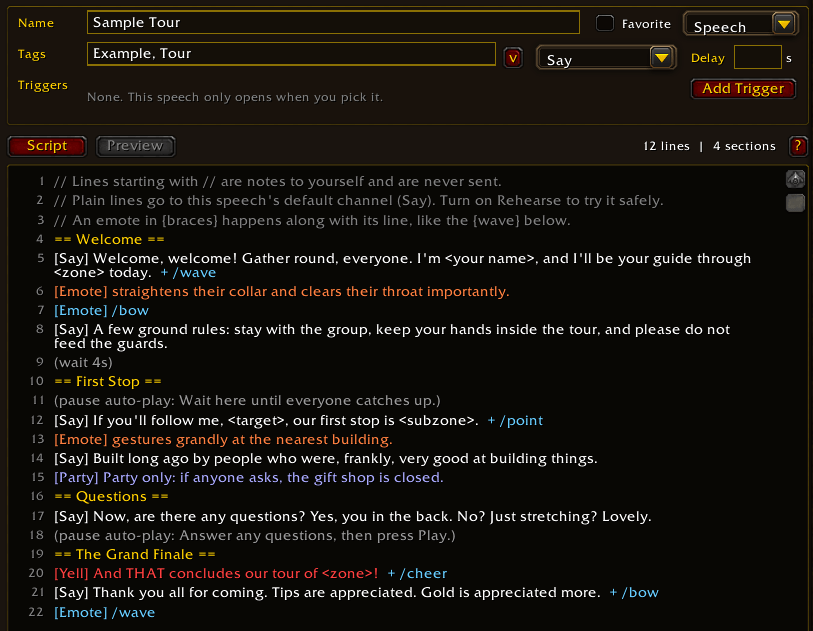
- Everything saves as you type, with Ctrl+Z and Ctrl+Y for undo and redo.
- Flip to Preview to see every line exactly as it'll be sent, color-coded by channel, with tokens shown as readable stand-ins like
<target>and<subzone>. Typos in commands and lines that are too long for chat get flagged before anyone sees them. Click any line to start presenting from there. - A little meter tells you how many characters you have left on the line you're typing, and goes red when you're close to chat's limit.
Auto-play
- Press Play and your speech runs on a timer. Set a default delay, override it per speech, and optionally give longer lines extra time so people can keep up.
- Emotes like
/cheerfire right after the line before them instead of waiting out the full delay, so a big finish actually lands. - Lines too long for one chat message get split at a sentence break and sent as separate messages, spaced out like any other line.
- About Say and Yell: Blizzard doesn't let addons send Say, Yell, or numbered channel messages on a timer outside of instances; those need a real key press. Worth Saying works with that instead of fighting it. Party, raid, guild, whisper, and emote lines go out on their own, and when it reaches a Say or Yell line it pauses, lights up the presenter, and waits for your Send. Inside dungeons and raids, everything plays by itself.
- If the game blocks addon chat entirely (like during some boss fights), it simply waits until it's allowed again.
- Optional sounds for when it needs your key press, when it hits a
/pause, and when a speech wraps up, each with your pick of sound.
Triggers

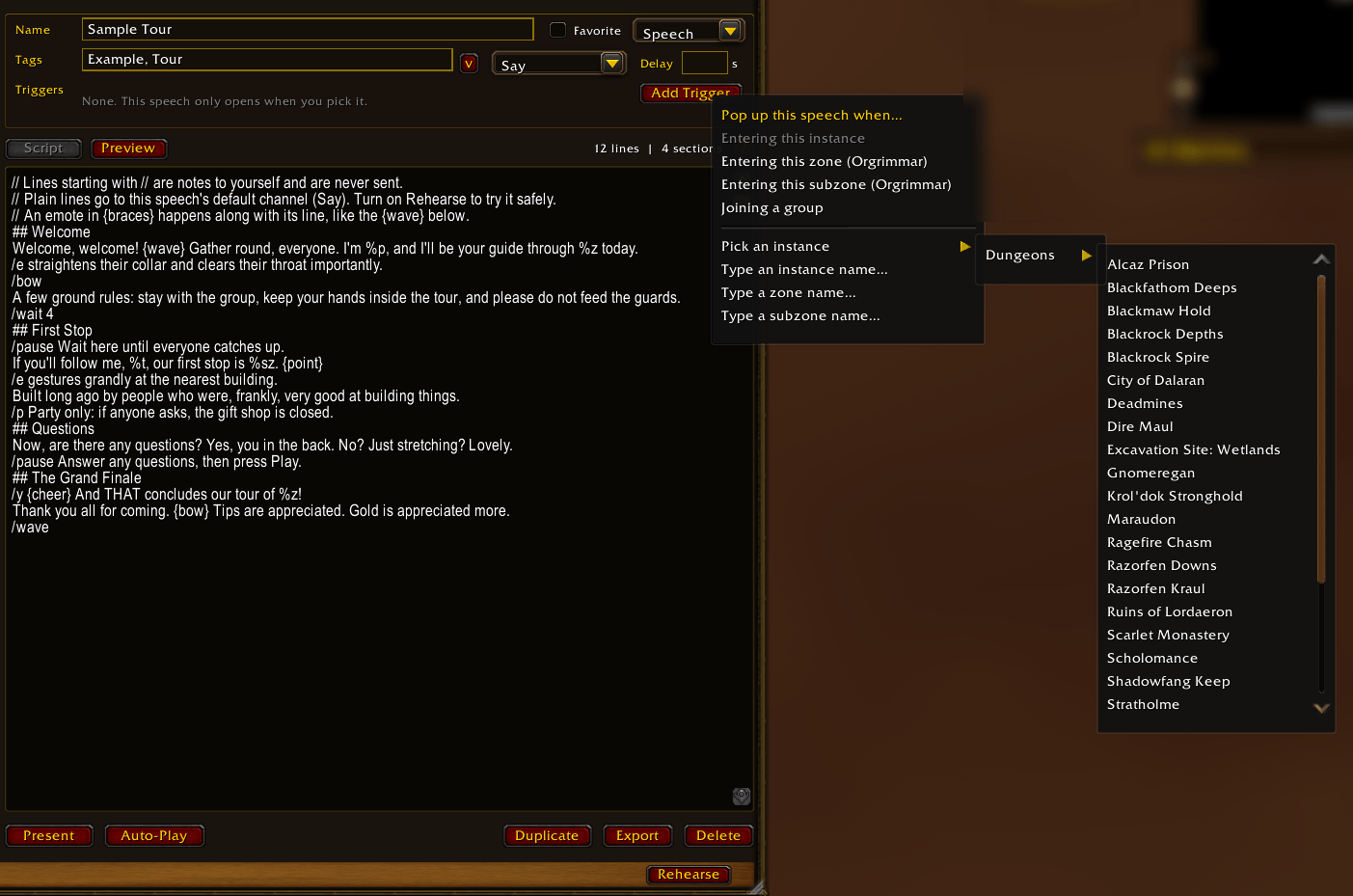
- Have a speech pop up the presenter when you enter an instance, a zone, or a subzone, or when you join a group.
- Choose instances from a list of every dungeon and raid, use wherever you're standing, or type a name.
- Got several speeches for the same place? One is chosen for you (random, random favorite, most used, least used, last used, or the one you haven't used in the longest), and the others are right there in the dropdown.
- Nothing gets said until you press Send or Play, unless you'd like it to start on its own.
- It can wait until you're out of combat, play a sound, and close itself again when you leave.
Rehearse first
- Turn on Rehearse (from the presenter, the main window, or
/ws rehearse) and every line prints only to your own chat window. Practice the whole thing with nobody watching. - Optionally let emotes play for real while rehearsing, so you can see how they look.
Your speech library

- Keep as many speeches as you like, shared across all your characters.
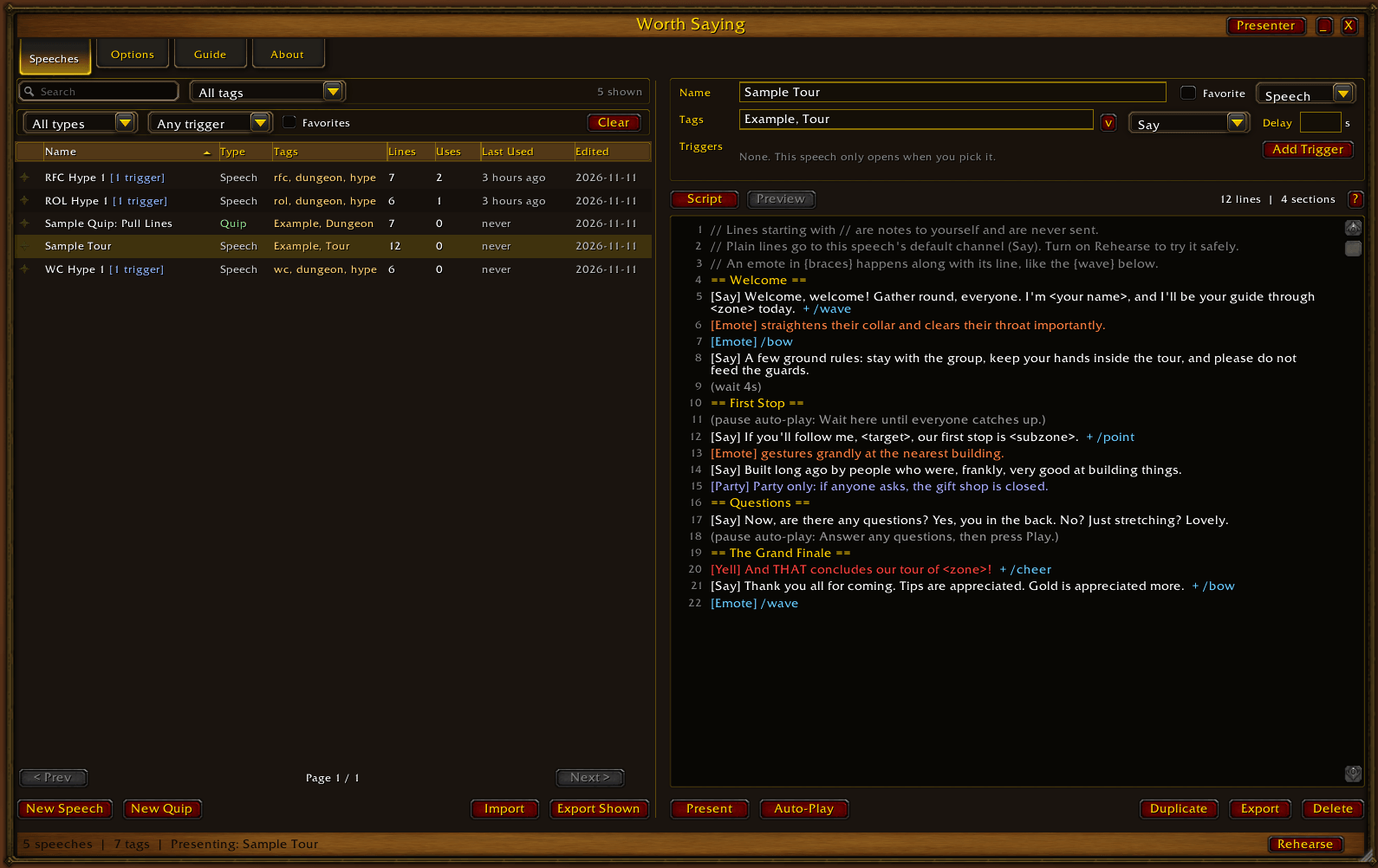
- Tag them, star your favorites, and search through names, tags, trigger places, and the scripts themselves.
- Filter by tag, type, trigger, or favorites, and sort by name, line count, how often you've used them, or when you last did.
- Double-click to present, right-click to duplicate, export, or delete.
Sharing
- Export one speech, or everything currently in your list, as a single string you can paste anywhere. Importing shows you what's inside before anything is added.
Everything else
- Keybinds for Send, Back, Play/Pause, the presenter, and the main window, set in Options.
/wswithpresent,play,next,back,skip,pause,stop,quip, andrehearsesubcommands, all macro-friendly.- A guided tour of the whole addon, offered the first time you open it and any time from the About tab.
- A built-in Guide tab that covers every script feature, plus a sample tour that shows most of them off.
- Opacity and scale settings for both windows.

A few words
Worth Saying is new, so if something breaks, feels awkward, or you've got an idea for it, I really want to hear about it. Bug reports, suggestions, and pull requests are all welcome.
It was inspired by Tour Narrator by PxL8, and written from scratch.
I used AI assistance to build it. I know the reputation AI-made addons have right now, so for what it's worth: every feature here was designed, tested in game, and argued over by an actual person who uses it.
Worth Saying Team