Worth Remembering
- By
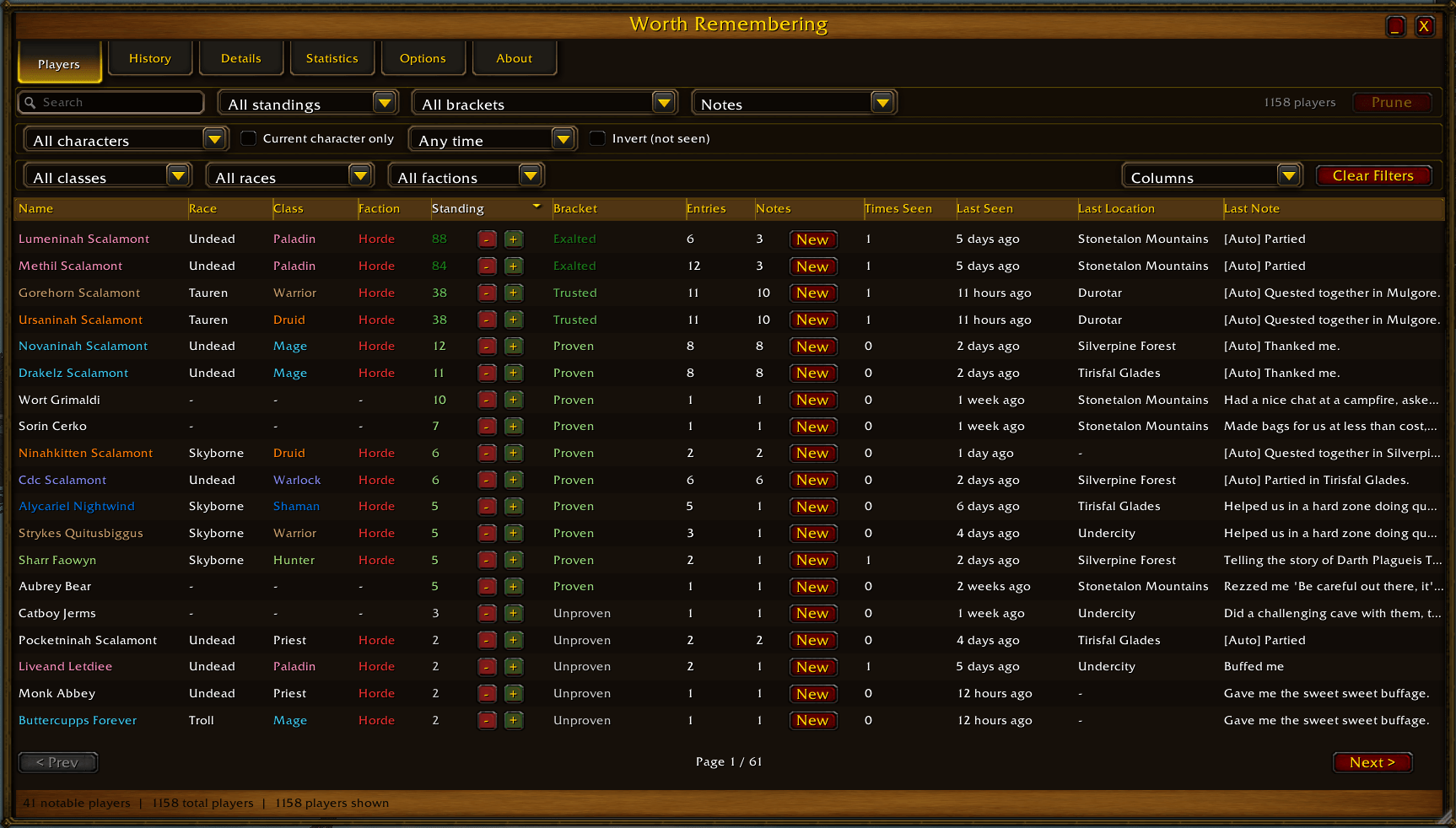
The Players tab
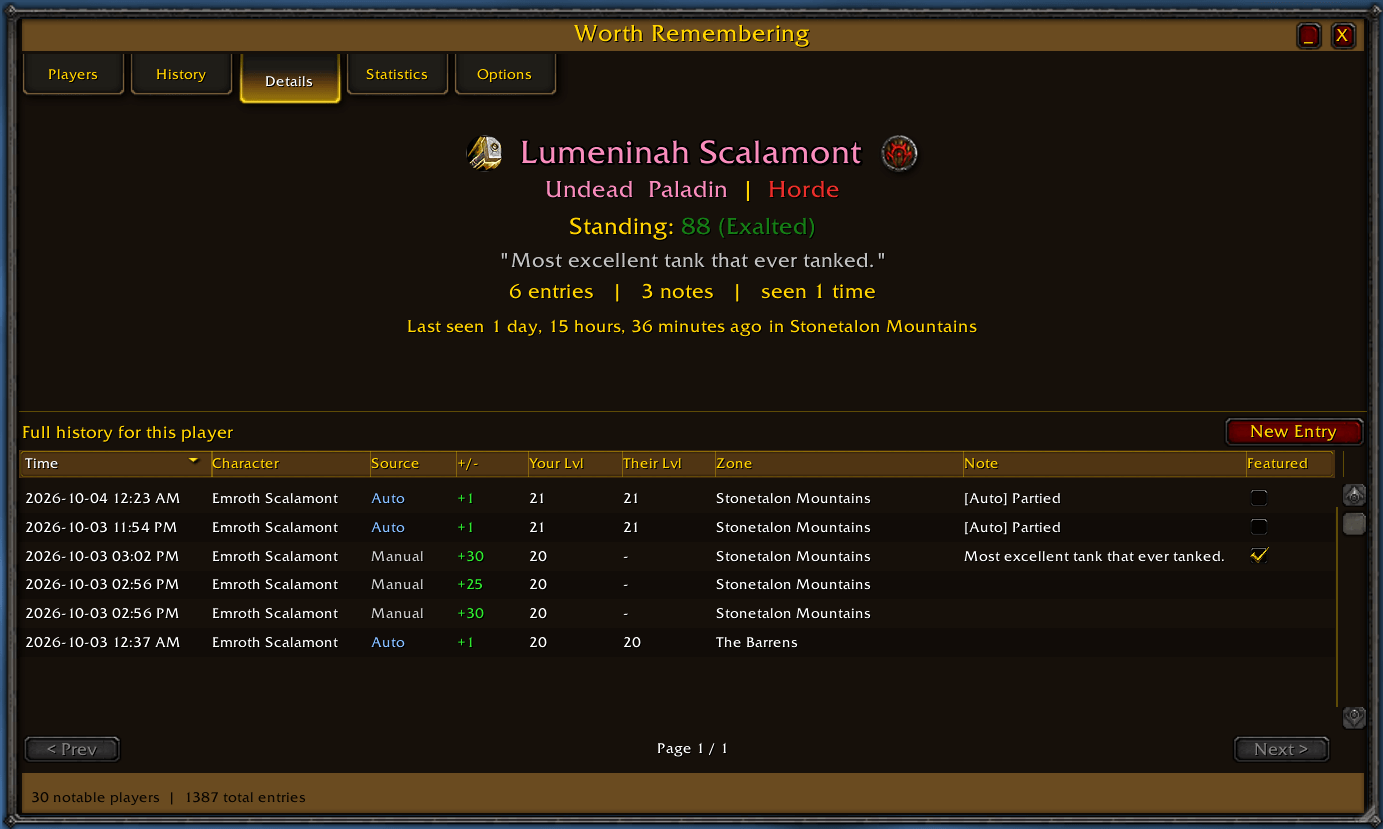
The Details tab
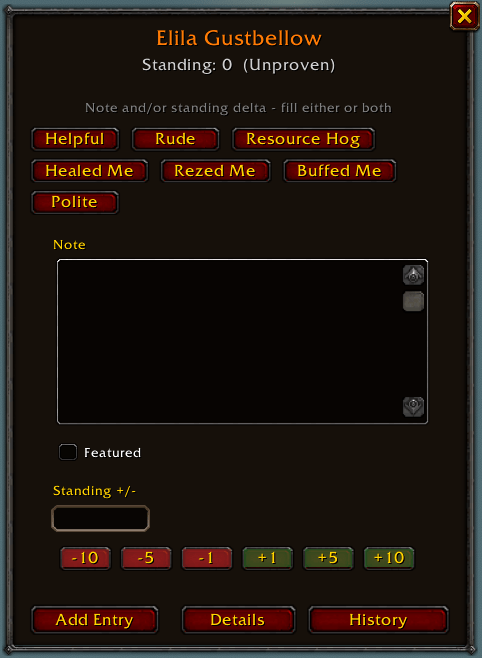
The Quick-Add window
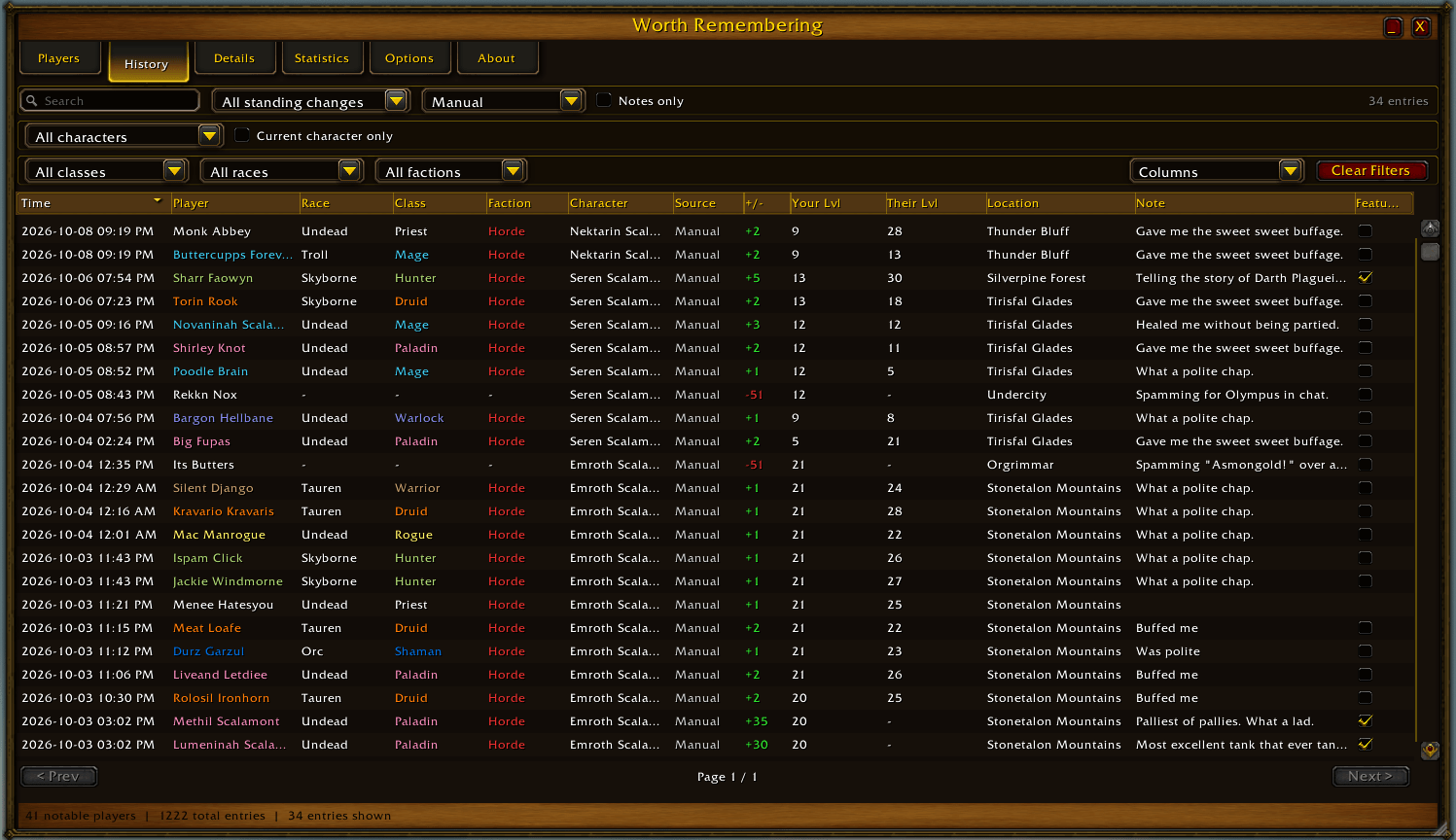
The History tab
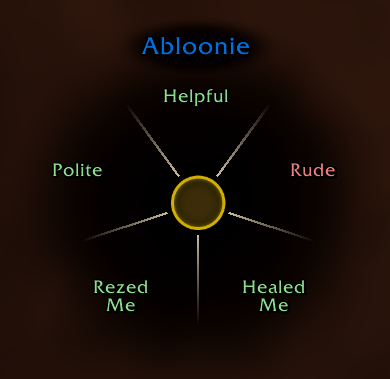
The Radial menu
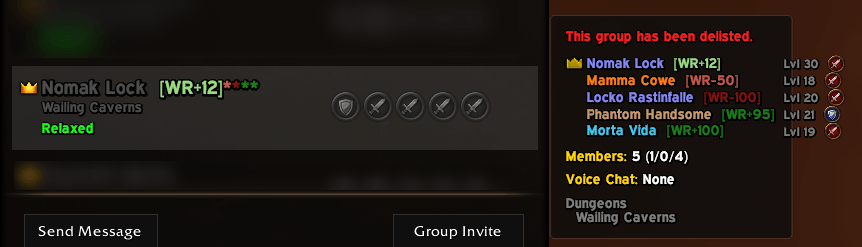
Showing the LFG window additions
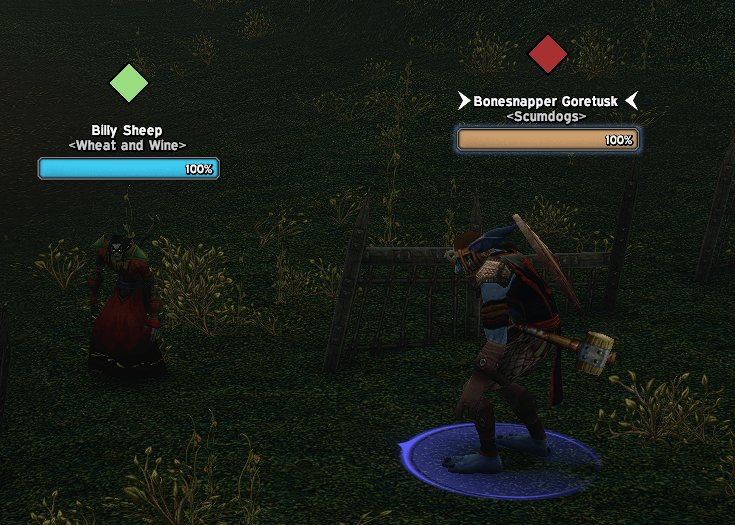
Showing the nameplate icons
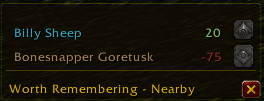
The nearby window (growing up in this picture)
Description
Worth Remembering
Never forget the people you meet in Azeroth.
Worth Remembering is a personal notes and reputation tracker for WoW: Forever.
People, and the memories you make with them, are why MMOs are special: the companion who quested with you for three hours; the person who saved your group in that elite area; the stranger you had a nice conversation with at a campfire. The interactions with others are the memories you keep. The problem, for me, is that I have the memory of a gerbil. So I made Worth Remembering.
Now, when you meet someone worth remembering, save a quick note. Days, months, or years later, when you cross paths again, the addon reminds you who they are, what they did, what character you were on, what levels you both were, and where in the world you were at the time.
"Hey, I remember you! Last February, we fought through that cave we were totally under-leveled for in The Barrens! You don't recognize my name? Oh, I was on my other character, we were level 12 and 15 at the time!"
Built for WoW: Forever, with the intention of being as unintrusive and easy to use as possible, while also offering lots of customization options. Uses only Blizzard's assets, so it stays lightweight and should fit right in with the "classic" feel of Forever.
I'm very open to suggestions, bug reports, and feature requests. If something feels clunky or you want something it doesn't do yet, let me know and I'll absolutely consider it.
Features
Use
- Access from the minimap icon, the configurable global hotkey (I use
Rfor "Remember"), or with the/wrcommand. - The main window is resizeable with the bottom-right anchor.
- Tap the hotkey to Quick-Add your target, or whoever you're hovering if nobody's targeted (both independently toggleable). With neither, it opens the main window, or does nothing at all if you'd rather it stayed quiet.
- Hold the hotkey instead of tapping it for a radial quick-add menu at your cursor. See below.
- You can set up macros for quickly adding your configured presets to a targeted player without ever opening any window, eg:
/wrquick good healer.
Notes and standing
- Timestamped notes on any player, with an optional standing delta (-100 to +100).
- A single entry can carry a note, a standing change, or both at once.
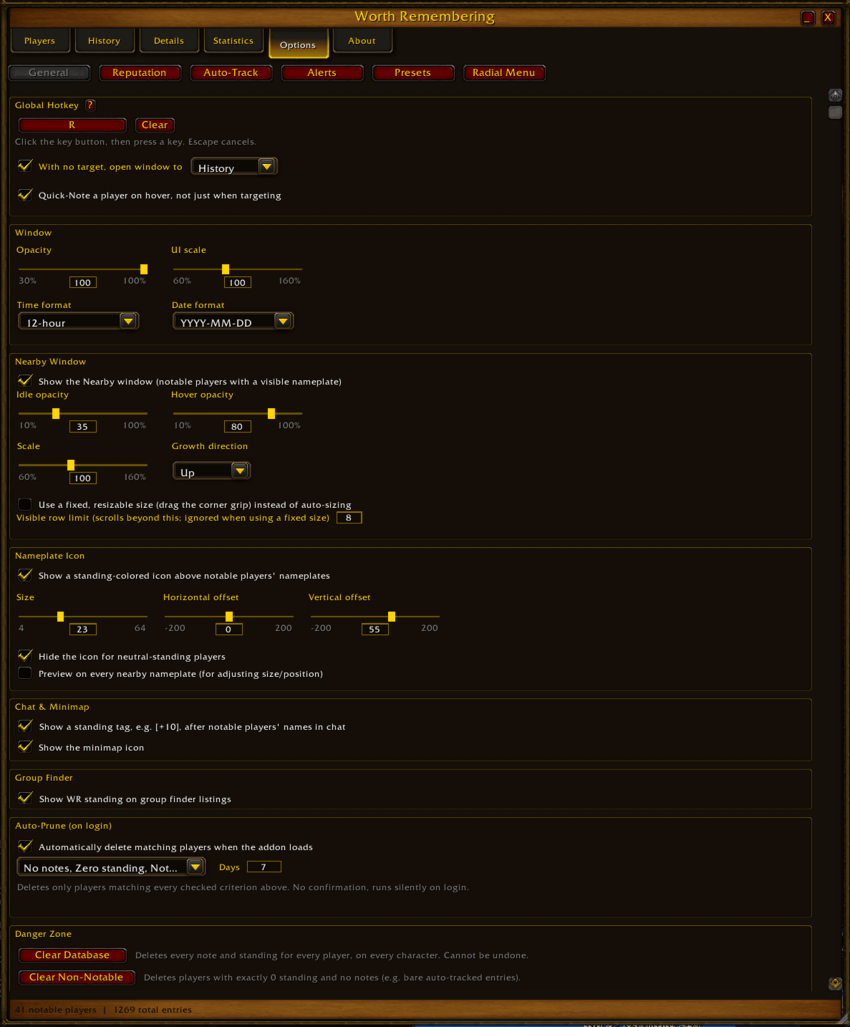
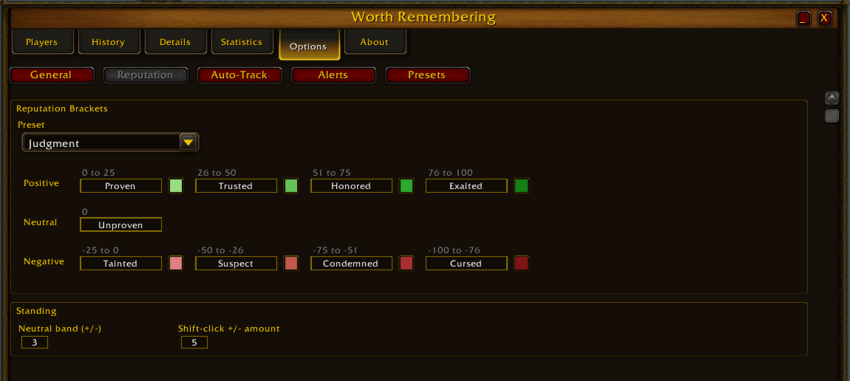
- Standing settles into color-coded reputation brackets (customizable labels and colors, 4 presets included plus a fully custom one).
- Shared account-wide database, filterable to any number of your characters.
Players tab
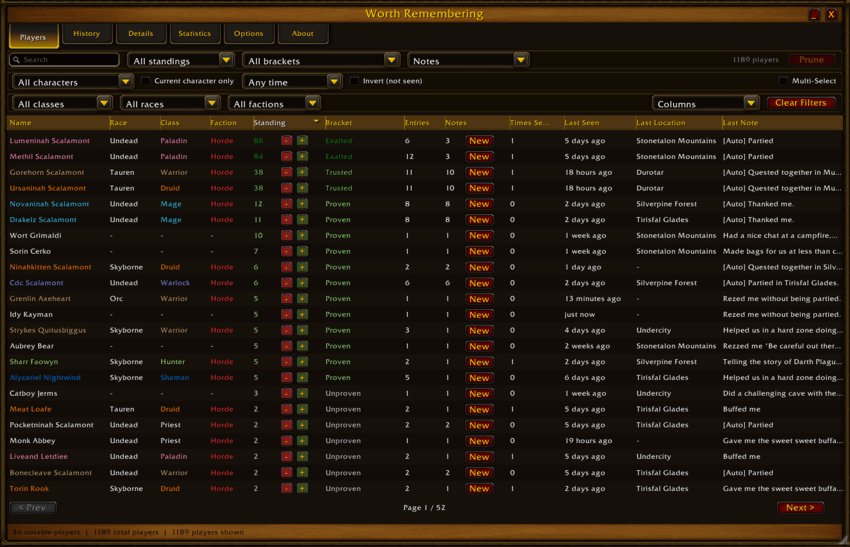
- Full roster of everyone you've noted or (optionally) crossed paths with.
- Sortable, resizable columns: name, class, race, faction, standing, bracket, entry count, note count, times seen, last seen, last location, last note.
- Show/hide any column from the "Columns" dropdown; widths and visibility are remembered.
- Most columns are clickable: click a value (a class, a race, a bracket, etc) to filter the whole list to just that. Click it again to un-filter.
- Inline +/- buttons to nudge standing without opening a popup (shift-click for a bigger jump).
- Filter bar with search (comma-separated terms act as "or"), standing sign, and many multi-select dropdowns filters.
- The "Prune" button in the top-right will delete all records for all players currently found by your active filters.
- Optional Multi-Select mode adds a checkbox column for checking several rows at once, with a bulk "Delete Selected" option on right-click.
History tab
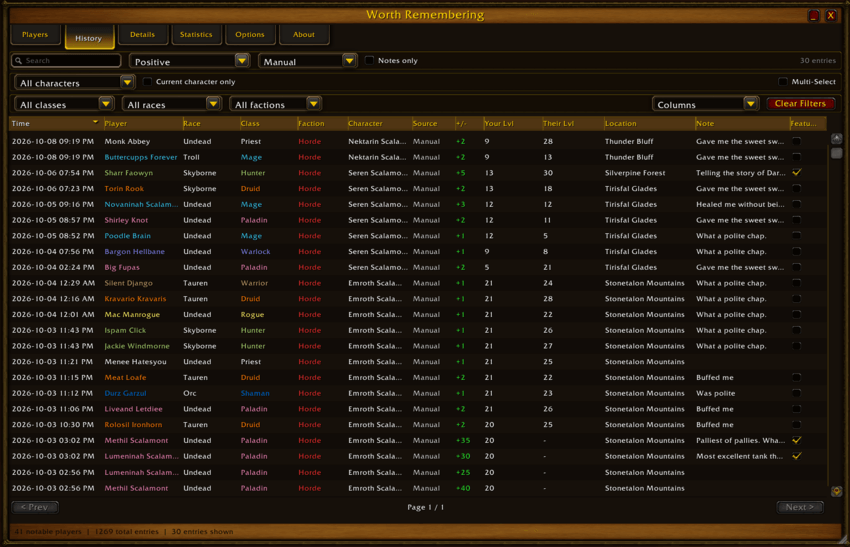
- Every entry ever logged, across every player, in one sortable table.
- Same click-to-filter columns as the Players tab, plus zone and source (manual vs automatic).
- Filter by which of your characters logged the entry.
- Right click any entry to edit or delete it. The same Multi-Select mode as the Players tab lets you delete several at once.
Details tab
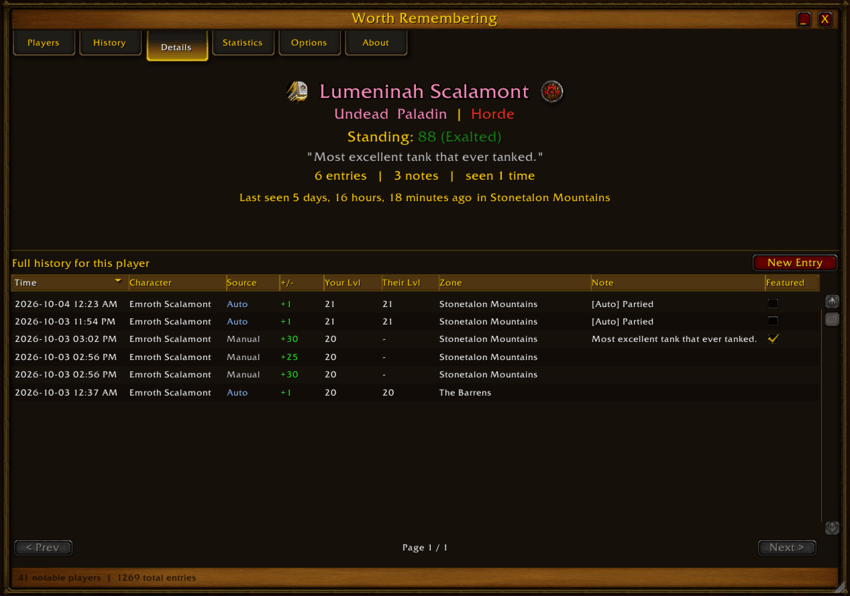
- Full history for one player, with class/race/faction, current standing, entry/note counts, time seen, and last seen date and location.
- Right-click any entry to edit or delete it.
- "Featured" notes will be randomly selected for the quote at the top.
Statistics tab
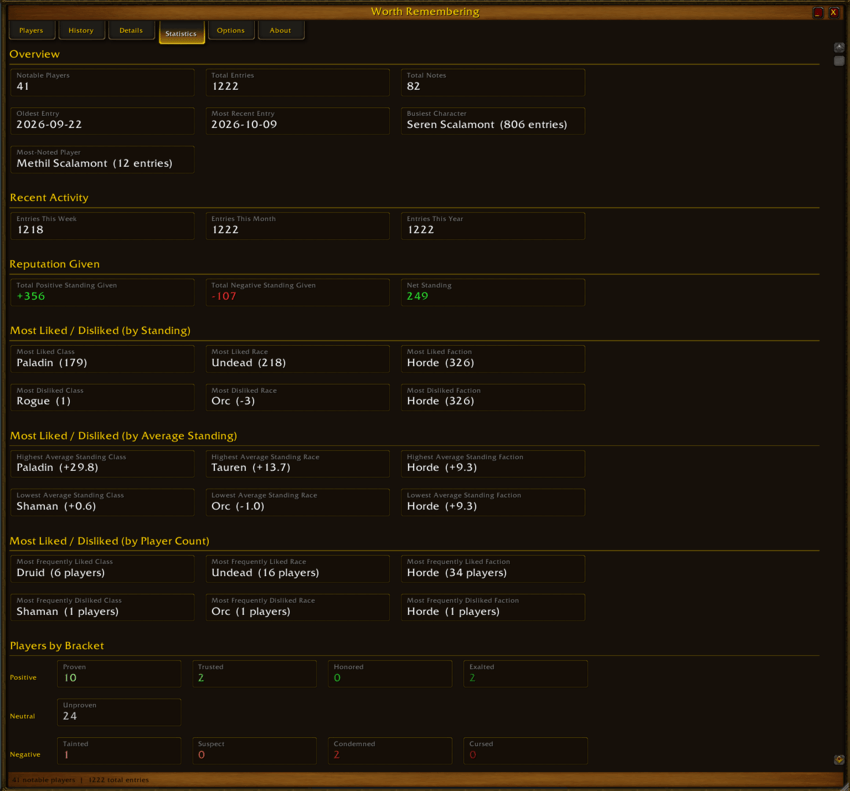
- Totals, activity over the last week/month/year, busiest character, most-noted player.
- Most and least liked class/race/faction, by total standing, average standing, and player count.
- A full breakdown of how many players fall into each reputation bracket.
- Click almost any stat to jump straight to the Players tab, pre-filtered to match.
Nearby window
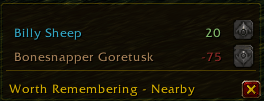
- A small floating window listing notable players currently on your screen (within nameplate range; a Blizzard limitation).
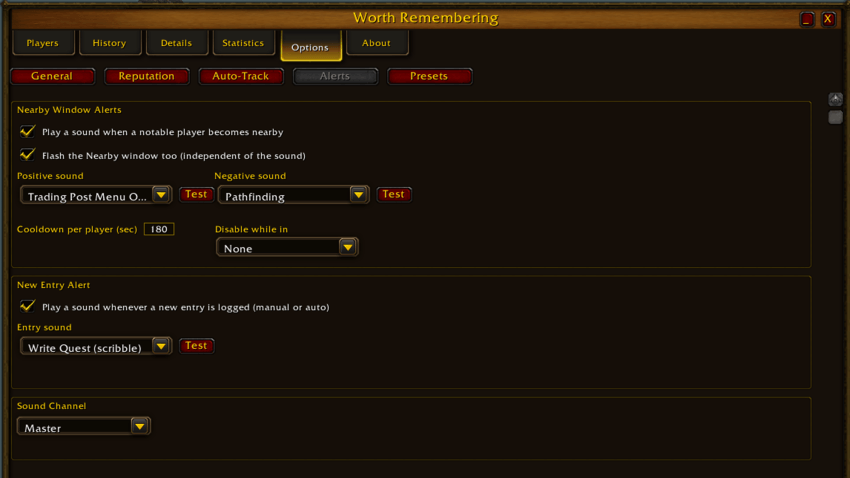
- Optional sound and/or window flash when someone notable comes into range, with a per-player cooldown and the option to suppress alerts while in dungeons/raids/battlegrounds.
- Auto-sizing or fixed/resizable, grows up or down, idle/hover transparency, fully draggable.
- Right-click a row for quick actions, including deleting the player's record.
Nameplate icons
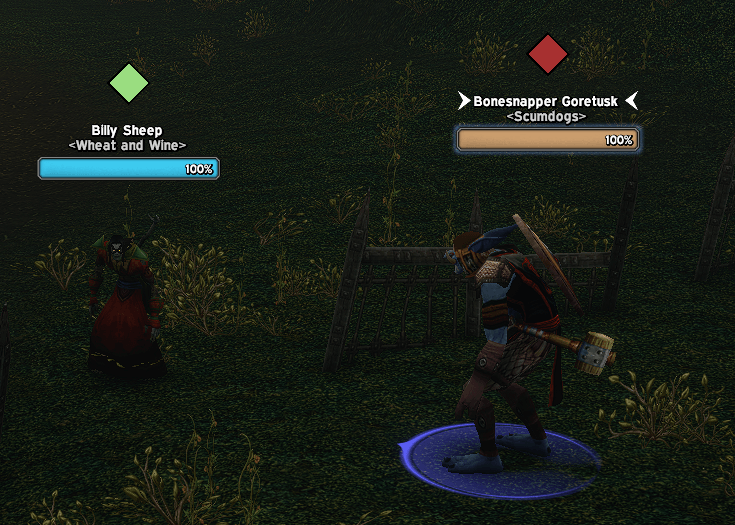
- A small colored marker above the nameplate of anyone notable, colored by their current bracket.
- Adjustable size and position, with a live preview mode so you can dial it in without waiting for the right player to walk by.
Chat and tooltips
- Notable players get a colored standing tag right after their name in chat, like [+10].
- Hovering a notable player's unit tooltip shows a line like "WR Rep: +17" along with their entry count.
- Right-click a name in chat (or anywhere else you'd normally right-click a player) for a "Worth Remembering" menu with Add Note and Delete Player options.
Quick add
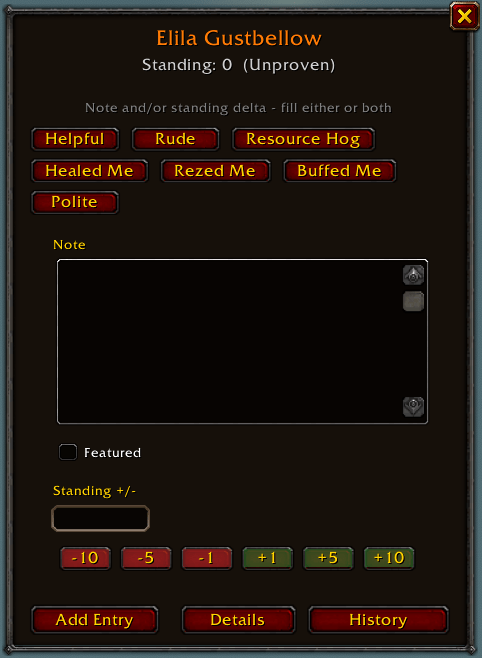
- A lightweight popup for jotting a note or standing change without opening the full window.
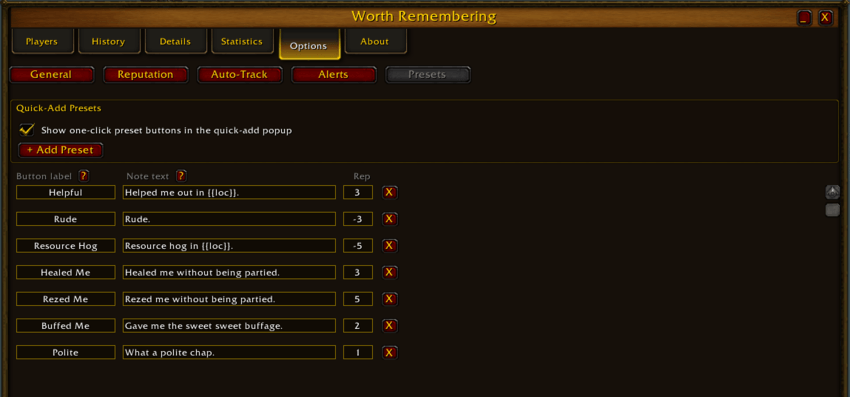
- One-click presets (Good Healer, Rude, Healed Me, etc), fully editable in Options.
- Quick delta buttons (+1/+5/+10 and negatives) for fast standing adjustments.
- "Featured" notes will be randomly selected for the quote at the top of the Details tab.
- A dedicated
/wrnotecommand and keybind (configurable right in Options) to note your current target and get right back to playing.
Radial quick-add menu
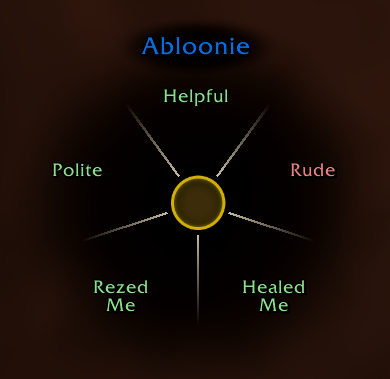
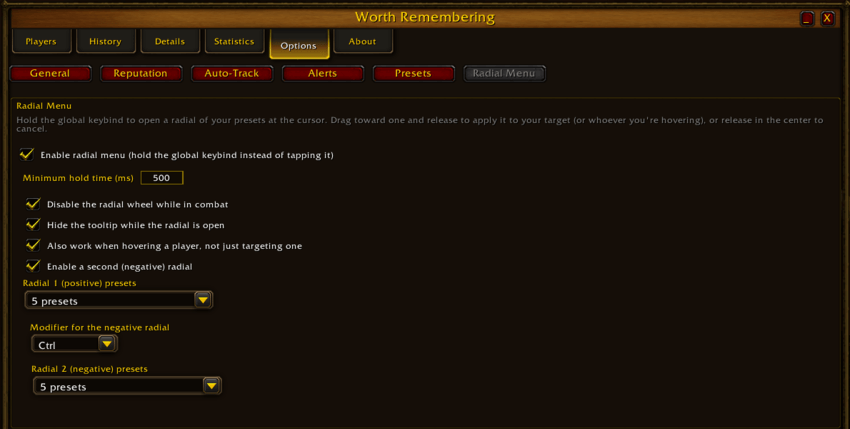
- Hold the global hotkey (instead of tapping it) to open a radial of your presets right at your cursor. Drag toward one and release to apply it, or release without moving to cancel.
- Built from Blizzard's own radial-wheel art.
- Works on your target or (optionally) whoever you're hovering, same as a tap.
- Optional second "negative" radial on a modifier key of your choice, so good and bad presets can live on separate wheels, or just use one wheel with everything color-coded.
- Configurable minimum hold time (so a quick or imprecise press doesn't get misread as a drag), tooltip auto-hide while it's open, and an option to disable the whole thing during combat.
Group Finder integration
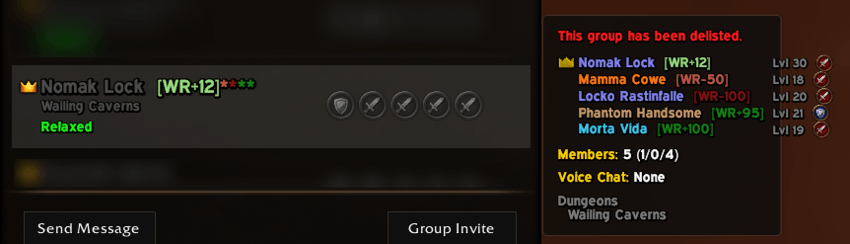
- The group finder's Browse tab shows everyone's WR standing right in the list: a colored tag next to the leader's name, plus a mark for every other notable party member.
- Hovering a listing shows the same tag for every individual member in the preview, not just the leader.
- Tap your hotkey while hovering a listing to instantly pull up the Players tab, filtered to that whole group's roster.
Other
- A draggable minimap icon for quick access: left-click to open the window, right-click for a small menu, or hide it entirely from Options.
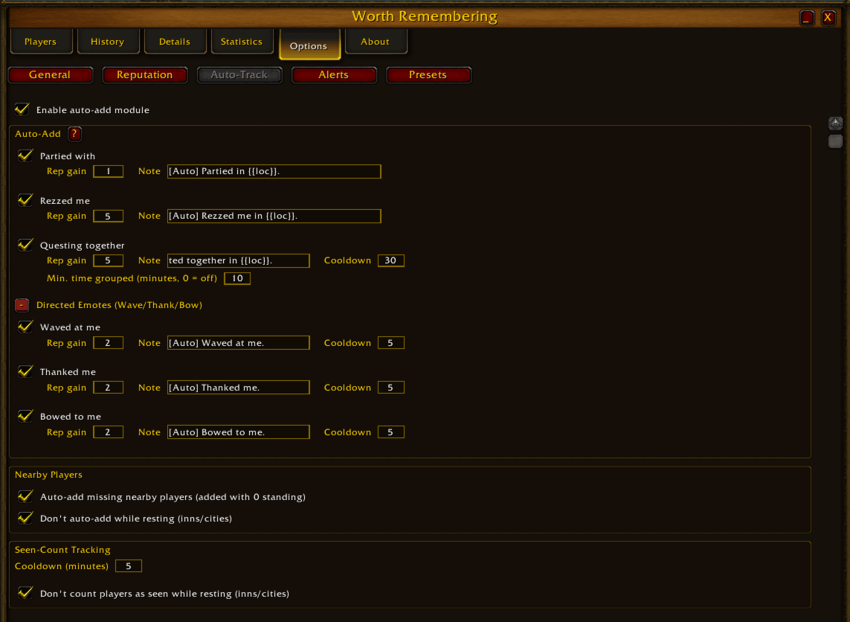
/wropens the main window, withnote/rep/show/listsubcommands for keyboard-driven use./wrquick <preset label>(eg/wrquick good healerwill instantly apply that preset to your target - good for window-free adding via macros.- Optional automatic logging (Options > Auto-Track), each with its own toggle, rep gain, note text, and cooldown: partying up, being rezzed, someone waving/thanking/bowing directly at you, and questing together in a group.
- Optional "track everyone nearby," which quietly records anyone whose nameplate you see, even before you've written a note about them.
- A "Clear Database" option in Options for starting fresh, with a confirmation since it can't be undone.
- A "Clear Non-Notable" option in Options for clearing all players with zero reputation and no notes.
- Auto-Prune: automatically deletes matching players on login (no notes, zero standing, neutral-band standing, not seen in X days, any combination), off by default and fully configurable.
- Adjustable window opacity and UI scale.
Lots of settings
General
Reputation
Auto-Track
Alerts
Radial Menu
Presets
A note on design
A lot of care went into making this feel quick to use rather than another window you have to fight with. Click-to-filter everywhere, defaults that make sense (to me, at least), popups that get out of your way when you just want to jot something down and keep playing. At the same time, I tried to offer a lot of customization options because I, for one, really like tweaking things until they're just right.
AI assistance was used in writing this addon, but I hope that isn't the headline given how many low-effort AI addons are floating around right now. This one had a lot of iteration, testing, and actual design thought behind it, and I'm not done with it.
I'm very open to suggestions, bug reports, and feature requests. If something feels clunky or you want something it doesn't do yet, let me know and I'll absolutely consider it.
Worth Remembering Team