Screenshot 2026-10-06 133618.png
Screenshot 2026-10-06 133631.png
Description
How value is calculated
- Value = vendor sell price x stack size.
- Quest items (quest class, quest-bound, or quest-starting items) are never flagged.
- Items with no vendor value (Hearthstone, keystones, most toys, etc.) are skipped by default. Turn them on with
/wl novalueif you want them ranked as the cheapest items in the bag. - The reagent bag is scanned by default. Turn it off with
/wl reagent.
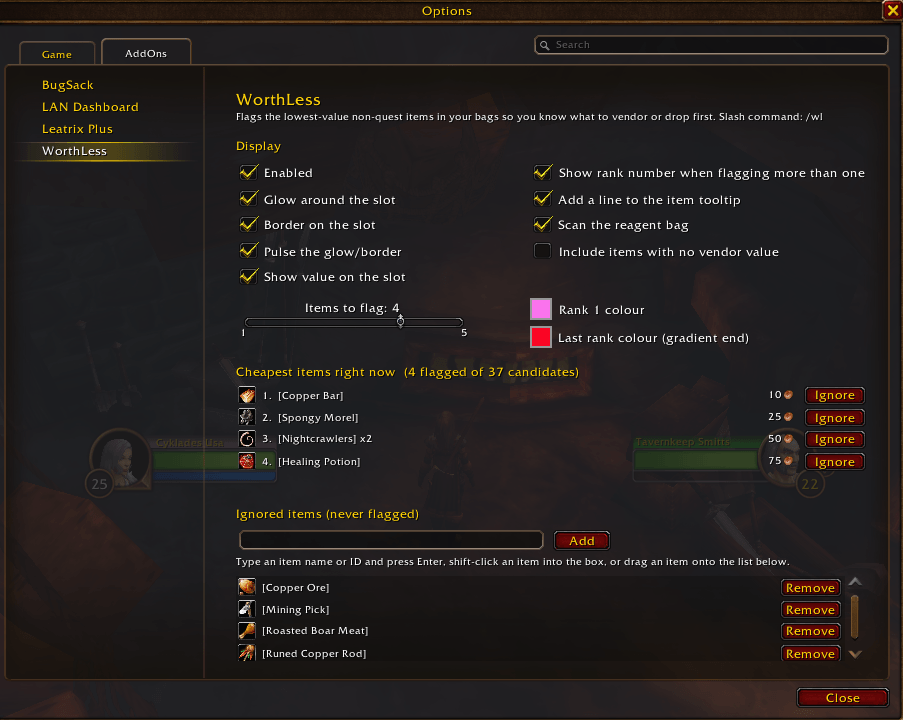
Options panel
Open it with /wl config, or from the game menu under Options → AddOns → Worth Less. It has:
- Checkboxes for every display setting and for which bags are scanned.
- A slider for how many of the cheapest items to flag (1 to 5).
- Colour swatches for the rank 1 colour and the gradient end colour.
- A live list of the items currently flagged, with their values and an Ignore button on each row.
- The ignore list. Items on it are never flagged (a mining pick, a fishing pole, a favourite trinket). Add to it by typing a name or ID, shift-clicking an item into the box, or dragging an item onto the list. Each row has a Remove button.
Slash commands
/worthless or /wl
| Command | Effect |
|---|---|
/wl |
Show help and current settings |
/wl toggle |
Enable / disable the addon |
/wl count N |
Flag the N cheapest items (1-5, default 1) |
/wl novalue |
Include items that cannot be sold to a vendor |
/wl reagent |
Toggle scanning the reagent bag |
/wl price |
Toggle the value text drawn on the slot |
/wl rank |
Toggle the rank number drawn on the slot (count > 1) |
/wl glow |
Toggle the soft glow around the slot |
/wl border |
Toggle the crisp 2px border on the slot |
/wl pulse |
Toggle the pulsing of the glow and border |
/wl tooltip |
Toggle the extra line on the item tooltip |
/wl color <c> |
Set the rank 1 colour: a name, hex (9f40ff) or r g b |
/wl color high <c> |
Set the colour of the last rank when count > 1 |
/wl colors |
Show current colours and the list of colour names |
/wl ignore <item> |
Never flag this item (link, ID or exact name; blank = current #1) |
/wl unignore <item> |
Remove an item from the ignore list |
/wl ignored |
List the ignored items |
/wl config |
Open the options panel |
/wl list [N] |
Print the N cheapest items to chat (default 10) |
/wl test |
Force the indicator onto the first visible slot (toggle) |
/wl debug |
Report which bag frames and slots were found (open bags) |
/wl reset |
Restore default settings |
Colour names: purple, violet, pink, magenta, red, orange, yellow, green, cyan, blue, white, gold. Hex is rrggbb; r g b accepts 0-1 or 0-255.
Settings are saved per account in WorthLessDB.
Troubleshooting
If /wl list ranks items but nothing is drawn on the bag:
/wl testforces the indicator onto the first visible slot. If that shows, drawing works and the problem is matching bag/slot to a button./wl debugwith the bags open prints which frames and buttons were found and whether Blizzard's own bag/slot lookup returned a button.- Any error inside the refresh is printed to chat once as
Worth Less: error: ..., even with "Display Lua Errors" turned off.
Supported bag frames
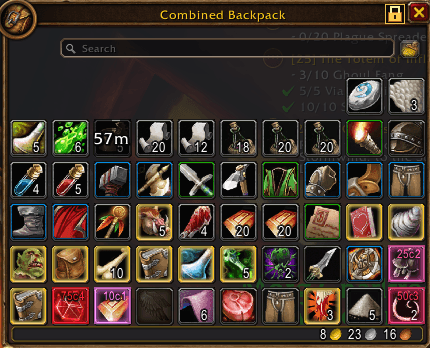
The default Blizzard bag frames, both the separate-bags view and the combined-bags view. Bag replacement addons (Bagnon, ElvUI, Baganator, …) use their own item buttons and are not yet supported.
Worth Less Team