World of Wokecraft
- By
Interface which changes minimap, castbar, buttonbar, chatbackground etc!
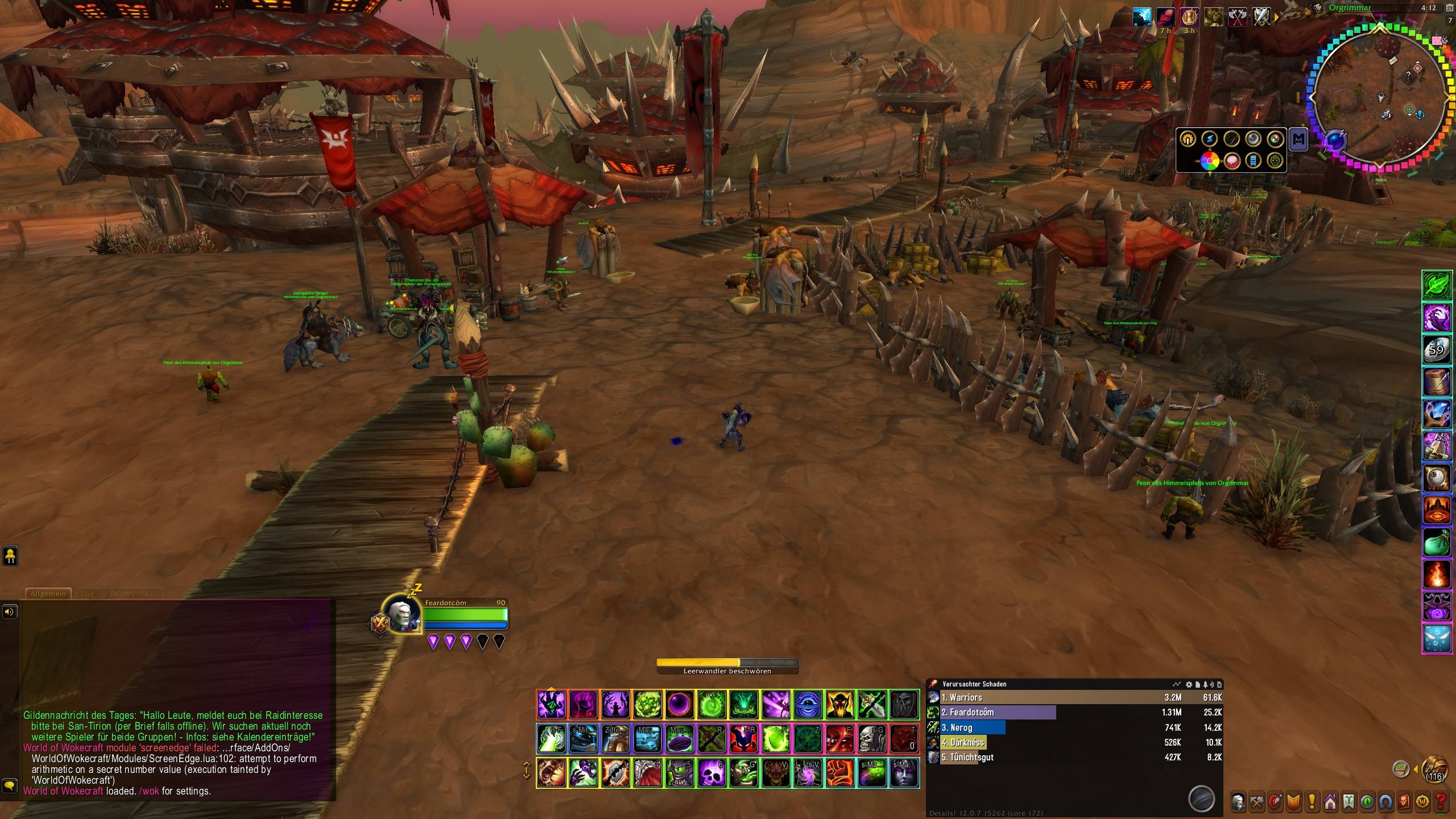
WoWScrnShot_072926_161213.jpg
Description
World of Wokecraft
Your interface, but pink. Aggressively pink.
A rainbow overlay layer for the World of Warcraft interface. Action bars pulse in travelling colour waves, health bars fill with scrolling gradients, the screen edges flare when you crit, confetti rains on level ups, and a Nyan Cat orbits your minimap while another one chases your mouse.
It is exactly as sensible as it sounds, and it has an off switch.
It does not replace your UI
This is not a UI overhaul. Nothing is moved, nothing is rebuilt, and none of Blizzard's textures are recoloured. Every effect is drawn as a separate overlay on top of whatever you already run.
Three things follow from that:
- It works with ElvUI and other skins instead of fighting them. If ElvUI is loaded, the addon detects it and attaches to ElvUI's frames automatically.
- Turning a module off restores nothing, because nothing was ever changed. No leftovers, no "reset to default" button, no broken frames if you uninstall.
- Your layout stays yours. Move things wherever you like; the colours follow.
Photosensitivity
Read this before installing if flashing imagery is a problem for you.
This addon can flash and pulse across the entire screen. It is off by default in the Subtle preset, but on in the others.
Turn on Reduced motion in the settings, or type /wok motion. It freezes the
colours in place, disables every flash, pulse and confetti burst, and stops the
combat log from being scanned at all. Everything stays colourful; nothing moves.
/wok off kills every effect instantly.
Modules
Each one can be switched on or off independently.
| Module | What it does |
|---|---|
| Action bars | A neon frame around every button. Each button's colour is offset slightly from its neighbour, so the rainbow travels along the bar as a wave rather than blinking all at once. |
| Unit frames | Health and cast bars filled with a scrolling gradient that shrinks and grows with the actual value. |
| Nameplates | A glow around enemy health bars. Your current target burns pink and breathes. |
| Screen edges | A vignette around the screen that idles at a low shimmer, swells to pink below 35% health, and flashes on your crits, level ups and achievements. |
| Confetti | Falling confetti on level ups, achievements, and epic or legendary loot. |
| Minimap | Four layers: a rainbow ring, a glowing halo, pulsing spokes radiating outwards, and a Nyan Cat in orbit trailing a rainbow. |
| Minimap button | A spinning rainbow orb on the minimap rim. Drag it anywhere around the edge. |
| Nyan cursor | Nyan Cat rides alongside your pointer with a rainbow trail behind it. |
| Chat backdrop | A rainbow wash behind your chat windows with unicorns tucked into the corners. Alpha is capped so the text stays readable. |
| Chat colours | Your own chat lines rendered as a gradient. |
Presets
Three starting points, each one a single click in the settings panel.
- Subtle — slow, desaturated, low intensity, reduced motion already on. For people who want a hint of colour and nothing else.
- Pride — the default. Everything visible, nothing overwhelming.
- Retina — every module on, maximum speed, maximum intensity, 60 fps. Named honestly.
Every preset is just a starting point. Speed, intensity, saturation and colour spread are all sliders, and each module has its own toggle.
Commands
| Command | Effect |
|---|---|
/wok |
Open the settings panel |
/wok on / /wok off |
Master switch |
/wok preset subtle\|pride\|retina |
Apply a preset |
/wok speed <0-1> |
Hue rotations per second |
/wok intensity <0-1> |
Global effect alpha |
/wok motion |
Toggle reduced motion |
/wok <module> |
Toggle a single module by name |
/wok test |
Fire every event trigger and report what happened |
/wok debug |
Report which frames each module attached to |
Performance
One ticker drives every effect in the addon. Elements register themselves with a hue offset instead of each running its own timer, so lighting up 150 elements costs a single pass per tick, not 150 timers.
- Tick rate is 20–60 fps depending on preset, and can be lowered further.
- The confetti runs on the client's animation system, not in Lua.
- Combat log scanning only happens when the screen edge module is on, is filtered to your own damage, and is disabled entirely by reduced motion.
- If an effect ever errors, it is dropped and reported once, rather than throwing an error every frame.
/wok debug shows exactly what is attached if you want to see the cost.
Things it deliberately does not do
It cannot replace your mouse cursor. WoW exposes no API for the cursor; it belongs to the client, not to the interface. Every "cursor mod" on this site works the same way this one does: by drawing something that follows the pointer. The cat runs next to your cursor, it does not become it.
Chat colouring is display-only and local. The filter runs when a message is printed to your chat frame, long after it has left your client. Nothing you send is modified, and nobody else sees any of it. Lines containing item links or existing colour codes are left alone so links never break.
It does not touch anything protected. No frames are moved, no attributes are set, nothing is done in combat that could taint the interface.
Compatibility
- Retail only, interface 120007.
- ElvUI — detected automatically, attaches to ElvUI's frames.
- Other skins and unit frame addons generally work, since the addon only adds
overlays. If a module finds nothing to attach to, it reports that in
/wok debuginstead of erroring.
Known limitations
This is an early release and honest about it:
- The Blizzard default UI path has had far less testing than the ElvUI path.
- Raid-scale performance has not been measured under load.
- Nameplate health bar detection tries several known layouts and falls back
gracefully;
/wok debugreports which one it found.
Bug reports are genuinely useful. Please include the output of /wok debug and
/wok test, and say whether you run ElvUI.
Feedback
Issues and suggestions are welcome. If something looks wrong, /wok debug is
almost always the fastest way to tell me why.
Licensed MIT.
The World of Wokecraft Team