Screenshot 2026-08-20 232517.png
Description
Warbander
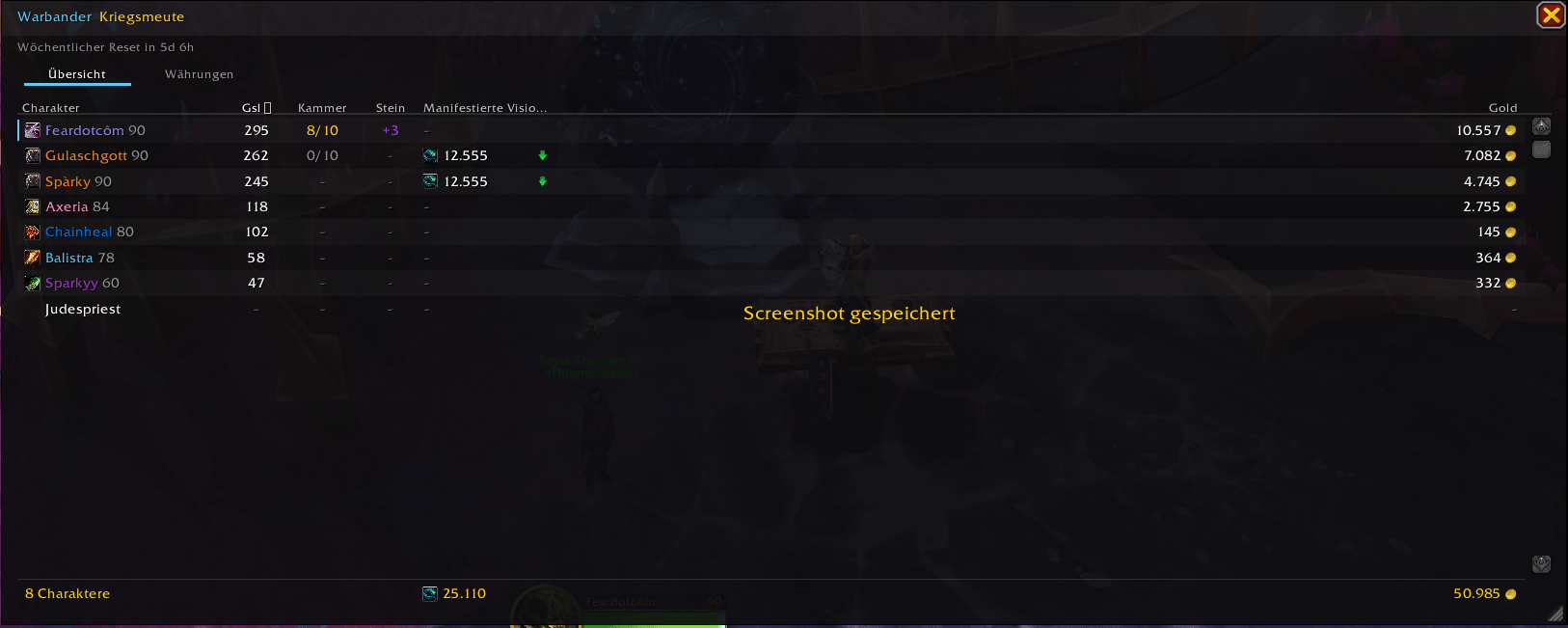
Your entire Warband on one screen.
Warbander answers the question you ask yourself every time you log in: which of my characters still has something worth doing this week, and where did I leave all my crests?
One flat, dark panel that matches the modern game UI. No setup, no configuration screen to wade through, and nothing to keep up to date when the season rolls over.
What you see
| Column | |
|---|---|
| Character | Name in class colour, with level |
| ilvl | Equipped item level |
| Vault | Great Vault reward slots unlocked this week |
| Currency | The season's main currency — the header is named after it |
| Gold | Per character |
Hover any row for the full picture: the Great Vault broken down by Raid, Dungeon
and World; professions with skill level; every currency that character is
holding; weekly-capped currencies with their progress for the week — delve
coffer keys show up here automatically as 2/4 this week; and when you last
played them.
Drag the window to move it, drag the corner to resize it. Both are remembered.
Escape closes it.
One-click Warband currency transfer
Blizzard's Warband transfer works, but it means opening the currency tab, finding the currency, picking a character and confirming. Warbander puts an arrow directly next to any alt holding a transferable currency. Click, confirm, done.
The confirmation tells you exactly how much arrives and exactly what it costs the source character — most currencies lose a percentage in transit, and that number is easy to forget.
Honest about what it can and cannot know
This matters more than a feature list, so here it is up front.
Read automatically for characters you have never logged into: account-transferable currencies, via the same API that powers Blizzard's own transfer window. Those alts appear in the table on their own.
Requires one login per character: gold, item level, professions and Great Vault progress. The game exposes no way to read these for a character you are not standing in — not to Warbander, and not to any other addon. Log in once and the row is filled in permanently.
Anything not yet known shows a grey –, never a misleading 0. You always know
the difference between "this character has none" and "I have not seen this
character yet."
Nothing to maintain
Most alt trackers carry a list of currency and quest IDs that Blizzard changes every season, and quietly show you wrong numbers until someone updates the addon. Warbander has no content IDs at all.
- Currencies come from walking the client's own currency list — the same one the in-game Currency tab renders, collapsed headers included.
- Weekly progress comes from the Great Vault API, not from hidden quest IDs.
- Alt data comes from the Warband currency API.
A new patch cannot make it show stale information, because there is nothing stale to show.
Commands
| Command | |
|---|---|
/wb |
Show or hide the dashboard |
/wb import |
Pull alt data from the Warband currency API |
/wb currencies |
List every discovered currency with its ID |
/wb currency <id> |
Choose which currency the table shows (auto to undo) |
/wb minimap |
Toggle the minimap button |
/wb reset |
Reset the window position and size |
/wb purge <name> |
Remove a character from the database |
Also reachable from the minimap button and the addon compartment. If LibDataBroker and LibDBIcon are present on your account, Warbander registers with them, so it shows up in Titan Panel, ElvUI, ChocolateBar and friends. It ships no libraries and depends on none.
Light by design
Fully event driven. There is not a single OnUpdate handler in the addon, and
the table is only rebuilt while the panel is actually open — a closed dashboard
costs nothing at all. Data is stored locally per account in SavedVariables and
never leaves your machine.
Languages
English and German, with every string in one file. Translations are welcome —
Locales.lua is a plain key/value table and a new locale is a copy-paste of the
German block.
Feedback
Bug reports and feature requests are very welcome. If something shows a – that
you think it should know, tell me which column and which character — that is
usually the most useful report I can get.
The Warbander Team