Does it die - Classic
- By
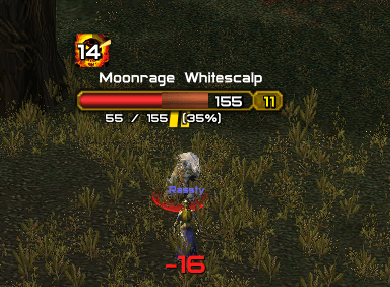
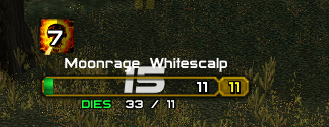
See at a glance whether your DoTs will finish the enemy. Shows the damage your DoTs have left as a coloured block on enemy nameplate health bars.
WID1.png
WID2.png
Description
# Does It Die?
**Stop guessing whether your DoTs will finish the job.** Does It Die? shows, right on the enemy nameplate, how much of that enemy's remaining health your damage-over-time effects will take before they run out.
For WoW Classic Era.
## What you see
- **A coloured block on the health bar.** It sits on the right-hand end of the enemy's current health, and its width is the share of the bar your DoTs will remove.
- **Colour tells you how close it is.** Purple, then orange, then yellow, then green. When the block turns green and fills the bar, the DoTs will kill it. You can stop casting.
- **A small text readout under the bar**, for example `340 / ~410 (83%)`, or `DIES` when the DoTs will finish it.
## How it works
- Tracks every damaging debuff you apply: Corruption, Shadow Word: Pain, Rend, Serpent Sting, Rake, Moonfire, Immolate, Flame Shock, Garrote, Rupture and so on. It reads the damage from the spell's own tooltip, so every rank is supported and your spell power is included.
- Counts the ticks still to come, so the number drops as ticks land.
- Classic Era only gives you an enemy's health as a percentage, so the addon learns each mob's real health by watching combat. The first time you fight a mob type it may show "HP unknown" for a few seconds. After that it remembers it, and it gets more accurate every pull.
## Works with your nameplate addon
It works with the default Blizzard nameplates and tries to work with other nameplate addons such as Plater and ElvUI. It finds the health bar on its own, and if it can't, it draws its own small health bar under the nameplate. Enemy nameplates must be turned on (V key).
## Commands
`/did` shows the full list.
- `/did text` toggles the text under the bar
- `/did segment` toggles the coloured block
- `/did color` also recolours the whole bar
- `/did plate` shows which health bar was found on your target's nameplate
- `/did mini` always uses the built-in small bar
- `/did mult 1.1` scales the DoT damage, for example to allow for Curse of the Elements
- `/did target` shows what DoTs are tracked on your target
- `/did reset` forgets learned enemy health
## Good to know
- English client only, because DoT damage is read from the English tooltip text.
- Debuffs on the enemy that increase damage taken (like Curse of the Elements) aren't counted unless you use `/did mult`.
- Curse of Agony's damage ramps up over time, but the addon spreads it evenly, so it slightly underestimates early on.
Found a bug or have an addon it doesn't play nicely with? Leave a comment with the addon's name and what `/did plate` prints.
Does it die - Classic Team