Wick's Travel Form

One druid keybind. Picks Aquatic, Flight, Travel, or Cat based on where you are right now.
thumb-2x.png

thumb-2x.png

Description

Wick's Travel Form

One druid keybind. Picks Aquatic, Flight, Travel, or Cat based on where you are right now.

Bind one key in the Key Bindings menu and forget about it. Pressing it works out the right form for your current state and shifts you in:

  • Swimming → Aquatic Form
  • Outdoors in an Outland flyable zone, out of combat → Flight Form (Swift Flight Form if you've trained it)
  • Anywhere else outdoors, or in combat → Travel Form
  • Indoors → Cat Form (no speed boost; just for the aesthetic)

Why this exists

In TBC Classic Anniversary, Blizzard's IsFlyableArea() returns true for some Azeroth zones where flying actually doesn't work. A standard [flyable] macro will try to put you in Flight Form on the road in Elwynn Forest, fail silently, and leave you stuck. Wick's Travel Form ignores the broken API and uses a hard-coded list of TBC's actual flyable zones (Hellfire Peninsula, Zangarmarsh, Terokkar Forest, Nagrand, Blade's Edge Mountains, Netherstorm, Shadowmoon Valley, Isle of Quel'Danas), so the bind always picks something that works.

Features

  • Smart form selection in Lua, no fragile macro conditionals to debug
  • Picks Swift Flight Form when trained, regular Flight Form otherwise
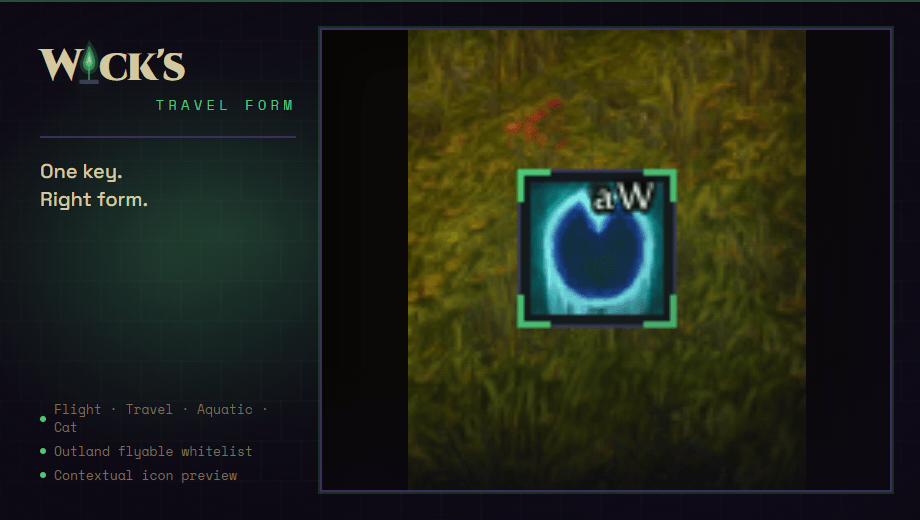
  • Contextual icon button shows which form the next press will trigger
  • Draggable, resizable (mouse wheel while unlocked, or /wstf size N)
  • Persistent position and size across reloads and characters

Usage

Bind a key under Esc → Key Bindings → Wick's Travel Form → Smart travel form. The icon appears center-bottom of the screen by default. Right-click toggles lock; drag while unlocked to move; scroll while unlocked to resize.

Slash commands

  • /wstf or /wtravel — show the help
  • /wstf unlock or lock — toggle the icon's lock for moving and resizing
  • /wstf reset — return the icon to its default position and size
  • /wstf size 64 — explicit size set, clamped 32 to 96
  • /wstf debug — print zone, predicted form, and the macro string

Compatibility

TBC Classic (Burning Crusade / Anniversary), Interface 20505. 
Wick's Travel Form Team

profile avatar
  • 2
    Followers
  • 23
    Projects
  • 7.3K
    Downloads

A suite of precision addons for TBC Classic Anniversary and WoW Forever. One locked palette. One voice.

More from WicksmodsView all

  • Wick's Bags project image

    Wick's Bags

    Categorized bag and bank panels for TBC Classic. Auto-categorize by item class, masonry layout, ItemRack integration, secure right-click for combat consumables, hides Blizzard's default bag and bank UIs.

    • 335
    • October 9, 2026
  • Wick's Comforts project image

    Wick's Comforts

    Small comforts for TBC Anniversary and WoW Forever. Square minimap in Wick chrome, richer tooltips, auto loot, auto repair and junk selling, auto quest accept and hand in, further camera zoom, and class colored health bars. All off until you turn them on.

    • 132
    • October 9, 2026
  • Wick's UI project image

    Wick's UI

    A full interface for TBC Anniversary and WoW Forever: action bars, unit and group frames, nameplates, chat, minimap, tooltips, a threat meter and the game's own windows, all in one look and every part optional. Ten looks, shared with every Wick addon.

    • 180
    • October 9, 2026
  • WickCore project image

    WickCore

    The shared floor under the Wick suite for TBC Anniversary and WoW Forever. Brand chrome, profiles and themes, one options panel, a client dialect shim, a restriction guard, a minimap launcher and version broadcast. Required by every other Wick addon.

    • 624
    • October 7, 2026
  • Wick's Bags project image

    Wick's Bags

    Categorized bag and bank panels for TBC Classic. Auto-categorize by item class, masonry layout, ItemRack integration, secure right-click for combat consumables, hides Blizzard's default bag and bank UIs.

    • 335
    • October 9, 2026
  • Wick's Comforts project image

    Wick's Comforts

    Small comforts for TBC Anniversary and WoW Forever. Square minimap in Wick chrome, richer tooltips, auto loot, auto repair and junk selling, auto quest accept and hand in, further camera zoom, and class colored health bars. All off until you turn them on.

    • 132
    • October 9, 2026
  • Wick's UI project image

    Wick's UI

    A full interface for TBC Anniversary and WoW Forever: action bars, unit and group frames, nameplates, chat, minimap, tooltips, a threat meter and the game's own windows, all in one look and every part optional. Ten looks, shared with every Wick addon.

    • 180
    • October 9, 2026
  • WickCore project image

    WickCore

    The shared floor under the Wick suite for TBC Anniversary and WoW Forever. Brand chrome, profiles and themes, one options panel, a client dialect shim, a restriction guard, a minimap launcher and version broadcast. Required by every other Wick addon.

    • 624
    • October 7, 2026