What's Training ? (Forever)
- By
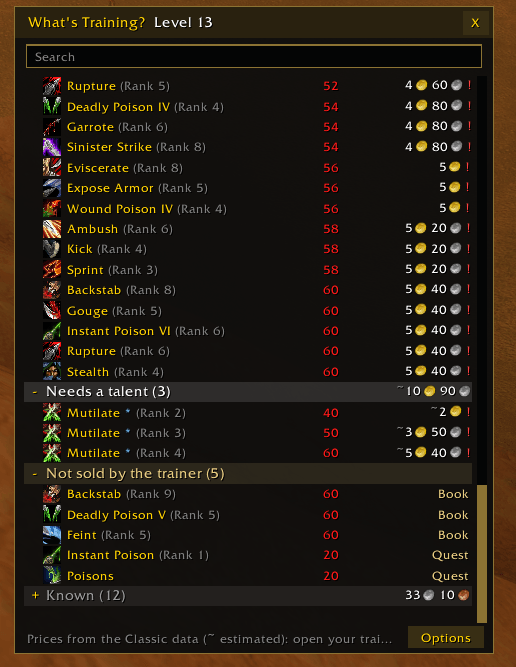
Every spell your class can learn on WoW Forever, level by level, with its trainer price, from a button on the spellbook.
wt1.png
wt2.png
Description
A button on the right edge of your spellbook opens the list of your class spells, beside the spellbook. It closes with the spellbook and comes back when you reopen it.
## Features
- Spells sorted into categories: Available now, Missing a previous rank, Next two levels, Later levels, Needs a talent, Not sold by the trainer, Ignored, Known.
- Level and price on every row, total price per category. "!" marks a spell you cannot afford yet.
- Spells new to Forever are included and marked. Their price is estimated (~) until you visit your trainer.
- Each visit to your class trainer reads his list: real prices (reputation discount included), real levels, and any spell the addon did not know.
- Faction and racial spells are filtered for your character.
- Search box. Shift-click a spell to link it in chat. Right-click to ignore it, Shift + right-click to ignore every rank.
- At each level up, a chat line lists the new spells and their cost (can be turned off).
- The spellbook button shows how many spells are available now.
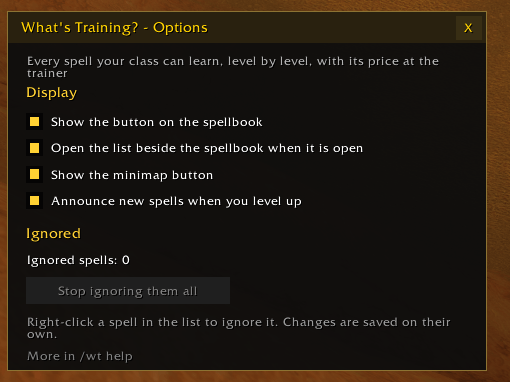
- Minimap button: left click for the list, right click for options.
- No library dependencies. English, French, German, Spanish.
## Commands
- /wt : show or hide the list
- /wt options : options
- /wt status : spells and total cost per category
- /wt unignore all : stop ignoring every spell
## Known issues
- Hunter pet skills and Warlock demon grimoires are not listed.
- On the Forever beta, the game does not reload addon settings at login, so ignored spells and the last trainer read reset each session. This is a client bug that affects every addon.
## Credits
Based on What's Training ? by Sveng (MIT). Spell data from wowforevertalents.com and Wowhead.
The What's Training ? (Forever) Team