Target Tooltip (Forever)
- By
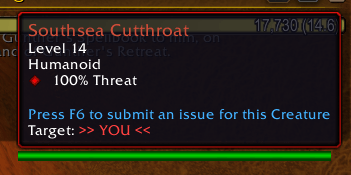
Shows who the unit under your mouse is targeting, right in its tooltip, for WoW Forever. Red when it is you.
gg1.png
Description
# Target Tooltip
Mouse over a player or a creature : its tooltip shows who it is targeting, without having to target it.
## Features
- One more line in the default unit tooltip : Target: Name. Players in their class colour, creatures in their reaction colour (red hostile, yellow neutral, green friendly).
- When the unit targets you, the line reads Target : >> YOU << in red and the tooltip border turns red. The red border can be turned off.
- The line follows the target while the mouse stays on the unit: new target, switch, target on you. If the unit drops its target, the line shows Target : none in grey.
- Works on units in the world, nameplates and unit frames.
- If the game hides from addons whether the target is you, the line shows your name and the border stays normal. The addon does not guess.
- Minimap button: left click for options, right click to turn the addon on or off, drag to move it.
- No library dependencies. English, French, German, Spanish.
## Commands
- /ttip (or /targettooltip) : options
- /ttip toggle : turn the addon on or off
- /ttip border : turn the red border on or off
- /ttip minimap : show or hide the minimap button
- /ttip status : current settings
- /ttip debug : what the game tells the addon about the unit under the mouse (or your target) and its target
## Known issues
- On the Forever beta, the game does not reload addon settings at login, so they reset each session. This is a client bug that affects every addon. Everything is on by default.
- Not yet tested in battlegrounds and boss encounters, where the game can hide unit names from addons.
## Credits
Same idea as the target line of the DragonflightUI tooltip. Written from scratch, no shared code.
The Target Tooltip (Forever) Team