What Dropped?
- By
What Dropped? is a loot tracker for WoW Forever. It records what you loot, how much gold you earn, and where it all came from. It shows drop rates right on mob tooltips, so you can see what a mob has dropped for you previously.
Description
What Dropped?
What Dropped? is a loot tracker for WoW Forever. It records what you loot, how much gold you earn, and where it all came from. It shows drop rates right on mob tooltips, so you can see what a mob has dropped for you before you pull it.
Found a bug, or something that isn't tracking? Please leave a comment and let me know. This addon is new and is still being tuned for the WoW Forever client, and your reports help a lot.
Not yet tested: class abilities (lockpicking, pickpocketing, Comprehend) and some chest types could not be tested, because I haven't played those classes or found those chests. If one of them doesn't record, a comment saying what you did and what you got would help me fix it.
Feature highlights
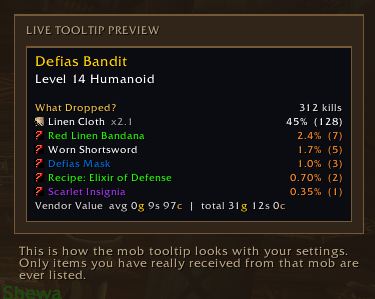
Mob tooltips with real drop rates
- Hover a mob to see what has dropped from it for you, how many you've killed, and how often each item drops.
- Only items you actually received are listed, so the numbers reflect your own experience.
- Shows an average and total Vendor Value for that mob.
- Choose how rates are calculated (looted kills only, or all kills), the sort order, the number of rows and the text size.
- Item tooltips can also show which sources have dropped that item for you.
Tracks nearly every kind of loot, for your character
- Mobs, chests and other objects, and containers (bags, clams and similar).
- Professions: herbalism, mining, fishing, skinning, and disenchanting / prospecting / milling.
- Class skills: lockpicking, pickpocketing and Comprehend scrolls.
- Quest rewards and group roll wins.
- Vendor sales, mail and trades, so items that move through your bags are accounted for too.
- Gold, silver and copper, as well as currencies, are logged alongside items.
Gold tracking
- Session gold, gold per hour and lifetime gold.
- Broken down by source: looted, picked up, quest rewards, vendor, mail, trade and other.
- Gold by type, zone and day.
Big, filterable loot window
Open it with /wdpd or the minimap button.
- Overview: your session at a glance, with top items and recent loot.
- Loot Log: filter by period, type, quality, quest-only and search. Identical items can be combined into one row with a total quantity and a "last looted" time. Shift-click an item to link it.
- Sources: every mob, chest and node, with kills, times looted, gold, and each item's drop rate and average quantity.
- Items and Gold tabs.
- Every table is paged, and every column sorts highest to lowest first (click again to reverse).
Customisable
- Switch tracking on or off by group (Mobs, Chests / containers / bags, Professions, Class skills, Quest rewards, Group rolls, Other) and set a minimum item quality.
- Four window styles (Parchment, Modern, WoW Forever and Slate), with window opacity, scale, density and text size options.
- 12-hour (default) or 24-hour local time, and full or short gold display.
- Choose which log columns to show.
- Minimap button and a data broker source, with optional gold / items text.
Getting started
Install the addon, log in, and loot something. Type /wdpd to open the window, or /wdpd settings for options. OR open via the mini map button.
Light on memory
- Log entries are stored compactly, and old entries are automatically rolled up into daily totals after 14 days (or 30, 60 or 90, or never). Totals and drop rates are never affected.
- Settings for the maximum log size, deleting old entries, and a Clean memory button (shift + left-click the minimap button also works).
- A Clear all history button wipes everything after a confirmation prompt.
What Dropped? Team