Not My Sheep!!
- By
Mage Polymorph tracker for WoW Forever: a timer bar, a group marker on your sheeped target so everyone sees it, and an alert when it breaks early.
UI-Interface.png
Description
Not My Sheep!! keeps track of your Polymorph so you always know how long the sheep has left, and who ruined it when it breaks.
Dependencies
- Required: none. The addon is self-contained (no embedded libraries).
- Optional: EllesmereUI. If installed, Not My Sheep!! adds its own page to the EllesmereUI options panel and two movers to EllesmereUI's Unlock Mode. Without it, the addon uses its own built-in window and Unlock Mode, which look the same.
Features
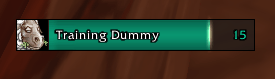
- Timer bar: a clean flat bar with the spell icon, target name, time remaining and a spark. It turns amber at 10 seconds and red (with a warning sound) as it runs out. Multiple sheeps stack, soonest to expire on top.
- Group Marker Macro: puts a marker on the sheeped enemy so your whole party or raid can see it. The Triangle is the default; pick any of the eight. The marker is cleared when the sheep ends. Is handled by a fancy auto generated macro you can drag to your bars and sheep away!
- Personal Icon over the target: shows the assigned marker (or the Polymorph spell icon) above the sheeped enemy's nameplate, with a countdown swipe.
- Customisabe "Not my sheep!!" alert: if your sheep breaks early, a big banner tells you, and names who did it when it can tell (a spell cast by you or a group member at that moment). Optional announce to party or raid.
- Real timers: durations are read from the actual debuff when the mob is your target, focus, mouseover or on a nameplate, and fall back to the Polymorph rank otherwise.
Setup
- Type `/nms` for settings. The page has a live preview, with tabs for Timer Bar, Target Icon and Alerts.
- Type `/nms unlock` to drag the bar and the nameplate icon where you want them. Drag to move, use the corner handle to resize, arrow keys to nudge (Shift = 10), right-click to reset.
- Type `/nms test` for a sample sheep, `/nms reset` to restore defaults.
EllesmereUI users
With EllesmereUI installed, settings appear in its panel and the movers appear in its Unlock Mode.
Not My Sheep!! Team