WGINFO
- By
Send customizable guild welcome messages with one click, featuring a modern settings panel, an adjustable button, and minimap access.
WGINFO_01.png
Description
WGINFO
Make new guild members feel welcome with a single click!
WGINFO lets you prepare guild welcome messages and send them to guild chat in sequence. Use it to share guild rules, useful information, or a friendly greeting without typing the same messages every time.
Features
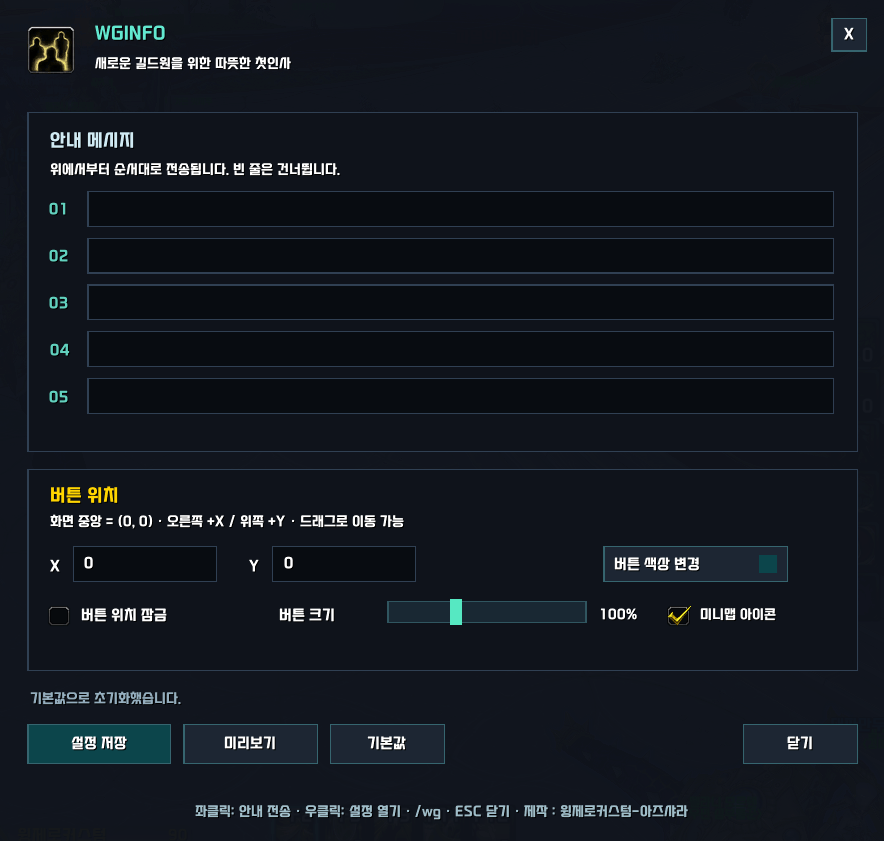
- Up to 5 customizable messages — Write your own welcome messages. Empty lines are automatically skipped.
- One-click sending — Send your saved messages to guild chat in order, with a default interval of 1.5 seconds.
- Duplicate-send protection — Additional send requests are ignored while a message sequence is running.
- Progress display — The guild announcement button shows the current line during sending.
- Modern settings panel — Edit messages and customize the button in a clean, organized interface.
- Adjustable button position — Drag the button or enter X/Y coordinates relative to the center of the screen.
- Position lock — Lock or unlock the button instantly.
- Live size adjustment — Resize the button from 50% to 200% using a slider.
- Custom button colors — Choose a color with live feedback. Your selection is saved automatically.
- Minimap access — Open settings or send messages from a movable minimap icon.
How to Use
- Type
/wgto open settings. - Enter your messages and click Save Settings.
- Left-click the on-screen guild announcement button to send them.
All five message fields are empty on a fresh installation, so you can add information specific to your guild.
Controls
On-screen button
- Left-click: Send saved messages.
- Right-click: Open settings.
- Drag: Move the button while its position is unlocked.
Minimap icon
- Left-click: Open settings.
- Right-click: Send saved messages.
- Drag: Move the icon around the minimap.
Settings
/wg: Toggle the settings panel.ESC: Close the settings panel.- Preview: Display the entered messages locally in your chat window without sending them to the guild.
Button size, color, and position lock changes are applied and saved immediately. Click Save Settings after editing messages, coordinates, or minimap visibility.
Notes
- Guild membership is required to send guild messages.
- Blizzard chat restrictions may prevent sending during certain encounters or other restricted situations. WGINFO displays a notice and stops the sequence when it detects a restriction.
- Sending does not resume automatically. Click again after restrictions are lifted to send the full sequence from the beginning.
- Defaults resets messages to empty and restores the default button appearance and position.
Created by 윙제로커스텀-아즈샤라.
WGINFO
새로운 길드원을 위한 환영 인사를 클릭 한 번으로 전하세요!
WGINFO는 미리 작성한 안내 메시지를 길드 채팅으로 순서대로 전송하는 애드온입니다. 길드 규칙, 이용 안내, 환영 인사처럼 매번 반복해서 입력하던 내용을 간편하게 전달할 수 있습니다.
주요 기능
- 안내 메시지 최대 5줄 — 원하는 문구를 자유롭게 작성할 수 있으며, 빈 줄은 자동으로 건너뜁니다.
- 클릭 한 번으로 순차 전송 — 저장된 메시지를 순서대로 전송합니다. 기본 전송 간격은 1.5초입니다.
- 중복 전송 방지 — 전송 중에는 추가 전송 요청을 무시해 메시지가 겹치는 것을 방지합니다.
- 전송 진행 표시 — 길드안내 버튼에 현재 전송 중인 줄 번호를 표시합니다.
- 깔끔한 설정창 — 메시지 편집과 버튼 설정을 한곳에서 관리할 수 있습니다.
- 버튼 위치 조절 — 드래그하거나 화면 중앙 기준 X·Y 좌표를 입력해 위치를 변경할 수 있습니다.
- 위치 잠금 — 체크 즉시 버튼 위치를 잠그거나 해제할 수 있습니다.
- 실시간 크기 조절 — 슬라이더로 버튼 크기를 50~200% 범위에서 조절할 수 있습니다.
- 버튼 색상 변경 — 원하는 색상을 실시간으로 적용하고 자동 저장합니다.
- 미니맵 아이콘 — 설정창 열기와 안내 전송을 지원하며, 미니맵 둘레로 이동할 수 있습니다.
사용 방법
/wg를 입력해 설정창을 엽니다.- 안내 메시지를 작성하고 설정 저장을 누릅니다.
- 화면의 길드안내 버튼을 좌클릭하면 메시지가 전송됩니다.
신규 설치 시 안내 메시지 5줄은 모두 공란입니다. 길드에 맞는 내용을 직접 입력해 사용하세요.
조작 안내
화면의 길드안내 버튼
- 좌클릭: 저장된 안내 메시지 전송
- 우클릭: 설정창 열기
- 드래그: 위치 잠금 해제 상태에서 버튼 이동
미니맵 아이콘
- 좌클릭: 설정창 열기
- 우클릭: 저장된 안내 메시지 전송
- 드래그: 미니맵 둘레로 아이콘 이동
설정창
/wg: 설정창 열기·닫기ESC: 설정창 닫기- 미리보기: 길드에 전송하지 않고 자신의 채팅창에서 작성한 내용을 확인
버튼 크기·색상·위치 잠금은 변경 즉시 적용되고 저장됩니다. 메시지·좌표·미니맵 표시 여부를 변경한 뒤에는 설정 저장을 눌러주세요.
참고 사항
- 길드 메시지를 전송하려면 길드에 가입되어 있어야 합니다.
- 일부 교전이나 제한 상황에서는 블리자드의 채팅 제한으로 전송이 불가능할 수 있습니다. 제한이 감지되면 안내를 표시하고 전송을 중단합니다.
- 제한 해제 후 자동으로 전송을 재개하지 않습니다. 다시 클릭하면 전체 메시지를 처음부터 전송합니다.
- 기본값을 누르면 안내 메시지가 모두 공란으로 바뀌며, 버튼 모양과 위치 등 설정이 기본 상태로 초기화됩니다.
제작 : 윙제로커스텀-아즈샤라
WGINFO Team