Welcome Keystone
- By
Announce your Mythic+ keystone in party chat with a host card: welcome the group, post the clickable key, list Fort/Tyrann/Bargain/Guile affixes, and add a Season 2 dungeon quip. Commands: /wk
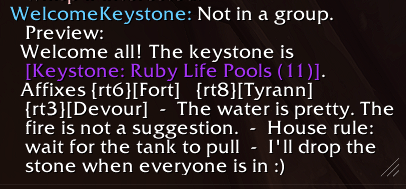
example1.png
Description
Welcome Keystone
A Mythic+ host kit for party chat. Welcome the group by name, post your clickable keystone and affixes, pull keys with !keys, and thank everyone when the chest pops. Built for WoW Midnight Season 2 pugs and premades.
Stop linking a bare key. Start hosting the run.
Current release: 1.3.6
What it does
Type /wk after the group fills. Welcome Keystone scans your bags for the current Mythic+ keystone and sends a host card:
- Welcomes the players who actually joined, then posts the clickable keystone link (dungeon + level). Hover the link for the official affix tooltip.
- Prints this key's affixes as short marked labels, adds a one-line quip for that dungeon, and appends your optional house rule.
- Optionally adds a short CurseForge line so other hosts can grab the addon.
Example:
Welcome Sara, Jon, and Lexi! The keystone is [Keystone: Voidscar Arena (12)].
Affixes {square}[Fort]   {skull}[Tyrann]   {cross}[Guile]  -  The crowd came for a show. Don't become the show.  -  I'll drop the stone when everyone is in :)
When the key is done, type /wk gg:
GGs Sara, Jon, and Lexi. Thanks for coming to Voidscar Arena.
The crowd got their show. You keep the loot. Enjoy your future adventures in Azeroth.
Why this is not only another !keys addon
Most Mythic+ announcers wait for !keys and dump My Key: [Keystone]. Welcome Keystone still does that — and it also hosts the invite.
- Greets the party by name
- Posts your bag keystone as a real link
- Lists Fort / Tyrann / Bargain / Guile in a scannable line
- Unique quip and sendoff for each Midnight Season 2 dungeon
- Saved house rule ("wait for the tank pull")
- !keys / !key / !wk / !pull share your stone in party chat
- /wk pull builds a local roster from other Welcome Keystone users
- /wk gg thanks the group at the door
- Minimap button and a tiny settings pane (CurseForge + Buy Me a Coffee)
Use it next to AstralKeys, MiniMythicKeys, or Details. Those tools track keys. This one runs the table.
Commands
Host card
- /wk or /welcomekey — send the host card to party, instance, or raid chat
- /wk test — preview locally
- /wk promo on|off — CurseForge line after the card
- /wk rule wait for the tank pull — save a house rule
- /wk rule / /wk rule clear
Group keys
- In party chat: !keys !key !wk !pull
- /wk pull — collect a local roster
- /wk auto on|off — reply to !keys (on by default, 8-second cooldown)
End of key
- /wk gg — thank the group
- /wk gg test — preview
- Also: /wk ggs /wk thanks /wk outro /wk end
Settings
- /wk config — settings pane
- Minimap: left-click settings, right-click send host card, drag to move
- /wk minimap on|off
- /wk coffee <url> — Buy Me a Coffee page
- /wk help
Make a macro containing /wk and bind that. There is no default keybind.
Affixes
Affixes are read from the keystone item link first. If the link has no affix IDs, the addon falls back to this week's affixes for that key level:
- +2 to +5 — Lindormi's Guidance
- +5 to +11 — this week's Xal'atath's Bargain (Ascendant, Pulsar, Voidbound, or Devour)
- +7 to +9 — Fortified or Tyrannical
- +10 and up — Fortified and Tyrannical
- +12 and up — Xal'atath's Guile replaces the Bargain
Chat labels: Fort, Tyrann, Ascendant, Pulsar, Voidbound, Devour, Guile, Guidance. Each gets a raid marker. Hover the keystone link for the official tooltip.
Midnight Season 2 dungeon lines
On the way in
- Altar of Fangs — The altar wants an offering. Try not to be it.
- Murder Row — Silvermoon's alley does not take polite refusals.
- Den of Nalorakk — The bear god is not here for a handshake.
- The Blinding Vale — If it starts glowing, stop staring and start moving.
- Voidscar Arena — The crowd came for a show. Don't become the show.
- Kings' Rest — The dead kings still take attendance.
- Temple of Sethraliss — The temple has opinions about where you stand.
- Ruby Life Pools — The water is pretty. The fire is not a suggestion.
On the way out (/wk gg): matching sendoff per dungeon, then Enjoy your future adventures in Azeroth.
Unknown dungeons still get a short generic closer.
Chat channels
- Party chat in a normal group
- Instance chat for dungeon finder / premade instance groups
- Raid chat if you converted
If you are not in a group, /wk and /wk gg preview locally.
Midnight notes
- Interface versions for 12.0 and 12.1, plus Standard / Mainline TOC flavors
- Uses
C_Container,C_Item.IsItemKeystoneByID,C_MythicPlus, andC_ChallengeMode - Does not hook combat, unit auras, or nameplates
- Minimap button + a small settings pane
- Midnight blocks addons from opening a browser or writing the clipboard. Settings buttons print a clickable chat link ([CurseForge], [Buy me a coffee]). Click it and the URL lands in the chat box for Ctrl+C.
Install
- Install with the CurseForge app, or unzip into
World of Warcraft\_retail_\Interface\AddOns\WelcomeKeystone - The folder must contain
WelcomeKeystone.toc,WelcomeKeystone.lua, andMedia - Fully quit World of Warcraft, then enable Welcome Keystone on the character-select AddOns screen
- Log in. Chat should print: WelcomeKeystone: Loaded.
- Type /wk test before your first real announce
FAQ
Does this reply to !keys?
Yes, as of 1.2.0. Type !keys in party chat. Toggle with /wk auto off if you do not want it.
Can affixes be separate clickable tooltips?
No. Party chat only allows official link types. Hover the keystone link on line 1.
Does it announce when someone joins?
No. You choose when to send /wk. That keeps pug chat clean.
Will it work without a keystone in bags?
/wk tells you no key was found and sends nothing. /wk gg still thanks the group.
Can it read other players' bags?
No. /wk pull lists keys from people who also run Welcome Keystone, or keys already linked in chat.
The settings link is not clickable.
You need 1.3.6+. The line should look like Click [Buy me a coffee], not a raw https dump.
Welcome Keystone Team