WeaponSkill
- By
WeaponSkill is a lightweight World of Warcraft Classic Era / Hardcore addon that shows your current weapon skill for equipped weapons.
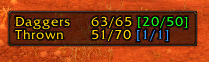
ws01.png
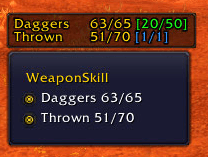
ws02.png

weaponskill_logo.png
Description
WeaponSkill
WeaponSkill is a lightweight World of Warcraft Classic Era / Hardcore addon that shows your current weapon skill for equipped weapons directly on screen and in weapon tooltips.
It is especially useful while leveling, swapping weapon types, or preparing for dungeons, where an underleveled weapon skill can make a big difference.
Features
- On-screen weapon skill display for equipped weapons
- Supports main-hand, off-hand, and ranged weapon slots
- Supports bows, guns, crossbows, thrown weapons, wands, and melee weapons
- Two-column display for characters using multiple weapon types
- Automatically deduplicates matching weapon skills
- Shows effective weapon skill bonuses, such as racial or item bonuses
- Tracks weapon attack attempts since the last skill-up
- Shows the last known number of attempts needed for a skill-up when available
- Optional item tooltip weapon skill lines
- Movable display frame
- Right-click context menu to choose which equipped skills are shown
- Slash-command configuration
- Per-character settings and skill attempt tracking
- Optional border and background
- Optional hide-at-cap behavior
- Glow animation when a displayed weapon skill increases
- Fade-out when a skill reaches cap and hide-at-cap is enabled
Display Modes
WeaponSkill can show different equipped weapon slots:
mainhand- main-hand weapon onlymelee- main-hand and off-handall- main-hand, off-hand, and ranged
The default mode is all.
If multiple equipped weapons use the same skill, the skill is only shown once.
Example:
Two-Handed Axes    43/45 [2/?]
Thrown             14/50 (+5) [7/12]
The value in brackets shows:
- Attempts since the last skill-up
- Last known attempts needed for a skill-up
If the addon does not know the previous skill-up attempt count yet, it shows ?.
Weapon skill bonuses, such as racial bonuses, are included in the displayed effective value. For example, a Troll thrown weapon bonus is shown as (+5).
The attempt counter is an estimate based on the player's outgoing combat log weapon events.
Tooltip Support
When enabled, weapon item tooltips show the relevant weapon skill and current value.
Example:
Thrown 14/50 (+5)Non-weapon items are ignored.
Commands
Primary command:
/wsAlias:
/weaponskillAvailable commands:
/ws help
/ws status
/ws display on|off
/ws tooltip on|off
/ws slots mainhand|melee|all
/ws hide capped on|off
/ws border on|off
/ws background on|off
/ws lock
/ws unlock
/ws reset
Context Menu
Right-click the on-screen display to open the context menu.
From there, you can choose which currently equipped weapon skills are shown. At least one equipped skill must remain visible, so the frame cannot become impossible to find when border and background are disabled.
Compatibility
Built for:
- World of Warcraft Classic Era
- World of Warcraft Hardcore
Retail WoW is not supported.
Notes
WeaponSkill uses slash commands only. There is no minimap button and no graphical options panel.
Settings and skill attempt tracking are saved per character.
Localization support relies on Blizzard's localized weapon skill strings where available.
Current Version
Version 1.1.0 adds per-character skill attempt tracking, a two-column display layout, colored skill values, effective skill bonus display, and Classic Era interface support for 11509.
Version 1.0.0
Initial public release included:
- Main-hand, off-hand, and ranged weapon skill display
- Tooltip weapon skill display
- Movable and lockable frame
- Display slot modes
- Right-click context menu
- Hide capped option
- Border/background options
- Skill-up glow and capped fade-out animation
WeaponSkill Team