Warn Your Raid
- By
Configurable buttons for sending Raid Warning messages with custom text, colors, rows, and layout.
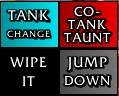
WarnYourRaid is a configurable button addon for sending Raid Warning messages with a single click.
What it does:
- Lets you create clickable buttons that send custom /rw messages.
- Supports up to 10 rows.
- Supports up to 20 buttons per row.
- Lets you assign custom button labels and custom message text to every button.
- Lets you create and use up to 50 different sets.
- Lets you cycle through the sets by left-clicking the set name above the buttons.
- Uses a secure button setup so buttons can still be used during combat as long as they were already created before combat started.
What you can configure in the options:
- Test Mode
- Shows the buttons outside of a raid for setup and testing. - Move Mode
- Lets you drag the button frame to a new position.
- While Move Mode is active, the buttons themselves are not clickable. - Reset Position
- Resets only the frame position. - Reset Everything
- Deletes all button texts and button settings. - Set selection
- Lets you choose which set you are currently editing. - Set Name
- Lets you rename the currently selected set. - Sets
- Sets how many different sets are available, up to 50. - Scale
- Adjustable from 0.5 to 5.0. - Rows
- Sets how many rows are available, up to 10. - Buttons in Row
- Sets how many buttons exist in the currently selected row, up to 20. - Button Width
- Controls the width of all buttons. - Button Height
- Controls the height of all buttons. - Spacing X
- Controls horizontal spacing between buttons. - Spacing Y
- Controls vertical spacing between rows. - Row selection
- Lets you choose which row you are currently editing. - Import Row...
- Import a row to a different set
What you can configure for each button:
- Up to 3 separate label lines shown on the button.
- One Raid Warning message text sent with /rw.
- A custom button color.
- A reset button to restore that single button to its default state.
Color options:
- A custom color can be selected by clicking the color wheel. The background shows the selected color.
Text field behavior:
- All option fields can be confirmed with Enter or by clicking the OK button next to the field.
- Empty buttons stay empty until you configure them.
- Raid Warning text is length-limited in the editor to stay within a safe macro range.
Visibility behavior:
- The frame is shown only when at least one button is configured and one of these is true:
- Test Mode is enabled.
- You are in a raid and have permission to send Raid Warnings. - Outside of Test Mode, the frame stays hidden if you cannot send /rw.
- Raid Warning permission normally requires raid leader or assistant status.
Slash commands:
- /wyr - Main slash command.
- /wyr help - Shows the command list.
- /wyr test - Toggles Test Mode.
- /wyr move - Toggles Move Mode.
- /wyr reset - Resets only the frame position.
- /wyr options - Opens the options panel.
/wyr scale <value> - Sets the frame scale directly from 0.5 to 5.0
I've set up a small Discord Server for my addons https://discord.gg/j3vQVnWUYv Feel free to use it if you have any problems, suggestions or just a simple feedback - I am grateful for everything!
The Warn Your Raid Team