Wargames+
- By
Wargames are back! This addon that provides a UI for sending arena / battleground wargame challenges to your friends.
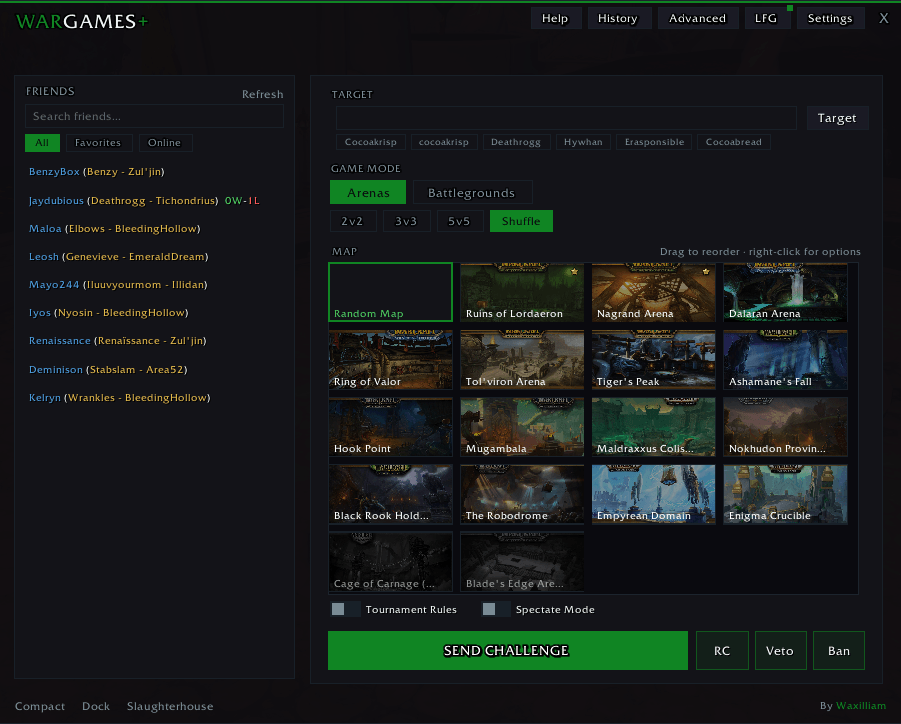
arena.png
Description
Wargames+ v3.0.0
The ultimate wargame companion for World of Warcraft. Challenge friends to arenas, battlegrounds, solo shuffle, and blitz all from one clean, fully themed UI.
What is Wargames+?
Wargames+ replaces the clunky default wargame interface with a modern, feature-packed panel. Browse your friends list, pick a map, pick a mode, and send the challenge. That's it. No slash commands, no memorizing map names, no hassle.
But it doesn't stop there.
---
Features
NEW to 3.0
Tired of spamming Trade Chat for wargames? Wargames+ 3.0 adds LFG — a built-in Looking-For-Wargames panel with cross-realm reach.
Getting started
1. Update to 3.0.0 and /reload.
2. Open the main window with /war.
3. Click the new accent-colored LFG button in the top-left.
Posting that you're looking
- Pick a bracket (2v2/3v3/5v5/Shuffle/BG/Blitz).
- Drop an optional note — "chill practice", "tourney prep", whatever.
- Click Post. You're live for 10 minutes, auto-refreshing every 2.
- Click Unpost to pull your listing early.
Browsing and challenging
- Left-click any row → fires a challenge instantly with a random map in the poster's chosen bracket.
- Right-click any row → context menu: Challenge, Start Veto (CS2-style map bans), Whisper, Add Friend, or Hide Poster.
- Filter bar above the list lets you narrow by bracket, faction (H/A/both), or search notes live as you type.
- [WG+] badge next to a name means that player has the addon, so challenge handshakes and veto are guaranteed to work.
- W-L column shows your head-to-head record against each poster — green if you're winning, red if you're not.
- Live / History toggle (top-right of the LFG panel) lets you browse recent advertisers even after they've dropped off.
Cross-realm reach (important!)
Posts automatically reach:
- Your guildmates on any realm (invisible addon traffic, no guild-chat spam).
- Members of the shared WargamesPlus community — cross-realm, cross-faction.
To unlock cross-realm matchmaking with strangers, join the community once:
https://www.worldofwarcraft.com/invite/ApGyKDyujND?region=US
then right-click the #lfg-traffic stream and mute notifications. That stream is addon-only traffic; you don't want to hear it.
The LFG panel footer shows your current reach at a glance: Reach: guild · WargamesPlus community
Full Challenge UI
- Friends list with search, favorites, and Battle.net integration
- Map selection with drag-and-drop reorder, favorites, and exclusions
- Arena (2v2/3v3/5v5), Solo Shuffle, Battlegrounds, and Blitz support
- Spectator mode — watch two friends go at it
- Tournament rules toggle
Match Tracker** *(New in 2.0)
- Automatic win/loss/draw detection after every wargame
- Full match history with opponent, map, mode, duration, and scoreboard data
- Opponent profiles — click any name to see your head-to-head record
Nemesis & Rival System (New in 2.0)
- Play someone 3+ times and the addon starts paying attention
- Your **Nemesis** is the player who beats you the most. Your Rival** is the one you can't stop farming
- 60 unique trash talk lines fire after every Nemesis/Rival match lose to your Nemesis and the addon won't let you forget, beat them and it celebrates the redemption arc
- Titles shift dynamically as your record evolves
Advanced Stats (New in 2.0)
- Deep analytics dashboard win rates by mode, class matchups, map performance, K/D ratios, damage/healing breakdowns, time trends, and more
- Access via minimap right-click or the stats panel
Dock Mode (New in 2.0)
- Compact panel that attaches to your Friends List
- Select a friend, pick your mode and map, challenge in one click
- Perfect for rapid-fire wargame sessions
Settings Panel (New in 2.0)
- Dedicated settings page — theme selection, minimap toggle, max history size, chat message toggles, veto defaults, and more
Reset to Defaults button to start fresh
Veto System (New in 2.0)
Map ban phase before a match — each player takes turns banning maps
Configurable bans per player (1-5), turn timer (10-60s), and format (Bo1/Bo3/Bo5)
Themes
3 built in themes: Midnight, Horde, Alliance
Full custom theme editor with color picker — accent, background, borders, buttons, text, all customizable
Quality of Life
Keybindings for main window and dock mode
Minimap button with today's W/L record on hover
Auto hides in combat, restores when combat ends
Collapsible UI and compact mode
Localized for 10 languages
Slash Command
`/war` — toggles the main window
### Getting Started
Install, `/war`, and start challenging. Your friends list loads automatically. Pick a name, pick a map, hit send. Everything else tracking, themes, stats just works in the background.
Wargames+ Team