Warbands
- By
Coordinates up to 3 raid groups (120 players) for large-scale World PvP with cross-raid vitals, target markers, roles, layer sync, and a modular HUD overlay.
WARBANDS_SS_.png
Description
WARBANDS
Tactical Multi-Raid Command, Cross-Raid HUD & Peer-Mesh Telemetry for World PvP
World of Warcraft’s default unit frames stop at 40 players. When executing faction defense, city raids, or open-world PvP coalitions, leaders and fighters are completely blind to allied forces.
WARBANDS bridges up to 3 full 40-man raid groups (120 players) into a single, cohesive battlefield command network. Powered by peer-to-peer data relays over native Blizzard channels, all 120 combatants share live vitals, assignments, target markers, and directional positions in real time without external servers or setup friction.
Key Features
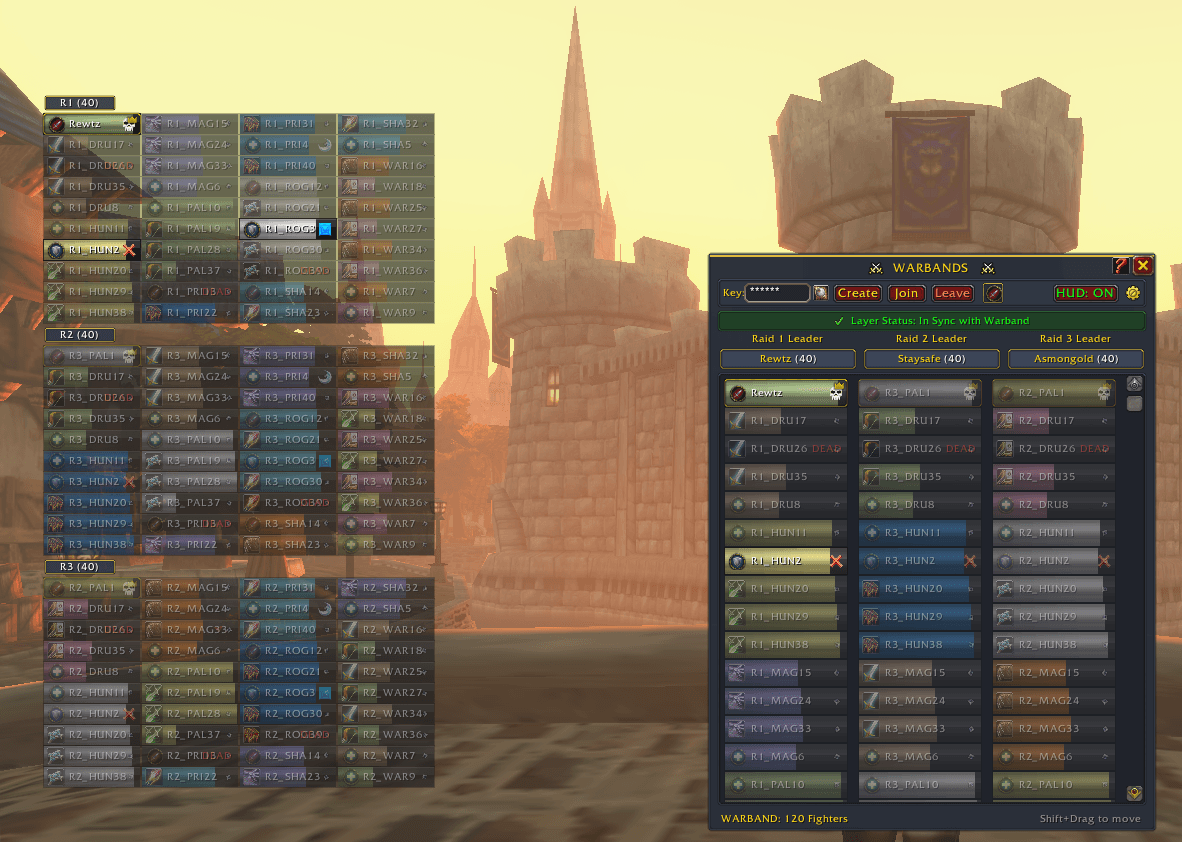
- 120-Slot Tactical Battlefield Grid: Displays up to 3 distinct 40-man raids side by side in a clean midnight-navy glass commander dashboard. Monitor real-time health bars, death states, class color coding, and directional vectors across the zone.
- Streamlined Floating HUD Overlay: A compact, vertically stacked unit array designed to keep allied raid frames in view during combat while remaining lightweight and unobstructed.
- Native Unit Context Menus: Full right-click dropdown integration across all unit bars. Right-click your own frame for player settings (Dungeon Difficulty, Reset Instances, Loot Options, Leave Group), or right-click any teammate to access native player actions (Inspect, Trade, Whisper, Promote).
- High-Frequency Peer-Mesh Telemetry: Operating on a rapid 0.35s polling loop, players running the addon automatically broadcast their vitals, role, target marks, and GPS coordinates while proxying nearby allies to ensure full battlefield visibility.
- Raid Target Marker Synchronization: Blizzard target icons (Skull, Cross, Square, Moon, Star, etc.) broadcast across all three groups in real time, rendering directly onto each unit's frame.
- Battlefield Role Badges & Class Indicators: Assign custom tactical roles (Tank, Healer, or DPS) with dedicated role badges, while players without the addon display crisp class icons.
- Visual Casualty & Status Indicators: Fallen allies instantly desaturate with an amber status label and lowered opacity, immediately snapping back to full color upon revival or release.
- 3-Tier Proximity & Compass Bearing: Distant or out-of-range allies adjust through progressive opacity tiers:
- Spell Range (40 yds): Full opacity for immediate target acquisition.
- Tactical Perimeter (100 yds): Medium opacity with live directional arrow tracking.
- Zone Distance (Far): Soft opacity with compass bearing indicators toward their position.
- Shard Layer Synchronization & One-Click Anchor: Detects when an allied raid is trapped on an alternate shard layer, allowing the anchor leader to pull groups onto the same layer with a single click.
- Triage & Leadership Filters: Dedicated toggle buttons let you isolate Only Healers across all 120 slots for multi-group triage or isolate Only Leaders for command pathfinding.
- Streamer-Safe Key Masking: Built-in session masking conceals your private join key across both the dashboard and minimap hover tooltips to prevent stream sniping.
- Coalition Chat Channel: Built-in
/warband <message>broadcasts tactical orders across all three synchronized raids simultaneously.
Setup & Operation
- Host Leader: Open the dashboard (
/wb), enter a private session Key word, and click Create. - Partner Leaders: Enter the identical Key word and click Join (or press Enter in the Key field).
- Approval: The Host Leader clicks the green plaque on their Warband dashboard to admit the joining raid group.
- Allied Raiders: Group members with the addon connect automatically to the active mesh, access the tactical grid, and broadcast their vitals.
Slash Commands
/wbor/warbands— Toggle the Warbands Dashboard./wb hudor/wb overlay— Toggle the floating HUD overlay./wb hud reset— Reset HUD position and scale back to the default location./wb test— Run a full 120-player simulation (40/40/40) to test layouts, scaling, and filters./wb icon— Show the minimap launcher icon./warband <message>or/wbchat <message>— Send a tactical message to all players across all 3 raids.
The Warbands Team