Vigorline
A customizable Skyriding HUD tracking Vigor, Second Wind charges, flight speed, and recharge time.
íë©´ ìº¡ì² 2026-09-14 000536.png
íë©´ ìº¡ì² 2026-09-14 000327.png
íë©´ ìº¡ì² 2026-09-14 000446.png
Description
한글버전 설명은 아래에 있습니다.
Vigorline
Keep your Skyriding resources and flight speed in view.
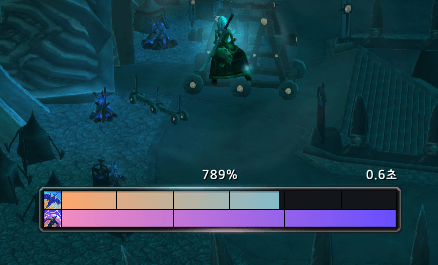
Vigorline is a compact World of Warcraft Retail HUD. Two joined, segmented bars with spell icons track shared Surge Forward / Skyward Ascent resources and Second Wind charges.
Features
- Separate segmented bars for Skyriding resources and Second Wind
- Numeric flight speed (%) above the HUD when available
- Time until the next shared resource charge at the upper right
- Four selectable border effects while Thrill of the Skies is active
- Independent bar colors and LibSharedMedia status bar textures
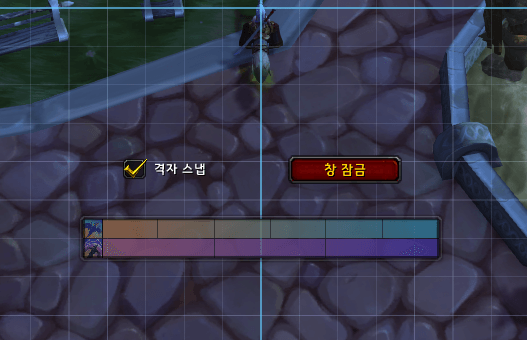
- Move mode, positioning grid, optional center snapping, and a nearby lock button
- Bar width slider and numeric input, with Korean and English localization
Settings
/vigorline — Open settings.
Right-click the HUD to lock or unlock it, or open settings. Texture and color selection are located in the settings panel.
- Layout and language: Move the HUD, adjust its width, and select a language. Width supports a slider and numeric input from 180 to 600. Press Enter or click outside the input to apply; Escape cancels the edit.
- Texture and effect: Choose a bar texture and a Thrill of the Skies effect.
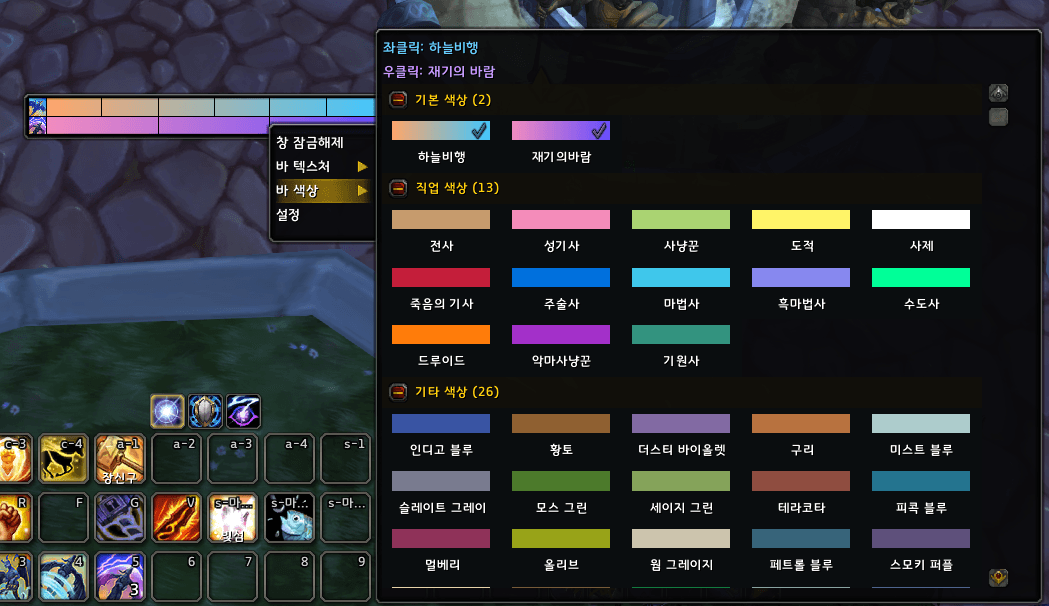
- Bar colors: Choose both bar colors from a bordered list. Groups can be collapsed or expanded; the list scrolls when needed.
Move mode displays a grid and an optional Snap to grid checkbox. Use the adjacent Lock frame button when finished.
Colors and textures
In the palette, left-click sets the Skyriding color and right-click sets the Second Wind color. Blue and purple checkmarks identify your selections.
Choose from 41 presets: 2 default colors, 13 class colors, and 26 other colors. The defaults are icon-inspired gradients; the remaining presets are solid colors. Swatches preview your selected bar texture, and group collapse states are saved.
LibStub, CallbackHandler-1.0, and LibSharedMedia-3.0 are bundled. No separate addon is required. Additional status bar textures registered by SharedMedia-compatible addons are supported.
Thrill of the Skies effects
- Metallic waves: Flowing cyan and coral reflections around the border.
- Flames: Orange and gold flicker along the border.
- Aurora: Smoothly blended teal and violet light.
- Holy light: Bright reflections over a warm golden glow.
All effects preserve your chosen bar colors.
Combat behavior
Accessible resource data remains visible during combat. If required information becomes restricted, the HUD temporarily hides and returns when the data becomes accessible. Context menus, movement, and settings changes are blocked during combat.
Flight speed is the reported forward speed expressed as a percentage of base running speed. It is hidden when unavailable.
Installation
WoW Retail / Midnight, version 1.1.0. The current TOC includes support for 12.1.0.
Extract the Vigorline folder into World of Warcraft/_retail_/Interface/AddOns/. Fully restart the game after a first installation or a folder rename. Existing Vigorline installations can use /reload after updating.
Vigorline
하늘비행 자원과 비행 속도를 한눈에 확인하세요.
Vigorline은 월드 오브 워크래프트 Retail의 하늘비행을 위한 작은 HUD입니다. 전방 쇄도·하늘 상승의 공유 자원과 재기의 바람 충전량을 아이콘이 붙은 두 줄의 바로 표시합니다.
주요 기능
- 각 충전 칸이 구분되는 하늘비행 자원·재기의 바람 바
- 측정 가능한 비행 중 바 위 중앙에 속도(%) 표시
- 공유 자원의 다음 충전까지 남은 시간을 오른쪽 위에 표시
- 하늘의 전율 활성화 시 선택한 테두리 이펙트 표시
- 바마다 독립적인 색상 선택과 LibSharedMedia 바 텍스처 지원
- 이동 모드, 배치 격자, 중앙 격자 스냅, 바로 잠그는 버튼
- 바 너비 슬라이더와 숫자 입력, 한국어·영어 지원
설정
/vigorline — 설정 창 열기
HUD 우클릭 메뉴에서도 설정을 열거나 창을 잠금·해제할 수 있습니다. 바 텍스처와 색상은 설정 패널에서 변경합니다.
- 배치 및 언어: 이동 모드, 바 너비, 언어를 설정합니다. 너비는 슬라이더 또는 숫자 입력으로 180~600 범위에서 조절합니다. 숫자는 Enter 또는 입력칸 밖 클릭으로 적용하고 Esc로 취소합니다.
- 텍스처 및 이펙트: 바 텍스처와 하늘의 전율 이펙트를 선택합니다.
- 바 색상: 내부 테두리로 구분된 목록에서 두 바의 색상을 선택합니다. 그룹을 접거나 펼칠 수 있고 내용이 길면 목록 안에서 스크롤합니다.
이동 모드에서는 격자와 스냅 체크박스가 표시됩니다. 배치를 마치면 체크박스 옆 창 잠금 버튼을 누르세요.
색상과 텍스처
색상 목록에서 좌클릭은 하늘비행, 우클릭은 재기의 바람 색상을 지정합니다. 선택은 하늘색·보라색 체크마크로 표시됩니다.
총 41개 프리셋을 제공합니다: 기본 색상 2개, 직업 색상 13개, 기타 색상 26개. 기본 색상은 아이콘에서 영감을 받은 그라데이션이며, 나머지는 단색입니다. 미리보기에는 선택한 바 텍스처가 반영되고 그룹 접기 상태도 저장됩니다.
LibStub, CallbackHandler-1.0, LibSharedMedia-3.0이 포함되어 있어 별도 설치 없이 사용할 수 있습니다. SharedMedia 호환 애드온으로 등록한 추가 바 텍스처도 선택할 수 있습니다.
하늘의 전율 이펙트
- 금속 물결: 청록·산호빛 반사광이 테두리를 따라 흐릅니다.
- 불꽃: 주황·금빛이 테두리 안에서 일렁입니다.
- 오로라: 청록·보라 계열의 빛이 부드럽게 섞입니다.
- 신성: 따뜻한 금빛 위에 밝은 반사가 나타납니다.
모든 이펙트는 선택한 바 색상을 유지합니다.
전투 중 동작
전투 중에도 읽을 수 있는 자원 정보는 표시합니다. 필요한 정보가 제한된 값으로 제공되면 HUD를 잠시 숨기고, 다시 읽을 수 있게 되면 자동 복원합니다. 전투 중에는 우클릭 메뉴와 위치·설정 조작이 차단됩니다.
속도는 게임이 제공하는 전방 속도를 기본 달리기 속도 대비 백분율로 표시하며, 측정할 수 없으면 숨깁니다.
설치
WoW Retail / 한밤용, 버전 1.1.0. 현재 TOC는 12.1.0을 포함합니다.
ZIP의 Vigorline 폴더를 World of Warcraft/_retail_/Interface/AddOns/에 넣으세요. 처음 설치하거나 폴더명이 바뀌었다면 게임을 완전히 종료한 뒤 다시 실행하세요. 기존 Vigorline을 업데이트했다면 /reload로 적용할 수 있습니다.
Vigorline Team