
VC Runes
- By
Create Season of Discovery rune presets, switch sets by spec, and apply mismatched runes with one button.
vc-runes-config.png
vc-runes-apply.png
vc-runes-set.png
Description
VC Runes
VC Runes is a rune-set manager for Season of Discovery. Build reusable presets for every equipment slot, assign them to your specs, and work through any mismatched runes from one clear on-screen button.
Features
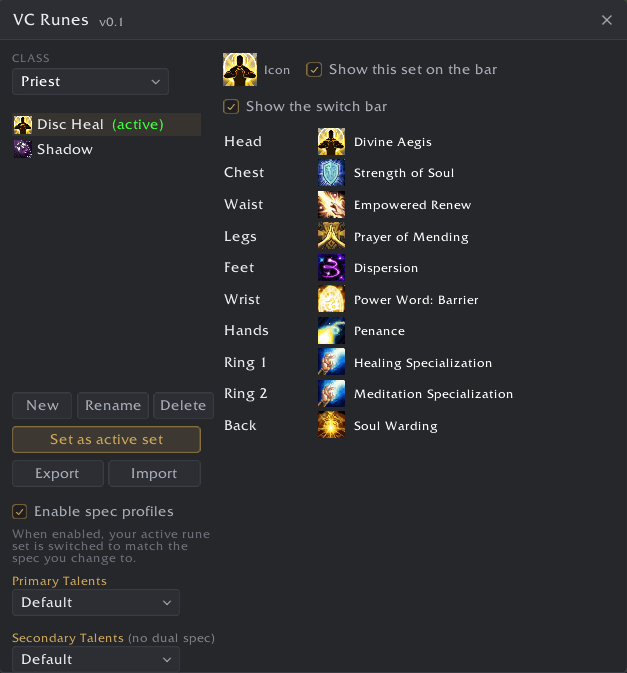
- Create, rename, duplicate, delete, and select rune presets for each class
- Choose a rune for every supported engraving slot, including ring slots
- Account-wide rune-set storage with character-specific active-set settings
- Assign sets to primary and secondary specs with automatic switching after a spec change
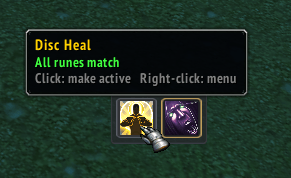
- Movable, scalable set-switch bar for fast preset selection
- Automatic comparison between the active preset and currently engraved runes
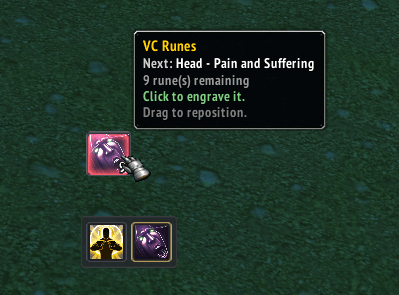
- Secure apply button that shows the next learned mismatch and remaining count
- One click engraves the next rune; continue clicking until the preset matches
- Unlearned runes are reported separately and never trigger an unusable apply action
- Import and export share codes for moving rune sets between players or accounts
- Minimap and LibDataBroker status that turns red when learned runes need changing
- Movable controls with saved positions
WoW requires each protected engraving action to come from a hardware click, so VC Runes advances through the preset one rune per click and does not automate protected actions in combat.
Commands
/vcror/vcrunes- open the rune-set editor/vcr check- list runes that do not match the active set/vcr apply- show the secure apply button/vcr active <name>- select the active set/vcr export [name]- export a set as a share code/vcr import- import a share code/vcr button- pin or unpin the apply button/vcr bar- show or hide the set-switch bar/vcr minimap- show or hide the minimap icon
Requirements
- VC Core
Compatibility
- Season of Discovery
VC Runes Team

