UltraBag
- By
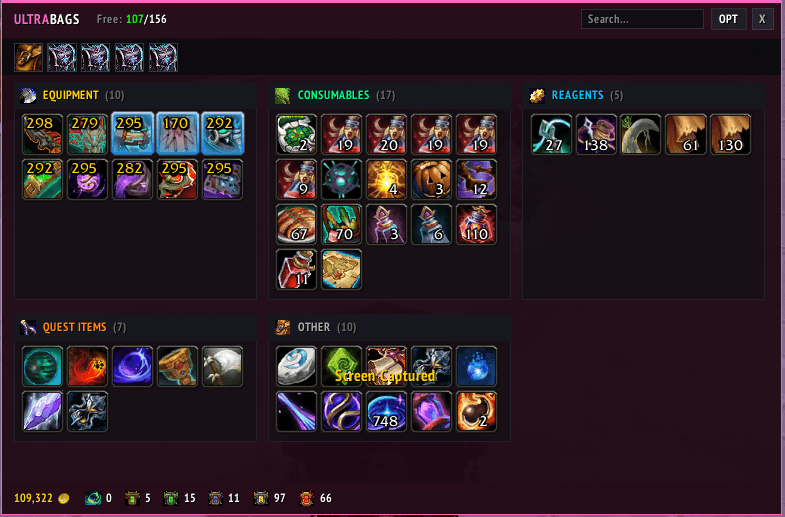
UltraBags is a lightweight, modern bag addon that automatically sorts your inventory into clean categories with drag-and-drop ordering, custom category support, currency tracking, and instant search.
bagg.png
bagggg.png
Description
UltraBags
UltraBags is a lightweight, modern, and highly customizable clean-bags addon for World of Warcraft. It automatically sorts your inventory into clean category blocks, letting you easily customize layout, colors, and tracking without cluttered UI elements.
🌟 Key Features
-
Smart Auto-Categorization: Automatically groups your items into clean categories (Equipment, Consumables, Reagents, Quest, Junk, and Other).
-
Drag & Drop Category Reordering: Drag and drop any category header to place your categories exactly where you want them.
-
Custom Categories & Item Assignment: Create your own custom categories in seconds. Simply drag and drop any item onto a custom category header to assign it.
-
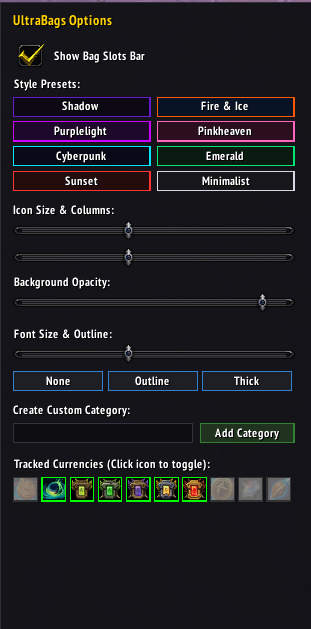
Flicker-Free Live Resizing: Fine-tune icon sizes, column limits, and background opacities smoothly via the built-in option panel (
OPT). -
Built-in Trackers: Track your Gold and favorite Currencies live at the bottom bar.
-
Instant Search: Quickly filter items in real-time with the header search bar.
-
Full Retail & Native Support: Native item slots preserve item levels, stack counts, vendor icons, and cooldown spirals while completely overriding default Blizzard bags (
B).
⚙️ How to Use
-
Open / Close: Press
Bor type/ubor/ultrabags. -
Access Options: Click the OPT button on the top right header.
-
Reorder Categories: Click and drag any category title bar to swap positions with another category.
-
Assign Items to Custom Categories:
-
Create a category in the OPT menu.
-
Click and drag an item from your bag directly onto the custom category header.
-
To reset an item back to default categories: Drag the item onto any standard category header (e.g., Equipment).
-
🛠️ Slash Commands
-
/ub— Toggles the bag frame. -
/ultrabags— Toggles the bag frame.
📁 Installation
-
Download the latest release.
-
Extract the
UltraBagsfolder into your World of Warcraft directory under_retail_/Interface/AddOns/. -
Restart your game or reload your UI (
/reload).
UltraBag Team