Ultimate Hunter
- By
The Classic Era hunter made easy: one-click pet feeding and healing, pet mood, XP and loyalty, ammo counter, dead zone badge, aspect warnings and Auto Shot timer.
Ultimate Hunter – The Classic Era hunter, made easy
One clean panel shows everything a hunter has to watch, a full pet database tells you everything about pets, and Ultimate Hunter warns you before small mistakes turn into deaths. Made with Hardcore in mind.
YOUR PET
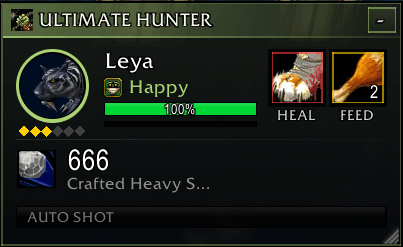
• Round portrait with a mood ring: green happy, yellow content, red unhappy.
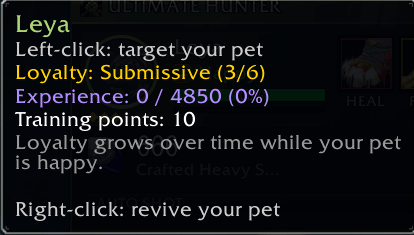
• Health bar, experience bar and loyalty level (six gold diamonds). Hover the portrait for loyalty, experience and training points.
• Click the portrait to call your pet, revive it when it is dead, or target it. Works in combat.
• Heal button: casts Mend Pet in one click, glows red when your pet's health is low.
• Feed button: picks the best food your pet eats from your bags and glows when your pet gets hungry. It knows the exact type of all 198 pet foods, raw meat and fish included.
• Want a specific food? Drag it from your bags onto the feed button. When you run out, it goes back to automatic. Right-click the button to go back to automatic yourself.
• A food your pet refuses is never offered again.
• Heal and feed buttons turn grey when your pet is out of range.
PET DATABASE (BESTIARY)
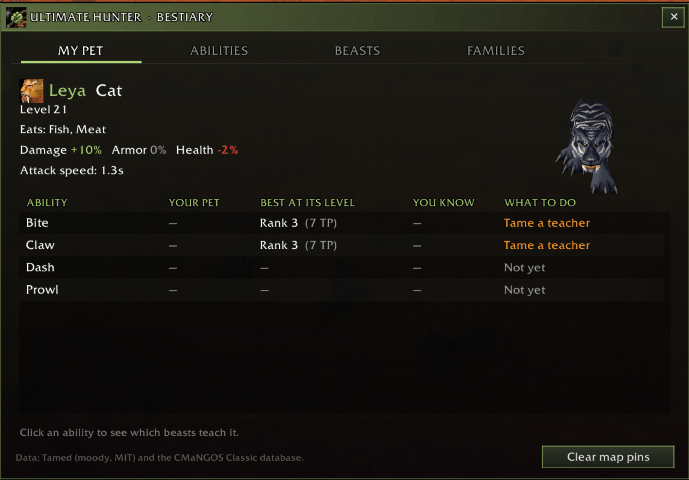
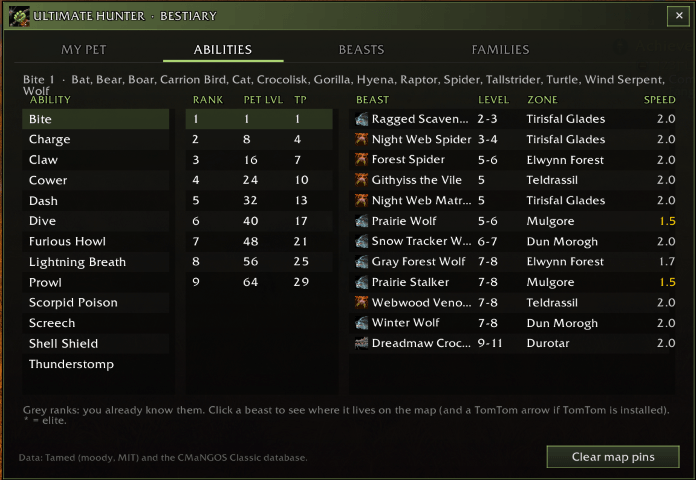
Open it with the book button on the panel or /uh pets.
• My pet: what your pet knows, the best rank at its level, what you can teach, and what to do next (train it now, or tame a beast that teaches it).
• Abilities: every ability rank (pet level, training points) and the beasts that teach it. Click a beast to see where it lives on the world map, with a TomTom arrow if TomTom is installed.
• Beasts: all 591 tameable beasts with family, level, attack speed and where they live (478 on the map, 16 in dungeons). Filter by family, by your level, or rares only (65 rares). Sorted by attack speed: a faster pet holds aggro better.
• Families: diet and damage / armor / health modifiers side by side.
• Click any column title to sort, click again to reverse.
• Family icons everywhere, map pins with the family icon, and a rotating 3D preview of each beast.
• Tooltips: hover a beast to see its family, attack speed, whether you can tame it, where it lives, its diet and what it teaches. Hover a food to see its type and whether your pet eats it.
AMMO
• Big ammo counter with the name of your arrows or bullets.
• Alerts when you run low or out.
• Reminder at merchants that sell your ammo.
COMBAT
• Range badge: green in range, red and pulsing in the dead zone (too close to shoot, too far to hit), orange in melee, grey out of range.
• Threat meter: a slim line shows who holds aggro (pet or you) and your threat compared to what pulls the target off your pet. Green to red as you get close to 100%.
• Debuff and trap timers: slim bars for your stings, Hunter's Mark and slows on the target, and your traps (armed on the ground, then their effect). Warning 3 seconds before a Freezing Trap ends.
• Aspect warnings: Aspect of the Cheetah on in combat (one hit and you are dazed), or fighting without any aspect.
• Auto Shot timer: smooth bar with a spark. Stand still in the red part, or the shot is delayed.
ALERTS YOU CONTROL
• Every alert can be turned on or off in the Alerts tab: hungry pet, pet low health (threshold, default 25%), low ammo (threshold), merchant reminder, Cheetah in combat, no aspect in combat, aggro pulled from your pet (off by default) and Freezing Trap ending.
PANEL
• Drag it anywhere, resize it with the corner grip, or minimize it to a slim bar that still shows ammo, pet, range and threat in color.
• Book button for the Bestiary, gear button for the settings, and a minimap button.
• English and French.
COMMANDS
/uh : settings window
/uh pets : Bestiary
/uh clear : clear the map pins
/uh show or hide : show or hide the panel
/uh min : minimize or expand the panel
/uh lock : lock the panel
/uh reset : reset its position and size
/uh test : test the alerts
NOTES
• Only active on hunters.
• The panel cannot be moved, resized or hidden in combat (it holds secure buttons): changes apply when combat ends.
• Pet data: Tamed by moody (MIT license) and the CMaNGOS Classic database. Family modifiers: Allakhazam. Positions marked with ~ are computed and approximate.
Ultimate Hunter Team