
MobAlert – Stay alive in Hardcore
MobAlert warns you as soon as a dangerous mob is nearby: a mob 2+ levels above you, a skull (??) or an elite. Built for WoW Classic Era and Hardcore.
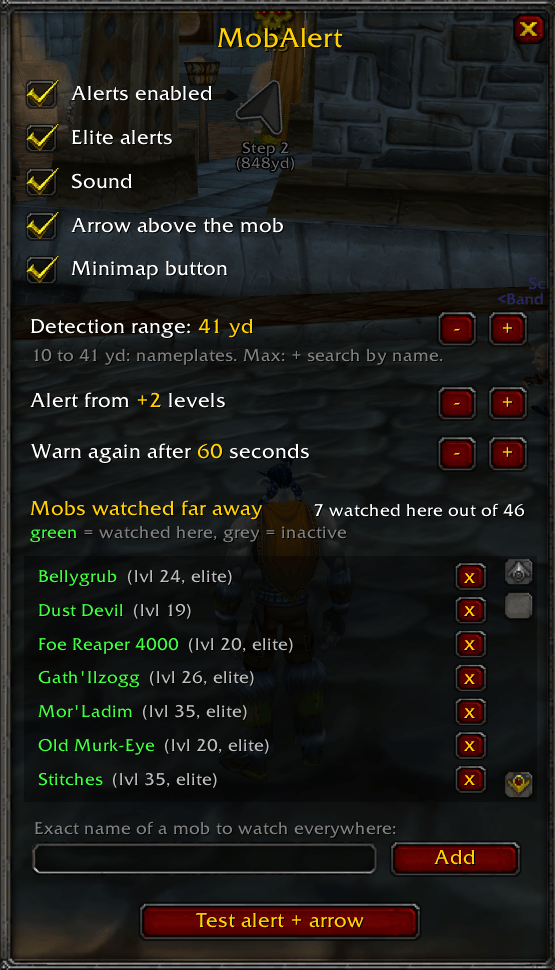
FEATURES
• Big on-screen warning + sound when a dangerous mob comes into range: "DANGER: Dust Devil (level 19)".
• Red arrow above every dangerous mob, gently bobbing, so you spot it instantly even in a crowded camp.
• "Out of sight" warning when a dangerous mob is behind you: turn your camera!
• Far detection (~100 yards) for roaming killers like Dust Devil, Old Murk-Eye, Foe Reaper 4000, Stitches or Mor'Ladim.
• Learns as you play: every dangerous mob you meet is remembered for that zone and searched for from far away next time. Mobs you outlevel are dropped automatically.
• Smart filtering: no alert for neutral (yellow) mobs unless they attack you, and none while on a flight path. When you land, MobAlert checks what is waiting for you.
• Settings window and minimap button: range, level threshold, elites, sound, arrow, alert cooldown and watched mob list.
• English and French.
HOW IT WORKS
• Near detection (10 to 41 yards, your choice): uses enemy nameplates, your target and your mouseover. Checks the real level and elite status.
• Far detection (~100 yards): searches for mobs by name. It tells you "it is around", without exact level or direction.
MobAlert turns enemy nameplates on if they are off (near detection needs them). The range setting also changes your nameplate view distance.
Why an arrow above the mob and not a compass? WoW does not let addons know where mobs are, nor measure where nameplates are on screen. Attaching an arrow to the mob's nameplate is the most the game allows.
COMMANDS
/mobalert : open the settings window
/mobalert on or off : enable / disable alerts
/mobalert range N : detection range in yards (5 to 41), or "max" for far detection
/mobalert threshold N : alert from +N levels (1 to 10)
/mobalert elites : elite alerts on / off
/mobalert sound : sound on / off
/mobalert list : mobs watched far away in this zone
/mobalert add Name : watch a mob everywhere
/mobalert remove Name : stop watching it
/mobalert test : test the alert and the arrow (target a mob first)
Minimap button: left-click for settings, right-click to enable / disable, drag to move.
NOTES
• MobAlert only warns you. It never plays for you, never targets or attacks.
• Far detection uses the same well-known technique as unitscan.
• Built-in mob names are English. On other client languages, MobAlert learns local names as you meet them.
MobAlert Team
