Screenshot 2026-10-15 013348.png
Screenshot 2026-10-13 032618.png
Description
A lightweight quality-of-life collection for World of Warcraft: Forever. A dozen small utilities in one addon, each individually toggleable with a slash command. Settings persist between sessions.
A separate addon from UlRemedy (retail). Only the features that make sense in Forever are included.
Status: tested in-game on the Forever beta client (build 1.60.1).
Since 1.10.0 the addon shares auction prices with other UlRemedyForever users on your realm, and this is on by default. Read this before you decide to keep it.
- How: addons have no network access. The only way two addons can talk is addon messages over the game's chat system. The addon joins a chat channel named
UlRemedyAH(kept out of your chat windows, but it takes a channel number) and sends addon messages there. Nobody sees them as text. - What is sent: item ID, lowest buyout per unit and the age of that price, for the prices this character saw itself at the auction house in the last 24 hours, plus a short hello on joining that says how fresh your newest price is. The chat system attaches your character name to every message, as it does to all chat.
- What is never sent: gold, bag or bank contents, other characters, and prices you received from others (nothing is relayed, so nothing echoes around the channel).
- When: after a full scan (unless someone else's broadcast came in within the last ten minutes), and on request from a newly joined user who asks the user with the freshest data for a copy, whispered as addon messages to that user only.
- What comes in: prices from others are stored when they are newer than yours and shown in the tooltip with a "shared" tag, so you can tell them apart. Everything received is checked and bounded; garbage is dropped.
- Off:
/ur auctionshareor the Price Sharing checkbox in/ur. The channel is left at once./ur ahshareshows what has been sent and received.
Auto Repair: Repairs your gear when you open a vendor. Guild bank funds first when they actually cover the cost, your own gold as fallback, and it only reports success once the repair is confirmed.
Junk Seller: Sells all grey items when you open a vendor.
Junk Deleter (off by default): When your bags are full, deletes the cheapest grey item to free a slot, so you can keep looting. It only ever touches grey (junk) items, and skips locked items, quest items and items whose vendor price the client has not cached yet. "Cheapest" means the stack with the lowest total vendor value. It stays idle while a vendor window is open, since the junk seller sells the greys there instead. Each deletion is reported in chat with the item and its value. The Forever client only lets an addon delete an item in response to a click or key press, so when the silent routes are refused a small popup appears naming the item, and one click on Delete removes it. Cancelling the popup pauses the feature until your bags have a free slot again. Turn it on with /ur junkdelete.
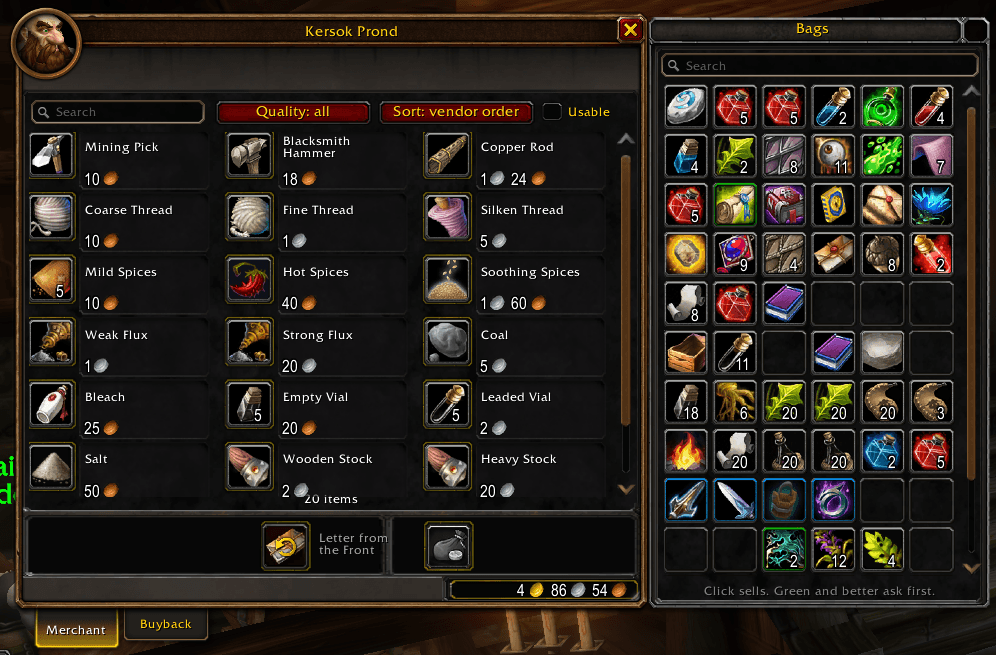
Vendor Window: A bigger merchant window. Every item the vendor sells is shown in one scrollable grid instead of ten per page, with a search box, a quality filter (all, uncommon+, rare+, epic+), a usable-only checkbox and a sort order (vendor order, name, price, quality). Drag the grip in the bottom-right corner to resize the window; it remembers its size across characters. Buying works exactly as before (right-click buys, shift-click buys a stack, drag to the cursor), because the grid uses Blizzard's own item slots. The buyback tab uses the same grid. /ur vendorreset restores the default size.
Vendor Bags: A bag panel docked to the right of the vendor window showing everything in your bags. One click sells an item; green and better items ask for confirmation first, locked items, quest items and items without a vendor value are never sold. Shift-click links an item in chat. A search box dims everything that does not match. While the panel is on, Blizzard's own bags stay closed at vendors. Turn the panel off with /ur vendorbags to get the normal bags back.
Group Invite: Auto-accepts group invites from friends, Battle.net friends and guildmates. Unknown inviters are left for you to handle.
Enhanced Trainer: Adds a Train All button to trainers that learns everything you can afford in one click.
Trainer Preview: What your class trainer has for you, without walking there. The list is learned on each visit to your class trainer (every ability and rank with its level and price, remembered per class across your characters), so visit the trainer once and it is filled in. A Trainer tab in the spellbook, to the right of Blizzard's own tabs, shows what is available now with the total price, and what is coming up at which level. Hovering a line shows the spell's tooltip. On level up a chat line names the abilities that just became available and what they cost in total. Ranks you have replaced with a higher rank do not count as missing. /ur tp prints diagnostics, /ur tpreset forgets the list for the current class.
Cursor Ring: A dusty purple ring with a soft silver glow that follows your mouse cursor, visible on light and dark backgrounds alike.
Movable Windows: The standard Blizzard windows (character, spellbook, talents, quest log, friends, guild, trainer, merchant, mail, bank, professions, and any other window Blizzard registers as a panel) and every bag can be dragged anywhere, overlap each other, and come back where you left them the next time they open. Click a window to bring it in front. The world map is included. The spellbook and talent window (one window on this client) is the exception: it stays under Blizzard's control, because detaching it breaks its cooldown display, but it can still be dragged and comes back where you left it, and windows it closes on opening are reopened. Escape still closes them. Positions are shared across your characters. /ur winreset forgets all saved positions; turning the feature off takes full effect after /reload. If your action bars ever vanish in combat, turn it off with /ur windows and /reload, and please report it.
Bag Sort Button: Blizzard's bag sort button is back on the combined bag. The Forever client draws its slot counter over the button in that corner, so it is there but cannot be seen or clicked; the addon moves it to the right end of the search box and shortens the search box to make room. Clicking it is Blizzard's own sort, nothing else. Separate bags are not touched, their backpack shows the button already.
Minimap Button: One button on the minimap for the whole Ul family. Left-click opens this addon's options, right-click opens a menu with one row per installed sibling addon (UlDungeonCompanion, UlSource), and hovering lists them. This addon is not in the menu, the left click is its row. Drag it around the minimap's edge; the spot is remembered. This addon owns the button and the menu; the others register themselves at login and have no button of their own. /ur minimap hides it, /ur hub prints what is registered.
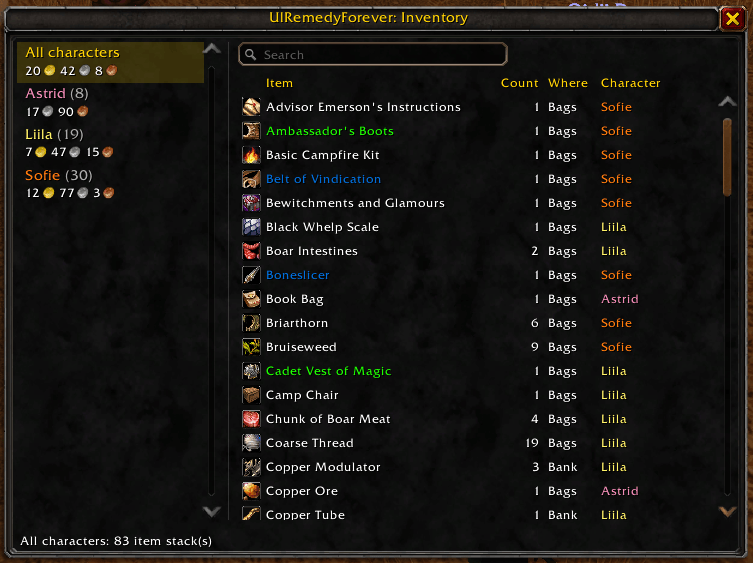
Inventory Tracker: Remembers gold, bag contents and bank contents for every character you log in with. Hovering an item shows which of your characters have it and whether it sits in their bags or bank, with a total across characters. /ur inv opens a window where you can browse each character's items (or all at once), search by name, and see gold per character and in total. Bags and gold update live; the bank is read each time you open it, so a character's bank snapshot is from their last bank visit. Characters you no longer play can be removed with the Forget character button.
Reagent Tooltip: Items that are used as a reagent in a profession recipe get a "Used by: Alchemy, Engineering" line in their tooltip. Professions this character knows are green, the rest grey. Smelting counts as Mining, so ore shows Mining next to the professions that use the bars, and rogue poison materials show Poisons. Two sources feed it. A shipped table generated from game data by tools/build_reagents.py (currently from the vanilla 1.12 database, so it does not know recipes that are new in Forever), and what the addon learns in play: every time a profession window has its recipe list up, every recipe's reagents are read and remembered account-wide. Open each of your professions once and the line is right for Forever for those professions, on all your characters. Recipes the window does not list (unlearned drop recipes) are not seen, so learning only ever adds professions to an item, never removes one. /ur rs shows what has been learned, /ur rsreset forgets it.
Auction Prices: Items get an "Auction:" line in their tooltip with the lowest buyout per unit the auction house showed last time, and how long ago that was, right under the vendor sell price and in the same coin format. For a stack, a second line gives the price of the whole stack ("Auction x20:"). The game has no price database to ask, so the addon remembers what the auction house shows while you are there: everything you browse or search for is remembered on its own, and the whole list is read quietly each time you open the auction house when the last full scan is more than 15 minutes old (as often as the client allows). The quiet scan is read slowly, a few hundred auctions per frame, so it is not felt; the Scan prices button in the auction house window does the same at once. Prices are kept per realm and faction, account-wide. No average and no history, just the last thing the auction house showed. /ur ah prints what is known and which auction house data the client delivers, /ur ahresetforgets the prices for this realm and faction.
Price Sharing: Swaps auction prices with other UlRemedyForever users on your realm over a hidden chat channel, so one person's auction house visit fills everyone's tooltips. Shared prices are tagged "shared" in the tooltip and never override a price you saw yourself in the last ten minutes. See Price sharing: what leaves your machine at the top for exactly what is sent. /ur ahshare prints diagnostics.
Flight Paths: Shows every flight master for your faction on the world map, including the ones you have not discovered yet. Undiscovered ones are tinted red, drawn slightly larger and have a pulsing red ring behind them; the ones you know are drawn as the normal faction icon. On a continent map (all of Eastern Kingdoms or Kalimdor) every icon is drawn a quarter smaller so they do not crowd each other; zone maps keep the full size. The locations come from the Forever client's own flight path table (so new Forever zones such as Riverglades and Mount Hyjal are included) and are projected onto whichever map you have open. Flight points the game already draws itself are left alone. Clicking a pin sets a map waypoint where the client supports it. The Forever client currently reports every flight path as known, so the addon keeps its own list instead: each time you open a flight master, every path you can fly to from there is saved for that character (paths the flight master lists as unreachable are ignored, since on Forever that includes undiscovered ones). Until you have done that once, all paths show as undiscovered. /ur fpprints diagnostics for the open map.
Transports: Shows boats, zeppelins, the Deeprun Tram and the Darnassus portals on the world map, each with a tooltip naming where it goes. Dock and tower positions come from the Forever client's transport route table, and the tram and portal positions from its area trigger table, so the Forever-only routes (Stormwind Harbor, Southshore, Powderfuse Port, Zephras Isle) are included. Clicking a pin sets a map waypoint where the client supports it.
Zone Levels: The level range a zone is meant for and whose territory it is (Alliance, Horde, Contested), under the zone's name when the mouse rests on it on a continent map, colored for your level: yellow fits, green is easy, orange is soon, red is too high, grey is outgrown. The retail map has this line built in, but the Forever client has no level data for its zones, so the line stays empty; the addon fills it, and steps aside for any zone the client does give a range. The ranges are Forever's own, read from the beta client by ForeverChanges (tools/fetch_zones.py regenerates the table), and they differ from the classic ones in most zones. Zones the client has no range for yet (Mount Hyjal, Shen'dralas) show nothing. /ur zones prints every zone with its range and the zone maps the data does not know.
Loot Rolls: While a group loot roll is running, a small window lists every group member with what they chose (Need, Greed, Pass, Disenchant) and what they rolled, under the item's icon and name, so several rolls at once stay apart. The winner is shown for a few seconds after the roll ends. It sits to the right of the party frames by default; /ur rollside (or the button in /ur) cycles between right of the party frames, left of them, above the chat, and free, and dragging the window anywhere makes it free. /ur rolltest shows a fake roll with your current group so you can place it. The choices come from the game's loot history (the same data as Blizzard's loot history window), with the loot messages in chat as a fallback on clients that still print them.
UlRemedyForever Team