UlDungeonCompanion
- By
WoW: Forever companion that finds the dungeons, dungeon quests and elite quests that fit your level, on the world map and in a browser window.
Screenshot 2026-10-15 013419.png
Screenshot 2026-10-15 013430.png
Description
A companion for World of Warcraft: Forever players who want to level on their own terms but not miss the group content. It finds the dungeons, dungeon quests and elite quests that fit your level and shows them on the world map and in a browser window. Every feature can be switched off, and settings persist between sessions.
Status: 0.5.0, first release, tested on the Forever beta client (build 1.60.1). Dungeon entrances and quest markers are verified in game. Forever's own dungeons and quests come from community data (see below) and grow with the beta.
Dungeon Entrances: Every dungeon and raid entrance on the world map, with the level range in the tooltip colored for your level: yellow fits, green is easy, orange is soon, red is too high, grey is outgrown. Instances with several wings (Scarlet Monastery, Blackrock Spire, Maraudon, Dire Maul) list each wing with its own range. Instances the map already draws itself keep the game's pin and get the level line added to its tooltip instead. On the continent maps the pins are drawn a quarter smaller so they do not crowd the map; zone maps keep the full size. Clicking a pin marks the entrance. /udc dungeons prints the whole list sorted by level, /udc pins prints diagnostics for the open map.
Entrance positions come from the vanilla 1.12 area trigger tables and are projected onto whichever map is open, so Forever's maps need no coordinate tables of their own. Level ranges are the classic ones. The four Forever dungeons open in the beta (The Hall of Thanes, Ruins of Lordaeron, Excavation Site: Wetlands, City of Dalaran) use the map positions the client shows, as read by ForeverDB; the five announced for later (The Drowned City, Krol'dok Stronghold, Alcaz Prison, Blackmaw Hold, Shaper's Terrace) are added when the beta opens them.
Quest Givers: The givers of the dungeon quests and elite quests you can go for, as quest markers on zone maps: pastel pink with a small dungeon or raid badge for steps that lead into an instance, pastel light blue for elite quests in the open world. A dungeon quest is any quest, or any quest chain, that at some point requires entering an instance. The whole chain counts, and the marker points at the first step you have not done yet, so a chain that ends in the Deadmines starts with its first quest in Westfall. The tooltip lists the step, what it leads to and in which instance, with levels in the game's difficulty colors. Quests you have already completed are left out (the client knows, even for quests never in your log), and so are steps already in your log, since the game tracks those itself. Faction, race and class restrictions come from the data, your character's from the client. Shown are goals from eight levels below you to six above. Clicking a marker on the map marks the giver (see the hub).
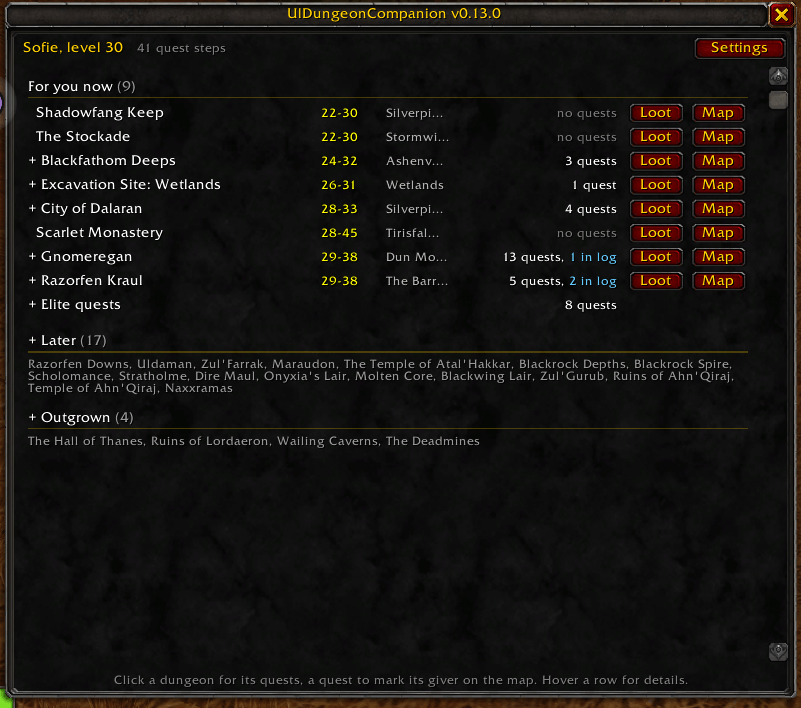
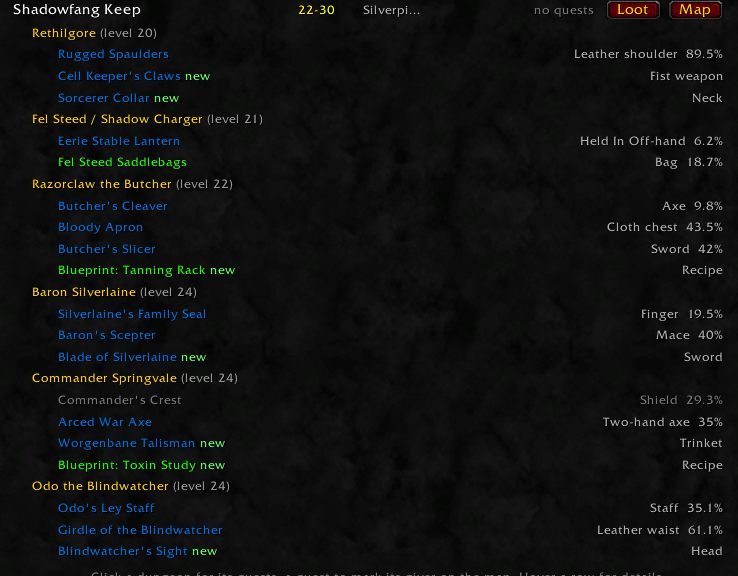
Hub: /udc opens one window that answers "what can I do now?" the moment it opens. Every dungeon and raid your faction can enter is listed once, sorted by level, under "For you now" (fits or easy), "Soon" (within five levels), and "Later" and "Outgrown" folded into a line of names each (click the heading to unfold). A row shows the level range in the colors above, the zone and how many quest steps lead there; the rows start folded, click one to fold its quests out underneath, hover a quest for the chain, click it to mark the giver on the map and open the map there. Markers are the addon's own, so any number can be set at once; a marker stays on the map until you right-click it (or click the row again), and a quest's marker goes away when the quest is done. Quests whose giver stands inside the instance, or that start from an item found there, mark the entrance instead. The Map button marks the entrance, the Loot button folds out the notable drops inside: one line per boss or named creature, its items in quality colors with slot and drop chance, dimmed when your class cannot use them. Hover an item for the game's tooltip, click it to put the link in an open chat box. Elite quests in the open world have a row of their own. The feature switches live behind the Settings button.
The dungeon loot comes from ForeverChanges via tools/fetch_loot.py: every boss and rare spawn of the 23 dungeons it covers, with the drops players have seen in the beta, Forever's own additions marked new, and drop chances where known (290 bosses, about 1800 items). The raids are not on the site, so they use loot data generated from the vanilla 1.12 database by tools/build_loot.py (26 instances, about 390 creatures and chests, about 2900 items): every creature in an instance that drops an uncommon item at 10 % or more or a rare-or-better item at 3 % or more, every chest with something rare, plus the bosses the instance scripts spawn, with loot references followed and group chances spread; once a creature counts, its rare items from 1 % and uncommon items from 3 % are listed. Forever may have retuned loot, and its own dungeons have no loot data yet.
The quest data is generated from the vanilla 1.12 database by tools/build_quests.py (1400 quests: every dungeon, elite and raid quest plus every quest leading up to one, with givers and positions). Every quest the addon is about to show is checked against the server once: quests Forever has removed are hidden, and Forever's own title and level are used where they differ from the old data. The answers are kept between sessions and refreshed after a week.
Quests that are new in Forever (the new dungeons' quests and the reworked chains, such as Alba Fairmoon's road to the Deadmines) come from ForeverChanges, which reads the beta client and Wowhead's Forever database, via tools/fetch_forever.py (78 quests, givers with map positions). The beta only has content up to its current level cap, so the data grows with the beta; vanilla quests Forever kept are covered by the vanilla data.
Minimap menu: No minimap button of its own. When UlRemedyForever is installed, its minimap button's right-click menu gets a "Dungeon Companion" row that opens the hub. UlDungeonCompanion registers itself there at login and works unchanged without it. One optional dependency in the TOC, one global read, nothing else shared.
UlDungeonCompanion Team