Twisteds Combat Cues
Custom combat-safe sound, visual, and chat alerts with built-in focus, raid marker, interrupt, and stun tools.
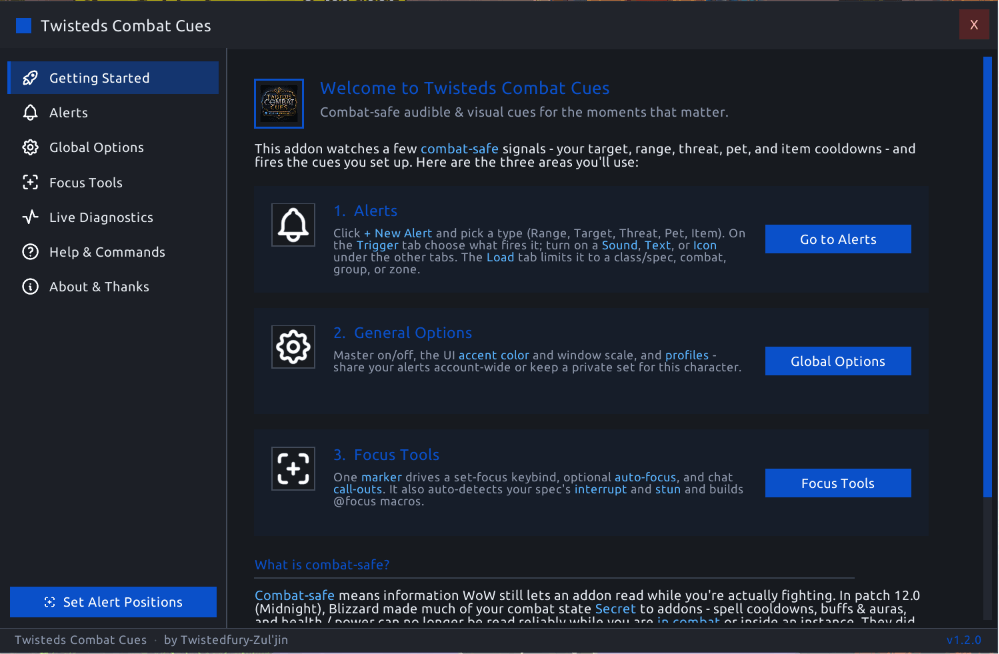
Getting Started.png
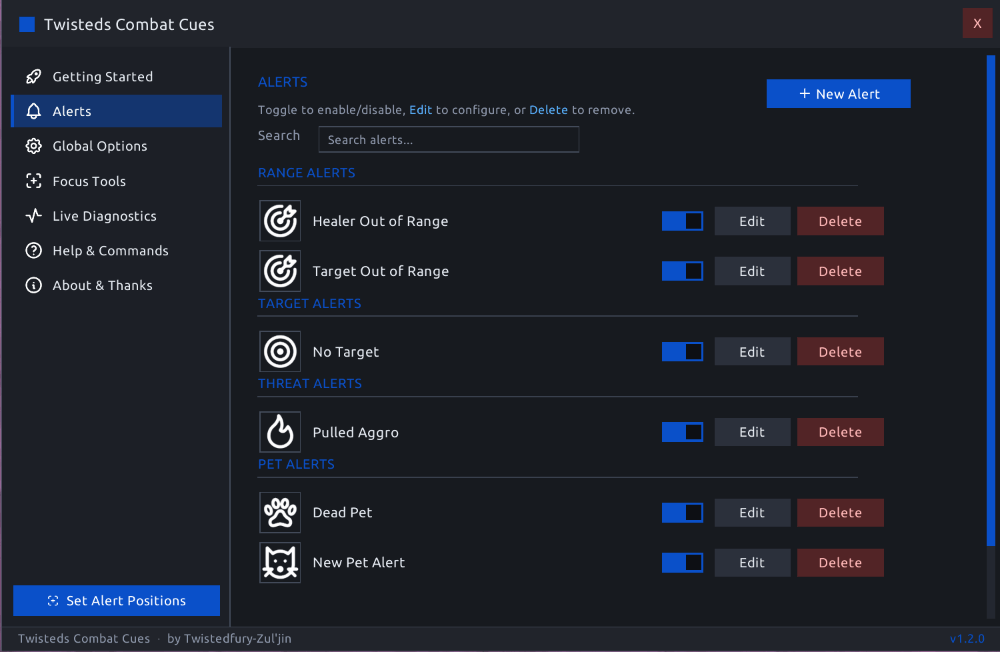
Alerts Page.png
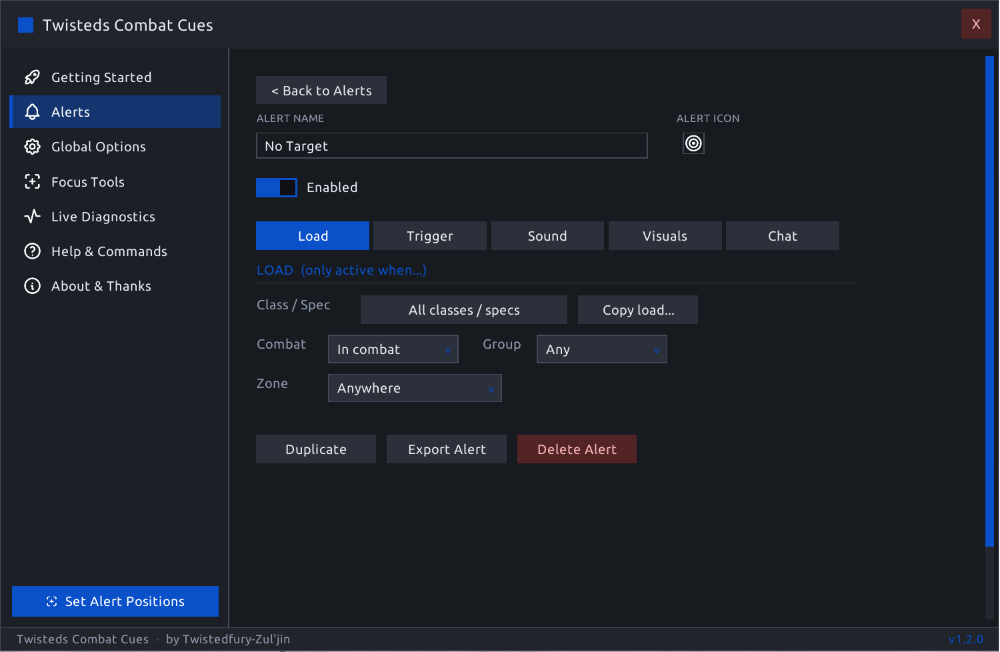
Alerts Editor.png
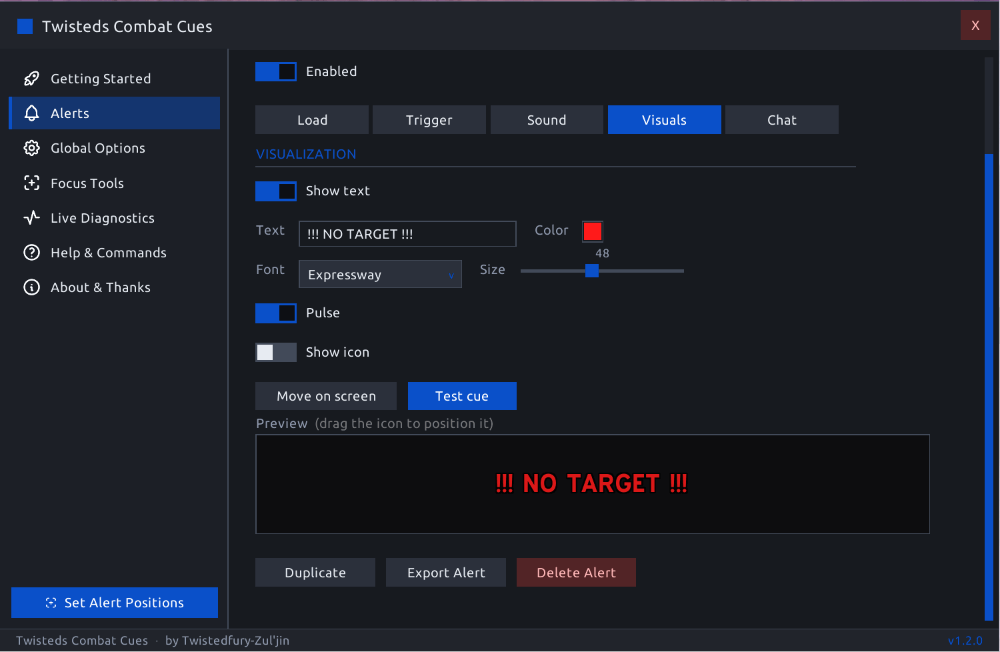
Alerts Editor 2.png
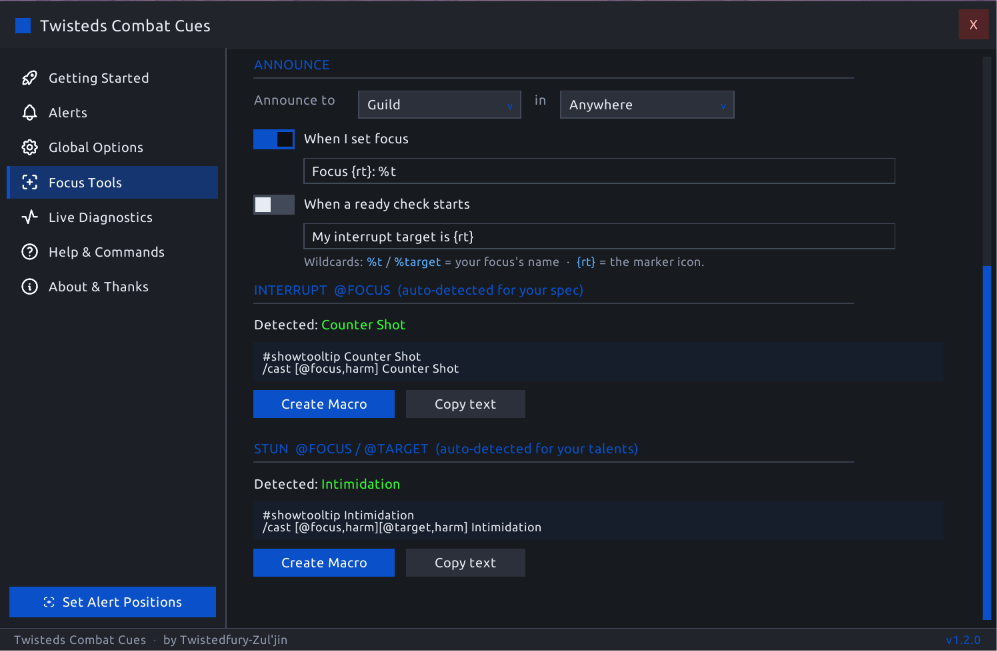
Focus Tools 1.png
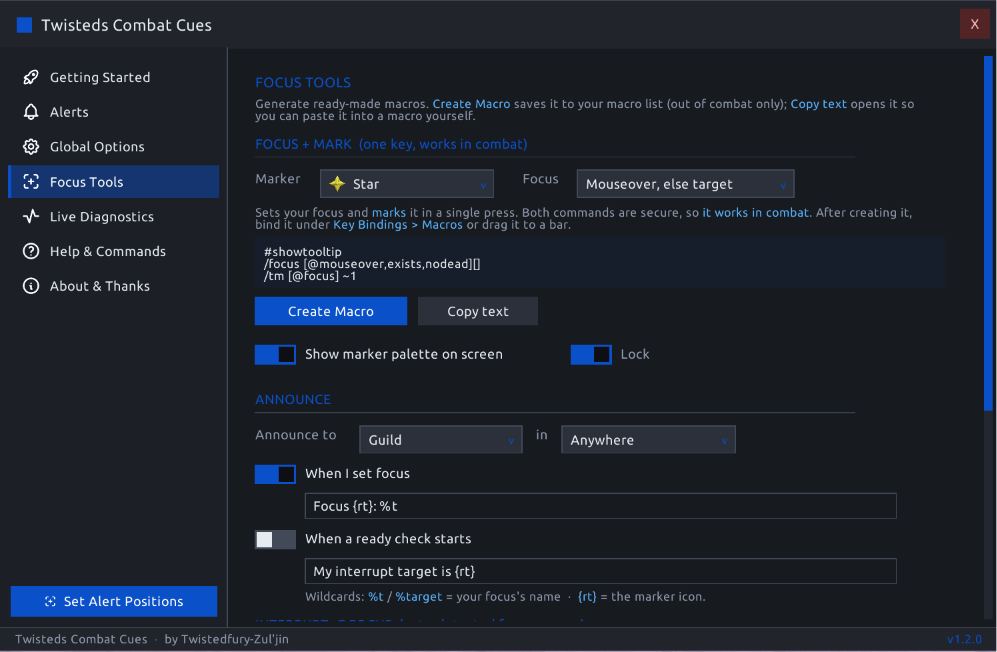
Focus Tools 2.png

Marker Mini Bar.png
Description
Twisteds Combat Cues
See the Fight. Hear the Moment.
Twisteds Combat Cues, or TCC, is a lightweight combat-awareness addon for World of Warcraft Retail. Create custom audible, visual, and chat alerts for combat conditions that remain available to addons under the Midnight combat API.
TCC can warn you when you lose your target, move out of range, pull aggro, lose your pet, or have an item come off cooldown. It also includes a focused set of tools for marking targets, managing focus, announcing assignments, and generating spec-aware interrupt and stun macros.
No scripting or theorycrafting is required. Choose a condition, select the feedback you want, and let TCC notify you when it happens.
Public Beta
TCC is functional and has been extensively tested by the author, but this release still needs broader testing across different classes, specializations, talents, group sizes, and types of content. Bug reports and feedback are welcome.
What TCC Does
TCC creates alerts from combat information that World of Warcraft still allows addons to evaluate reliably during combat.
Available alert conditions include:
- Target state
- Spell range
- Group-member range
- Threat status
- Pet status
- Item and trinket cooldown state
- Advanced combinations using nested AND/OR logic
When an alert becomes active, TCC can:
- Play a sound
- Display customizable on-screen text
- Display an icon
- Pulse the visual alert
- Send a message to chat
- Repeat the notification at a configurable interval
Each alert can be restricted by class, specialization, combat state, group type, and content type.
Alerts
Every cue is stored as an individual Alert. Alerts appear in a searchable list with their own icon, enable toggle, editor, and delete control.
Range Alerts
Trigger an alert when:
- A selected spell is in range
- A selected spell is out of range
- A healer, tank, or damage dealer is out of range
The spell used for the range check is selected by you, allowing the alert to match the practical range of an ability from your own toolkit.
Target Alerts
Trigger an alert when you:
- Have no target
- Have any target
- Have a hostile and living target
- Have a dead target
- Have an attackable target
A simple NO TARGET alert is especially useful for ranged players who may not immediately notice that their previous target died or became invalid.
Threat Alerts
Trigger an alert when:
- You pull aggro
- You have high threat and are close to pulling aggro
- Your threat is safe
Pet Alerts
Trigger an alert when your pet is:
- Dead
- Missing
- Alive
Pet alerts are useful for Hunters, Warlocks, and other specializations that depend on an active pet.
Item Alerts
Monitor a usable item such as a trinket, potion, or other on-use item.
Trigger an alert when the selected item is:
- Ready for use
- Currently on cooldown
For item alerts, TCC can automatically use the item's own icon.
Advanced Alerts
Advanced Alerts let you combine supported conditions using custom AND/OR logic.
Features include:
- Nested condition groups
- Mixed AND/OR rules
- Colored group boxes
- A plain-English summary of the completed rule
- Access to all supported combat-safe conditions
This provides more control without requiring custom Lua or scripting.
Alert Editor
Each alert uses a tabbed editor.
Load
Choose when and where the alert is allowed to run:
- One or more classes
- One or more specializations
- In combat or out of combat
- Solo, party, or raid
- Open world
- Dungeon or Mythic+
- Raid
- Arena
- Battleground
- Scenario
Load settings can also be copied from another alert.
Trigger
Configure the condition that activates the alert.
Trigger settings are written as a readable sentence, such as:
Fire when Spell [Kill Command] is out of range.
An optional Grace Period requires the condition to remain active briefly before the alert fires. This helps prevent momentary target, range, or state changes from producing unnecessary notifications.
Sound
Choose from:
- Bundled cue sounds
- Supported Blizzard alert sounds
- A configurable repeat cooldown
- Optional looping
Visuals
Create an on-screen alert with configurable:
- Text
- Color
- Font
- Size
- Position
- Pulse animation
- Icon
Icons can come from:
- Blizzard spell artwork
- Item artwork
- TCC's bundled icon set
Multiple alerts can appear at the same time, and each alert can have its own screen position.
Use /tcc move to display and reposition all configured alert locations together.
Chat
Send a custom message to:
- Yourself
- Say
- Yell
- Party
- Raid
- Instance
- Guild
- Officer
- Emote
Focus Tools
TCC includes a compact set of tools for focus-based gameplay.
Focus + Mark Macro
Generate a single macro that sets your focus and applies your selected raid marker in one press.
Available focus sources include:
- Mouseover, then current target as a fallback
- Current target only
- Mouseover only
The resulting macro can be assigned through the standard macro keybindings or dragged directly onto an action bar.
On-Screen Raid Marker Palette
Enable an optional movable palette containing all eight raid markers.
Select a marker to:
- Focus your current target
- Apply the selected raid marker
- Set that marker as your preferred focus marker
The palette is useful when another player is already using your normal marker or when assignments change between encounters.
Focus Call-Outs
Announce your focus:
- When focus is set
- When a ready check begins
Call-outs can also be restricted by content type, allowing them in Mythic+ without also posting them in raids, for example.
Interrupt Macro
TCC detects an appropriate interrupt for your current class, specialization, and selected talents, then generates an @focus interrupt macro.
Supported detection includes class and talent variations such as:
- Solar Beam
- Spell Lock
- Axe Toss
- Muzzle
- Avenger's Shield
- Divine Toll
- Other specialization-specific interrupt options
Classes or specializations without an available interrupt are identified clearly.
Stun Macro
TCC can also detect an appropriate targeted stun and generate a focus/target stun macro based on your class and selected talents.
Generated macros are character-specific. After saving, TCC opens the standard macro window so the macro can be dragged directly onto an action bar.
Additional Features
Live Diagnostics
Use /tcc debug to open a real-time diagnostic display containing the information evaluated by the alert engine.
Diagnostics include:
- Combat state
- Target state
- Instance type
- Threat
- Range
- Pet status
- Class and specialization
- Protected-value restrictions
- Item cooldown testing
- Addon CPU usage
- Addon memory usage
This page is particularly useful when testing an alert or preparing a bug report.
Profiles
Use:
- Account-wide profiles
- Character-specific profiles
- Copy settings between profiles
Import and Export
Share:
- One individual alert
- An entire alert configuration
Imported data is parsed through TCC's controlled import process rather than executed as arbitrary Lua.
Built-In Help
TCC includes:
- A Getting Started walkthrough
- Alert documentation
- Focus Tools documentation
- Options help
- A complete slash-command reference
Custom Interface
TCC uses a self-contained interface with:
- Dark styling
- Recolorable accent colors
- Custom dropdowns and toggles
- Tabbed alert editors
- Spell and item search
- Icons and tooltips
- A minimap button
The larger spell and item search database is contained in a load-on-demand companion module and remains unloaded until a picker requiring it is opened.
Getting Started
- Type
/tccto open the addon. - Select Alerts.
- Click + New Alert.
- Choose Range, Target, Threat, Pet, Item, or Advanced.
- Configure the condition under Trigger.
- Enable the desired sound, visual, or chat response.
- Use Load to restrict the alert by specialization or content type.
- Click Test to preview the completed alert.
New installations begin with no alerts enabled, allowing you to create only the notifications you need.
Example Alerts
No Target
Condition: You have no target Response: Display NO TARGET in the center of the screen
Out of Range
Condition: Your selected primary ability is out of range Response: Play a short chime
Aggro
Condition: You pull aggro Response: Display AGGRO! and play an alert sound
Pet Dead
Condition: Your pet is dead Response: Display a pet warning
Trinket Ready
Condition: Your selected trinket is ready Response: Play a short sound while inside a dungeon
Slash Commands
| Command | Function |
|---|---|
/tcc |
Open or close TCC |
/tcc alerts |
Open the Alerts list |
/tcc macros |
Open Focus Tools |
/tcc debug |
Open Live Diagnostics |
/tcc options |
Open the Blizzard addon options |
/tcc on |
Enable all configured cues |
/tcc off |
Disable all configured cues |
/tcc test |
Play a test cue |
/tcc move |
Reposition on-screen alerts |
/tcc status |
Print the current alert status |
/tcc reset |
Reset the active profile after confirmation |
Installation
Install TCC through the CurseForge application or download the approved CurseForge file and extract it into:
World of Warcraft\_retail_\Interface\AddOns\
The package contains:
TwistedsCombatCuesTwistedsCombatCues_DB
The database module is optional at runtime. Without it, TCC continues to operate, but spell and item searches are limited to known spellbook entries and manually entered IDs.
A full game restart is recommended after the first installation so newly added textures, sounds, and fonts are indexed correctly.
Combat API Limitations
World of Warcraft Midnight protects some combat information from addon code through restricted or Secret values. Depending on the player's state and location, protected values cannot be reliably compared, calculated, or used to make alert decisions.
TCC intentionally limits its triggers to information that can be evaluated safely and reliably for its intended use.
As a result, TCC does not currently offer combat alerts based on:
- Spell cooldown readiness
- Buff or debuff presence
- Aura duration or remaining time
- Health percentage
- Resource percentage
Item cooldowns, target state, supported range checks, threat, and pet state use separate information that remains available for TCC's supported alerts.
The protection state and the values available to TCC can be viewed through /tcc debug.
Additional limitations:
- Range checks are based on the selected spell.
- Spell and item selections are internally stored by ID.
- The search database is generated from a patch-specific snapshot.
- Newly added spells or items may require manual ID entry until the database is updated.
- Secure focus and marker actions can be used during combat, but creating or editing saved macros remains restricted during combat by the game.
Beta Feedback
TCC is currently in public beta.
Testing is especially helpful for:
- Classes and specializations not regularly played by the author
- Talent-dependent interrupts and stuns
- Pet behavior
- Group-member range alerts
- Raid and PvP environments
- Advanced nested conditions
- Profile copying
- Import and export
- Unusual screen resolutions or UI scales
When reporting a problem, please include:
- TCC version
- Class and specialization
- Selected talents, when relevant
- Alert type
- Expected behavior
- Actual behavior
- Any Lua error
- A screenshot of
/tcc debug, when applicable
Bug reports and feature requests can be submitted through the CurseForge project comments or the project's listed community links.
Credits and Third-Party Material
- WeakAuras provided major inspiration for TCC's audible combat-cue concept. TCC is not affiliated with WeakAuras and is not intended to be a WeakAuras replacement.
- Some bundled cue sounds originate from the WeakAuras project and are redistributed under the applicable WeakAuras license and attribution requirements.
- EllesmereUI provided visual inspiration for portions of the panel layout. No EllesmereUI code or artwork is claimed as original TCC material.
- Tabler Icons are used under the MIT License.
- wago.tools exports are used to help generate the spell and item search index.
- World of Warcraft names, icons, artwork, and related assets are property of Blizzard Entertainment.
No affiliation with or endorsement by WeakAuras, EllesmereUI, Tabler Icons, wago.tools, Blizzard Entertainment, or their respective contributors is implied.
Created by Twistedfury-Zul'jin
Twisteds Combat Cues Team