TweakIdentifier - Who changed my frame?!
- By
A tool that identifies which addon created or alters a frame. Dependency-free (no libraries, no XML). Observe-only via taint-safe hooks.
Overview
Description
TweakIdentifier
"Which addon keeps moving my minimap?" — point at the frame, and TweakIdentifier tells you.
Ever had a button drift, a panel go invisible, a bar get the wrong font, or a mystery frame show up — and no idea which of your 40 addons did it? TweakIdentifier watches a frame and names the culprit. It's a diagnostic tool: it only looks, it never changes your UI.
- 🔎 Names the addon that created a frame, and every addon that's messing with it.
- 🖱️ Point-and-click picker — hover any frame on screen, even ones you can't click.
- 🧾 Builds a case file per frame — what was changed, by whom, how many times — and remembers it across reloads and sessions.
- 🪶 Featherweight & safe — no libraries, nothing to configure, never touches the addons it's inspecting.
Quick start
- Open it: type
/twidto open the window (or/tifor short). - Aim: click Pick (or type
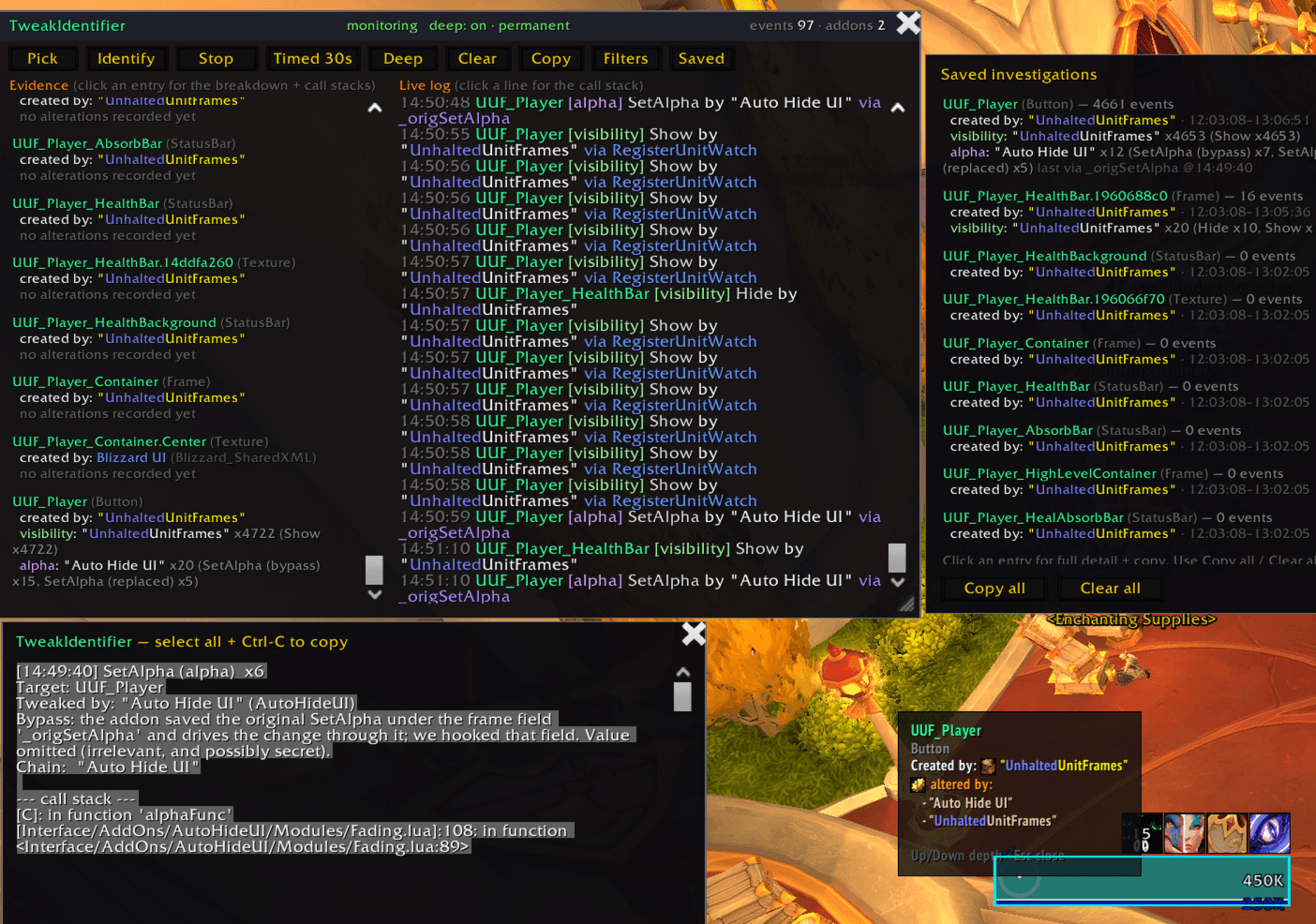
/twid pick), then move your mouse over the frame you're curious about. A cyan outline shows what's highlighted and a tooltip tells you what it is.- The thing you want is often behind something else. Tap Up / Down to step through the stack of frames under your cursor until the right one is outlined.
- Select: press Enter to start watching it (or Esc to cancel).
- Read the answer: the Evidence panel fills in with the frame's creator and a list of every addon touching it, grouped by what they did (moved it, hid it, recolored it…). The Live log shows changes as they happen — click any line to see the full detail.
- Just curious who made it? Use Identify (
/twid identify) instead of Pick — it tells you about whatever you hover, without starting a watch.
💡 Want frame creators named? Turn on Deep investigation (
/twid deep). It asks to reload once, then it can tell you the exact addon that built a frame — not just who's changing it. See below.
What it can tell you
| Question | Answer |
|---|---|
| Who created this frame? | The addon that built it (with Deep investigation on). |
| Who is changing it right now? | Every addon caught moving, hiding, restyling… it. |
| What's under my cursor? | The full stack of frames at that spot — even click-through ones. |
| What's happened to it over time? | A running tally that survives reloads and logouts. |
| Do several addons fight over it? | Yes — all of them are listed, not just the first. |
It recognizes changes in these areas: position, size, show/hide, transparency, layering, re-parenting, drag/resize, mouse & keyboard input, scripts, textures & colors, text, and fonts — plus brand-new frames appearing on screen. Each shows up with a colored tag so you can tell at a glance what kind of change it was.
Slash commands
/twid — also /tweakid or /ti.
| Command | What it does |
|---|---|
/twid |
Open / close the window |
/twid pick |
Aim at a frame and start watching it |
/twid identify |
Just tell me who made the frame I'm hovering |
/twid name <Frame> |
Watch a frame by name, e.g. /twid name PlayerFrame |
/twid start / stop |
Start / stop watching |
/twid timed [sec] |
Watch for a set number of seconds, then stop (default 30) |
/twid deep [on/off] |
Turn Deep investigation on or off (asks to reload) |
/twid deep persist [on/off] |
Keep Deep on across reloads |
/twid clear / copy / saved |
Clear the log / copy a report / browse saved cases |
/twid simple / detail |
Less or more detail in the hover tooltip |
/twid show / hide |
Force the window open or closed |
In Pick mode: Up / Down change which frame is highlighted, Enter selects, Esc cancels.
Deep investigation
Naming the addon that created a frame needs a bit of extra engine help that has a small performance cost, so it's off by default and opt-in.
- Type
/twid deep(or click Deep). It explains the one-time reload, then reloads. - After that, frame creators get named, and certain "hidden" changes — ones some addons route through Blizzard's system where the real culprit is normally invisible — get traced back to the addon responsible.
- It's tidy about it: if you already had the setting on, it leaves it on; if TweakIdentifier
turned it on, it switches itself back off the next time you log in so nothing lingers.
Use
/twid deep persistif you'd rather keep it on.
If you don't turn Deep on, everything else still works — you just get a best-guess for creators instead of an exact name. The window will nudge you to enable Deep if it spots a change it can only fully explain with it.
Works on
Every flavor of WoW: Midnight / Retail (12.0+), Cataclysm Classic, MoP Classic, Classic Era, and TBC / Anniversary.
The only difference: pinpointing the addon that created a frame relies on a Retail (12.0+) feature. On the Classic flavors that line simply reads "creator unknown" — everything else (the picker, the live watching, the evidence, and Deep's hidden-change tracing) works the same everywhere.
Good to know
- It's a diagnostic tool, not a UI editor. It reports who changes your frames; it never changes them itself.
- Picking is paused in combat (a WoW restriction on the picker), and resumes when combat ends. Watching keeps running through combat.
- The watch lasts until you reload. Switching to a new frame just changes what's reported;
a
/reloadclears everything cleanly. - Made a bug report? Hit Copy for a ready-to-paste summary of what TweakIdentifier found — handy for telling an addon author exactly what their addon is doing.
TweakIdentifier - Who changed my frame?! Team

Owner