TustUI - EllesmereUI Companion Tools
- By
Shape EllesmereUI around the way you play with flexible Data Bars, customizable chat, enhanced XP and faction bars, and everyday shortcuts. An Enhanced Quest Tracker is coming soon. Requires EllesmereUI.
EnhancedXP Settings.png


SimpleNameplates2.png

DataBar2.png

3rdPartyDataText2.png

Volume Data Bar.png
Description

TustUI
TustUI is an independent companion addon for EllesmereUI. It adds flexible Data Bars, a customizable chat, enhanced XP and faction bars, and a collection of useful tools without asking you to replace your whole UI.
TustUI supports Retail WoW and the current WoW Forever beta. The settings automatically account for features that are unavailable on a particular client or require an optional EUI module.
TustUI requires EllesmereUI. It is not a standalone UI and does not modify EllesmereUI's files.
TustUI is independently developed and is not affiliated with, endorsed by, or maintained by the EllesmereUI team.
The EllesmereUI team does not provide support for TustUI.
Please send TustUI questions and bug reports to the TustUI project.
Enhanced Quest Tracker is coming soon
TustUI's Enhanced Quest Tracker is currently in public beta and is getting close to its stable release. It brings quests and instance objectives into one movable, resizable window that uses familiar EllesmereUI controls and styling.
- Follow campaign and regular quests alongside world quests, bonus objectives, achievements, profession recipes, the Traveler's Log, Endeavors, Delves, dungeons, and scenarios.
- Arrange tracker sections in EUI's reorder menu. You can keep the instance block fixed above the scrolling quest list or let it follow your chosen section order.
- Use Current Zone Quests to keep the regular quest section focused on your area while retaining your focused quest and quests without a single destination.
- Keep quest items and scenario abilities in a side drawer with tooltips and cooldowns. The drawer can use tracked quests or every active quest in your log.
- Open the map, share, focus, untrack, and use other available quest actions from the tracker. Completed quests switch to turn-in directions, and auto-complete quests get a clickable completion card.
- Choose separate Collapse and Hide conditions, hide the tracker when it is empty, collapse individual sections, and keep manual show or collapse choices until the automatic context changes.
- Adjust width, maximum height, scale, fonts, outlines, backgrounds, borders, section colors, and separators. Move the tracker with EUI Unlock Mode.
- Track recipe and recraft reagents, with a Profession Search shortcut when Auctionator is available at the auction house.
- Use confirmed Untrack All and Abandon All actions when the quest log needs a cleanup.
The tracker steps aside while EllesmereUI's Mythic+ timer is visible. Its beta also includes testing tools for exporting settings, checklists, notes, and Lua errors so feedback can include the details needed to reproduce a problem.
You can try it now from the project's Files tab by choosing the latest Early Beta build. The beta shares your TustUI settings, so back them up before switching between stable and beta versions.
Data Bars
Build bars around the information and shortcuts you use. They share EllesmereUI's visual language, and each bar can have its own blocks, layout, appearance, and visibility rules.
- Create multiple horizontal or vertical bars, reorder their blocks, change spacing and sizing, or let Auto Fit Content handle the width. Visibility choices include Always Show and combat conditions.
- Start with TustUI Top Bar, TustUI Micro Menu Strip, another available preset, or an empty bar. The Top Bar follows the screen width across resolutions and UI scales. Presets carry layout choices only; they never copy character gold or other installation-specific data.
- Add clock, FPS, latency, location, coordinates, gold, bags, durability, combat status, item level, XP or reputation, currencies, crests, professions, specialization and loot spec, Travel Info, travel cooldowns, Great Vault, audio, and micro-menu blocks where the client supports them.
- Tune backgrounds, fonts, icons, borders, textures, opacity, offsets, layering, and texture brightness.
- Show a clock, combat timer, or both during combat, with separate fonts. Tooltips can show saved lockouts, difficulty and boss progress, plus total and per-addon memory use.
- Left-click the Durability block to summon a repair mount or use a configured repair-item fallback. Right-click it to summon a random owned auction house mount. Other blocks open their related windows, adjust audio, or expose the action that makes sense for their data. Supported blocks can use Blizzard or EUI icon styles, and micro-menu buttons can be reordered.
- Add compatible LibDataBroker feeds through Broker Plugin or External Data Text blocks. External Data Text supports labels, icons, tooltips, and click controls, including an addon's own detailed tooltip. Optional integrations include AlterEgo, Northern Sky Raid Tools, and Myu's Knowledge Points Tracker.
Chat
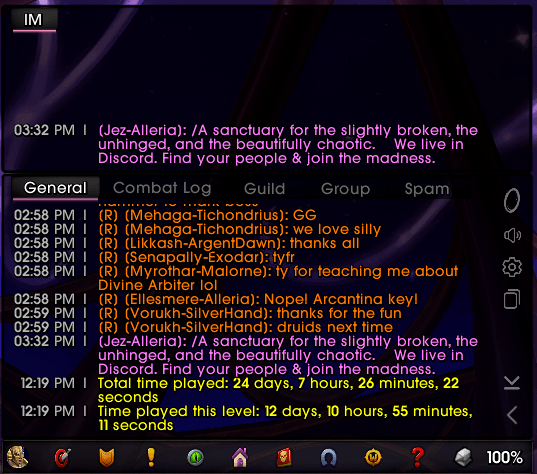
When TustUI Chat is enabled, it takes ownership of the main chat panel and permanent undocked windows and turns off the EUI Chat module. This keeps one chat system in control.
- Choose EllesmereUI, Blizzard, Classic, or Forever artwork where available, then adjust backgrounds, textures, fonts, outlines, input fields, and supported borders. Settings that do not apply to the selected artwork stay disabled.
- Style tab backgrounds, fonts, borders, and active or inactive colors. Tab borders underline the active tab. Tabs can sit inside the panel, share its border, and extend an attached sidebar into the tab row.
- Put the sidebar on either side, change its icon size and spacing, choose its shortcuts, and decide whether it shares the chat border or stands on its own.
- Move the main panel with EUI Unlock Mode. Permanent undocked windows can be dragged, docked, resized, and given their own fade timing. Text and backgrounds can fade separately and wake when new activity arrives.
- Pick from six timestamp formats, apply timestamps to player messages or all output, choose a separator and color, and align wrapped lines after the timestamp.
- Keep selected message types in history, browse earlier typed messages, preserve supported links and sender information, and copy chat or supported URLs such as Discord invite links.
- Add Friends, Guild, Durability, Copy Chat, Portals, Voice and Channels, Chat Settings, Scroll to Bottom, and Collapse Chat shortcuts. Keyword and channel alerts support custom entries, sounds, and optional combat muting.
Enhanced XP and Faction Bars
The XP and faction bars are separate displays with their own movers, size, artwork, text layout, and animation settings.
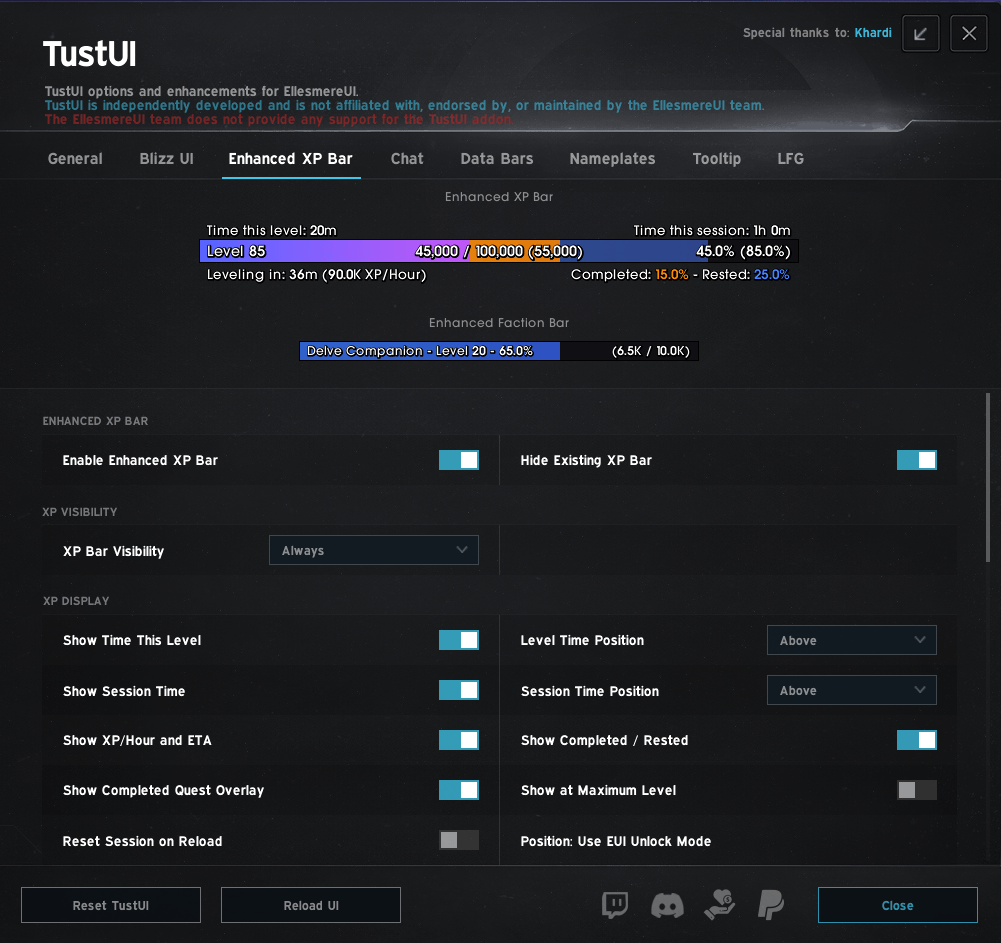
- Show current and rested XP, completed-quest reward XP, XP per hour, estimated time to level, session time, and time spent at the current level. Session tracking can continue or reset after a reload.
- Follow the watched faction, pick one from a searchable list, or track the current Delve Companion on Retail. Standard reputation, renown, friendship, paragon rewards, and companion progress are supported where available.
- Put each text line inside, above, or below its bar, or hide it. XP amount, XP per hour, ETA, completed and rested XP, time, faction details, and faction amount all have their own placement choices.
- Divide a bar into 20 bubbles with ticks or real gaps, then set tick color, opacity, gap size, animation style, and animation color.
- Use supported EllesmereUI, Blizzard, Classic, or Forever artwork, custom textures and borders, XP gradient colors, and faction colors. Enabling TustUI's faction bar hides the EUI and Blizzard faction bars; disabling it restores their usual visibility.
Social and raid tools
The Social and Raid Tools popups keep group information and common actions close to your Data Bars.
- Browse friends and online guild members without losing your scroll position when someone logs in or out. Friends can be grouped with favorites first. Guild members can be listed alphabetically or grouped by rank, with optional rank names, officer crowns, notes, compact rows, alternating shading, and class icons.
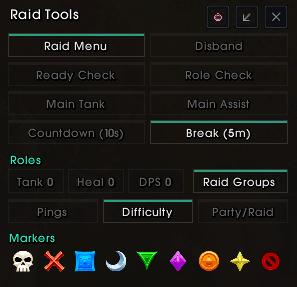
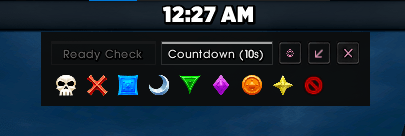
- Run ready checks, role checks, countdowns and break timers; place target and world markers; assign main tanks or assists; convert the group; change difficulty; and manage available ping permissions. Marker tooltips explain their click actions, and unavailable controls remain easy to identify.
- Use Blizzard, BigWigs, or DBM for supported break timers. Clicking Break again cancels a running timer.
- Drag the Raid Tools panel, lock it, reset its position, or minimize it in stages. Its position is remembered after hiding or reloading.
- Open the raid window beside the role counts to view or rearrange groups. Disband is clearly marked and requires Shift-click.
Group Finder and Mythic+ on Retail
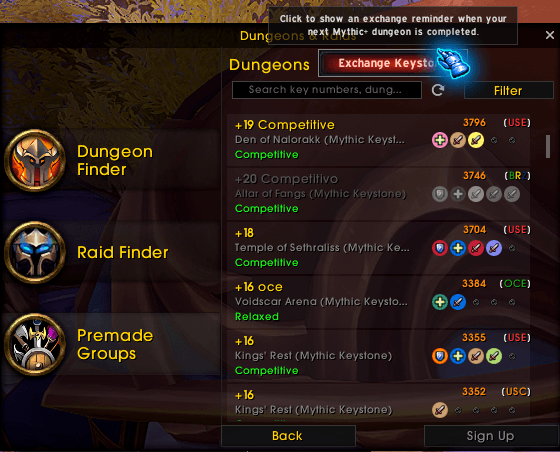
TustUI adds useful details and shortcuts to Group Finder while respecting combat and Blizzard's restricted-data rules.
- Show region tags and Mythic+ ratings, sort listings by rating, and filter for available roles.
- Use optional quick signup, a Shift bypass, automatic confirmation, and an Exchange Keystone reminder.
- Send an optional greeting after joining a Mythic+ Group Finder party or a closing message after a completed run. Pick a random preset, one fixed message, or your own text. Both messages start disabled and send after a short delay, once you are out of combat and chat is safe to use.
Bags, merchants, and character details
- Retail upgrade arrows consider your class, specialization, primary stats, armor type, and weapon use. They appear in supported bags, the character bank, Warband Bank, and Guild Bank.
- Hide collected mounts, toys, arsenals, and ensembles in EUI's Retail merchant list. A Show All button reveals hidden entries without changing the setting.
- Use one-pixel equipment and socket borders while keeping item-quality and gem colors.
- Show built-in Retail stat priorities or create custom orders for different content. Custom Auto chooses the relevant saved order. WoW Forever uses custom class-based Dungeon and Raid priorities.
Tooltips and nameplates
- Add available specialization and role colors, colored item levels, EUI Hover Cast and Click Cast bindings, and the unit's current target to player and unit tooltips.
- Show sources for uncollected mounts. Optional ID lines cover NPCs, quests, currencies, mounts, achievements and categories, and factions.
- Simple Nameplates can shrink selected minor enemies, minions, and normal dungeon enemies while preserving EUI targeting, casts, hitboxes, and stacking. Scale, names, classification details, and raid markers remain configurable.
- A separate targeted-cast option colors an enemy's name while it casts at you.
Minimap and everyday tools
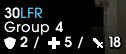
- Add your group number and assigned-role totals for the whole party or raid to EUI's instance-difficulty text. Arrange the lines in your preferred order and use supported Blizzard or EUI role icons, or no icons.
- Configure Blizzard Auto Loot, Quick Loot, loot-warning suppression, and a colored cursor. The cursor includes native Yellow and Blue styles, five tinted presets, and a custom color picker.
- Autofill transmog deletion confirmations, focus supported search fields, limit Crafting Orders and Auctionator helpers to the current expansion, and adjust Spell Queue Window from your latency.
- Automate single-option or explicitly approved gossip choices, add per-NPC exclusions, and hold Shift to bypass TustUI. A coexistence guard prevents the TustUI and EUI single-option selectors from acting together.
Compatibility and setup
- Install and enable EllesmereUI beside TustUI. Some options also need the matching EUI module or a supported optional addon.
- Retail WoW and the current WoW Forever beta are supported. Forever support is still in development, and Retail-only systems such as merchant filtering and bag upgrade markers remain unavailable there. TustUI keeps saved choices for unavailable features without trying to run them.
- WoW Forever additions include ammunition, equipped thrown-weapon uses, and class reagents in Class Resources. Profession and micro-menu choices follow the systems available on that client, including First Aid and separate spellbook and talent actions.
- Settings and notices are translated across the supported WoW locales, using native EUI wording when it exists. Player names, chat messages, and data supplied by other addons stay in their original language.
- Open EllesmereUI settings > TustUI, or type
/tustor/tusteui. For a manual install, place theTust_EUIfolder in the client'sInterface/AddOnsdirectory beside EllesmereUI.
Pick the part of TustUI you need first. You can add a Data Bar, adjust chat, or turn on one progression display and leave everything else alone until you want it.
TustUI - EllesmereUI Companion Tools Team