TTSWorld
- By
Automatically manages NPC text-to-speech by muting it inside instances and enabling it in the open world.
🎙️ TTSWorld — Multi-Voice Chat Text-to-Speech & Channel Mixer
TTSWorld turns World of Warcraft chat into a multi-voice audio experience using your system's installed Text-to-Speech voices. Every player and NPC gets their own distinct voice, other TTSWorld users automatically hear your chosen voice and gender profile, and noisy open-world channels mute the second you enter a dungeon, raid, or battleground.
💬 Open the Voice Studio anytime with
/ttsworld or /vc (or via Options > AddOns > TTSWorld).✨ Key Features
- 🎭 Unique Voices & Gender Matching: Assigns distinct system voices to up to 1,500 players and NPCs, automatically matching male and female characters.
- 📡 Voice Profile Sync: Broadcasts your chosen Synced Voice and My Profile gender (
Auto,Male, orFemale) to nearby, party, raid, and guild TTSWorld users. - 🎚️ Per-Channel Mixer & Instance Mute: Individual
1–100%volume controls, Read toggles, and Mute in Inst. switches for 10 core channels plus joined custom channels. - 🎨 Live WoW & ElvUI Chat Color Swatches: Click the color box next to any channel to customize your in-game chat colors on the fly.
- 📌 Permanent Character Pins: Lock specific voices to friends, raid leaders, or targets so they are never overwritten.
- 🏆 4 Color Themes & Resizable UI: Switch between Forever Bronze, Dark Gray, Dark Blue, and Dark Green, or drag the bottom-right corner (
75%–160%).
🖥️ Inside the Voice Studio
🎛️ Tab 1: General & Channel Mixer
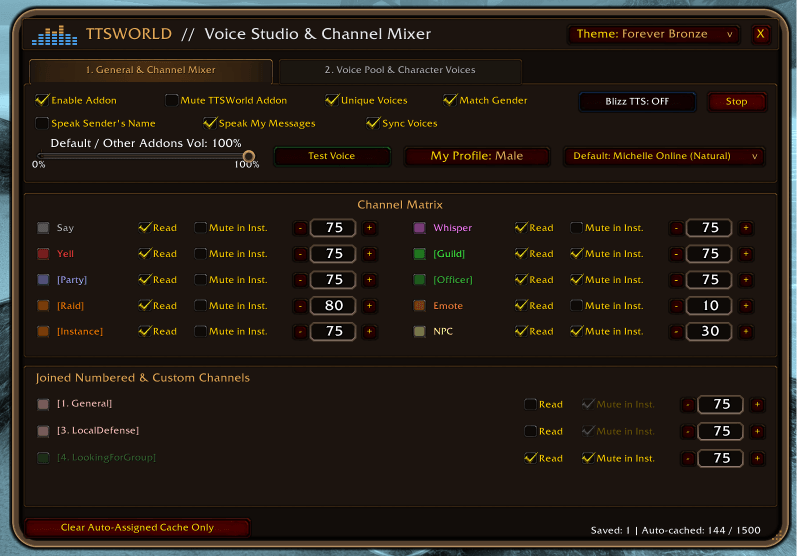
- Channel Matrix & Custom Channels: Toggle Read, Mute in Inst.,
1–100%volume (-/+), and live chat colors for Say, Yell, [Party], [Raid], [Instance], Whisper, [Guild], [Officer], Emote, NPC, and joined channels ([1. General], etc.). - Quick Controls: Toggle Enable Addon, Mute TTSWorld Addon, Unique Voices, Match Gender, Speak Sender's Name, Speak My Messages, Sync Voices, My Profile gender, Blizz TTS: OFF, Stop, and your Default Voice dropdown.
🎧 Tab 2: Voice Pool & Character Voices
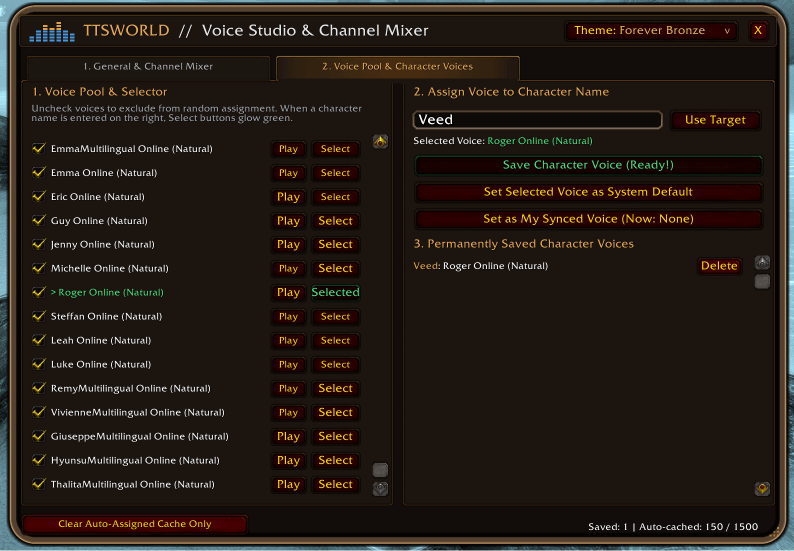
- Live Voice Pool: Click Play to preview any installed voice (including Microsoft Natural Online voices) or uncheck voices to exclude them from random assignment.
- Pin & Sync Voices: Type a name or click Use Target, pick a voice, and click Save Character Voice to lock it in permanently—or click Set as My Synced Voice to share it with other TTSWorld players.
⌨️ Commands & Tips
/ttsworldor/vc— Open or close the Voice Studio.- Drag Bottom-Right Corner — Resize the window (
75%–160%); Right-click the corner to reset to100%. - 💡 Keep Blizz TTS: OFF enabled in the top bar so Blizzard's built-in narrator doesn't read messages twice.
TTSWorld Team