ButtonChanger
- By
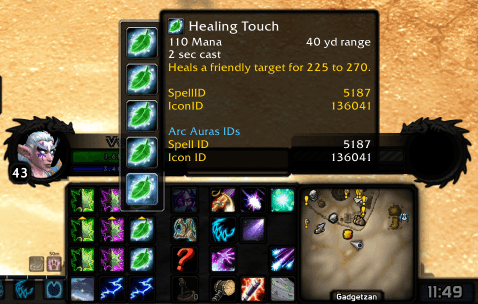
Turn any action bar button into a drag-and-drop flyout menu—Shift + Right-Click to add spells or items, and Right-Click to swap on the fly
Screenshot 2026-11-15 125054.png
Screenshot 2026-11-15 124702.png
Description
# ButtonChanger
**ButtonChanger** turns any action bar button into a customizable flyout menu. Group your Hearthstones, portals, mounts, buffs, food, or consumables onto a single slot and swap them out of combat with a quick right-click.
## How to Use
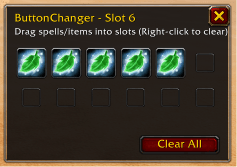
1. **Configure a Button:** Hold **Shift + Right-Click** on any action bar button (or hover your mouse over it and type `/bcset`) to open the 12-slot setup window.
2. **Add Spells or Items:** Drag spells from your Spellbook or items from your Bags directly into the grid. Right-click any slot in the setup window to remove it.
3. **Swap Anytime:** **Right-Click** that action bar button out of combat to open your flyout menu and click any icon to swap it onto your bar.
## Features
* **Simple Drag-and-Drop Setup:** Build custom 12-slot flyouts for any button in seconds.
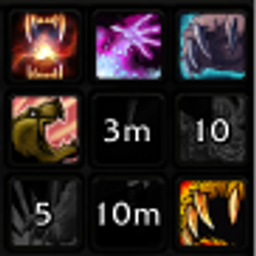
* **Visual Flyout Indicators:** Action bar buttons with 2 or more saved options automatically display a flyout arrow.
* **Live Bag Stack Counts:** Items in your flyout display current stack counts and turn grayscale when you have `0` left in your bags.
* **Customizable Flyout Direction:** Open **Escape > Options > AddOns > ButtonChanger** to switch between opening menus upward or downward for top action bars.
* **Full Action Bar Support:** Works seamlessly with default Blizzard action bars, **Bartender4**, **ElvUI**, and **Dominos**.
## Slash Commands
* `/bcset` — Open the drag-and-drop setup window for the action bar button under your cursor.
* `/bcadd Spell 1, Item 2` — Quickly add spells or items by name to the hovered button.
* `/bcdebug` — Check addon status and hooked button count.
ButtonChanger Team