Trust Crafter: Crafting Order History & Crafter Ratings
- By
Remembers every crafting order you place: who crafted it, the quality you asked for and got, and how long it took. See at a glance if a crafter did good work for you before, with an online dot and your own notes.
TrsutCrafterv1.png
Description
Know which crafters you can trust. Crafting orders are full of crafters you know nothing about. Trust Crafter keeps a private ledger of every order you place, so the next time you see a crafter you can tell at a glance whether they've done good work for you before.
- Every order logged automatically: crafter, quality asked for and received, time taken and tip.
- Outcomes from the facts: Met, Exceeded or Below, never a star rating.
- Right where you need it: tooltips, the crafting orders window and the right-click menu.
- Online dot: see whether a crafter you trust is online right now.
No typing and no setup. Place orders as usual and Trust Crafter fills itself in.
Logs Every Order for You
Placing a crafting order logs it straight away. For each one Trust Crafter records who crafted it, the quality you asked for and the quality you got, when it was placed and filled, how long it took, the tip you paid and whether it was a public, guild or personal order. Collecting the crafted item from your mail marks it filled, with the crafter and quality read from the mail, so there's no need to go back to the crafting orders NPC. An order one of your own characters fills is marked the moment you fill it. Orders placed before you installed it are added too, for as long as the game still lists them.
Outcomes From the Facts
Each order is marked Met, Exceeded or Below by comparing the quality you asked for with the quality you got. Orders nobody filled are kept as Not filled and never counted against anyone. Results read as rates, not stars: "4/4 met or exceeded" tells you far more than a score.
Shows It Where You Need It
- Tooltip: hover a player you've used as a crafter to see crafted 4x for you | 4/4 met or exceeded | avg 38 min.
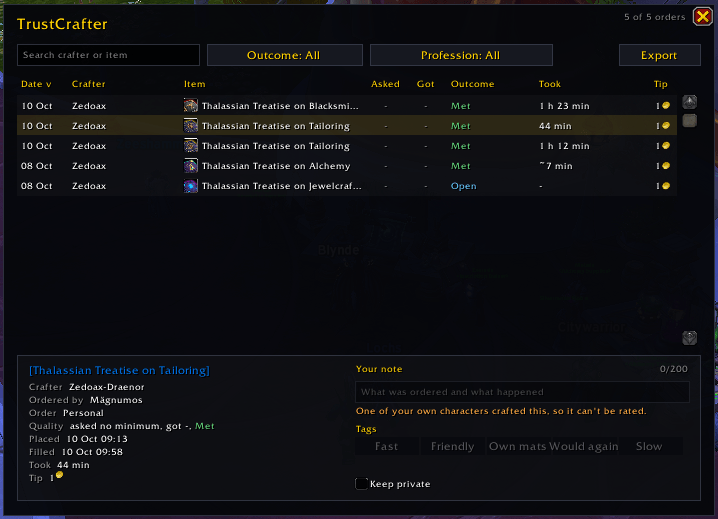
- Crafting orders window: type a crafter's name for a personal order and your history with them shows beside it. In My Orders, a tick marks crafters you've used before, yellow if any order came in below what you asked for.
- Right-click menu on a player's name in chat, the friends list, your guild or a unit frame opens your history with that crafter.
Is the Crafter Online?
A dot beside each crafter: green when they're online, red when the game says they're offline, grey when it can't tell. It uses the game's own whisper check plus your friends list, group and Battle.net friends, and sends nothing to the crafter. Shown in the history window, the order details, the personal order name box, the My Orders tooltip and /tc lookup.
History Window and Export
Open it with /tc or the minimap button: every order on your realm, sortable by date, crafter, item, outcome, time taken or tip, with search and outcome and profession filters. /tc export or the Export button gives you every order as CSV for a spreadsheet.
Notes and Tags
Add a short note and tags like Fast, Friendly, Own mats, Would again or Slow to your own orders. Your words sit next to the facts, never on top of them.
Fair to Crafters
- Only the character who placed an order can rate it.
- Orders crafted by one of your own characters can't be rated, so nobody rates their own work, not even on an alt.
- The facts can't be edited, and there's no "failed" button: an order that met the quality you asked for always shows as met.
- How long an order took is shown as a number, never as a score. They might have been asleep.
Commands
/tc: open or close your order history (or click the minimap button)/tc lookup Name: what you know about a crafter/tc export: copy your orders as CSV/tc tooltip: turn the tooltip line on or off/tc minimap: hide or show the minimap button/tc wipe: delete your history on this realm (asks first)/tc help: every command
Coming Next
Guild sharing in 2.0: see how your guild's orders with a crafter went, with orders confirmed by both the customer and the crafter. Then realm sharing in 3.0: ask other Trust Crafter users on your realm about a crafter, always labelled separately from what you and your guild know. Sharing will be off by default, and notes marked private never leave your computer.
Good to Know
- Retail (Midnight) only.
- Everything is kept per realm, because public crafting orders only reach crafters on your own realm.
- Mail doesn't say exactly when it was sent, so time taken from mail is worked out and shown with a "~".
- Bugs and ideas are welcome in the comments.
/tc debuglogs crafting order events to chat for bug reports.
Also by CtrlShiftZed
- Auction Coach: plain-English Auction House advice, a simpler alternative to TSM.
- Alt Inventory: how many of an item each of your characters has, right in the tooltip.
- Recommended Stats: stat priority, BiS gear, talents and rotation from the top players of your spec.
- Party iLvl Check: your group's item level, M+ score and buffs the moment you enter a dungeon.
- Push Planner: the fastest set of Mythic+ keys to reach your target rating.
Support
Trust Crafter is free. If it helps you, you can buy me a coffee.

Trust Crafter: Crafting Order History & Crafter Ratings Team