Recommended Stats, Talents & Rotation
- By
Compare your Haste, Crit, Mastery and Versatility to top players of your spec, on the character panel. Plus BiS gear, enchants, gems, talents for Raid and Mythic+, and a per-boss rotation guide, built from Warcraft Logs and Raider.IO data.
screenshot_druid.png
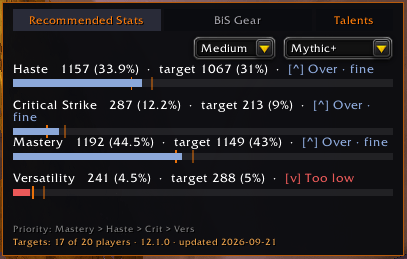
screenshot_druid_medium.png
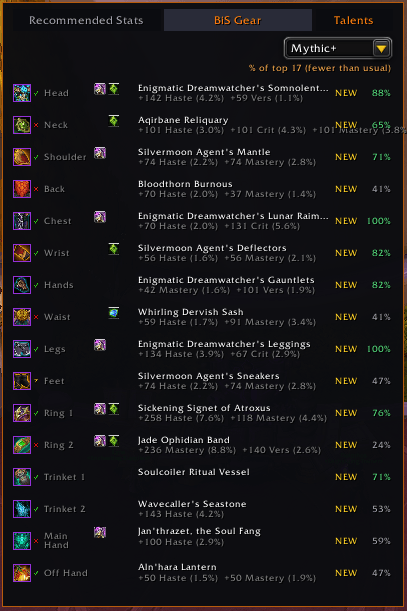
screenshot_druid_mythicplus_bis_gear.png
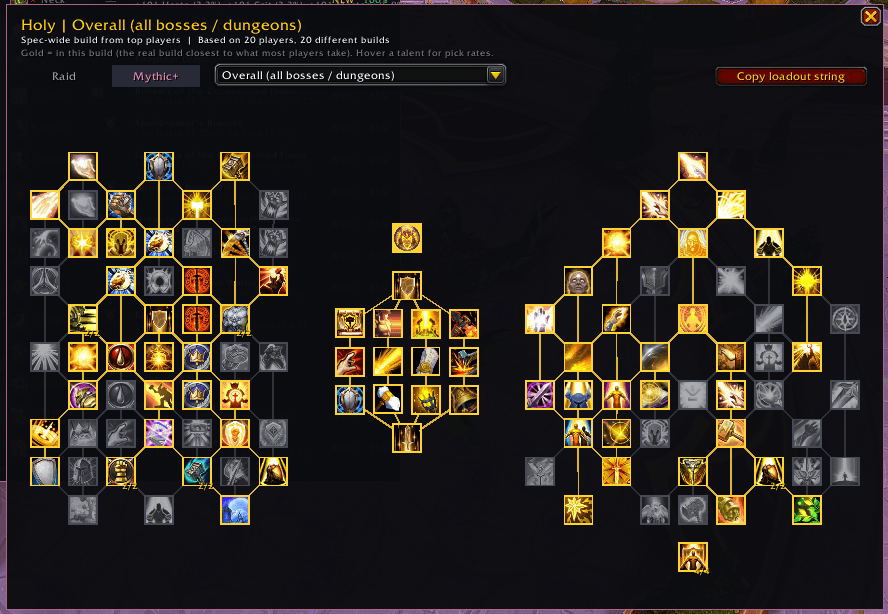
Description
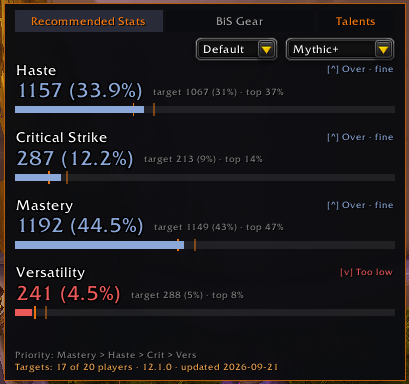
Recommended Stats & Talents puts your character's true performance in view. It compares your live secondary stats against real data pulled from top players in your exact class and spec, tells you straight away whether Haste, Critical Strike, Mastery, or Versatility needs more attention, shows the talent builds those players actually run, down to each raid boss and Mythic+ dungeon, and lays out how they play the spec: the opener, the rotation, and when they press their cooldowns.
Live Stat Comparison
Haste, Critical Strike, Mastery, and Versatility are compared in real time against target percentages built from top players of your class and spec. Color-coded progress bars show at a glance whether each stat sits under, on, or over target.
Talents, Per Boss and Per Dungeon
Open the Talents window to see the build top players run for your spec, laid out like the in-game talent page: class talents, hero talents, and spec talents. Pick a specific raid boss or Mythic+ dungeon from the dropdown to see the build for that fight, or stay on Overall for the spec-wide build. Hover any talent to see how many players take it, and copy the loadout string to import it in one click. Where a boss or dungeon doesn't have enough exact kill or run data yet, the panel says so and shows the closest real build instead, so you always know what you're looking at.
New: Rotation Guide, Per Boss
Open the Rotation window to see how top players of your spec and hero talents actually play it, read from what they pressed on real raid kills. Four columns cover the opener, the core of the rotation, the filler, and when to use cooldowns. It shows which press gives each proc or buff, which press spends it, and how many stacks to build first. Pick a raid boss from the dropdown to see how that fight is played, or stay on Overall for all bosses pooled. Every spell and buff is an icon with its real in-game tooltip.
The rotation guide won't increase your DPS by itself. It is there to grow your knowledge of the class and what takes priority in the rotation. It is a reference, not a "press this now" helper, and it reads nothing about the fight you are in.
Best-in-Slot Panel
See the top gear choice for every slot, complete with usage percentage, item icon, and a full hover tooltip. Matching checks item level as well as the exact item, so a comparable upgrade in a different form is never wrongly flagged as missing.
Enchants & Gems
Recommended enchants and gems for each slot, with a simple check showing whether your current gear already has them.
Tier Set Tracking
Shows how many pieces of the current set you're wearing and what portion of top players run the 4-piece bonus.
Stat Priority
An optional stat priority line, worked out from the same top-player sample, gives a recommended order for your class and spec alongside the usual targets.
Raid & Mythic+ Targets
Switch between Raid and Mythic+ targets from a dropdown or with /rs raid and /rs mythicplus. The Talents window has its own Raid and Mythic+ switch. The Rotation window covers raid bosses for now.
Colorblind-Friendly Mode
Adds shape and icon cues on top of the usual colors, for both the stat panel and BiS indicators.
Minimap Button
A LibDataBroker button gives one-click access. Left-click toggles the panels, right-click opens options, and it plays nicely with minimap organizer addons.
Custom Skins
Choose a Default, Class Color, or Custom Color skin from Options, then export a short code so friends can copy your look.
Where the Numbers Come From
Every target, BiS pick, talent build, and rotation is built from real top-player data, not guesswork. Warcraft Logs surfaces the top parsers for each class and spec on every raid boss and the top Mythic+ players in every dungeon, Raider.IO supplies the talent builds top players ran on real kills and runs, and Blizzard's own API supplies each player's exact stat percentages, equipped gear, and current talents. The rotation guide is read from the Warcraft Logs combat logs of those top-parsing raid kills: what each player pressed, the buffs they gained and spent, and the talents they had on that pull. Nothing is fetched in-game and the addon never contacts a server. All of it ships baked into the addon and refreshes with each update, the same as any other addon content. The panel shows exactly how many verified players a target is built from, so it's easy to tell an established number from one still filling in during a fresh tier.
Getting Started
- Open your character panel (default
C) and the panel appears automatically beside it, with Stats, BiS, Talents and Rotation across the top. - Switch content type with the dropdown, or
/rs raid//rs mythicplus. - Click Talents (or
/rs talents) and choose a boss or dungeon from the dropdown to see the build for that encounter. - Click Rotation (or
/rs rotation) and choose a raid boss from the dropdown, or stay on Overall. Hover any icon for the spell's tooltip and how top players use it. - Hover any BiS entry for its full item tooltip.
- Drag any window anywhere you like; the position is remembered per character. Run
/rs resetposto snap them back to their default spot. - Open options with
/rs options, the minimap button's right-click, or Esc > Options > AddOns > RecommendedStats, to change attach mode, pick a skin, toggle colorblind mode, or show/hide the BiS section. - Share a skin with
/rs skin export, or apply one a friend sent with/rs skin import.
Good to Know
- Both Raid and Mythic+ targets are rebuilt regularly from real top-player data as the season progresses.
- A very low-population spec may not show data yet if too few top players currently run it, and specs early in a fresh tier can rest on a smaller sample until more players are verified. The panel always states the real player count so you know exactly what you're looking at.
- Per-boss and per-dungeon talents use the exact build from top kills and runs where enough exist. Otherwise they use the current builds of the top players on that encounter, and the panel labels which one you're seeing.
- The rotation guide changes with patches, not day to day, so it is refreshed about once a month or after a patch rather than with every update. The window shows the patch and date it was read on.
- The rotation guide follows your hero talents. If too few top players run yours to read a rotation from, it shows the tree they do run and says so.
- Healers see the rotation and filler columns only. Healing cooldowns follow the boss's damage rather than a fixed timing, so they can't be read from logs.
- The rotation guide covers raid bosses. Fights with several targets give a hint of how a spec plays in Mythic+, but not the full picture.
- Data sourced in part from Warcraft Logs and Raider.IO
Translations
- Traditional Chinese (zhTW), contributed by BlueNightSky.
- Russian (ruRU), contributed by ZamestoTV.
- The Rotation window is English only for now. Spell names, icons and tooltips already show in your own language.
- Want to help translate RecommendedStats into your language? Submit a comment or DM me.
Support
RecommendedStats is free. If it helps you, you can buy me a coffee.

The Recommended Stats, Talents & Rotation Team