Tranquility Guild
- By
Organize guild groups, track loot, research auctions and coordinate summons with a modular toolkit and private Tranquility LFG.
toolkit-phasefeature.png
toolkit-summoner-helper.png
tranquility-recruiter-toolkit.png
reference-library-toolkit.png
auction-toolkit.png
tranquility-toolkit-lfg.png
Guild-toolkit.jpg
Description
Tranquility Guild Toolkit
**Bring your guild's everyday tools together: organize dungeon groups, keep useful loot notes, research auction prices, prepare summons and coordinate with guildmates from one menu.**
Tranquility Guild Toolkit is a modular collection for World of Warcraft: Forever. It combines a shared launcher with focused panels for recruitment, dungeon information, loot observations, auctions, target inspection, regional samples, phase hints and party summons. The included TranquilityLFG board helps Tranquility members find each other for dungeon and PvP groups. Optional Uber integration opens the separate summons and portals service interface when that addon is enabled.
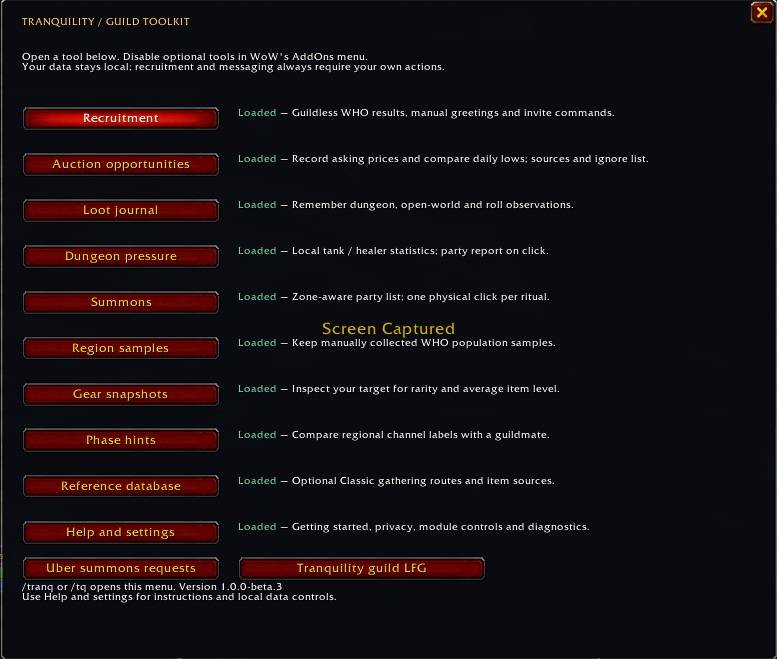
Open **`/tranq`**, **`/tq`**, or the **TQ minimap button**. Keep the core enabled, choose the modules you need, and disable the rest in WoW's AddOns menu. Movable panels and in-game help keep the controls close without filling guild chat with every action.
## A shared home for your guild tools
The Tranquility core supplies the main menu, launcher, common interface and manual WHO-results reader. Each feature is a separate optional addon, so a member interested in loot and dungeons can use a different combination from someone researching auctions or helping with recruitment.
The home panel also provides entry points for the included guild LFG board and Uber. These integrations remain optional: the core and normal toolkit features can run with Uber disabled. Most toolkit panels are local tools; the private LFG board specifically requires membership in the guild named **Tranquility**.
## Private dungeon and PvP group finding
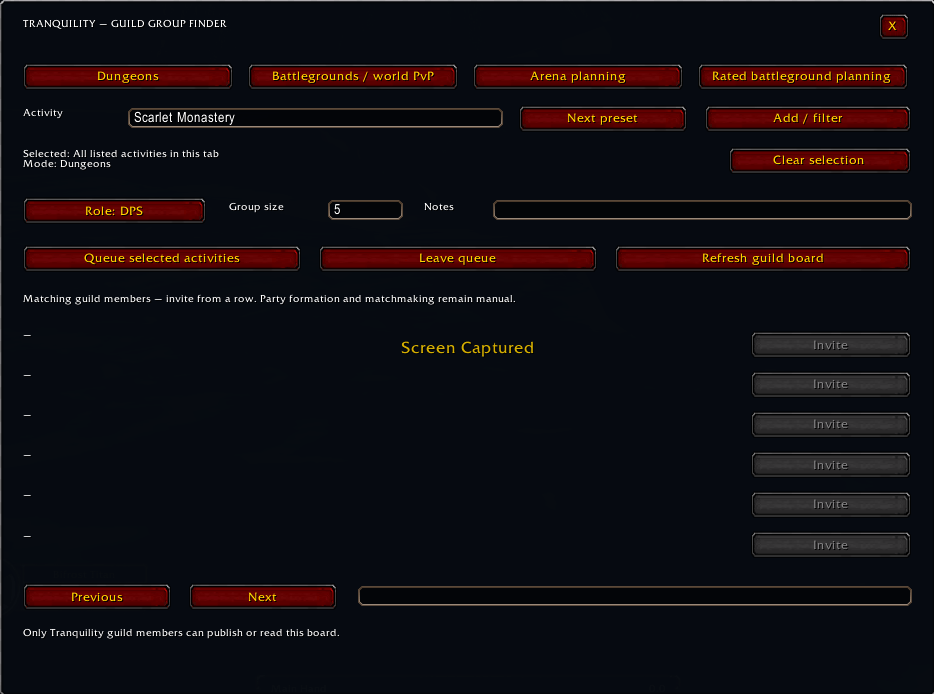
**TranquilityLFG** is a shared activity board for Tranquility guild members using the addon. It helps people discover compatible plans without repeatedly advertising their group in visible guild chat.
- Choose a dungeon, battleground/world-PvP activity, arena plan or rated-battleground plan.
- Select presets or enter a custom activity, with up to five selected activities per listing.
- Set your Tank, Healer or DPS role, intended group size and a short note.
- Browse guildmates matching any selected activity, or clear the activity filter to browse that category.
- Invite a listed member with a deliberate click, subject to normal party leadership and game permissions.
- If the invitation API is unavailable, use the provided copyable native invite command.
- Leave the board when your plans change. A non-leader who joins a group leaves the listing automatically; a leader can keep looking for more members.
Guildmates need TranquilityLFG enabled to publish or see listings. The board uses guild addon messages rather than visible guild-chat advertisements. Listings renew while queued and expire after approximately two minutes without updates. Reload begins unqueued.
This is a guild coordination board, not Blizzard's matchmaking queue. It does not automatically enter a dungeon or create game modes unavailable on your client. Arena and rated-battleground categories are planning tools wherever those modes are not playable.
## Recruitment with deliberate, per-player controls
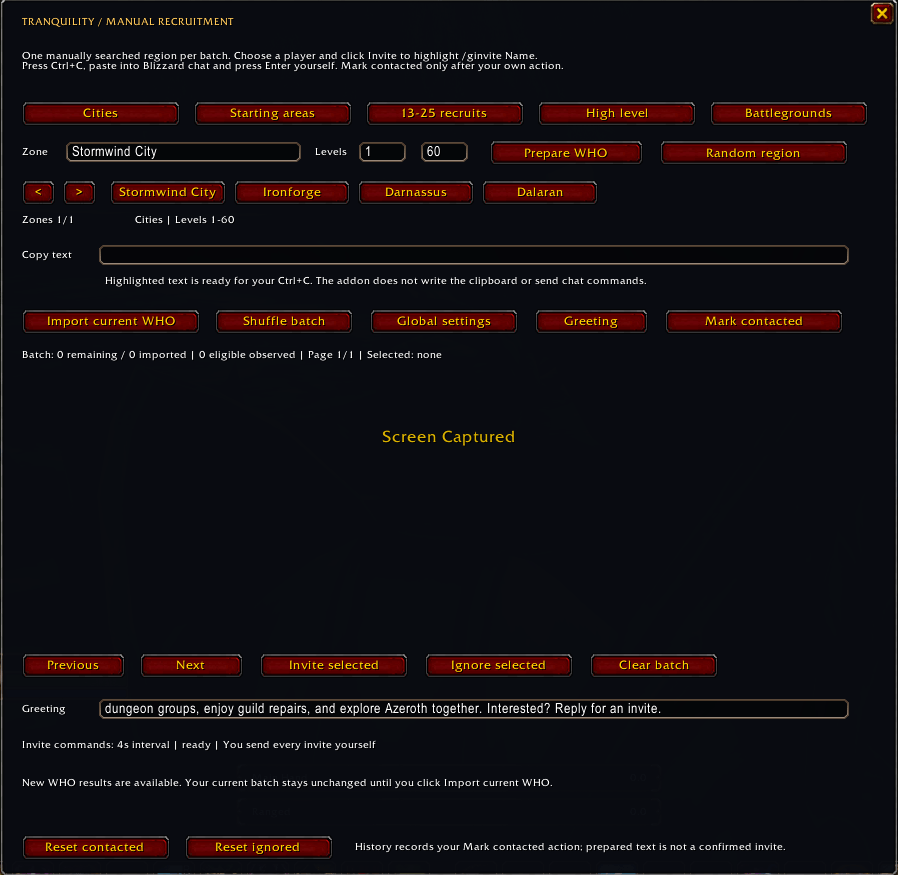
The Recruitment panel helps guild members review manually obtained WHO results and prepare a personal response.
Prepare a zone query, run it yourself through the native game interface, then import the returned list. The guildless browser includes only results whose guild field is explicitly empty. Unknown, unavailable or restricted guild data is not treated as proof that someone is guildless.
Select a player to prepare an invite command or a greeting containing their name and your editable introduction. Copy and submit each command yourself. The addon does not run background WHO searches or bulk-send recruitment invitations and whispers.
Mark a player contacted or ignored to skip them on later imports. These are separate histories you can manage through the toolkit. A prepared invitation is not a confirmed successful invitation, and contacted history reflects your explicit action. Native guild permissions, WHO result limits and game throttles continue to apply. Respect declines and requests not to be contacted.
## Auction research and observed price history
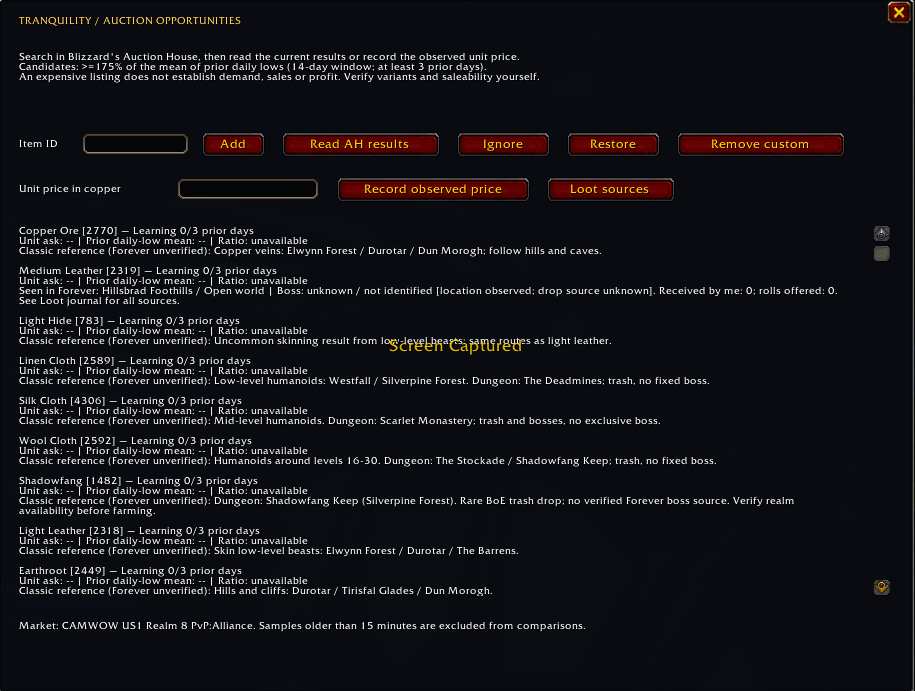
The Auctions panel helps compare prices you have actually observed.
Add watched items, inspect complete results from your own Auction House searches, or manually record a unit price. The module retains daily-low observations and compares a current sample with previous sample days. A historical comparison requires at least three prior days of data; one unusual listing is not enough to establish a useful baseline.
Use ignore controls to leave unwanted items out of your research. Where available, item-source notes from the Loot journal or optional reference database add context about where an item may come from.
All prices are asking-price samples. They do not establish completed sales, actual demand, available buyers or guaranteed profit. Incomplete or unavailable results remain insufficient data. The toolkit does not buy, sell, undercut, cancel auctions or repeatedly query the Auction House for you.
## Loot and item-source journal
The Loot module keeps a local record of observed dungeon and open-world items, group-roll offers and available encounter/source information. It distinguishes an item being seen, offered in a roll and actually received rather than treating every appearance as personal loot.
Use the journal to build your own item-source notes over time and revisit where an item was observed. When the client cannot identify a source, the record stays unknown rather than inventing a boss or creature attribution.
Observed information and bundled reference notes serve different purposes. A remembered source is evidence of what this character observed; it is not a complete drop table, drop-rate estimate or promise that an item is available in the current phase.
## Dungeon information and XP warnings
The Dungeon panel presents available tank-health, healer-mana and partial enemy-count observations. Keep the detailed assessment local or click the party report button to send a short, rate-limited summary. Low-health flashing requires enough observed enemies rather than treating one visible unit as a complete pack count. Restricted or missing values remain unavailable, and monitoring does not continue with stale assessments when client reads fail.
The Dungeon module also includes **automatic, rate-limited dungeon XP warnings**. While enabled in a party dungeon, it compares available party levels with targeted enemies or visible nameplates. Its current implemented check warns when a party member is more than 12 levels above an observed enemy. The warning names the relevant member when that information is available.
Warnings are limited to one per 120 seconds, with repeat combinations suppressed until the group or area changes. **`/tranqxp off`** disables these warnings for the session; **`/tranqxp on`** enables them. They begin enabled when the module loads. This is a level-based prediction for observed enemies, not measurement of actual XP, a guarantee about every creature in the dungeon, or an assessment of quest XP. Game rules can change.
The manual dungeon summary and the automatic XP warning are separate features. Neither performs combat actions or chooses abilities for the player.
## Party summons checklist
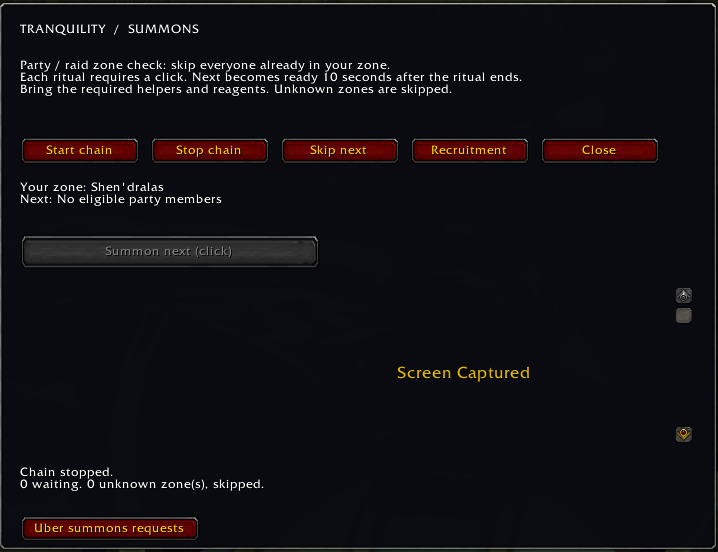
The Summons module helps an eligible caster work through a party checklist. Players already reported in your zone are skipped, helping you focus on people who may still need travel assistance.
A ritual requires your physical click, the learned spell, required reagents and appropriate helpers. Normal combat-lockdown, spell and party restrictions apply. The interface includes pacing and retry/skip feedback; it does not cast an unattended sequence or verify that every attempted ritual successfully delivered its target.
For customer bookings, Mage portals, provider scheduling and delivery records, use the separate optional Uber interface rather than treating the basic checklist as an order-management system.
## Optional Uber summons and portals
The current distribution also includes **Uber 0.4.0-beta.1**, which can be enabled or disabled separately. The Tranquility home and Summons panels open it when available. Uber's own CurseForge approval is pending; its presence in this bundle is not a claim that either project has been approved.
Uber provides reviewed Warlock/Mage provider cards, prices, regular hours, customized requests, advance reservations, setup status and reported map location. It also includes creator review/moderation, native-mail drafts and receipt/cast/customer-arrival timelines. Offline reservations remain local until delivered and accepted. Delivery observations are client evidence, not server-certified proof.
Uber has its own pricing and data-sharing rules: a configured 22s Mage portal minimum, additional service/priority rates, optional tips and a house/provider fee split. Payments are player-controlled native mail, not an automatic transfer or escrow service. Read Uber's included README and detailed administration/delivery guide before using paid services. Its commission model still requires platform-policy clarification. Tranquility's local tools and basic party checklist do not require Uber or participation in that service.
## Regions, inspection and phase hints
**Regions:** prepare zone queries and save manual WHO population samples. The number shown is based on returned rows. Capped, filtered or stale WHO results are not a census of the server or a reliable measure of total population.
**Gear:** inspect a selected target to view available equipment, a rarity-based score and average item level. Incomplete inspections are marked. Equipment information is not a rating of a player's skill, wealth, readiness or behavior.
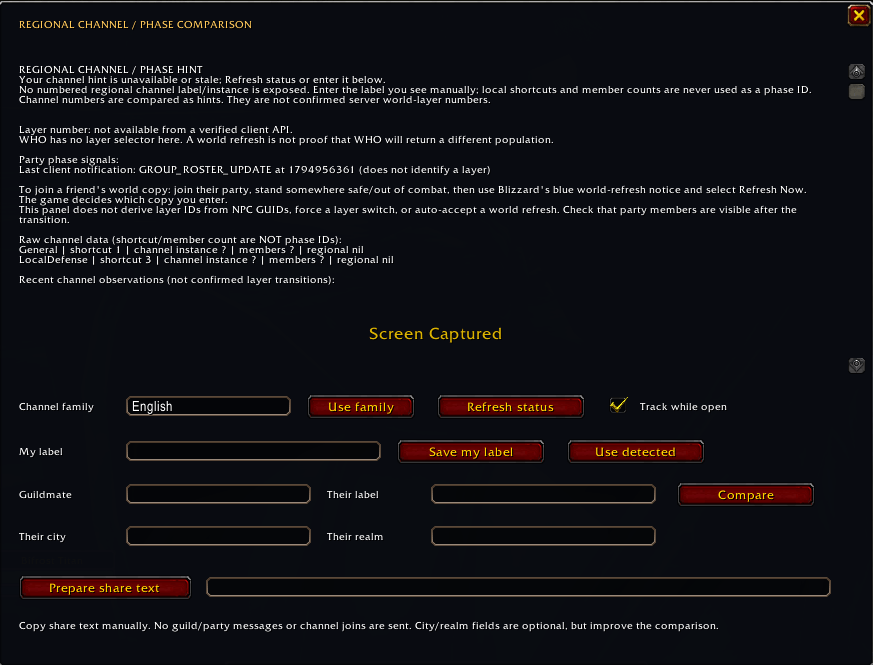
**Phases:** record regional channel observations and compare them with details from a guildmate as a possible phase hint. Channel labels are not verified world-layer IDs. The feature does not force phasing, change a world copy or guarantee that two characters can see each other.
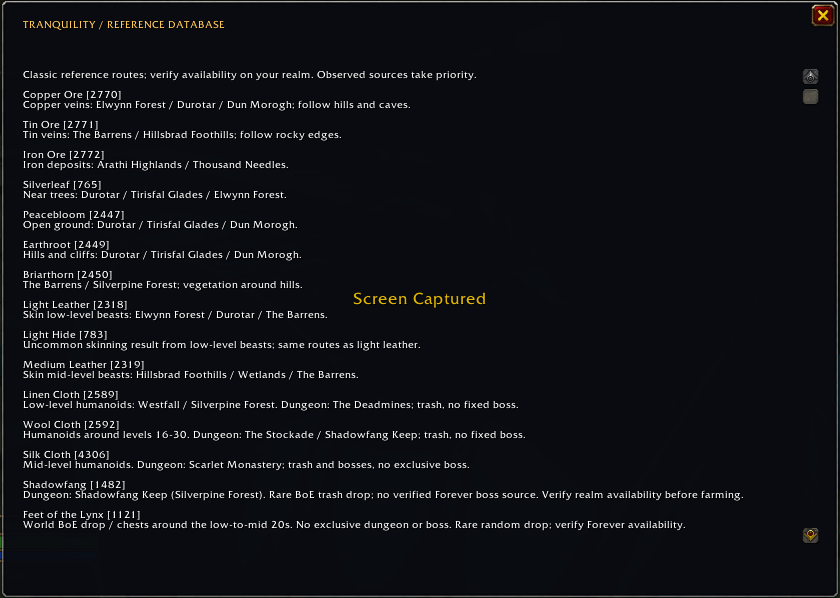
**Reference DB:** optional Classic gathering-route and item-source notes provide starting points for research. They are explicitly unverified for Forever and should not be mistaken for a complete, current database. Observed sources take priority where available.
## Help, settings and your data
The Info module contains instructions, launcher preferences, diagnostics and per-module data controls. Persistent toolkit records use local SavedVariables: recruitment histories, observed prices, loot/source notes and manually entered comparisons. Target-inspection and dungeon snapshots are session information rather than a permanent player-monitoring service.
Local storage does not mean every feature is private to one client. Guild LFG shares listing names, roles, activities, sizes and notes with guildmates running that board. Clicked party reports and enabled XP warnings appear in the relevant party chat. Optional Uber exchanges service records, provider positions and evidence reports with its participating clients and creator. Do not put sensitive personal information into notes or listings.
No website login, cloud account, desktop executable or additional third-party library is required. Normal logout or a player-requested reload writes SavedVariables; a crash before the client saves can lose recent changes. Use the provided data controls and ordinary backups when changing installations.
## What's included
| Folder | Purpose |
|---|---|
| Tranquility | Required toolkit core, home menu and launcher |
| Tranquility_Recruitment | Manual recruitment preparation and contact/ignore histories |
| Tranquility_Auctions | Observed prices and daily-low research |
| Tranquility_Loot | Local loot and item-source journal |
| Tranquility_Dungeon | Dungeon observations, clicked summaries and optional XP warnings |
| Tranquility_Summons | Physical-click party summons checklist |
| Tranquility_Regions | Manual zone queries and WHO samples |
| Tranquility_Gear | Target inspection and equipment information |
| Tranquility_Phases | Channel observations and phase hints |
| Tranquility_DB | Optional Classic reference notes |
| Tranquility_Info | Help, settings, diagnostics and data controls |
| TranquilityLFG | Standalone Tranquility-guild activity board |
| Uber | Optional standalone summons/portal booking service |
## Install and get started
1. Extract the ZIP's addon folders directly into your Forever installation's **Interface/AddOns** directory. Avoid nesting them inside a second toolkit folder.
2. Enable **Tranquility** and whichever **Tranquility:** modules you want in WoW's AddOns menu. Keep the core enabled for its ten modules.
3. Enable **TranquilityLFG** if you want the private guild activity board. Enable **Uber** only if you want its separate service features.
4. Restart the game after a fresh installation, log in and open **`/tranq`** or **`/tq`**.
5. Read **Help and settings**, configure your greeting and launcher preferences, and try a tool at your own pace.
Direct commands: **`/tqlfg`** opens guild LFG; **`/uber`** opens Uber. The toolkit remains usable if either companion addon is disabled. All folders needed by this distribution are bundled; no required external project download is needed.
## Compatibility and support
The current toolkit is **1.0.0-beta.3**, targeting **World of Warcraft: Forever / Interface 16001**. Other flavors are not claimed as supported. Companion addons have their own version numbers. Automated module and package checks complement, but do not replace, live client testing of multiplayer delivery, protected actions and UI scale.
For a useful bug report, include the toolkit/addon version, exact game build, enabled modules, steps to reproduce and the full Lua error. Remove private character information before posting. Use the project's comments or the publisher's listed support channel.
Tranquility Guild Toolkit is free, readable Lua under the **MIT License**. It has no paid software unlock, advertising or required desktop helper. It does not automate combat, navigation or loot collection. Native game permissions and restricted-data rules remain in force.
Independent community project. Not affiliated with or endorsed by Blizzard Entertainment or CurseForge. Uber is also independent of Uber Technologies. Use genuine in-game screenshots to illustrate the toolkit; generated branding or design previews are not gameplay evidence.
Tranquility Guild Team