Topped Off
- By
Set the consumables and reagents you always want in your bags, and Topped Off buys the shortfall for you at any vendor that sells them.
Screenshot 2026-07-01 at 5.56.31â¯PM.png
Screenshot 2026-07-01 at 5.55.57â¯PM.png
Screenshot 2026-07-01 at 5.55.57â¯PM.png
Screenshot 2026-07-01 at 5.56.26â¯PM.png
Screenshot 2026-07-01 at 5.56.31â¯PM.png
Description
Never run dry on reagents, ammo, food, or water again. Tell Topped Off the items and amounts you always want in your bags — it quietly buys the shortfall whenever you visit a vendor that sells them.
Built for TBC (Burning Crusade) Classic / Anniversary.
What it does
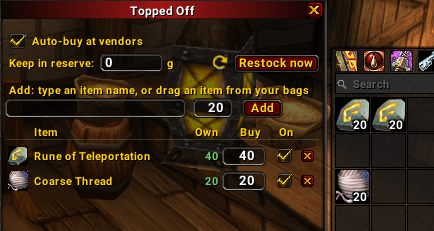
Set it once: "always keep 20 Rune of Teleportation in my bags." Have 7? Walk up to the vendor and Topped Off buys the other 13 — automatically, no clicking through the merchant list.
It works for anything a vendor sells for gold: vendor food & water, ammo, runes, powders, ankhs, poison reagents, sharpening/weightstones, and more.
Features
- Target counts per item — "keep N in my bags," and it fills the gap.
- Auto-buy at vendors — tops up the moment you open a merchant that stocks your items.
- Gold reserve — set a floor and it will never spend you below it.
- Enable/disable per item — pause one without deleting it.
- Per-character — your mage's list is separate from your rogue's, automatically.
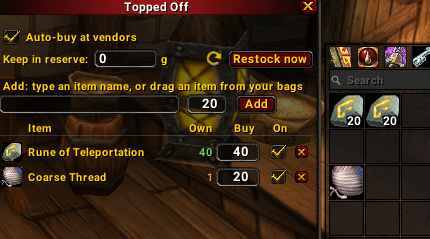
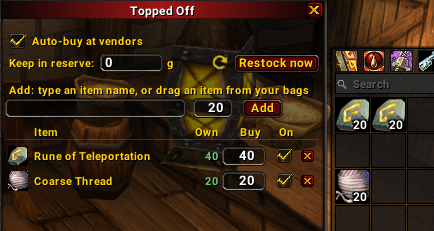
- Movable window — stays open while you shop, so you can add items you see at the vendor.
- Lightweight — no fuss, no bloat; it just keeps you stocked.
How to use
- Open the window with
/to, or the Open Topped Off button in ESC → Options → AddOns → Topped Off. - Type an item's name (or shift-click / drag it in) and set a target quantity, then Add.
- Set your gold reserve and leave Auto-buy at vendors on.
- Shop as normal — it tops you up as you pass the right vendors.
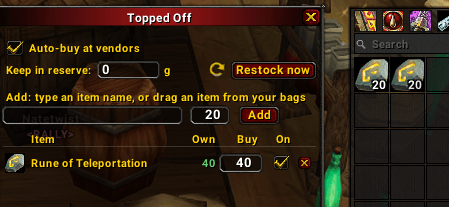
Each row shows your current have N vs. your target, so you can see what's low at a glance.
Commands
/to— open the restock window/to buy— force a top-up at the vendor you currently have open
Good to know
- It can only buy what a vendor actually stocks, so items fill up as you pass the right vendors (reagents at a reagent vendor, water at a drink vendor, etc.).
- It won't buy conjured food/water (those aren't vendor items) or anything purchased with honor / arena points / badges / tokens — gold-priced goods only, so your currencies are never touched.
Feedback
Bug reports and suggestions welcome on the issue tracker.
Topped Off Team