Toksiker +
- By
**Less drama, more DPS.** A lightweight chat management addon that keeps your chat clean, your friends organized, and your important conversations easy to find.
WoWScrnShot_081026_221643.jpg
WoWScrnShot_081026_221659.jpg
WoWScrnShot_081026_221758.jpg
WoWScrnShot_081026_221810.jpg
Description
**Less drama, more DPS.** A lightweight chat management addon that keeps your chat clean, your friends organized, and your important conversations easy to find.
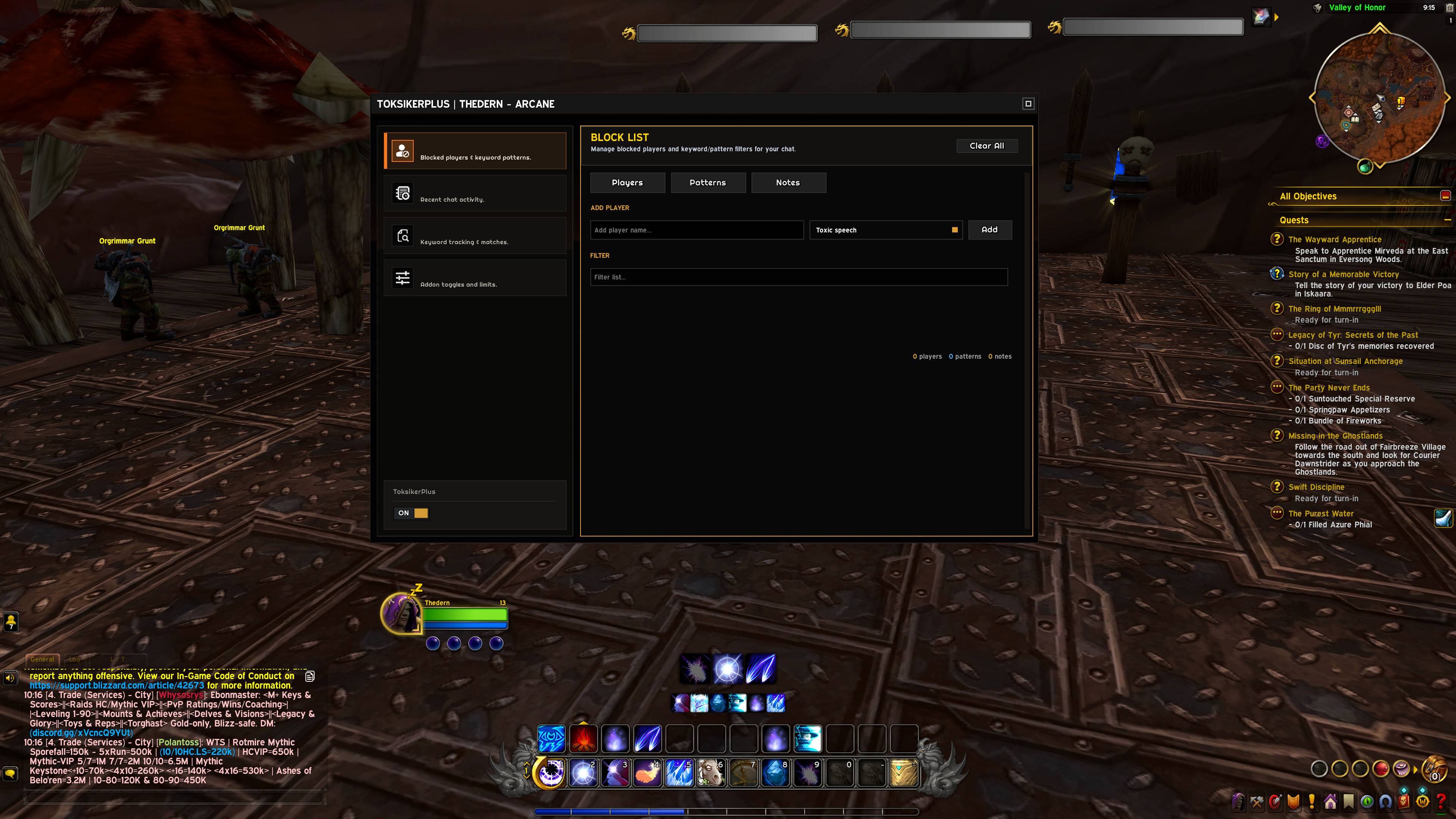
ToksikerPlus is a self-contained chat toolbox. It hides messages from blocked players and spam patterns, records a searchable history of everything said, watches chat for keywords that matter to you, and lets you pin quick notes to any player name — all from a clean, dark, gold-accented interface.
---
## What It Does
ToksikerPlus gives you complete control over your chat experience:
- **Block toxic players** right from the context menu with one click.
- **Filter spam** by blocking words and patterns (boost sellers, gold ads, etc.).
- **Keep notes** on anyone you meet — why you blocked them, who they are, what they owe you.
- **Log all chat** so you never miss a message, with timestamps and class-colored names.
- **Search for keywords** and instantly jump to the people talking about them — then whisper them directly.
- **Copy your whole chat history** with one click, links included.
---
## Features
### 🚫 Block List — Players & Patterns
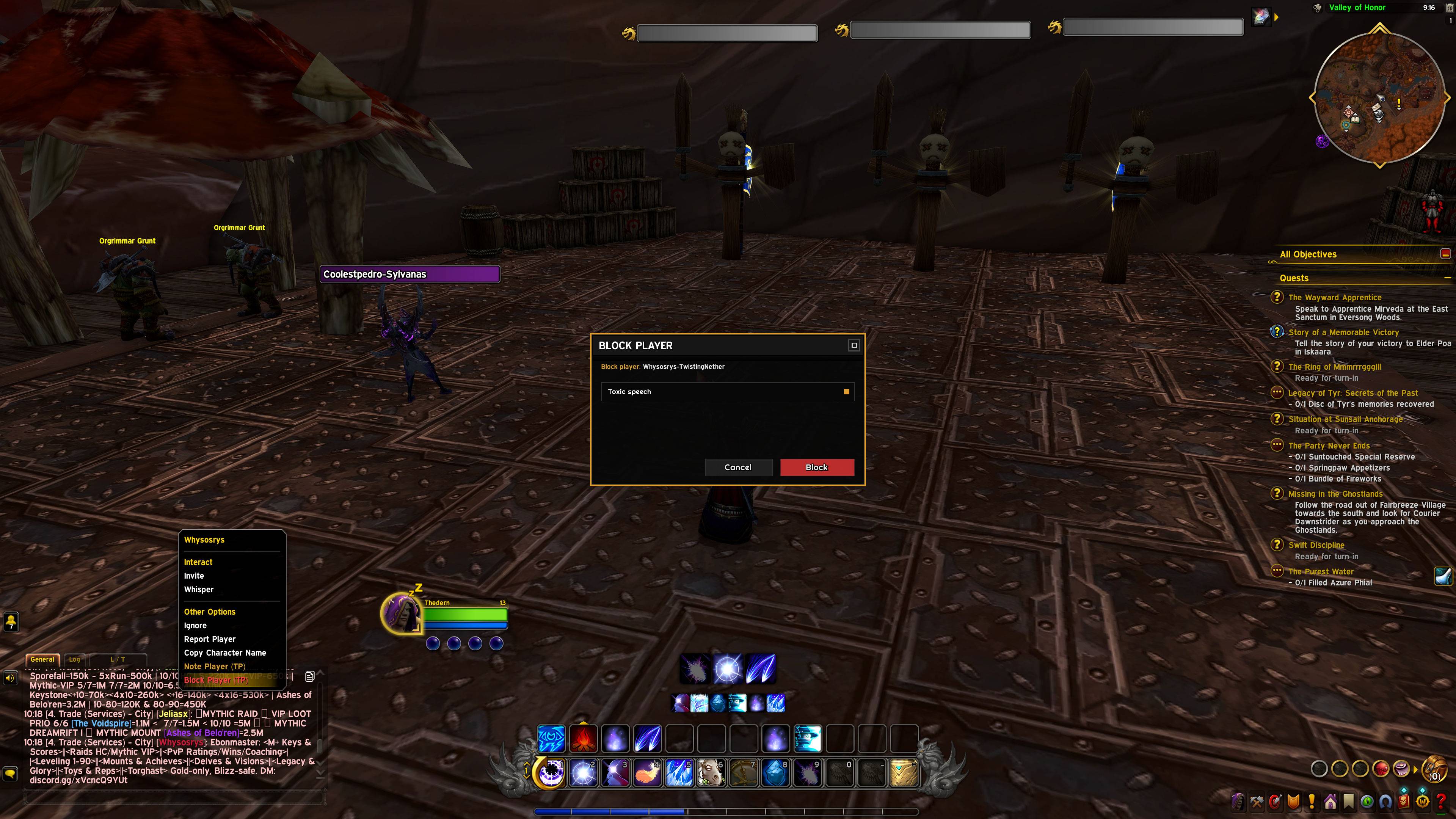
**Block players:**
- Right-click any player name in chat or the world → **Block Player (TP)**.
- Pick a preset reason (Toxic speech, Spam / Advertising, Scam, Harassment, Rude behavior, Other) or type your own **Custom...** reason.
- Their messages disappear from chat immediately.
- Blocked players are flagged in the right-click menu so you always know who you've already muted.
**Block patterns (spam):**
- Block by **keyword / pattern** — e.g. `boost`, `wts`, `cheap gold`.
- Any message containing a blocked pattern is filtered out, no matter who says it.
**Manage everything from the main menu:**
- Two tabs: **Players** and **Patterns**.
- Live counters showing how many players and patterns are active.
- Add entries manually with the input box.
- Instant filter box to search your list.
- One-click **Clear All**.
- A delete button on every row.
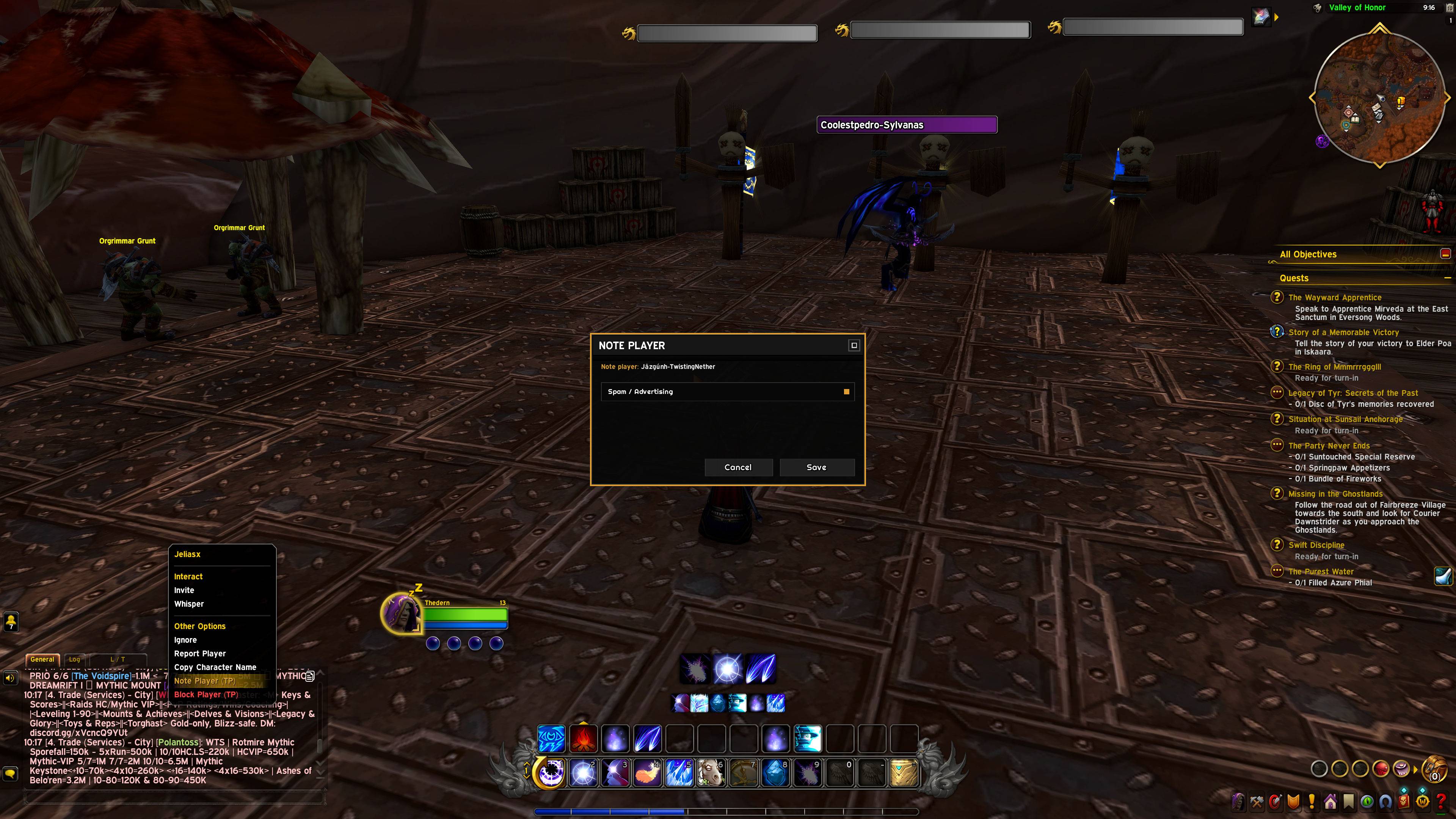
### 📝 Player Notes
- Right-click a player → **Note Player (TP)** to attach a note.
- Notes use the same preset categories as blocking, or you can write a **custom note**.
- **Edit or Delete** a note anytime from the note dialog.
- Hover any player link in chat and their note appears in the tooltip.
- Your notes are shown in the main menu's Block List page alongside blocked players.
### 📜 Chat Log
- Automatically records messages from Say, Yell, Channel, Whisper, Guild, Party and Raid (incoming and outgoing).
- Every entry shows a timestamp and a **class-colored sender name**.
- Logs are **clickable**: item, spell, quest and player links work exactly like in regular chat.
- Configurable **log limit** (50–500 messages), **font size**, and **line spacing**.
- **Clear Logs** button in one click.
### 🔍 Keyword Search
- Add keywords and every matching chat line is collected in a dedicated results list.
- Each match shows which keyword triggered it.
- Add keywords by typing or **shift-clicking an item/player** to insert its link directly.
- Remove keywords from the list or with `/tox search del`.
### 💬 Direct Whisper to Found Players
- Open any player's **chat history** right from the search results.
- A dedicated message box lets you **whisper that player directly** — perfect for following up on a trade offer, a group invite, or an important message you saw in chat.
### 📋 Chat Copy
- A copy button sits in the corner of the chat window.
- Opens your **entire chat history** in a resizable, scrollable window.
- Select and copy any text; all links stay clickable.
- Perfect for quoting someone, saving a trade conversation, or pasting an ID into your notes.
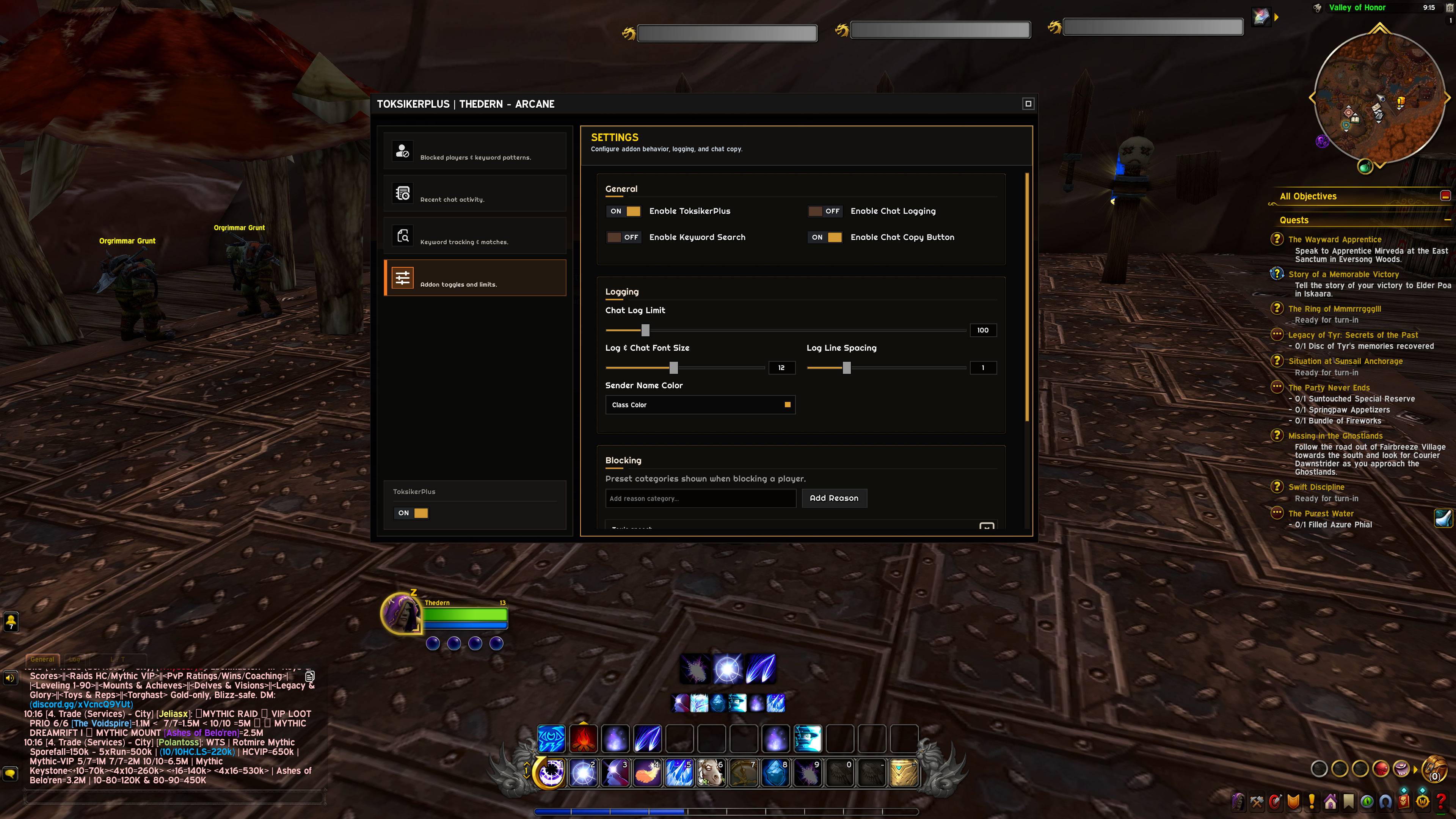
### ⚙️ Settings
- Master **enable/disable** toggle for the whole addon.
- Per-feature toggles: **Chat Logging**, **Keyword Search**, **Chat Copy button**.
- Sliders for log limit, font size and line spacing.
- **Block reason manager**: add or remove your own preset reason categories.
---
## How to Use
**Open the main menu:**
- Type `/tox` in chat.
- Click the **minimap button**.
- Or use the **Edit Mode compartment icon**.
**Block a player from chat:**
1. Right-click their name in chat or the world.
2. Choose **Block Player (TP)**.
3. Pick a preset reason or select **Custom...** and type your own.
4. Done — their messages are filtered out.
**Note a player from chat:**
1. Right-click their name in chat.
2. Choose **Note Player (TP)**.
3. Select a preset or write a custom note and press **Save**.
4. To remove it, reopen the dialog and press **Delete**.
**Block spam words:**
1. Open the main menu → **Block List**.
2. Switch to the **Patterns** tab.
3. Type a pattern (e.g. `cheap gold`) and press **Add**.
**Watch for keywords:**
1. Open the main menu → **Search**.
2. Type a keyword and press **Add** (or shift-click an item to add its link).
3. Every matching line appears in the results below.
**Whisper someone you found:**
1. In the **Search** results, click a player.
2. Their chat history opens with a message box at the bottom.
3. Type your message and press **Enter** — it's sent as a whisper.
**Review your chat:**
1. Open the main menu → **Logs** to browse the full history.
2. Use the **copy button** on the chat frame to open the whole log in a selectable window.
The Toksiker + Team