Toban's Game Menu
- By
Full replacement (and more) for the Blizzard Micro Menu for any LibDataBroker compatible display.
Screenshot 2026-11-13 171832.jpg
Description
For WoW Retail and WoW Forever.
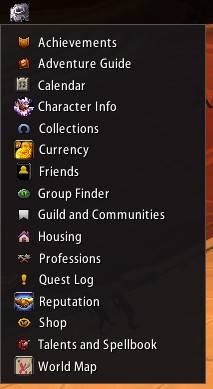
Toban's Game Menu turns one word on your LibDataBroker bar into a list of the game's panels: character, talents, collections, group finder and the rest. Hover, click, done. Blizzard's micro menu can then be hidden entirely, and your key bindings keep working.
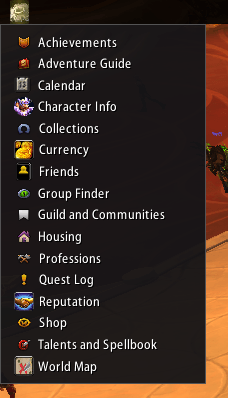
The menu
- Hover for an alphabetical list, each row with the icon of the panel it opens; Character Info shows your portrait.
- Only the panels your game has are listed, so Retail and Forever each get the right set.
- Panels Blizzard has switched off for your account are dimmed.
- Choose which panels appear.
Hide the micro menu
- One tick makes Blizzard's micro menu invisible and unclickable, its pop-up alerts included. Key bindings and Escape still work.
Safe by design
- Every row clicks Blizzard's own button, so no addon code touches the panel and nothing is tainted.
- The list opens out of combat only.
Getting started
- Needs a LibDataBroker display, such as Bazooka, ChocolateBar or Titan Panel: add Toban's Game Menu to your bar there.
- Right-click it for the options.
Toban's Game Menu Team