TipTac Forever
- By
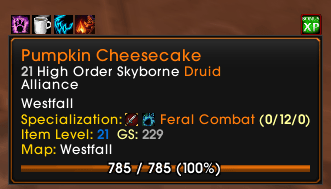
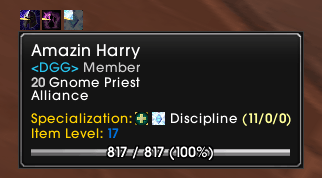
TipTac Forever is a tooltip enhancement addon, it allows you to configure various aspects of the tooltip, such as moving where it's shown, the font, the scale of tips, plus a lot more. It's the successor of the original TipTac by Aezay (Abandoned 2020)
Description
What is it?
TipTac Forever is a tooltip enhancement addon, it allows you to configure various aspects of the tooltip, such as moving where it's shown, the font, the scale of tips, plus a lot more. It's the successor of the original TipTac by Aezay (abandoned since Nov 2020) with massive modifications since then done by Frozn45 for Anniversary.
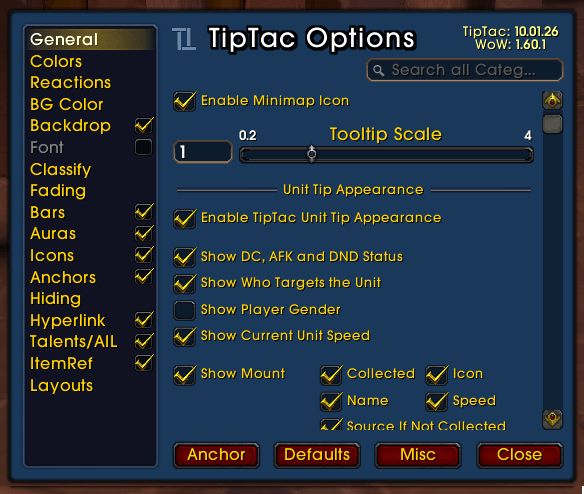
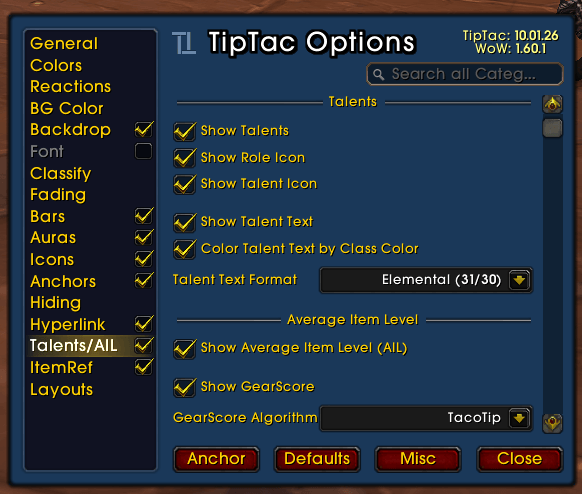
To open the option dialog, just use "/tip" without any parameters. Use "/tip anchor" to show the anchor frame and position it as you want.
What can it do?
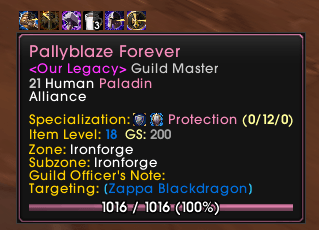
- Shows the buffs and debuffs of the target with cooldown models. Has options to make it only show the ones you cast.
- When in a raid or party, there is an option to show who from the group is targeting the unit. When ungrouped, the visible nameplates (can be enabled under WoW options 'Interface->Names') are evaluated instead.
- Vast anchoring options allows you to change between Normal, Mouse and Parent anchor, this is configurable for both unit and non-unit tips on a frame or non-frames.
- Anchoring frame lets you decide exactly where you want tips with the normal anchoring option.
- Able to change the font face and size for all tips in the User Interface. Uses "LibSharedMedia" if installed.
- Can show a Health, Mana, Energy, Rage, Runic Power or Focus bar inside the tip, which can be enabled or disabled as you prefer.
- Tips are getting updated at a customizable interval to display changes.
- Configurable fading options, both a prefade and fadeout time can be set. They can also be set to zero if you prefer the tips to just hide instantly.
- Allows for you to change the background and border color of the TipTac tip and any of the modified tip.
How do I use it?
Layout Templates
Currently TipTac comes with a few presets, these are a collection of preset settings. You can find the presets in the options. I am looking for more layout presets to include in future releases of TipTac. So feel free to post your saved settings.
Special Tip Modification
TipTac does not only configure the tip for units, you can also use TipTac to modify other tips in the WoW Interface. The way they are getting modified are both in scale and appearance. The border and background of the modified tips can be changed to colors of your desire. You can disable this appearance change by disabling the option "Hook Special Tips" under the General tab of the options dialog. Currently these tips are getting modified, but you can add more if you wish by editing the "TipTac\ttCore.lua" file. GameTooltip, ShoppingTooltip1, ShoppingTooltip2, ShoppingTooltip3, ItemRefTooltip, WorldMapTooltip, AtlasLootTooltip and QuestHelperTooltip.
Other TipTac Addons
There are two other addons, included in the TipTac package, which improves tip functionality in WoW. First one is "TipTacTalents", which will show player talents/specialization including role and talent/specialization icon and the average item level in the tip. The second addon is "TipTacItemRef", which improves the look of the ItemRefTooltip, which is the one shown when clicking on an item, spell or achievement link in the chat. Please refer to each addon's readme.txt file for more information regarding their functionality.
FAQ
- Getting the "Font not set" error? Make sure both the "Font->Font Face", as well as the "Bars->Font Face" are properly set to a valid font.
- Getting the "Action[SetPoint] failed because[SetPoint would result in anchor family connection]: attempted from: GameTooltip:SetPoint" error? Delete file "World of Warcraft\__<Edition>__\WTF\<Account>\<Server>\<Character>\layout-local.txt"
The TipTac Forever Team