TimeIsMoney
- By
A clean, native-feeling live farm & gold tracker for WoW Retail (Midnight). It values what you gather and loot, tracks your real gold/hour, remembers where you earn the most, and helps you clear your bags and price your mats on the Auction House
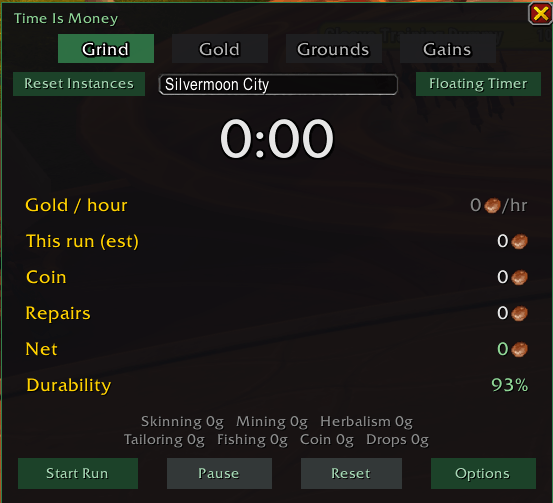
Clean, native-feeling UI — themeable, compact, and built to look like it belongs in WoW. For those who want all the numbers but none of the clutter.
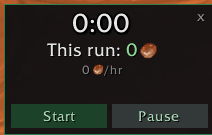
Farm without the panel open — a tiny, movable, scalable widget showing your run timer, this-run gold, and Gold/hour. Start/Pause right from it.
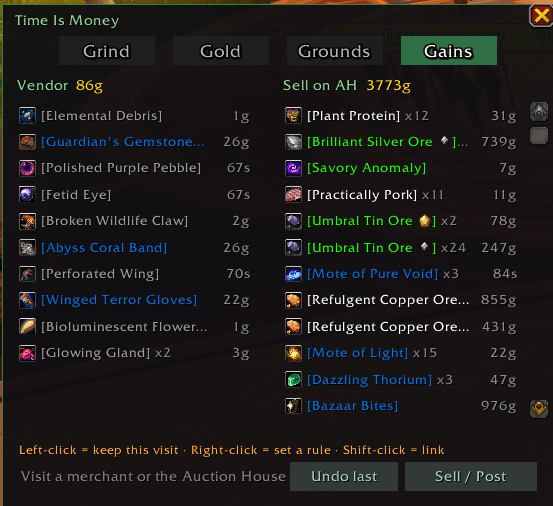
At a merchant, review the vendor pile and Sell All (with keep-toggles, per-item rules, and one-click undo). At the Auction House, Time Is Money scans live prices itself and shows the exact undercut price to list at — no TSM or Auctionator required.
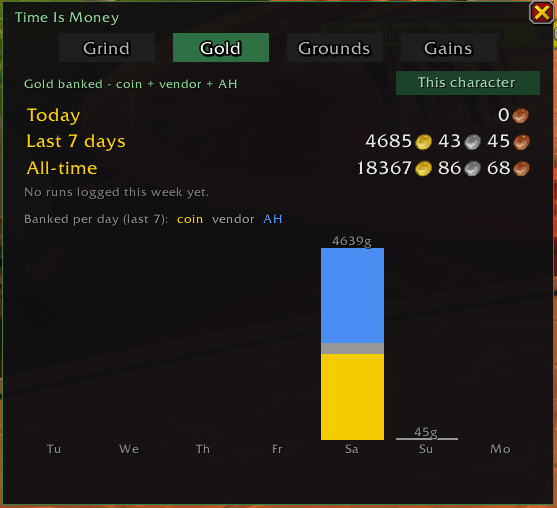
Gold you've actually banked — coin looted + vendor sales + Auction House mail, shown Today / Last 7 days / All-time with a per-day breakdown chart. Kept completely separate from the live estimate. Toggle This-character vs. whole account.
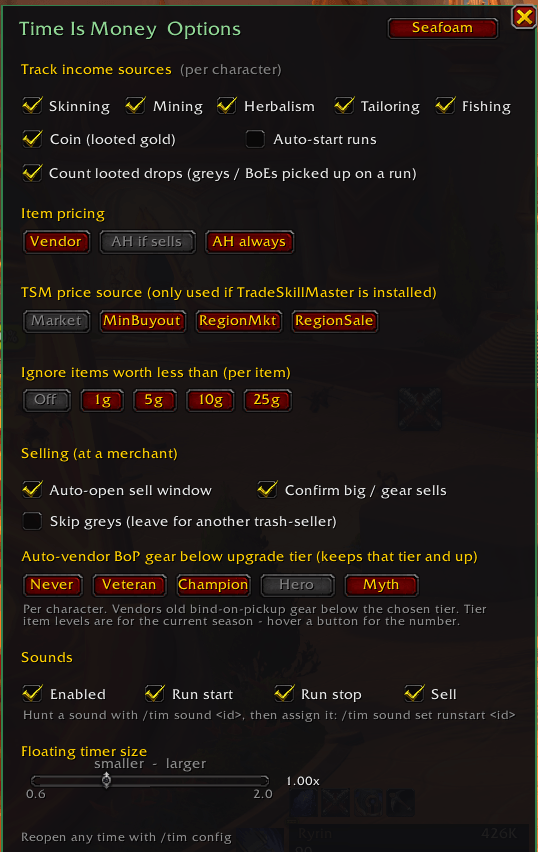
Options panel — track exactly the income sources you want (per character), pick your item-pricing rules, set your merchant sell behavior, auto-vendor old gear by upgrade tier (Veteran → Myth), tune sounds, and choose from six color themes. No spreadsheet!
Description
Time Is Money
A live farm and gold tracker for WoW Retail. It values what you gather and loot, tracks your real gold per hour, remembers which zones pay best, and prices your mats for the Auction House. No TSM or Auctionator required. If you have either installed, it will read prices from them.
Type /tim to open the window. A run auto-starts on your first gather or loot, so you can
just go farm.
The four tabs
- Grind: your live run. Timer, gold/hour, value so far, and a per-source breakdown across skinning, mining, herbalism, cloth, fishing, coin and drops, shown net after repairs. A detachable floating timer lives here too.
- Gold: what you have actually banked, counting coin, vendor sales and AH mail, for today, the last 7 days, and all time. Includes a daily chart, your best run of the week, and a this-character/account toggle.
- Grounds: run history and Auction House intel. Cycle through Runs, Locations and Market. Locations ranks your zones by earnings. Market shows prices and supply for your mats, or searches a whole category (Herbs, Ore, Leather, Cloth, Cooking) for under-supplied mats worth farming. Left-click any Market item for a copyable Wowhead link.
- Gains: selling and pricing. At a merchant, review the vendor pile, set keep and sell rules, then Sell All with a confirmation and an undo. At the Auction House, every mat shows the undercut price to list at.
New in 1.0.5
Shift-click an item in your bags while the Auction House is open and it loads straight into the sell slot. No dragging. You still set the price and press Create Auction yourself, so nothing is ever posted without you.
It is on by default and can be switched off in Options under "Shift-click sell". The shortcut only fires while a sell view is actually open, so shift-clicking on the Buy tab is left alone, and shift-clicking into the chat box still links the item normally.
/tim ahdiag toggles a diagnostic trace of the AH sell path. If a future patch reshapes the
Auction House and the shortcut stops working, run it, shift-click a bag item, and paste the
dump into a bug report.
How it values things
Gathered loot is attributed to the profession that produced it, then priced from your own self-contained AH scan first, falling back to TSM, then Auctionator, then vendor price. Coin is tracked from loot only. Banked totals count realized gold, and the live estimate never mixes into them.
Good to know
- Blizzard blocks addons from posting auctions. Time Is Money shows you the exact price to list at; you place the auction in Blizzard's own window.
- Data is per character and starts empty. It tracks going forward and does not back-fill.
- Six color themes: Seafoam, Amethyst, Amber, Crimson, Steel, and Class Color.
- Everything is saved locally to
TimeIsMoneyDB. WoW addons have no internet access, so there is no telemetry and nothing leaves your machine.
Commands
/tim shows and hides the window, /tim config opens options, and /tim help prints the
full command list in game.
TimeIsMoney Team