TimeCapsule
- By
Daily character scans for WoW: level, stats, gear, reputation, PvP and more. Browse your whole journey in-game and export any scan as clean, copy-ready text.
Снимок ÑкÑана 2026-10-20 024641.png
Снимок ÑкÑана 2026-10-20 024656.png
Description
# Time Capsule
Time Capsule quietly records a snapshot of your character once a day, so after a few months you have a complete timeline of your journey through the game: how you levelled, what you wore, where you were, and how your reputation grew. Perfect for nostalgia, progress videos, and guild retrospectives.
## How it works
- **Automatic daily scan** - the first time you log in each day (per character), the addon saves a scan a few seconds after entering the world. Playing past midnight? It catches that too.
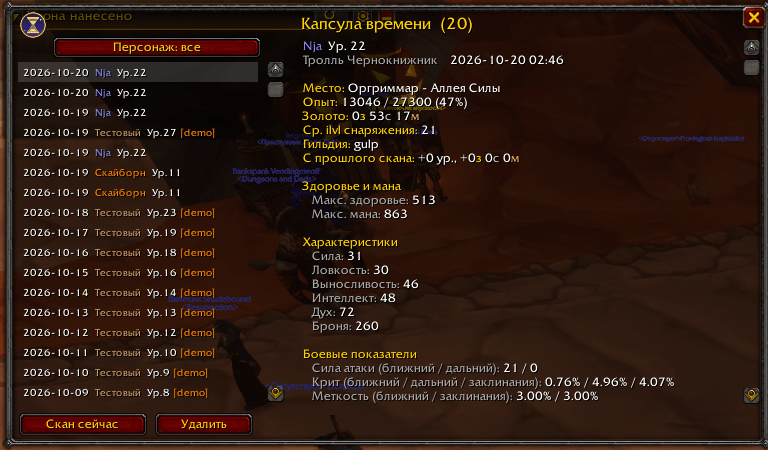
- **Browse in-game** - open the history with the minimap button or /tc. Pick any scan from the list and see everything exactly as it was that day. Filter by character.
- **Progress at a glance** - each scan shows what changed since the previous one (levels gained, gold earned).
- **Export as text** - click Export to get a neatly formatted, indented text version of any scan in a small window. Press Ctrl+C and the window copies and closes itself. No files, no hassle.
## What each scan records
- Level, XP, zone and subzone, gold, guild, talent points, average gear item level
- Max health and max mana
- Primary stats (Strength, Agility, Stamina, Intellect, Spirit) and armor
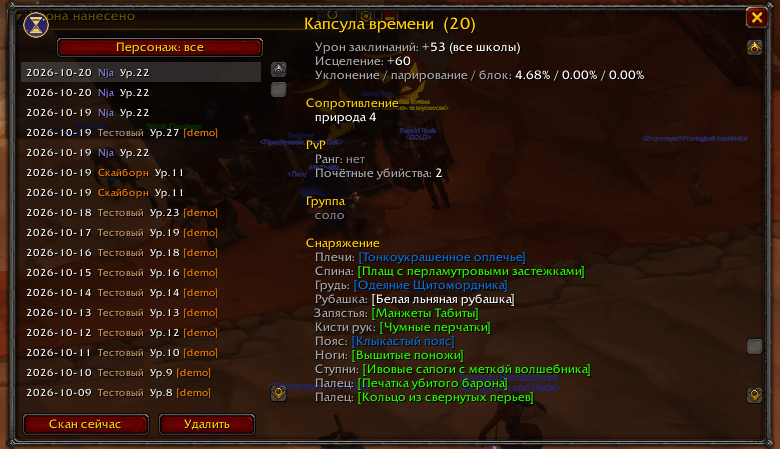
- Attack power, crit chance, hit, spell damage, healing
- Defense, dodge, parry, block
- Magic resistances
- PvP rank, rank progress and honorable kills
- Full equipment list
- All discovered reputations, with standing (Friendly, Honored, Revered...) and progress
## Commands
- /tc - open or close the history window
- /tc now - take a scan right now
- /tc demo [days] - generate a demo history starting from level 1, handy for trying the addon out
- /tc cleardemo - remove demo data
- /tc minimap - show or hide the minimap button
- /tc rep - reputation diagnostics
- /tc lang ru|en|auto - interface language
The minimap button sits on the edge of the minimap: left-click opens the history, right-click takes a scan, drag to reposition.
## Notes
- All data stays on your computer in the addon's SavedVariables file; nothing is sent anywhere.
- Scans are written to disk when you log out or /reload.
- The interface is available in English and Russian and follows your game client's language by default.
- One scan per character per day keeps the saved data small, even after a year of play.
Feedback and bug reports are welcome!
TimeCapsule Team