TickTrail
- By
Timeline for your DoTs & HoTs on every target – not just the one you have selected.
TickTrail-Stile-EN.png
Description
TickTrail
All your DoTs and HoTs on one timeline – on every target, not just the one you have selected.
Deutsche Beschreibung weiter unten.
TickTrail shows every damage- and heal-over-time effect you have running as an icon gliding along a timeline towards zero. Each target gets its own row, so you can keep several enemies dotted up without tabbing back and forth to check what is about to fall off.
Built for World of Warcraft: Forever. Works for every class that uses DoTs or HoTs – Warlocks, Priests, Druids, Hunters, Shamans and more.
Features
- Multi-target tracking – one row per target, fed by your target, focus, mouseover, all enemy nameplates and your party or raid.
- Glowing trails – every icon pulls a trail behind it, so you can read the remaining time at a glance.
- Expiry warning – icons pulse red during their last 3 seconds.
- Current target highlighted – the row of the unit you have selected lights up in gold, and rows keep their position instead of jumping around.
- Living enemies stay listed – when your DoTs fall off, the enemy stays in the list marked "no DoTs left", so you know who needs a refresh.
- Raid markers shown next to each name.
- Learns your spells automatically – no spell lists to maintain; durations are read from the client or the spell tooltip.
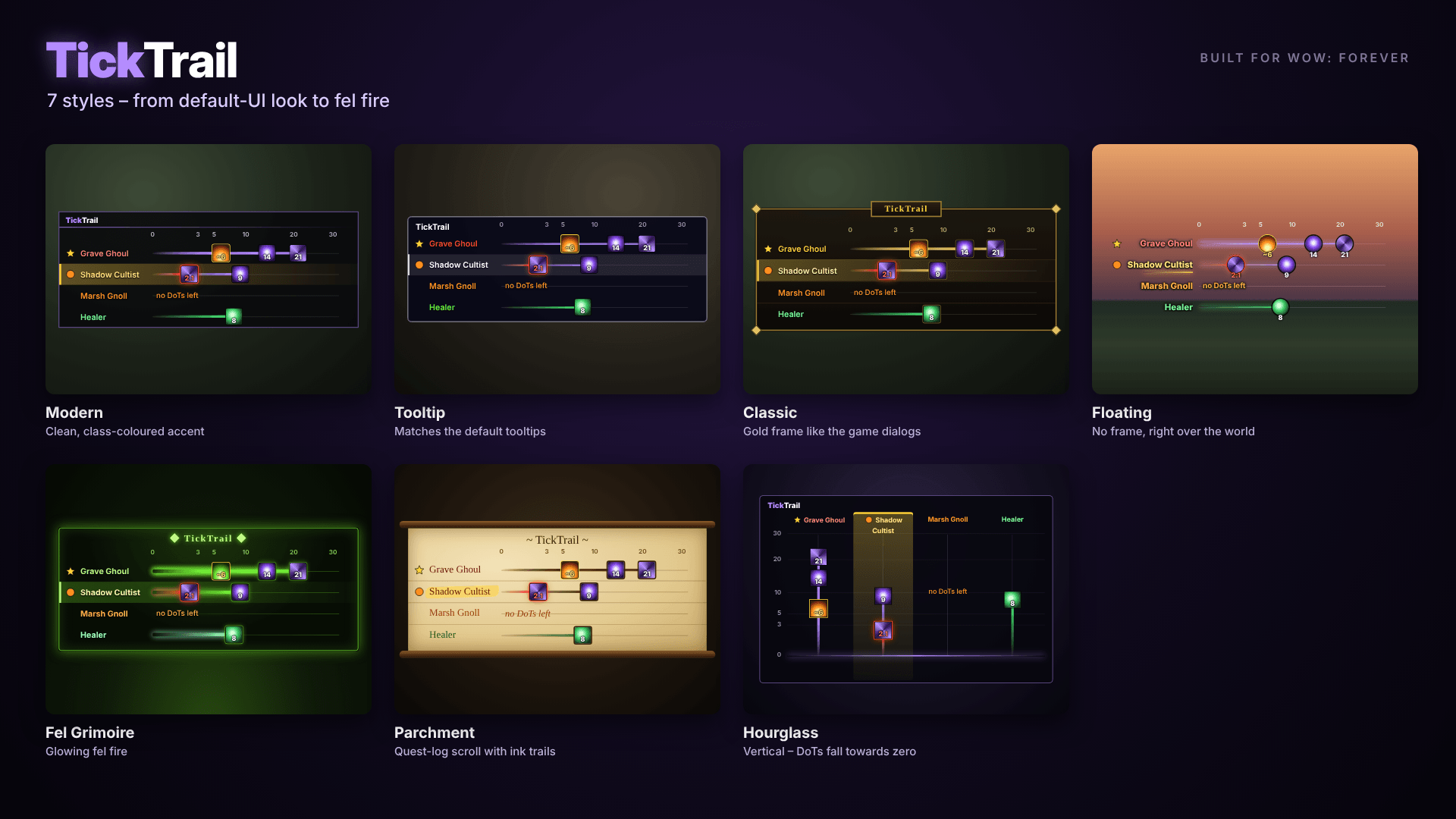
- 7 styles to choose from – Modern, Tooltip and Classic to match the default UI, plus Floating (no frame at all), Fel Grimoire, Parchment and the vertical Hourglass layout.
- Hide out of combat – optional, the frame only appears while you are fighting.
- Fully adjustable – scale, width, name column, row height, background opacity, timeline length and number of targets.
- Live preview – sample targets are shown while the options window is open.
- Minimap button and class-coloured accents (both optional).
- English and German, chosen automatically from your game client.
Usage
Open the options with the minimap button or /ttr. Right-click the minimap button to lock or unlock the frame; while unlocked, drag it wherever you like.
| Command | Action |
|---|---|
/ttr |
Open options |
/ttr lock / unlock |
Lock (click-through) / move the frame |
/ttr list |
Show learned spells and their IDs |
/ttr ignore <ID> |
Hide a spell, e.g. a crowd-control effect |
/ttr forget |
Clear all learned spells |
/ttr test |
Show what the client reveals about your current target |
/ttr debug |
Report every newly learned spell in chat |
/ttr reset |
Reset position and scale |
Good to know
WoW: Forever runs on the modern client, which limits what addons may read during combat. TickTrail works within those rules:
- Keep enemy nameplates switched on. A unit you have not selected can only be read through its nameplate.
- Timers marked with "~" and a yellow border are estimates that start when your cast lands. They are used whenever the client hides exact aura times.
- Death of an enemy can only be detected while it is visible. Rows of enemies that have not been seen for 45 seconds, or once combat ends, are removed automatically.
- Clicking a row cannot select that target. Blizzard does not allow addons to change your target dynamically during combat. Raid markers plus Tab or the nameplate are the way to go.
Bug reports and ideas are welcome in the comments – please include your class, the spell and the output of /ttr test.
TickTrail (Deutsch)
Alle deine DoTs und HoTs auf einer Zeitleiste – auf jedem Ziel, nicht nur auf dem anvisierten.
TickTrail zeigt jeden Schadens- und Heilungseffekt über Zeit als Symbol, das auf einer Zeitleiste Richtung Null wandert. Jedes Ziel bekommt eine eigene Zeile. So hältst du deine DoTs auf mehreren Gegnern aufrecht, ohne ständig hin- und herzutabben.
Gebaut für World of Warcraft: Forever. Funktioniert mit jeder Klasse, die DoTs oder HoTs nutzt – Hexenmeister, Priester, Druiden, Jäger, Schamanen und mehr.
Funktionen
- Mehrere Ziele gleichzeitig – eine Zeile pro Ziel, gespeist aus Ziel, Fokus, Mouseover, allen gegnerischen Namensplaketten und deiner Gruppe bzw. deinem Schlachtzug.
- Leuchtspuren – jedes Symbol zieht eine Spur hinter sich her, die Restzeit erkennst du auf einen Blick.
- Warnung vor Ablauf – in den letzten 3 Sekunden pulsiert das Symbol rot.
- Aktuelles Ziel hervorgehoben – die Zeile deines Ziels leuchtet golden, und die Zeilen bleiben an ihrem Platz statt herumzuspringen.
- Lebende Gegner bleiben in der Liste – laufen deine DoTs aus, bleibt der Gegner mit dem Hinweis „keine DoTs mehr“ stehen, damit du weißt, wen du nachdotten musst.
- Zielmarkierungen neben jedem Namen.
- Lernt deine Zauber automatisch – keine Zauberlisten pflegen; die Dauer kommt vom Client oder aus dem Tooltip.
- 7 Stile zur Auswahl – Modern, Tooltip und Klassik passend zum Standard-Interface, dazu Schwebend (ganz ohne Rahmen), Teufelsfeuer-Grimoire, Pergament und die senkrechte Sanduhr.
- Außerhalb des Kampfs ausblenden – optional, die Leiste erscheint nur im Kampf.
- Alles einstellbar – Skalierung, Breite, Namensspalte, Zeilenhöhe, Deckkraft, Länge der Zeitleiste und Anzahl der Ziele.
- Live-Vorschau – solange das Optionsfenster offen ist, zeigt die Leiste Beispielziele.
- Minimap-Knopf und Akzente in deiner Klassenfarbe (beides abschaltbar).
- Deutsch und Englisch, automatisch passend zu deinem Spielclient.
Bedienung
Die Optionen öffnest du über den Minimap-Knopf oder /ttr. Rechtsklick auf den Minimap-Knopf fixiert oder löst das Fenster; im gelösten Zustand kannst du es frei verschieben.
| Befehl | Wirkung |
|---|---|
/ttr |
Optionen öffnen |
/ttr lock / unlock |
Fenster fixieren (klickt durch) / verschieben |
/ttr liste |
Gelernte Zauber mit ID anzeigen |
/ttr ignorieren <ID> |
Zauber ausblenden, z. B. Kontrolleffekte |
/ttr vergessen |
Alle gelernten Zauber löschen |
/ttr test |
Zeigt, was der Client über dein Ziel herausgibt |
/ttr debug |
Jeden neu gelernten Zauber im Chat melden |
/ttr reset |
Position und Größe zurücksetzen |
Gut zu wissen
WoW: Forever läuft auf dem modernen Client, der Addons im Kampf nur eingeschränkt Daten lesen lässt. TickTrail arbeitet innerhalb dieser Regeln:
- Gegnerische Namensplaketten eingeschaltet lassen. Ein nicht anvisierter Gegner lässt sich nur über seine Plakette auslesen.
- Zeiten mit „~“ und gelbem Rahmen sind Schätzungen ab dem Moment deines Zaubers. Sie kommen zum Einsatz, wenn der Client die genauen Aura-Zeiten verbirgt.
- Den Tod eines Gegners erkennt das Addon nur, solange er sichtbar ist. Gegner, die 45 Sekunden nicht mehr zu sehen waren, und alle Gegner ohne DoTs nach Kampfende werden automatisch entfernt.
- Ein Klick auf eine Zeile kann das Ziel nicht auswählen. Blizzard erlaubt Addons nicht, im Kampf dynamisch das Ziel zu wechseln. Zielmarkierungen plus Tab oder die Namensplakette sind hier der Weg.
Fehlermeldungen und Ideen gerne in die Kommentare – am besten mit Klasse, Zauber und der Ausgabe von /ttr test.
TickTrail Team