ThreatTag
- By
Threat, aggro radius and group cooldowns at a glance for Classic Era - everything you need to not pull the mob that kills you.
Discord_4Fehkv6Lyl.png
Discord_sCb9agetdn.png
Description
# ThreatTag
**Colour-coded threat percentages over enemy nameplates for Classic Era, with a built-in vanilla threat engine, a threat meter and party cooldown tracking.**
Classic Era never sends the client a threat table — the stock API returns nothing. ThreatTag carries its own vanilla threat engine built from the combat log, so it works on its own: no ThreatClassic2, no libraries, no companion addon.
---
## Threat above the nameplate
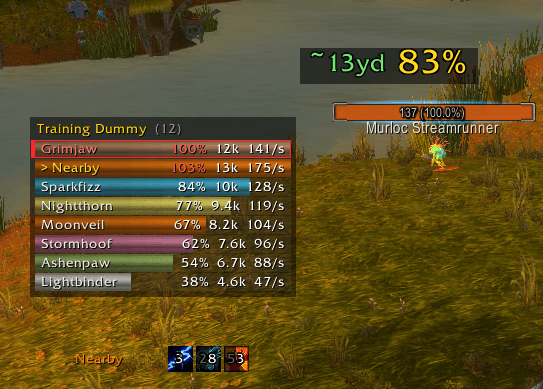
One number over each enemy, and it always means the same thing: **100% = aggro is about to switch.**
* **Tank** — green while the mob is on you, yellow when somebody is closing in, red when it has gone to somebody else.
* **DPS and healers** — the same colours inverted: green while you are clear, yellow near the threshold, red when you are on the wrong end of it.
* At the yellow and red stages the value **grows** and is drawn **on top of every other nameplate**, so it cannot be lost behind aura icons or another addon's text.
The pull threshold is 110% in melee and 130% at range, and which one applies is decided **per mob from your own auto attacks** rather than from your class — an elemental shaman pulls at 130%, the same shaman meleeing at 110%.
No nameplates? The same value falls back to a spot above the target frame's health bar.
## Threat meter
A movable window listing everybody on your current target: name in class colour, bar, percentage, threat per second.
* It **follows your target** — pick another mob and the list rebuilds for it.
* The percentage is measured against **whoever the mob is hitting**, so they are always 100% and everyone else is a share of that. Above 100% means somebody has overtaken the tank while the mob has not turned yet.
* The mob's current target is framed in red; you are marked with `>`.
## Aggro radius
To the left of the threat value, how far away a mob will notice you: 20 yards at your level, ±1 yard per level of difference. Shown for hostile mobs that are not fighting yet — which is exactly when it matters.
## Aggro switch popup
When a mob is taken off the tank, a popup names the culprit in their class colour. Text only, no backdrop, shift-drag to move, ctrl+wheel to resize. Optional sound. By default it only fires for mobs taken off the player assigned the TANK role.
## Party cooldown tracking
Other people's cooldowns cannot be read through the API, so they are rebuilt from the combat log.
* Icons with a countdown **under each player's health bar**, plus two independent on-screen panels (group and enemies) with their own position, size and row limits.
* ~139 abilities across nine classes, with per-class defaults and per-player overrides.
* Enemy players can be tracked too, using the same class lists.
* Real in-game tooltips on both the ability lists and the running icons.
## Talent scanning
Threat talents matter — Defiance, Feral Instinct, Silent Resolve, Burning Soul and the rest — so the addon inspects group members and folds their talents into the calculation. Talents are matched by their coordinates in the tree, not by name, so the client's language does not matter.
A **Spec** entry is added to the player right-click menu: it opens a talent window styled like the default one, for anybody you can inspect.
The scanner only ever touches party and raid members, never `target` or `mouseover`, keeps a five-second gap between requests and caches results for an hour — so it stays quiet in crowded places.
## Works with Plater
ThreatTag never touches Plater's frames, settings or CVars. It attaches its own child frame to the nameplate driver and anchors it to the health bar, whatever skin is in use. It does not measure nameplate frames, so it cannot taint Plater. The upward offset is worked out from Plater's own aura icon size.
If Plater is already drawing its own threat percentage, turn that off in Plater so there are not two numbers.
## Settings
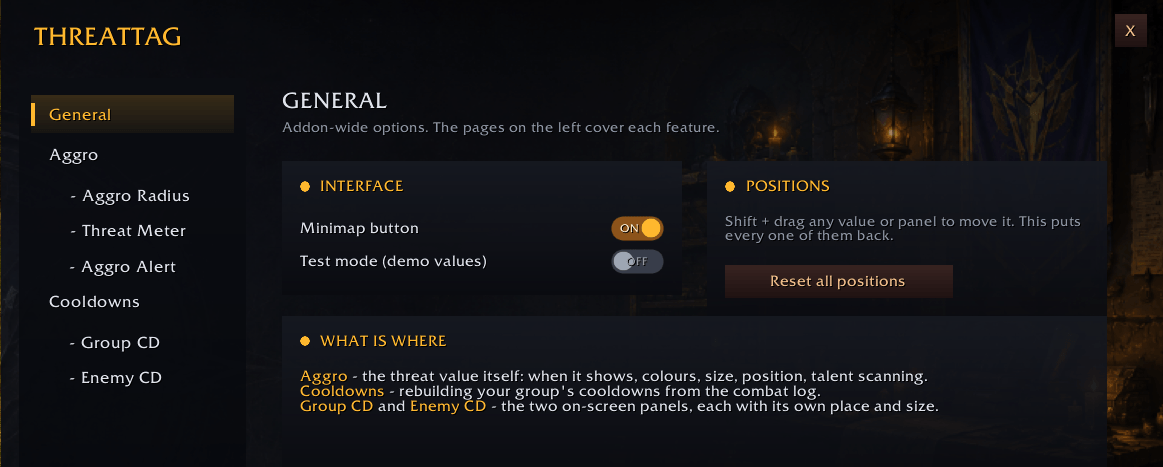
The addon has its own options window — `/ttag` or the minimap button — with pages for Aggro, Aggro Radius, Threat Meter, Aggro Alert and cooldown panels. Blizzard's own options pages are still there for anyone who prefers them.
**Test mode** (`/ttag test`) fills everything with running demo values so the whole layout can be placed while standing still in a city.
A few of the useful commands:
```
/ttag open the settings window
/ttag test demo mode for placing everything
/ttag meter the threat table window
/ttag alert the aggro switch popup
/ttag radius the aggro radius
/ttag spec [Name] a player's talents
/ttag dump the raw threat table for your target
/ttag debug why the value is or is not on screen
/ttag resetpos everything draggable back to its default spot
```
## Known limits
* Only what reaches your combat log is counted — a healer topping up the tank far away from you may never enter it. Every threat meter on Classic has this limit.
* Some values for lower ability ranks are interpolated; they are marked `approx` in the data file.
* Solo, the percentages say little — the mob is on you anyway.
Everything is plain Lua with the threat tables in `Data.lua` and the cooldown list in `Cooldowns.lua`, both editable by hand.
ThreatTag Team