BoW Cycler
- By
One click buffs the next party member who needs it. Every class, with expiry warnings and an emergency panel for when your health drops
Discord_3B7pDQykhY.png
Discord_mta0ISpZIH.png
Description
# BoW Cycler
**One click buffs the next party member who needs it.**
Keeping a five-man group buffed is the least interesting thing a support class
does. Check five nameplates. Spot who is missing what. Target them. Cast. Notice
someone else has run out. Repeat until the pull.
BoW Cycler collapses all of that into a button. Click it and the next person
missing your buff gets it. Click again for the one after that. When everybody is
covered the button goes dark and stays quiet until something runs low.
It began as a paladin blessing helper, which is where the name comes from. It now
works for every class that has something worth keeping up.
---
## What it does
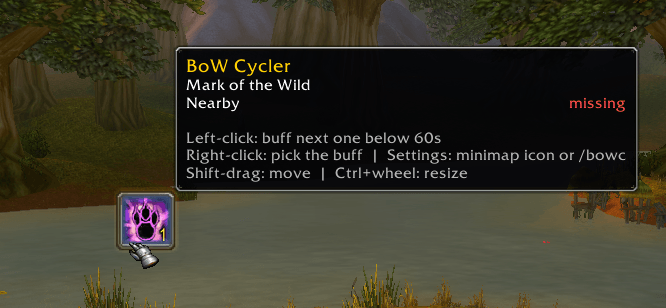
**Buff buttons.** One to five of them, each watching its own buff. Every click
casts on the next party member missing it or whose timer is running out. The
button glows and shows a count while anyone still needs it, and greys out when
the party is fully covered.
**Alerts before things drop.** A chat line and a sound when a buff falls below
your threshold — 60 seconds by default. One notification per person per expiry,
never a stream of repeats. When several expire together the chat collapses into a
single summary line, and the sound has a quiet period you control.
**Per-person tracking.** The mage does not want Thorns. Tick teammates on and off
per button and the addon stops counting the people you excluded.
**Emergency panel.** Two large buttons — your strongest healing potion and a
defensive spell — that stay completely invisible and unclickable until your
health drops below a threshold you set, then flash red. The potion button is
bound to every potion you own at once in descending strength, so draining your
Major Healing Potions mid-fight falls through to the weaker ones instead of
leaving you jabbing at a dead button.
**Follow button.** Optional, off by default. One click follows whichever party
member is nearest. Nothing is measured between clicks, so leaving it on is free.
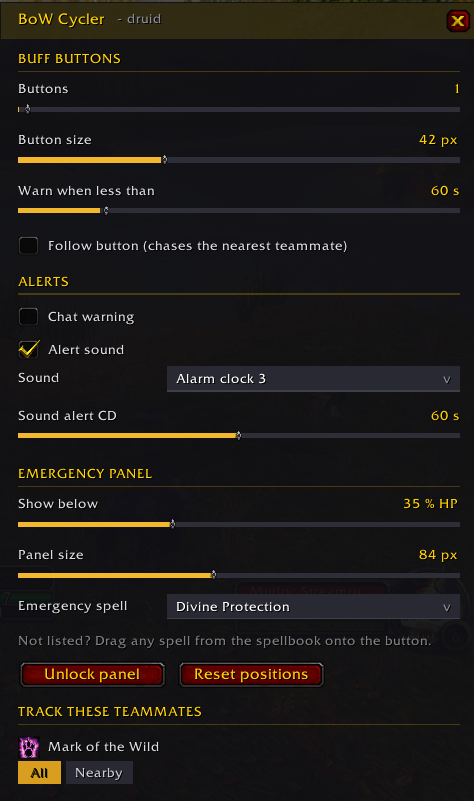
**Settings window.** Everything in one place, from a minimap icon or `/bowc`.
---
## Getting started
1. Extract into `World of Warcraft\_classic_era_\Interface\AddOns`
2. Log in. A button appears in the middle of your screen.
3. Shift-drag it where you want it; Ctrl+mouse-wheel resizes it.
4. Right-click it to pick which buff it watches.
5. Click the minimap icon for everything else.
### Buff button controls
| Action | Result |
| --- | --- |
| Left-click | Buff the next party member who needs it |
| Right-click | Pick this button's buff |
| Shift-drag | Move the whole row |
| Ctrl+wheel | Resize |
| Hover | Per-person timers and who is next |
The buff list is built from your class and your spellbook, so you only ever see
things you can actually cast. Ranks are handled for you — the highest one you
know is the one that goes out.
---
## Supported classes
| Class | Tracked buffs |
| --- | --- |
| **Paladin** | Might, Wisdom, Kings, Salvation, Light, Sanctuary, Righteous Fury |
| **Druid** | Mark of the Wild, Gift of the Wild, Thorns, Omen of Clarity |
| **Priest** | Fortitude, Prayer of Fortitude, Divine Spirit, Shadow Protection, Inner Fire |
| **Mage** | Arcane Intellect, Arcane Brilliance, Dampen Magic, Amplify Magic, armors |
| **Warlock** | Unending Breath, Demon Skin, Demon Armor |
| **Shaman** | Water Walking, Water Breathing, Lightning Shield |
| **Warrior** | Battle Shout |
| **Hunter** | Aspect of the Hawk, Aspect of the Wild, Trueshot Aura |
| **Rogue** | None — the buff button stays dark, the rest of the addon works |
Buffs are looked up by spell ID, so names appear in your client's own language.
No translation files, nothing to configure for non-English clients.
Each class also gets its own list of defensive spells for the emergency button,
and anything missing from a list can be dragged onto the button straight from
your spellbook.
---
## Settings
The minimap icon, `/bowc`, or a right-click on either emergency button opens the
window:
- Number of buff buttons, their size, and the seconds-remaining threshold
- The follow button on or off
- Chat warnings, alert sound, which sound, and the minimum gap between sounds
- Health threshold, panel size, and the emergency spell
- Which teammates each button watches
- Unlock the panel for dragging, reset every position
## Slash commands
Everything in the window has a command, for macros and muscle memory.
```
/bowc open the settings window
/bowc help list the commands
/bowc buttons <1-5> how many buff buttons
/bowc time <sec> warn when less than this is left
/bowc gap <sec> minimum seconds between alert sounds, 0 for every one
/bowc hp <1-100> health percentage that opens the emergency panel
/bowc panic <spell> emergency spell by name
/bowc follow toggle the follow button
/bowc size <px> buff button size
/bowc psize <px> emergency button size
/bowc move unlock the emergency panel for dragging
/bowc sound toggle the alert sound
/bowc chat toggle chat warnings
/bowc reset put everything back in the middle of the screen
/bowc debug print what the addon currently thinks
```
`BoWCyclerButton` is a stable global name for the first buff button, so you can
click it from a macro or a keybind.
---
## Worth knowing before you install
**Buff targets are chosen out of combat.** Picking who to cast on means setting a
secure attribute, which the game forbids once a fight starts. A click during
combat repeats whatever was chosen last. Buffing is mostly a between-pulls job,
so this rarely bites — but it is a limit of the game, not something an addon can
work around.
**Party only.** You and `party1` through `party4`. Raid frames are not tracked.
**The glow ignores line of sight.** Someone behind a wall still counts as needing
the buff, so the button keeps glowing while people move in and out of range. That
is deliberate: the alternative is a button that flickers every time a teammate
rounds a corner.
**The emergency panel holds its space.** Even while invisible it occupies its
patch of screen and swallows clicks that land there. Put it somewhere your action
bars are not.
**Settings are split on purpose.** Which buff each button watches, the teammate
ticks, the button count and the emergency spell are stored per character, because
they are class-specific — your paladin's blessings will not follow you onto a
druid. Sizes, positions, sound and thresholds are shared account-wide.
---
## Requirements
World of Warcraft Classic Era. No library dependencies, no configuration needed
to get started.
---
Found a bug or want a class list extended? Leave a comment — include your class
and what you expected to see, and the output of `/bowc debug` if something looks
broken.
BoW Cycler Team