TROPHY ROOM.JPG
LEADER BOARD.JPG
SETTINGS1.JPG
SETTINGS2.JPG
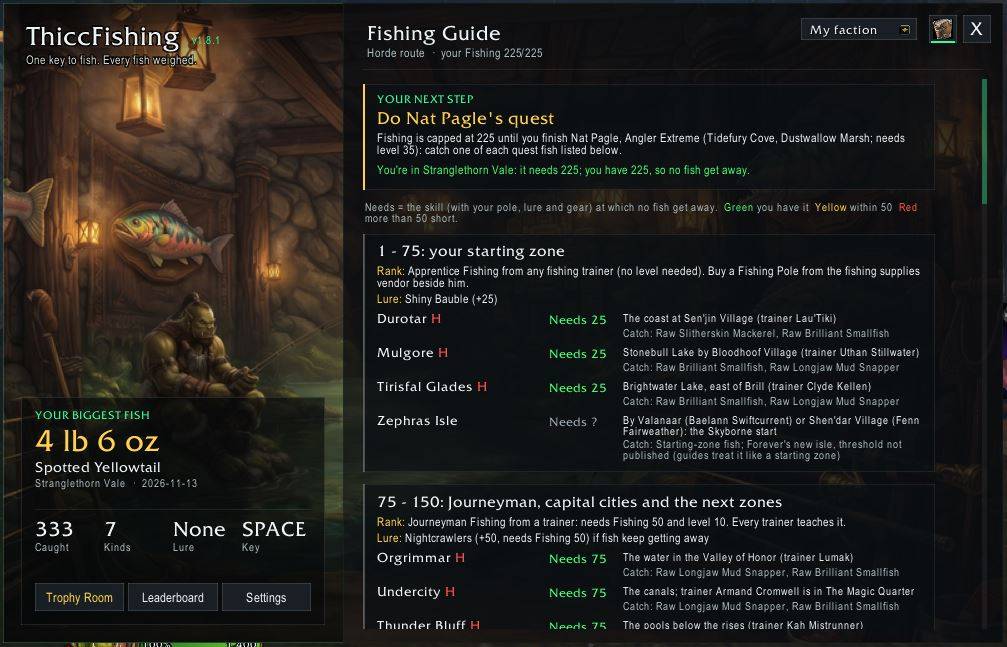
Fishing Guide.JPG
Description
ThiccFishing
One key to fish. Every fish weighed. A Trophy Room for your biggest, and a Leaderboard to beat everyone else.
♥ Leave a tip
ThiccFishing is free. Enjoying it? Leave a tip. Optional, and it unlocks nothing.
ThiccFishing is the Fishing feature from Thicc UI, on its own. Type /tfish for its settings: a modern window over a trophy-room painting, with your biggest fish and stats beside your settings, Trophy Room, Leaderboard and Fishing Guide.
One-Click Fishing
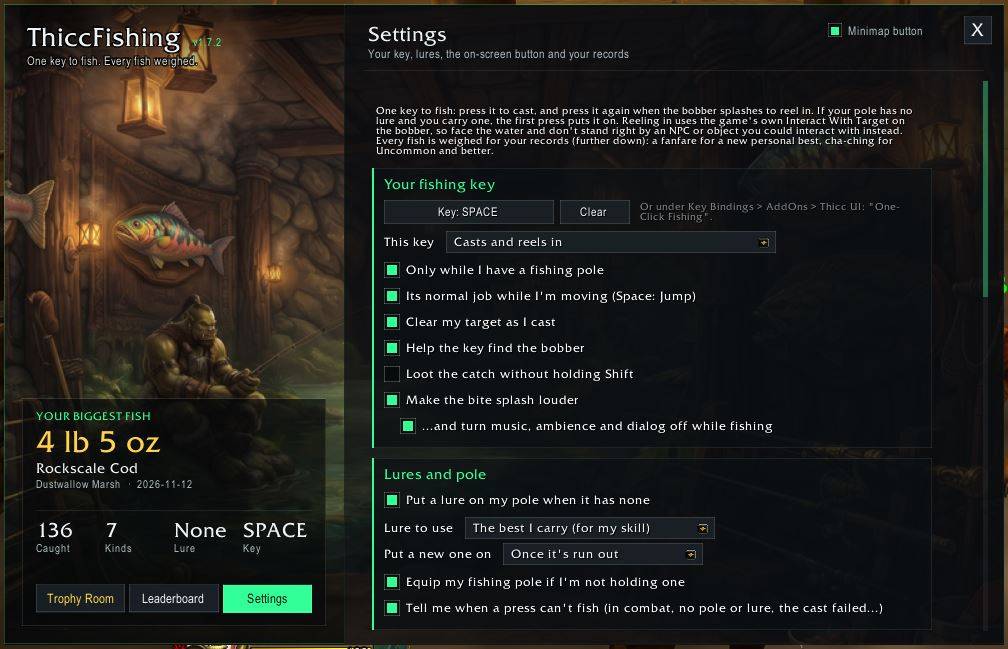
- One key does it all: press it to cast; press it again when the bobber splashes to reel in. If your pole has no lure and you carry one, the press puts it on first. It can equip your fishing pole from your bags too.
- Any key, Space included: choose it in the settings (or under Key Bindings > AddOns > ThiccFishing). ThiccFishing never changes the key's own binding: Space still jumps while you're moving, and whenever you have no fishing pole. Or set the key to Reels in only.
- Lures: the best one your Fishing skill allows (Aquadynamic Fish Attractor, Bright Baubles, Flesh Eating Worm, Nightcrawlers, Aquadynamic Fish Lens, Shiny Bauble) or the one you pick, put on when it runs out or with 30 seconds, 1 or 2 minutes left.
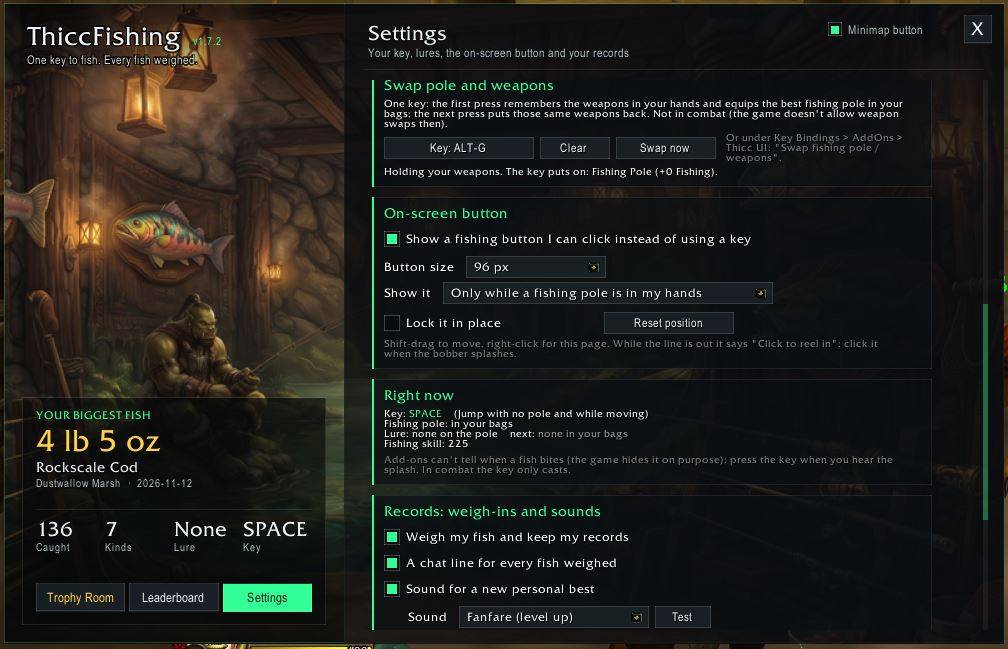
- On-screen button (if you'd rather click): any size from 32 to 96 px, Shift-drag to move. It casts, puts on lures and equips your pole, and while the line is out a click on it reels in.
- Finds the bobber: while the line is out, the game's interact range and arc are widened so a far cast is still reached, then put back exactly as you had them. Optional: clear your target as you cast, loot the catch without Shift.
- Pole Swap: one more key (or Swap now in the settings) swaps your weapons for the best fishing pole in your bags, remembering exactly which weapons you had; press it again and those same weapons go back on. Main hand and off hand, kept through a reload. Not in combat.
- Louder bite splash: sound effects at full (and music, ambience and dialog off) while you fish, even with the game in the background; your volumes come back afterwards.
- Sound in background: one tick switches the game's own Sound in Background option on or off, so you hear the splash while you're in another window.
Fishing Records
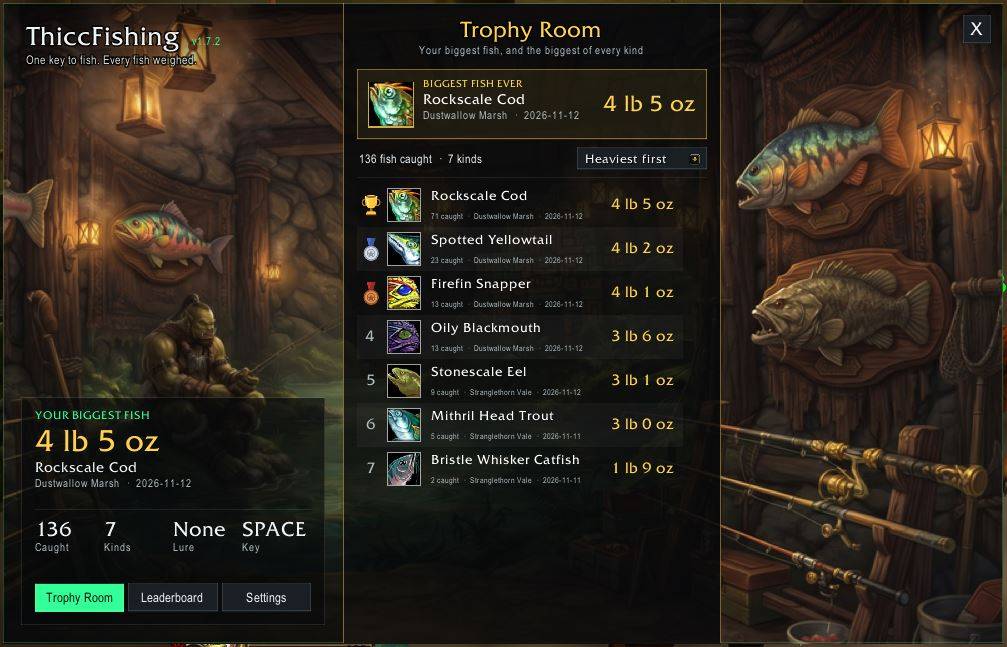
- Every fish is weighed: your biggest fish ever (where and when) and the biggest of each kind are kept.
- A new personal best plays a fanfare and shows in the middle of your screen, and can be announced in /say, /party, /raid or /guild.
- Cha-ching for an Uncommon, Rare or Epic catch, fish or not (Rare rings twice, Epic three times).
- The Trophy Room: one click on the main window swaps your settings for a trophy room: your biggest fish ever and the biggest of every kind, beside a wall of mounted fish. Sort by weight, most caught, newest or name.
- Pick each sound from a list, with Test buttons.
- The game gives fish no weight, so ThiccFishing weighs them: each kind has its own range from its level and quality (Forever's Uncommon and Rare fish are the heaviest), and the top of a range is rare.
Leaderboard
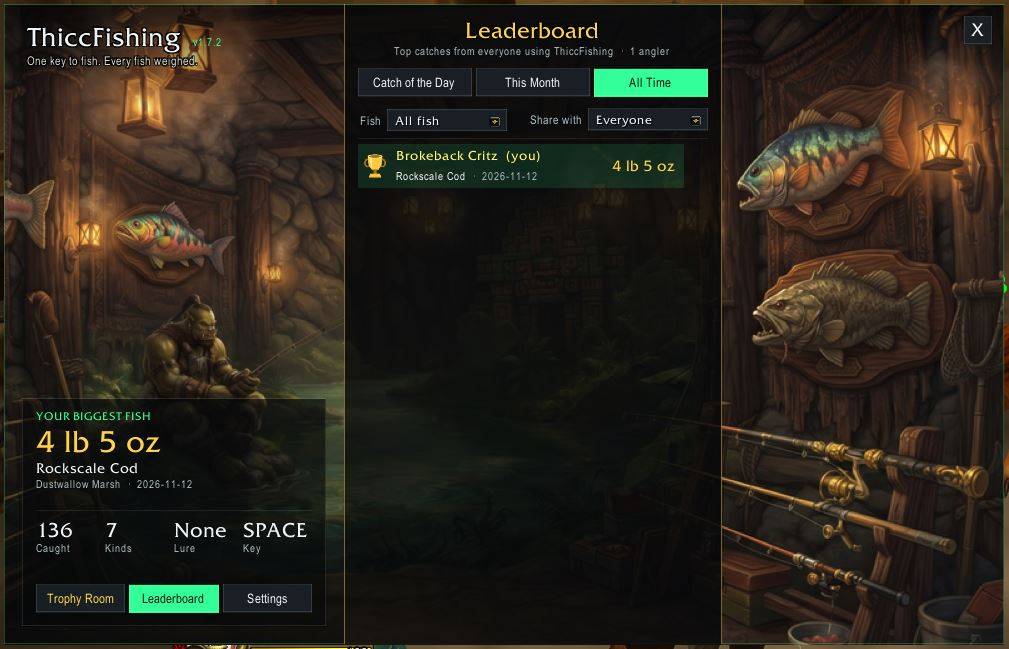
- Catch of the Day, This Month and All Time: everyone's best fish, ranked by weight. A gold trophy, a silver medal and a bronze medal for the top three.
- Pick a fish: the Fish filter shows the board for one kind only, so you can see who has the biggest catfish today, this month or ever.
- Share with everyone or just your guild (or turn it off). It syncs through a hidden ThiccFishing chat channel and your guild; only your best fish for today, this month and ever (overall and of each kind) are shared.
Fishing Guide
- Where to level your Fishing, for your faction: the book button next to the X (or
/tfish guide) knows whether you're Alliance or Horde and shows your route. A drop-down shows the other side. - Your next step: comes from your skill, cap and level. It says when to train Journeyman, when to buy the Expert book from Old Man Heming in Booty Bay, and when to do Nat Pagle's Artisan quest; otherwise it names the zones where no fish get away at your skill (with your pole, lure and gear).
- Every stage, 1-300: the rank you need and the lure to use. Each zone gets the skill it needs, where to fish there and what you'll catch, coloured green, yellow or red against your skill. It also tells you what the zone you're standing in needs.
- Nat Pagle's quest fish, and your faction's fishing trainers: click one to put a pin on your map.
Commands
| Command | What it does |
|---|---|
/tfish |
Open / close the settings window |
/tfish key |
Choose your fishing key |
/tfish swap |
Swap between your weapons and your best fishing pole (/tfish swapkey to choose its key) |
/tfish bait / loud |
Lures on / off, louder splash on / off |
/tfish bgsound |
The game's Sound in Background option on / off |
/tfish trophies |
Show the Trophy Room |
/tfish leaderboard |
Show the Leaderboard |
/tfish guide |
Show the Fishing Guide (where to level your Fishing) |
/tfish share everyone / guild / off |
Who your best catches are shared with |
/tfish records / test |
Your records in chat, play both sounds |
/tfish minimap |
Show / hide the minimap button |
/tfish reset |
Put the window back in the middle |
/tfrecords reset |
Clear your records |
Already using Thicc UI?
They work together. Thicc UI has the same feature built in (World & Dungeons > Fishing); with ThiccFishing installed, Thicc UI 3.17.3 and later switch theirs off and leave the fishing to ThiccFishing. To use Thicc UI's instead, disable ThiccFishing in your AddOns list.
Good to know
- Add-ons can't tell when a fish bites (the game hides it on purpose): press when you hear the splash.
- Reeling in uses the game's own Interact With Target on the bobber, so don't stand right by an NPC or object you could interact with instead.
- In combat the key only casts.
Discord
Bugs, ideas and feedback: https://discord.gg/tp5T5r94YZ
World of Warcraft and Blizzard Entertainment are trademarks of Blizzard Entertainment, Inc. ThiccFishing is a fan-made addon and is not affiliated with or endorsed by Blizzard.
ThiccFishing Team